Inngangur
This manual provides instructions for the proper installation, operation, and maintenance of your Generic phone case and tempered glass screen protector, designed for the INOI A151 A63 smartphone. Please read these instructions carefully before use to ensure optimal performance and protection for your device.
Innihald pakka
Vinsamlegast staðfestu að allir hlutir sem taldir eru upp hér að neðan séu innifaldir í pakkanum þínum:
- 1 x Phone Case (PC hard back panel + soft silicone frame + metal support finger ring)
- 1 x skjáhlífar úr hertu gleri
Uppsetning og uppsetning
1. Uppsetning símahulsturs
The phone case is designed with a dual-layer structure for enhanced protection, featuring a hard PC back panel and a soft silicone frame with shock airbags at the corners.
- Ensure your INOI A151 A63 phone is clean and free of dust or debris.
- Gently insert the phone into the soft silicone frame, starting with one side.
- Press the phone firmly into the case, ensuring all edges are securely seated within the silicone frame.
- Gakktu úr skugga um að allar tengi, hnappar og útskurðir fyrir myndavélina séu rétt samstilltir við símann þinn.

Image: The phone case demonstrating its shockproof design with reinforced corners and shock airbags.
2. Uppsetning skjávörn úr hertu gleri
Follow these steps for a bubble-free application of the tempered glass screen protector:
- Hreinsaðu skjáinn: Use the provided alcohol wipe to thoroughly clean your phone's screen. Remove any smudges, dust, or fingerprints.
- Þurrkaðu skjáinn: Use the microfiber cloth to dry the screen completely. Ensure no lint or dust remains.
- Fjarlægðu hlífðarfilmu: Carefully peel off the protective film from the adhesive side of the tempered glass screen protector. Avoid touching the adhesive surface.
- Align the Protector: Align the screen protector with your phone's screen, paying attention to the cutouts for the speaker and camera. Start from one edge and slowly lower it onto the screen.
- Sækja um: Once aligned, gently press the center of the screen protector. The adhesive will spread outwards.
- Fjarlægðu loftbólur: If any bubbles appear, gently push them towards the edges using the microfiber cloth or a soft card.

Image: Diagram illustrating the features of the tempered glass screen protector, including 9H hardness, shatterproof design, and anti-fingerprint properties.

Image: Visual representation of the screen protector's scratch-proof capabilities, showing resistance to sharp objects.
3. Ring Support Attachment (Optional)
The adhesive metal finger ring support can be attached to the case or used separately. If attaching to the case:
- Choose a suitable position on the back of the phone case for the ring support. Ensure the surface is clean and dry.
- Peel off the protective film from the adhesive backing of the ring support.
- Press the ring support firmly onto the chosen spot on the case for at least 30 seconds.
- Allow the adhesive to cure for a few hours before heavy use to ensure maximum bond strength.
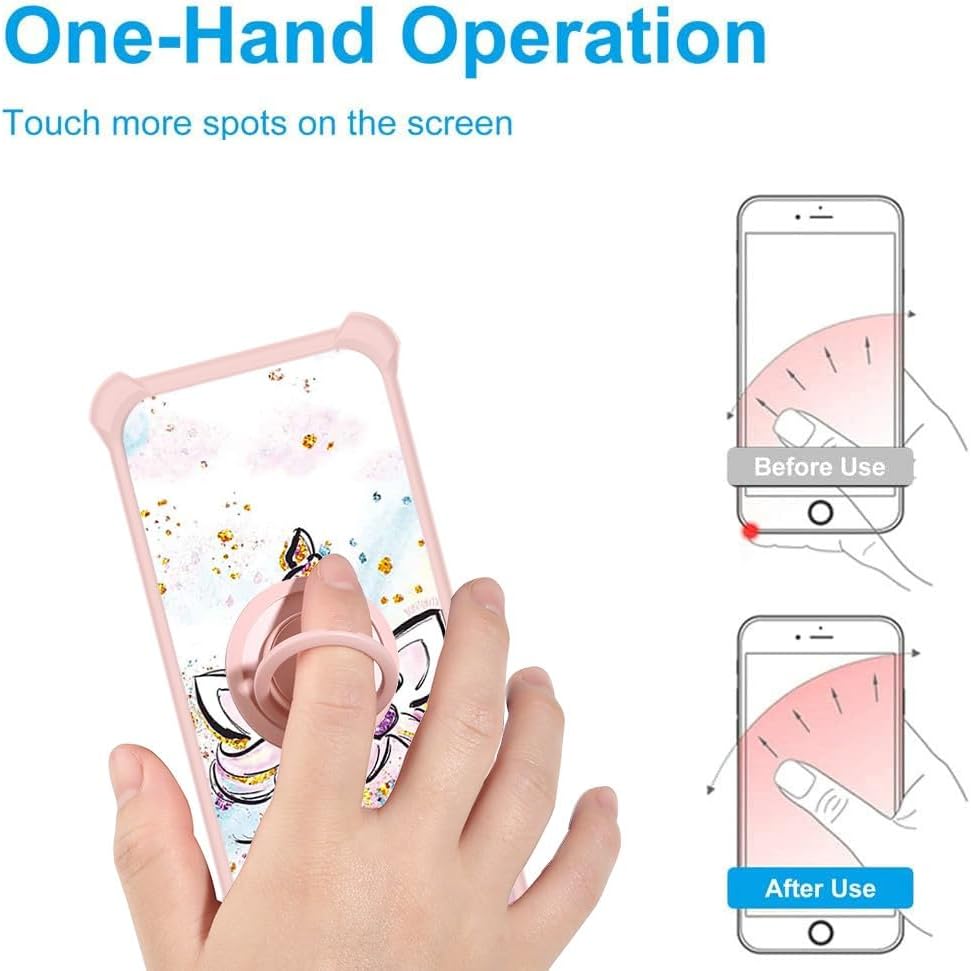
Image: The phone case featuring the gold glitter and luminous style, with the attached ring support visible.
Notkunarleiðbeiningar
1. Using the Ring Support
- Finger Grip: Slide your finger through the ring for a secure grip, reducing the risk of accidental drops.
- Kickstand Function: Rotate the ring 360 degrees and flip it 180 degrees to position your phone at a comfortable viewing angle for media consumption.
- Einhendisaðgerð: The ring allows for easier reach across the screen, improving one-handed usability.

Image: Illustration demonstrating how the ring support facilitates easier one-hand operation and reach across the phone screen.
2. Magnetic Car Mount Compatibility
The integrated metal plate within the ring support allows for compatibility with magnetic car mounts. Simply attach your phone case to a magnetic car mount (not included) for secure in-car navigation or hands-free use.
Athugið: This case does not support wireless charging due to the metal ring component. Please remove the case or use a wired charger for charging.

Image: Depiction of the phone case's compatibility with a magnetic car mount, highlighting the 360-degree rotation and 180-degree flip capabilities of the ring.
Viðhald
Til að halda símahulstri og skjávörn í sem bestu ástandi:
- Þrif á hulstri: Þurrkið hylkið reglulega með mjúkum klútamp cloth. For stubborn dirt, a mild soap solution can be used, followed by thorough rinsing and drying. Avoid harsh chemicals or abrasive materials.
- Þrif á skjávörninni: Use a microfiber cloth to gently wipe the screen protector. For smudges, a screen cleaner spray designed for electronics can be used.
- Forðastu mikla hitastig: Do not expose the case or screen protector to extreme heat or cold, as this may affect their material integrity.
- Skoðaðu reglulega: Periodically check the case and screen protector for any signs of wear or damage. Replace if significant damage is observed to maintain protection.
Úrræðaleit
- Skjávörn loftbólur: If bubbles appear after installation, gently lift the nearest edge of the protector and reapply, pushing the bubble out with a soft cloth. Small bubbles often disappear within 24-48 hours.
- Ring Support Loosening: If the adhesive ring support feels loose, ensure the surface it's attached to is clean and dry. Reapply with new adhesive if necessary, or consider using a stronger adhesive.
- Vandamál með kassa: Ensure the case is correctly aligned and snapped onto the phone. Remove and re-install if it feels loose or misaligned.
Tæknilýsing
| Samhæfar símagerðir | INOI A151 A63 |
| Efni | PC hard back panel, soft silicone frame, metal support finger ring |
| Sérstakir eiginleikar | 360 Rotating Ring, Car Magnetic Fixing, Finger ring + support + car bracket magnetic suction, Shock Airbags, Luminous effect, Gold Glitter |
| Þyngd hlutar | 2.46 aura |
| Vörumál | 0.39 x 0.39 x 0.39 inches (approximate, for packaging) |
| Litur | JSF-JJS (Gold Glitter+Luminous) |
Upplýsingar um ábyrgð
This product is covered by the standard return and refund policies of the retailer where it was purchased. For specific warranty details or to inquire about returns, please refer to the purchase platform's policies or contact the seller directly.
Þjónustudeild
If you have any questions, concerns, or require assistance with your Generic phone case or screen protector, please contact the seller through the platform where you made your purchase. Provide your order number and a detailed description of your inquiry for prompt support.


