1. Inngangur
This document provides essential instructions for the Generic IR replacement remote control, designed for use with Wimius W1 K5 and Yaber Y61 5G Mini DLP Portable 1080P WiFi Movie Projectors. This remote functions as a direct infrared replacement. For optimal compatibility, ensure that the button layout on this remote matches your original remote control.
Mikilvæg athugasemd: This remote control does not include batteries or a separate instruction manual in its packaging. Please refer to this guide for all operational details.
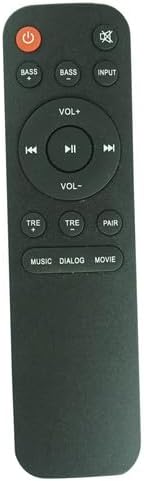
Mynd 1.1: Framan view of the remote control, displaying its button layout.
2. Uppsetning
2.1 Uppsetning rafhlöðu
Fjarstýringin krefst one (1) AAA battery for operation. Follow these steps to install the battery:
- Finndu rafhlöðuhólfið aftan á fjarstýringunni.
- Ýttu niður á lásinn og renndu rafhlöðulokinu niður til að opna það.
- Settu eina AAA rafhlöðu í og vertu viss um að plús (+) og neikvæðu (-) tengipunktarnir passi rétt við merkingarnar inni í hólfinu.
- Renndu rafhlöðulokinu aftur á sinn stað þar til það smellur örugglega.

Mynd 2.1: Bakhlið view of the remote control with the battery compartment open.
2.2 Upphafleg notkun
This is an infrared (IR) replacement remote. No pairing is typically required. Ensure there is a clear line of sight between the remote control and the IR receiver on your projector for proper function.
3. Notkunarleiðbeiningar
Kynntu þér virkni hvers hnapps á fjarstýringunni þinni:
- Rafmagnshnappur (rauður hringur með línu): Kveikir eða slekkur á skjávarpanum.
- Hljóðnemi (hátalari með X): Slökkvar á hljóði skjávarpans eða tekur það af.
- BASS+ / BASS- Buttons: Adjust the bass level of the audio output.
- INPUT hnappur: Fer í gegnum tiltækar inntaksuppsprettur (t.d. HDMI, USB).
- VOL+ / VOL- hnappar: Auka eða lækka hljóðstyrkinn.
- Spilunarstýringar (Fyrri, Spila/Hlé, Næsti): Control media playback (e.g., for content played from USB).
- TRE+ / TRE- Buttons: Adjust the treble level of the audio output.
- PAIR hnappur: (If applicable) Initiates pairing mode for certain projector models or features. Refer to your projector's manual for specific pairing instructions.
- Sound Mode Buttons (MUSIC, DIALOG, MOVIE): Select preset audio equalization modes for different content types.
4. Viðhald
4.1 Skipt um rafhlöðu
Replace the AAA battery when the remote control's response becomes inconsistent or stops working. Always use a new, high-quality AAA battery. Do not mix old and new batteries or different types of batteries.
4.2 Þrif
To clean the remote control, gently wipe it with a soft, dry cloth. Do not use liquid cleaners, abrasive pads, or chemical solvents, as these can damage the remote's surface or internal components.
4.3 Geymsla
Store the remote control in a cool, dry place away from direct sunlight and extreme temperatures. If the remote will not be used for an extended period, it is recommended to remove the battery to prevent leakage.
5. Bilanagreining
- Fjarstýring svarar ekki:
- Check if the battery is correctly installed and has sufficient charge. Replace with a new AAA battery if necessary.
- Ensure there is a clear line of sight between the remote's IR emitter and the projector's IR receiver. Remove any obstructions.
- Verify that the remote control is compatible with your specific projector model (Wimius W1 K5 or Yaber Y61 5G). The button layout should match your original remote.
- Sumar aðgerðir virka ekki:
- While this remote is a replacement, it may not offer all identical functions as your original remote. Functionality is generally limited to the buttons present on this replacement unit.
- Ensure your projector's firmware is up to date, as this can sometimes affect remote compatibility.
- Fjarstýring virkar með hléum:
- This could indicate a low battery. Replace the AAA battery.
- Ensure you are within the effective range of the projector's IR receiver.
Ef vandamálin halda áfram eftir að þessum skrefum er fylgt, vinsamlegast hafið samband við seljanda til að fá frekari aðstoð.
6. Tæknilýsing
| Eiginleiki | Smáatriði |
|---|---|
| Vörumerki | Almennt |
| Framleiðandi | Auðvelt að prófa |
| Samhæf tæki | Wimius W1 K5, Yaber Y61 5G Projectors (Home Theater) |
| Tengitækni | Innrautt (IR) |
| Aflgjafi | 1 x AAA rafhlaða (ekki innifalin) |
| Litur | Svartur |
| Sérstakur eiginleiki | Ergonomic design. Requires matching button layout to original remote for full compatibility. |
7. Ábyrgð og stuðningur
Information regarding specific warranty terms for this Generic replacement remote control is not provided in the product details. For any warranty inquiries, technical support, or assistance with product functionality, please contact the seller directly through your purchase platform.


