
1. Inngangur
Thank you for choosing the CallToU Wireless Call System. This system is designed to enhance communication efficiency in various environments such as care facilities, hospitals, restaurants, and commercial spaces. It features a receiver with digital display and voice announcement, paired with multiple call buttons. This manual provides detailed instructions for setup, operation, maintenance, and troubleshooting to ensure optimal performance and longevity of your device.

Image 1.1: CallToU Wireless Call System components, including one receiver and ten call buttons.
2. Vöru lokiðview
The CallToU Wireless Call System is a versatile communication solution. The receiver displays call numbers and provides voice announcements in Japanese or English. The call buttons are IP55 waterproof and designed for durability. The system offers a long communication range and is expandable to support up to 1000 call buttons, making it suitable for a wide array of applications.
Helstu eiginleikar:
- Auðveld uppsetning: Pre-paired units, no complex installation required.
- Raddleiðsögn: Supports Japanese and English voice announcements.
- Stillanlegur hljóðstyrkur: 8-level volume control and silent mode for various environments.
- Langt samskiptasvið: Up to 300 meters outdoors (unobstructed) and 50-100 meters indoors.
- IP55 vatnsheldur: Call buttons are resistant to water splashes and dust.
- Stækkanlegt kerfi: Receiver can pair with up to 1000 call buttons.
- Skiptanlegar rafhlöður: Call buttons feature user-replaceable batteries for extended use.

Image 2.1: The receiver displaying call numbers and announcing them in a hospital environment.
3. Uppsetning
3.1 Upptaka og skoðun
Takið alla íhluti vandlega úr og gangið úr skugga um að eftirfarandi hlutir séu með:
- 1 x Receiver unit
- 1 x AC Power Adapter for Receiver
- 10 x Call Buttons
- 10 x Neck Straps for Call Buttons
- 10 x 12V Alkaline Batteries for Call Buttons (pre-installed or separate)
- Mounting Screws and Double-sided Tape for Call Buttons
- Notendahandbók (þetta skjal)
Skoðið alla hluti til að sjá hvort einhverjir skemmdir séu á þeim. Ef einhverjir íhlutir vantar eða eru skemmdir, vinsamlegast hafið samband við þjónustuver.
3.2 Uppsetning móttakara
- Place the receiver on a stable, flat surface or mount it on a wall using the provided screws. Ensure it is in a central location to maximize signal reception from call buttons.
- Extend the antenna on the receiver for optimal signal range.
- Connect the AC power adapter to the receiver's power port and plug it into a standard electrical outlet. The receiver will power on automatically.
3.3 Call Button Installation
The call buttons are pre-paired with the receiver. No additional pairing steps are typically required for initial use.
- Límfesting: Clean the desired surface (wall, table, etc.). Peel off the protective film from the double-sided tape on the back of the call button and firmly press it onto the surface.
- Skrúfafesting: For a more secure installation, use the provided screws to attach the call button to a wall or other suitable surface.
- Færanleg notkun: Attach the neck strap to the call button for users who need to carry it.
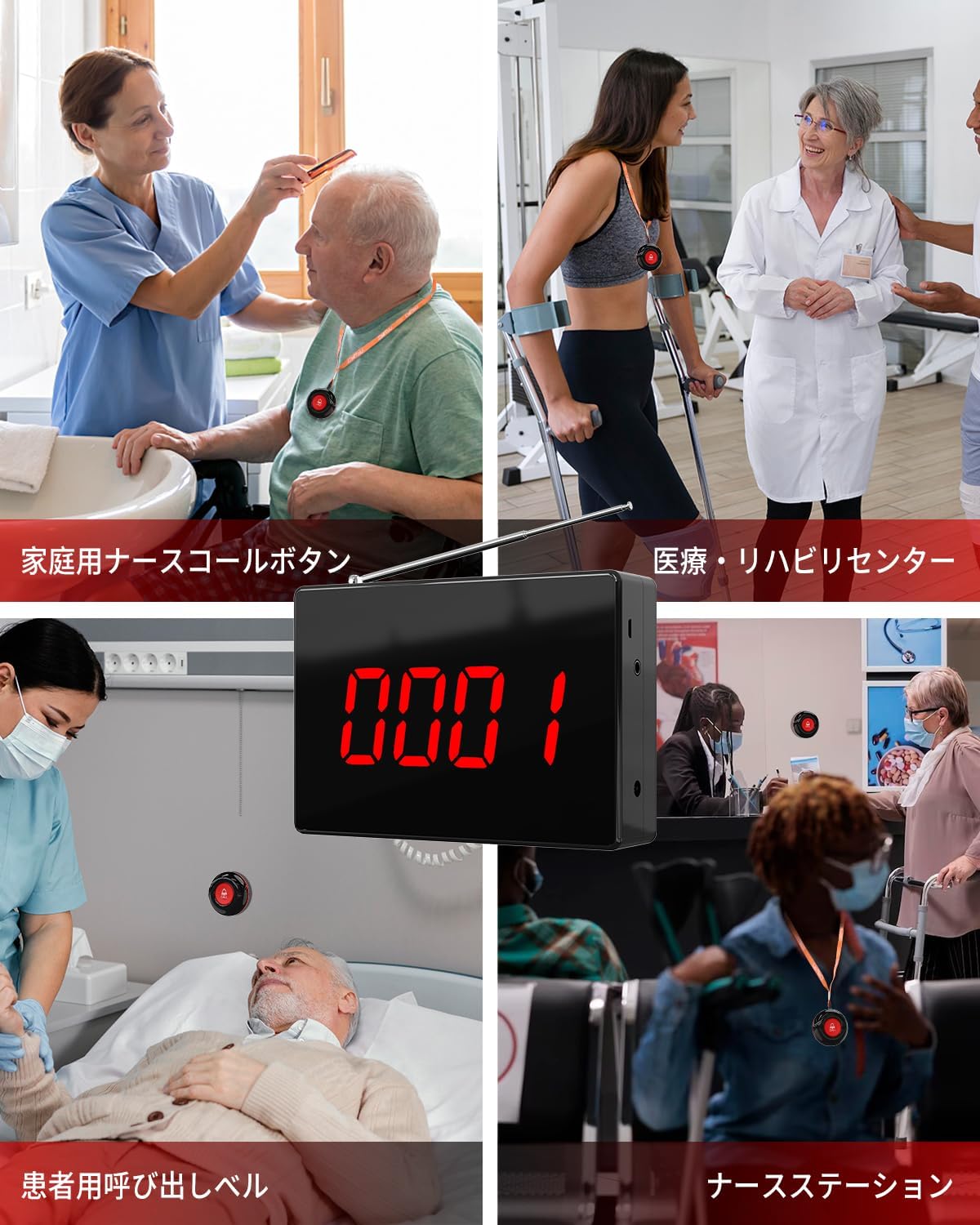
Mynd 3.1: Dæmiamples of call button and receiver placement in home care, medical, and patient settings.
4. Notkunarleiðbeiningar
4.1 Hringing
To make a call, simply press the large red 'CALL' button on the call transmitter. The button will send a signal to the receiver.
4.2 Að taka á móti símtali
When a call button is pressed, the receiver will:
- Display the corresponding call number on its digital screen.
- Emit an audible alert (chime or voice announcement) indicating the call number.

Image 4.1: The receiver showing a call from button '0001'.
Stillingar 4.3 móttakara
The receiver has several buttons for configuration:
- GAMAN: Function button, typically used to enter or exit settings menus.
- SETJA: Setting button, used to confirm selections or enter specific setting modes.
- FÆRJA: Navigation button, used to move between options or digits.
- ENT: Enter button, used to confirm changes.
Refer to the detailed instructions below for specific settings:
- Hljóðstyrksstilling: Use the navigation buttons to cycle through 8 volume levels or select silent mode. Confirm with the SET/ENT button.
- Voice Announcement Language: Select between Japanese and English voice guidance.
- Call Number Display Duration: Adjust how long the call number remains on the screen.
- Pairing Additional Buttons: The receiver can pair with up to 1000 call buttons. Follow the specific pairing instructions in the full manual if adding new buttons.

Mynd 4.2: Ítarlegt view of the receiver's control panel, ports, and antenna.
5. Viðhald
5.1 Þrif
Wipe the receiver and call buttons with a soft, dry cloth. Do not use abrasive cleaners or solvents, as they may damage the surface.
5.2 Battery Replacement (Call Buttons)
The call buttons use 12V alkaline batteries. When the call button's signal strength weakens or it stops functioning, the battery may need replacement.
- Carefully open the back cover of the call button.
- Fjarlægðu gömlu rafhlöðuna.
- Settu inn nýja 12V basíska rafhlöðu og gætið þess að pólunin sé rétt.
- Lokaðu bakhliðinni örugglega.

Image 5.1: The IP55 waterproof design of the call button, suitable for various environments.
6. Bilanagreining
| Vandamál | Möguleg orsök | Lausn |
|---|---|---|
| Móttakarinn kviknar ekki á. | Rafmagnsbreytir ekki tengdur eða bilaður. | Ensure the AC adapter is securely plugged into the receiver and a working power outlet. Test the outlet with another device. |
| Call button does not trigger receiver. | 1. Call button battery is low or depleted. 2. Call button is out of range. 3. Obstructions blocking signal. 4. Call button not paired (unlikely for initial setup). | 1. Replace the call button battery. 2. Move the call button closer to the receiver. 3. Relocate the receiver or call button to minimize signal interference from thick walls or metal objects. 4. If adding new buttons, refer to pairing instructions in the full manual. |
| Receiver volume is too low or silent. | Volume setting is low or silent mode is active. | Adjust the receiver volume using the control buttons. Ensure silent mode is deactivated if audible alerts are desired. |
| Voice announcement is in the wrong language. | Incorrect language setting. | Change the voice announcement language setting on the receiver. |
If you encounter issues not listed here or if the problem persists after attempting the solutions, please contact CallToU customer support.
7. Tæknilýsing
| Eiginleiki | Forskrift |
|---|---|
| Vörumerki | CallToU |
| Gerðarnúmer | P4+01AB-10-JP |
| Gerð uppsetningar | Veggfesting |
| Stærðir móttakara | Approx. 16 cm (width) x 11 cm (height) (based on image) |
| Stærðir pakka | 24.2 x 16.1 x 8.2 cm |
| Þyngd hlutar | 950 g |
| Samskiptasvið | Up to 300M (outdoor, unobstructed), 50-100M (indoor) |
| Call Button Waterproof Rating | IP55 |
| Call Button Battery Type | 12V alkalín rafhlaða |
| Móttökumaður Voltage | 12 volt (DC) |
| Rekstrarhitasvið | -30°C to 70°C (for call buttons) |
| Max Paired Buttons | 1000 |
8. Ábyrgð og stuðningur
8.1 Upplýsingar um ábyrgð
CallToU provides a 1 árs ábyrgð from the date of purchase for this Wireless Call System. This warranty covers manufacturing defects and ensures reliable operation under normal use. Please retain your proof of purchase for warranty claims.
8.2 Þjónustuver
For technical assistance, troubleshooting, or warranty inquiries, please contact CallToU customer support. Contact details can typically be found on the product packaging or the official CallToU websíða.