
Inngangur
This user manual provides comprehensive instructions for the setup, operation, maintenance, and troubleshooting of your Bmax B6 Pro Mini PC. Please read this manual thoroughly before using the device to ensure optimal performance and longevity.
Hvað er í kassanum
- 1 x BMAX B6 Pro Mini PC
- 1 x HDMI snúru
- 1 x VESA festing með skrúfum
- 1 x bandarísk rafmagnstengi
- 1 x Notendahandbók

Image: The Bmax B6 Pro Mini PC shown with its power adapter, HDMI cable, VESA mount, and user manual.
Vara lokiðview
The Bmax B6 Pro Mini PC is a compact and powerful computing solution designed for various applications, from home use to office tasks and multimedia consumption. It features a robust processor, ample memory and storage, and versatile connectivity options.
Helstu eiginleikar
- Öflugur örgjörvi: Equipped with a 10th Gen Intel Core i5-1030NG7 processor (Max Turbo Frequency 3.5GHz), featuring 4 cores and 8 threads, 4 MB cache, and advanced 10 nm technology.
- Minni og geymsla: Includes 16GB LPDDR4/2133MHz memory and a 512GB NVMe SSD. Supports dual channel NVMe SSDs and expandable storage up to 2 TB via an included SATA cable for a 2.5" HDD.
- Rík tenging: Features 3x USB 3.0 ports, 2x HDMI 2.0 ports (4K ultra-high-definition output), 1x earphone/microphone jack, 1x Full function Type-C port (data transfer, charging, video signal output), 1x Ethernet port (1000Mb LAN), 1x DC power input port, and 1x RJ45.
- UHD 4K @60Hz Three Screen Display: Integrated Intel Iris Plus Graphics supports 4K video playback and simultaneous output to three screens via 2xHDMI ports and 1x Type-C port.
- Efficient Cooling & Dual-Band WiFi: Integrated smart fan and two copper heat pipes for effective heat dissipation. Supports Wi-Fi5 2.4G/5G (802.11a/b/g/n/ac) for stable, high-speed wireless connectivity. Built-in Bluetooth 4.2 for wireless device connections.
- Fyrirferðarlítil hönnun: Ultra-compact form factor, easy to carry and saves desktop space. Includes a VESA mount for attachment to the back of a monitor.
- Snjallbati: One-key smart recovery function for system restoration. Supports Wake On LAN, PXE Boot, RTC Wake, and Auto Power On.

Image: An infographic detailing the core components and features of the Bmax B6 Pro Mini PC, such as the Intel Core i5 processor, 16GB LPDDR4, 512GB NVMe SSD, USB 3.0 ports, HDMI 2.0, Type-C, Bluetooth 4.2, 1000Mbps Ethernet, M.2 NVMe SSD slots, smart fan, copper heat pipes, and WiFi 6 capabilities.

Mynd: Ítarleg view of the Bmax B6 Pro Mini PC's front and rear ports, including 3.5mm headset jack, Clear CMOS, Type-C, USB 3.0, Power Button, HDMI ports, and Ethernet port.
Uppsetning
- Tengjast við rafmagn: Connect the US Power Adapter to the DC power input port on the Mini PC, then plug the adapter into a power outlet.
- Tengjast við skjá: Use the provided HDMI cable to connect the Mini PC to your monitor or TV. The device supports up to three displays via HDMI 2.0 and Type-C ports.
- Tengja jaðartæki: Connect your keyboard, mouse, and other USB devices to the available USB 3.0 ports.
- Nettenging: For a wired connection, connect an Ethernet cable to the RJ45 port. For wireless, the device will prompt you to connect to a Wi-Fi network during initial setup.
- Upphafleg ræsing: For the first boot, ensure the Ethernet cable is unplugged to potentially speed up the initial setup process. Press the power button to turn on the Mini PC.
- Uppsetning VESA festingar: If desired, attach the VESA mount to the back of your monitor using the provided screws, then slide the Mini PC onto the mount. This allows for a cleaner desktop setup.

Image: The compact size of the Bmax B6 Pro Mini PC is illustrated by placing it next to a standard desktop tower, highlighting its space-saving design.
Image: The Bmax B6 Pro Mini PC is shown mounted on the back of a computer monitor, demonstrating how the VESA mount can create a clean, cable-managed workspace.
Notkunarleiðbeiningar
- Kveikt/slökkt: Press the power button located on the front of the Mini PC to turn it on. To shut down, use the operating system's shutdown option. A short press of the power button can also put the device to sleep.
- Stýrikerfi: The Mini PC comes with Windows 11 Pro pre-installed. Follow the on-screen prompts for initial Windows setup.
- Stækkun geymslu: To expand storage, use the included SATA cable to connect a 2.5" HDD/SSD. The device also has two NVMe M.2 SSD slots for additional NVMe storage.
- Uppsetning margra skjáa: Connect up to three displays using the HDMI 2.0 ports and the full-function Type-C port. Configure display settings within the operating system.
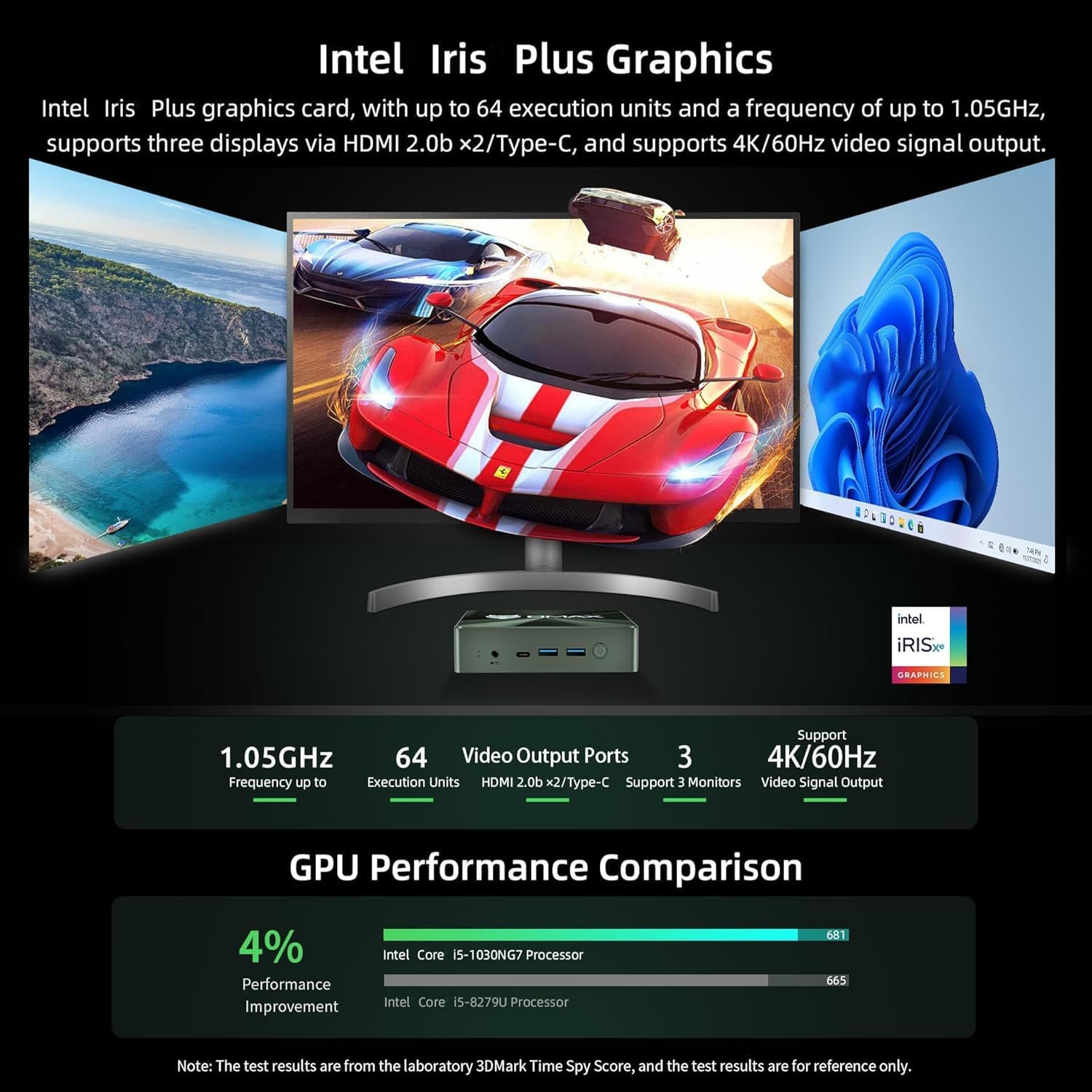
Image: A visual representation of the Bmax B6 Pro Mini PC's capability to support three simultaneous 4K displays, showing different applications open across multiple screens.
Viðhald
- Haltu loftræstum: Ensure the Mini PC has adequate ventilation to prevent overheating. Do not block the air vents. The smart fan and copper heat pipes are designed for efficient cooling.
- Hugbúnaðaruppfærslur: Uppfærðu stýrikerfið og rekla reglulega til að tryggja bestu mögulegu afköst og öryggi.
- Hreinlæti: Keep the device free from dust. Use a soft, dry cloth for cleaning the exterior. Avoid liquid cleaners.
- Öryggisafritun gagna: Taktu reglulega öryggisafrit af mikilvægum gögnum á utanaðkomandi drif eða skýgeymslu.

Mynd: Innra view of the Bmax B6 Pro Mini PC's cooling system, highlighting the smart fan and dual copper heat pipes designed for efficient heat dissipation.
Úrræðaleit
| Vandamál | Möguleg orsök | Lausn |
|---|---|---|
| Engin skjáúttak | Loose cable, incorrect input on monitor, power issue. | Check HDMI/Type-C cable connections. Ensure monitor is on correct input. Verify power adapter is securely connected. |
| Kerfið er hægt eða óviðbragðslaust | Too many applications running, insufficient storage, overheating. | Close unnecessary applications. Check available storage space. Ensure proper ventilation. Restart the PC. |
| Vandamál með Wi-Fi tengingu | Out of range, incorrect password, driver issue. | Move closer to the Wi-Fi router. Re-enter Wi-Fi password. Update Wi-Fi drivers. Restart router and PC. |
| System crash/failure to boot | Software conflict, corrupted system files. | Utilize the one-key smart recovery function to restore the system. If issues persist, contact support. |
Tæknilýsing
| Eiginleiki | Smáatriði |
|---|---|
| Örgjörvi | Intel Core i5-1030NG7 (10th Gen), 4 Cores, 8 Threads, Max Turbo Frequency 3.5 GHz |
| vinnsluminni | 16 GB LPDDR4 (2133 MHz) |
| Geymsla | 512 GB NVMe SSD (2x M.2 NVMe SSD slots), Expandable up to 2 TB via 2.5" HDD/SSD |
| Grafík | Intel Iris Plus Graphics, Supports 4K/60Hz |
| Myndbandsúttak | 2x HDMI 2.0, 1x Full function Type-C (supports video signal output) |
| USB tengi | 3x USB 3.0 |
| Net | 1x Ethernet (1000Mb LAN), Wi-Fi5 2.4G/5G (802.11a/b/g/n/ac) |
| Bluetooth | Bluetooth 4.2 |
| Hljóð | 1x Earphone/Microphone Jack |
| Stýrikerfi | Windows 11 Pro |
| Mál | Approximately 4.9 x 4.4 x 1.4 inches (based on image) |
| Þyngd | Um það bil 1.37 pund |
| Litur | Svartur |
Ábyrgð og stuðningur
BMAX Mini PCs come with a 30-day no-reason return policy and a 12-month warranty. For any problems or inquiries, please contact Bmax customer support via email. Refer to the contact information provided in your product packaging or on the official Bmax websíða.
For additional resources and FAQs, you may visit the Bmax Store on Amazon.