
Inngangur
Thank you for choosing the FlyEagle Galaxy Projector BL-XK01. This device is designed to transform any room into a captivating cosmic oasis with dynamic colors, adjustable light patterns, and integrated audio features. It projects a field of green stars, accompanied by a nebula cloud and ocean wave effects, creating a soothing and vibrant atmosphere. This manual provides detailed instructions for setup, operation, maintenance, and troubleshooting to ensure optimal performance and enjoyment of your projector.
Öryggisupplýsingar
Vinsamlegast lesið allar öryggisleiðbeiningar áður en varan er notuð. Ef þessum leiðbeiningum er ekki fylgt getur það valdið raflosti, eldsvoða eða öðrum meiðslum.
- Ekki taka tækið í sundur eða breyta því. Viðgerðir ættu aðeins að vera framkvæmdar af hæfu starfsfólki.
- Keep the device away from water and moisture. Do not use in wet environments.
- Ensure the power adapter is compatible with your local power supply and is properly connected.
- Forðist beina útsetningu fyrir leysigeisla í augum.
- Keep out of reach of children and pets to prevent accidental damage or misuse.
- Setjið skjávarpann á stöðugt, slétt yfirborð til að koma í veg fyrir að hann detti.
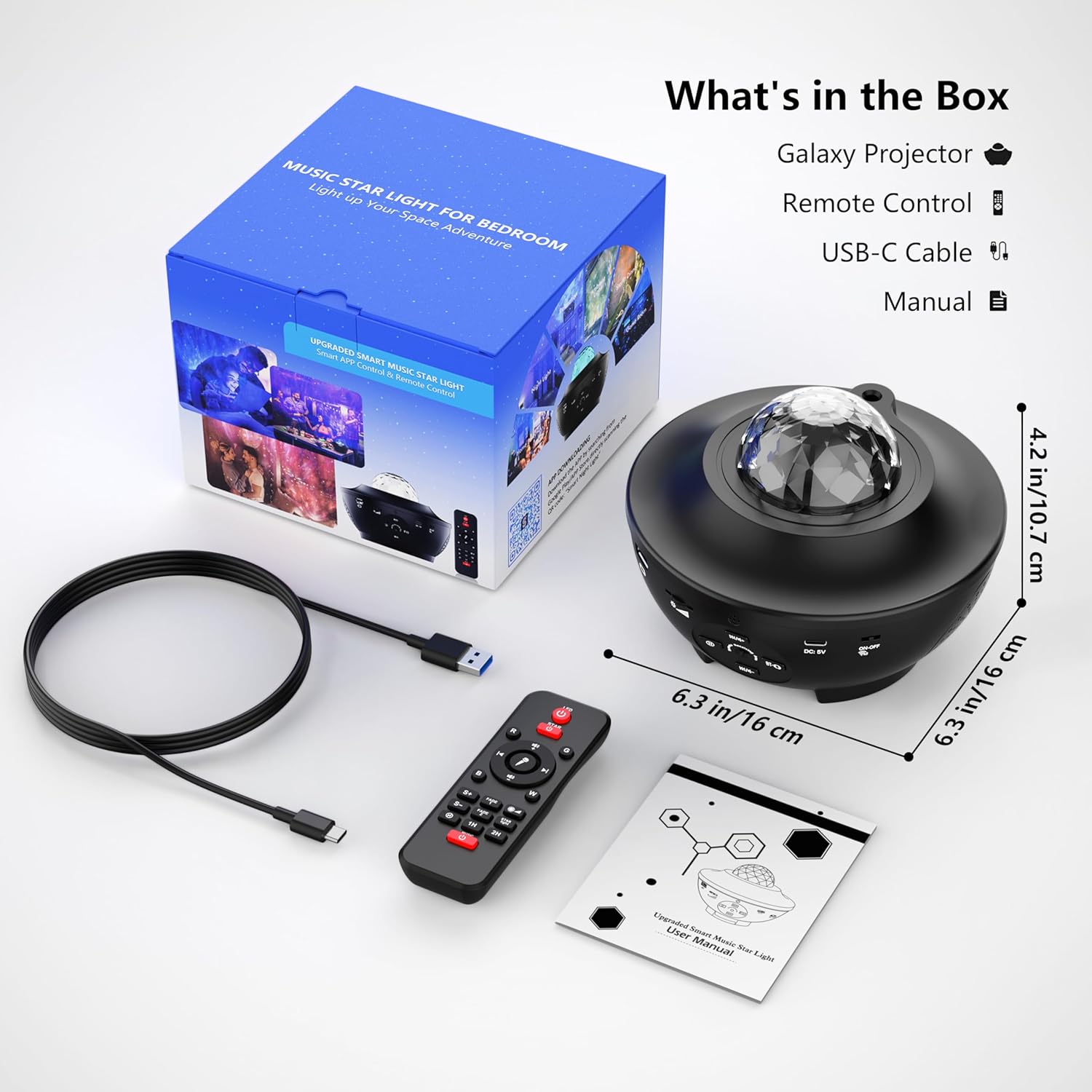
Hvað er í kassanum
Takið kassann vandlega úr og gangið úr skugga um að allir hlutir séu til staðar og í góðu ástandi:
- FlyEagle Galaxy Projector (BL-XK01)
- Fjarstýring
- USB-C kapall
- Notendahandbók
Uppsetning
- Staðsetning: Position the projector on a flat, stable surface in your desired room. For optimal projection, ensure there are no obstructions between the projector and the ceiling/walls.
- Rafmagnstenging: Connect the provided USB-C cable to the DC 5V port on the projector and plug the other end into a compatible USB power adapter (not included) or a USB port.
- Upphafleg kveikt á: Ýttu á rofann á skjávarpanum eða fjarstýringunni til að kveikja á tækinu.
Notkunarleiðbeiningar
The FlyEagle Galaxy Projector offers multiple control methods: onboard buttons, remote control, and a smartphone application.

1. Onboard Button Control
The projector features several buttons for basic functions:
- Aflhnappur: Kveikir eða slekkur á skjávarpanum.
- Ljósahnappur: Cycles through different light effects and colors.
- Birtustilling: Adjusts the intensity of the projected light.
- Tónlistarspilunarstýringar: Spila/Hlé, Næsta/Fyrra lag.

2. Fjarstýring
The included remote control provides full functionality for the projector.
- Kveikt/SLÖKKT: Separate buttons for stars and ocean wave effects.
- Litaval: Choose from 15 different light colors.
- Birtustig: Three adjustable brightness settings.
- Tónlistarstýringar: Play/Pause, Volume Up/Down, Next/Previous track.
- Stillingar tímastillingar: Set automatic shutdown for 1, 2, or 4 hours.
- Snúningshraði: Adjust the speed of the light effects.
3. App Control (Smart Night Life APP)
For enhanced control and customization, download the 'Smart Night Life' application on your smartphone.
- Sækja forrit: Leitaðu að 'Smart Night Life' in your device's app store and install it.
- Kveikt á skjávarpa: Ensure the projector is powered on and within Bluetooth range of your smartphone.
- Bæta við tæki: Open the app, register/log in, and follow the on-screen instructions to 'Add Device'. The app will guide you through the pairing process.
- Sérsníða stillingar: Once connected, you can effortlessly turn the light on/off, adjust light colors, brightness, and set custom timers.

4. Raddstýring
The projector is compatible with voice commands through the Smart Night Life APP, allowing integration with smart home assistants like Google Assistant and Alexa.
- Ensure your projector is connected to the Smart Night Life APP.
- Link the Smart Night Life APP to your preferred smart home assistant (e.g., Google Home, Amazon Alexa).
- Use voice commands such as "Alexa, turn on the galaxy projector" or "Hey Google, change projector color to blue."
5. Light Modes and Effects
The projector offers 15 LED light color options, projecting green stars, a nebula cloud, and ocean wave effects.
- Litaval: Cycle through various single or mixed color combinations using the remote or app.
- Birtustig: Adjust between three brightness levels to suit your preference.
- Hraði: Control the movement speed of the ocean wave and nebula effects.

6. Bluetooth Speaker & Music Playback
The projector features a built-in Bluetooth speaker for audio playback.
- Bluetooth-tenging: Kveiktu á Bluetooth í snjallsímanum þínum eða öðru tæki. Leitaðu að "MX10" (or similar device name) and pair with the projector.
- Spilun á USB diski: Insert a U disk (USB flash drive) into the USB port on the projector to play music directly.
- Tónlistartakthamur: The lights can flicker and change with the rhythm of the music, creating a dynamic visual experience.

7. Teljaraaðgerð
The projector includes a built-in timer for automatic shutdown.
- Set the timer for 1 hour, 2 hours, or 4 hours using the remote control or the smartphone app.
- The default automatic shutdown time is 4 hours if no timer is manually set.
- This feature helps conserve energy and is ideal for bedtime use.

Viðhald
- Þrif: Notið mjúkan, þurran klút til að þrífa yfirborð skjávarpans. Notið ekki slípiefni eða leysiefni.
- Geymsla: Þegar skjávarpinn er ekki í notkun skal geyma hann á köldum, þurrum stað, fjarri beinu sólarljósi og miklum hita.
- Linsuumhirða: Forðist að snerta beint við vörpunarlinsuna. Ef þörf er á að þrífa hana skal nota klút til að þrífa linsurnar.
Úrræðaleit
| Vandamál | Möguleg orsök | Lausn |
|---|---|---|
| Skjávarpinn kveikir ekki á sér. | Engin aflgjafi eða biluð tenging. | Ensure the USB-C cable is securely connected and the power adapter is working. Try a different power source. |
| Lights are dim or not projecting clearly. | Brightness setting is low; lens is dirty; room is too bright. | Increase brightness via remote/app. Clean the projection lens. Use in a darker environment. |
| Bluetooth hátalari tengist ekki. | Bluetooth is off on your device; projector is not in pairing mode; incorrect device selected. | Ensure Bluetooth is enabled on your device. Restart the projector. Leitaðu að "MX10" and try pairing again. |
| Fjarstýring virkar ekki. | Battery depleted; obstruction between remote and projector. | Replace the remote control battery. Ensure clear line of sight to the projector's IR receiver. |
| App cannot connect to the projector. | Projector is off; Bluetooth is off; app permissions not granted. | Ensure projector is on and Bluetooth is active. Check app permissions in your phone settings. Restart both the app and projector. |
Tæknilýsing
| Eiginleiki | Smáatriði |
|---|---|
| Nafn líkans | BL-XK01 |
| Vörumerki | FlyEagle |
| Vörumál | 5.11" D x 6.53" B x 6.53" H |
| Þyngd hlutar | 1.32 pund |
| Efni | Akrýlnítríl bútadíen stýren (plast) |
| Tegund ljósgjafa | LED |
| Fjöldi ljósgjafa | 1 |
| Skuggalitur | Marglitur |
| Aflgjafi | Rafmagnstenging með snúru (DC 5V) |
| Voltage | 5 volt (DC) |
| Hvaðtage | 10 Watt-stundir |
| Eftirlitsaðferð | App, Voice, Remote, Onboard Buttons |
| Sérstakir eiginleikar | Auto on/off, Bluetooth, Dimmable, Remote Control, Timer, Color changing, Music responsive |
| Inni/úti notkun | Innandyra |
| Vatnsþolsstig | Ekki vatnsheldur |
| Samsetning krafist | Nei |
Ábyrgð og stuðningur
For warranty information and customer support, please refer to the documentation included with your purchase or contact FlyEagle customer service through their official websíðuna eða söluaðilann þar sem varan var keypt. Vinsamlegast geymið kaupkvittunina vegna ábyrgðarkröfu.
Stuðningur á netinu: Heimsæktu FlyEagle Store on Amazon til að fá frekari upplýsingar um vöruna og stuðningsúrræði.