
1. Inngangur
This manual provides instructions for the BoxWave miniSync Retractable Portable Sync Cable. This cable is designed to provide both charging and data synchronization capabilities for your Lamtto C310 2 Channel device in a compact and convenient form factor. Please read this manual thoroughly to ensure proper use and care of your cable.
2. Vöru lokiðview
The BoxWave miniSync cable features an innovative retractable design, allowing for easy storage and tangle-free use. It supports Hi-Speed USB 2.0 data transfers and simultaneously charges your compatible device. The cable extends up to 25 inches in length, offering flexibility while remaining compact and lightweight for portability.

Figure 2.1: The BoxWave miniSync Retractable Portable Sync Cable shown alongside a Lamtto C310 2 Channel dashcam, illustrating its intended use.
Helstu eiginleikar:
- Afturkallanleg hönnun: For tangle-free storage and portability.
- Tvöföld virkni: Supports both data synchronization and device charging.
- Háhraða USB 2.0: Ensures efficient data transfer rates.
- Lengd lengd: Reaches up to 25 inches when fully extended.
- Varanlegur smíði: Hannað fyrir langlífi og áreiðanlega afköst.
3. Uppsetning
Setting up your BoxWave miniSync cable involves connecting it to your Lamtto C310 2 Channel device and a compatible USB power source or computer.
3.1 Að bera kennsl á tengi
- The cable features a standard USB Type-A connector on one end, typically for connecting to a computer or USB wall adapter.
- The other end has a mini-USB connector, designed for compatibility with devices such as the Lamtto C310 2 Channel.

Figure 3.1: The BoxWave miniSync cable fully extended, displaying its USB Type-A and mini-USB connectors.
3.2 Tengingaraðferð
- Extend the Cable: Gently pull both ends of the cable simultaneously until it reaches the desired length. Avoid pulling only one end, as this can damage the retraction mechanism.
- Tengjast tæki: Insert the mini-USB connector into the corresponding port on your Lamtto C310 2 Channel device.
- Connect to Power/Data Source: Insert the USB Type-A connector into an available USB port on your computer or a compatible USB wall charger.
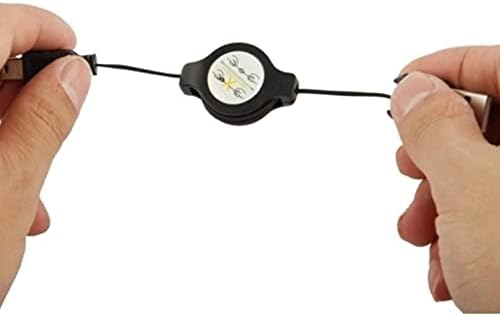
Figure 3.2: Proper method for extending the retractable cable by pulling from both ends.
4. Notkunarleiðbeiningar
4.1 Hleðsla tækisins
Once connected to a power source (USB wall adapter, car charger, or computer USB port), the BoxWave miniSync cable will begin charging your Lamtto C310 2 Channel device. The charging status will typically be indicated on your device's screen or via an LED indicator, depending on the device's design.
4.2 Samstilling gagna
When connected to a computer, the cable facilitates data transfer between your Lamtto C310 2 Channel and the computer. Your device should appear as a removable storage device or be recognized by compatible software. Follow your device's specific instructions for accessing and managing files.
4.3 Að draga snúruna til baka
To retract the cable for storage, gently pull both ends of the cable outwards again. The internal mechanism will then automatically retract the cable into its housing. Ensure both ends are pulled evenly to prevent tangling or damage to the retraction mechanism.
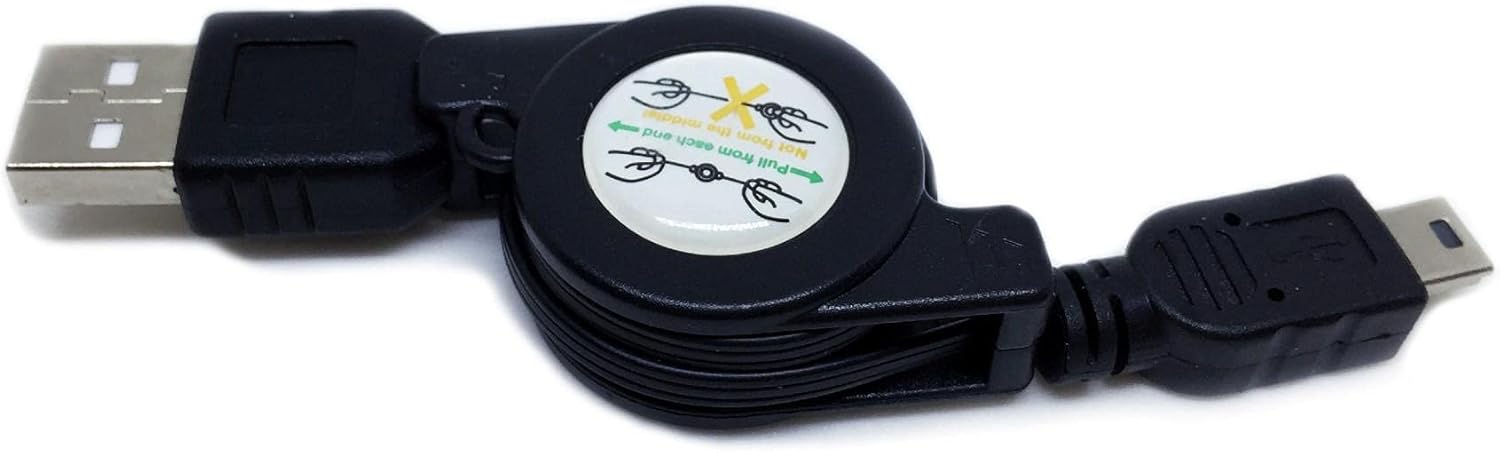
Figure 4.1: The retraction mechanism, showing the visual instruction to pull from both ends for proper operation.
5. Viðhald
Proper care will extend the life of your BoxWave miniSync cable.
- Þrif: Notið mjúkan, þurran klút til að þurrka snúruna og tengin. Forðist að nota sterk efni eða slípiefni.
- Geymsla: Always retract the cable fully when not in use to prevent tangling and damage. Store it in a cool, dry place away from direct sunlight and extreme temperatures.
- Meðhöndlun: Avoid excessive force when pulling or retracting the cable. Do not bend the connectors at sharp angles.
6. Bilanagreining
If you encounter issues with your BoxWave miniSync cable, refer to the following common solutions:
| Vandamál | Möguleg orsök | Lausn |
|---|---|---|
| Tæki hleðst ekki. | Loose connection, faulty power source, damaged cable. | Ensure both ends of the cable are securely connected. Try a different USB port or power adapter. Inspect the cable for visible damage. |
| Device not syncing data. | Loose connection, incorrect device settings, driver issues on computer. | Verify secure connections. Check your device's settings to ensure it's in data transfer mode. Try connecting to a different USB port on your computer. Ensure necessary drivers are installed on your computer for the Lamtto C310 2 Channel. |
| Cable not retracting properly. | Uneven pulling, internal mechanism obstruction. | Always pull both ends of the cable simultaneously and evenly to initiate retraction. Avoid forcing the mechanism. |
7. Tæknilýsing
- Gerð: miniSync
- Vörumerki: BoxWave
- Samhæfni: Lamtto C310 2 Channel (and other devices with mini-USB port)
- Gerð kapals: USB Type-A to mini-USB
- Gagnaflutningshraði: Háhraða USB 2.0
- Lengd lengd: Um það bil 25 tommur (63.5 cm)
- Þyngd hlutar: 1.5 aura (um það bil 42.5 grömm)
- ASIN: B0CV37GFG4
8. Stuðningur
For technical assistance or inquiries regarding your BoxWave miniSync Retractable Portable Sync Cable, please contact BoxWave customer support. While this cable is compatible with the Lamtto C310 2 Channel, BoxWave provides support for its own product and its compatibility, not for the Lamtto device itself.
Please refer to the BoxWave webvefsíðunni eða kaupskjölunum þínum til að fá upplýsingar um tengiliði.