
1. Inngangur og yfirview
This manual provides essential information for setting up, operating, maintaining, and troubleshooting your LG 86-Inch Class QNED85T Series LED Smart TV. Please read this manual thoroughly before using your TV to ensure proper and safe operation.
The LG QNED85T Series TV combines Quantum Dot and NanoCell technologies to deliver vivid and immersive picture quality. It features an AI-powered processor and a native 120Hz refresh rate for smooth action.
Helstu eiginleikar:
- QNED Contrast: Enhanced contrast ratio and brightness through powerful deep-learning algorithms.
- Quantum Dot NanoCell Color: Richer, more accurate colors for superior picture quality.
- 120 Hz endurnýjunartíðni: Smooth, crisp motion for fast-paced content like games and sports.
- a8 AI Processor 4K: AI-powered picture and sound refinement, automatically optimizing settings for the best viewing experience. Includes Multi View for two simultaneous screens.
- HDR10 Pro: Delivers a dramatic visual experience with elevated picture quality by enhancing each color.
- webOS Re:Nýtt forrit: Enjoy new software updates and feature refreshes for 5 years.

Mynd 1.1: Framan view of the LG 86-Inch QNED85T Series Smart TV, showcasing líflega skjágetu þess.
2. Uppsetningarleiðbeiningar
2.1 Hvað er í kassanum
Áður en þú byrjar skaltu ganga úr skugga um að allir íhlutir séu til staðar:
- LG 86-Inch QNED85T Series TV
- Magic Remote MR24
- Rafhlöður fyrir fjarstýringu (AA x 2 stk.)
- Rafmagnssnúra (meðfylgjandi)
- Flýtileiðarvísir
- Rafræn handbók (stafræn)
- Standa hluti
2.2 Physical Dimensions and Stand Assembly
Refer to the diagram below for TV dimensions and stand positions. The TV offers two stand positions for flexibility in placement.

Figure 2.1: Dimensions (Inches W x H x D) and 'What's in the box' for the LG 86QNED85TUA TV. The diagram illustrates the TV's width, height, depth, screen diagonal, and two possible stand footprint positions (20.6 inches and 62.2 inches).
2.3 Tenging við utanaðkomandi tæki
Your LG QNED85T TV is equipped with various ports for connecting external devices. Ensure the TV is powered off before making connections.

Mynd 2.2: Aftan view of the LG QNED TV, displaying the location of various input and output ports.

Mynd 2.3: Ítarleg view of the rear connectivity panel, showing Optical Digital Audio Out, LAN, and RS-232C ports.

Mynd 2.4: Ítarleg view of the side connectivity panel, highlighting HDMI and USB ports for easy access.
Algengar tengingar:
- HDMI: Tengdu Blu-ray spilara, leikjatölvur og kapal-/gervihnattaboxa.
- USB: Tengdu USB-geymslutæki til að spila margmiðlunarefni.
- LAN (Ethernet): Fyrir snúrubundið internettengingu.
- Stafrænn hljóðútgangur með ljósleiðara: Til að tengja við hljóðstikur eða hljóðviðtakara.
3. Að stjórna sjónvarpinu
3.1 Töfrafjarstýring
The LG Magic Remote provides intuitive control over your TV with point, click, scroll, and voice commands. Insert the two AA batteries as indicated in the battery compartment.

Figure 3.1: The LG Magic Remote, featuring a scroll wheel, directional pad, and dedicated buttons for streaming services and voice control.
3.2 webSnjallsjónvarpspallur stýrikerfisins
Your LG QNED TV runs on the webOS platform, offering access to a wide range of streaming apps and LG Channels.
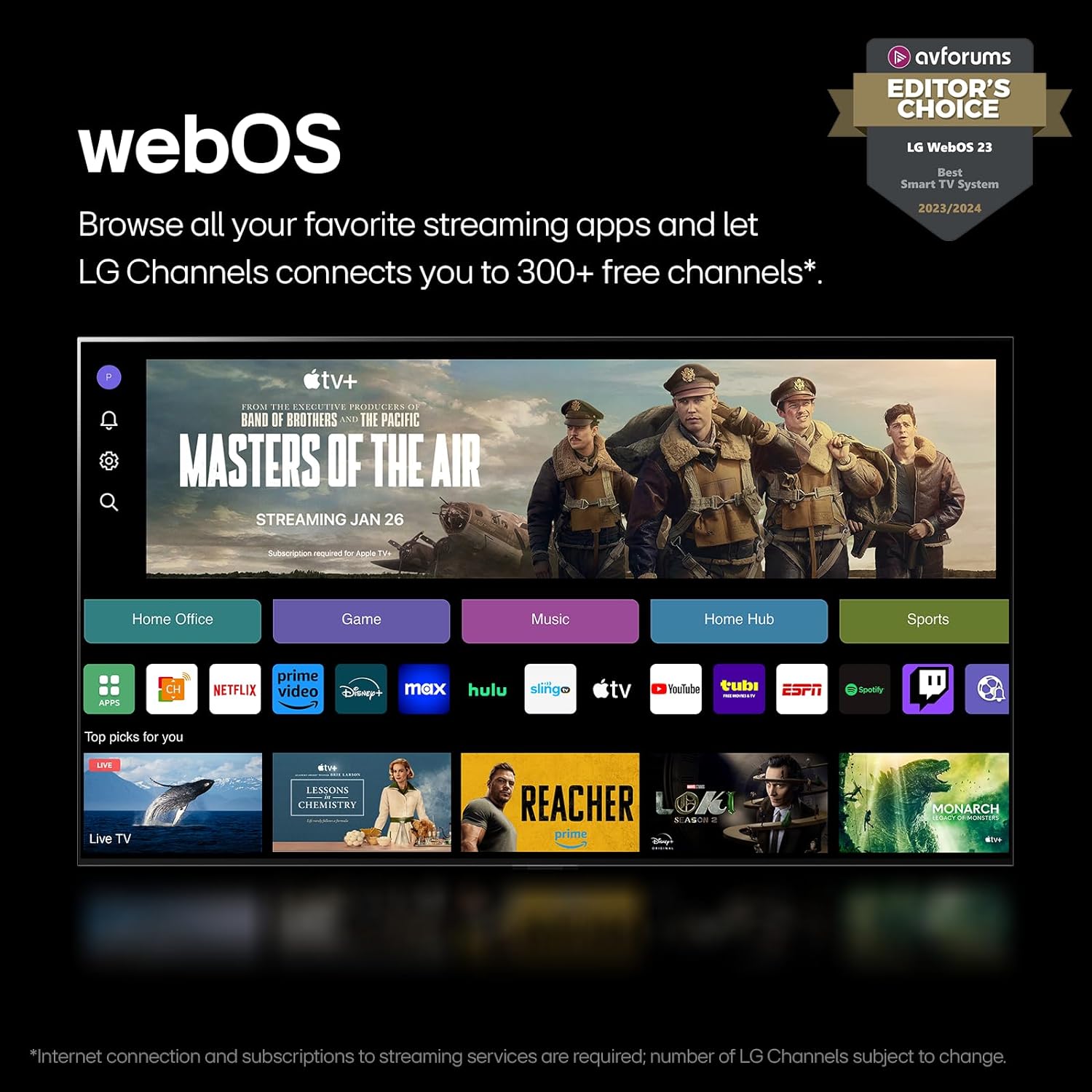
Mynd 3.2: Hinn webOS interface, displaying a selection of popular streaming applications and content categories.
3.3 webStýrikerfi Re: Nýtt forrit
The webOS Re:New Program ensures your TV stays updated with the latest software and features for up to 5 years. Software updates will download automatically; you will receive a pop-up notification to accept or deny the update.

Figure 3.3: Visual representation of the webOS Re:New Program, highlighting its commitment to long-term software support.
3.4 a8 AI Processor 4K
The a8 AI Processor 4K intelligently optimizes picture and sound quality by identifying content type and fine-tuning settings automatically. This results in improved graphics, processing speeds, and overall AI performance.

Figure 3.4: An illustration of the a8 AI Processor 4K, detailing its improvements in graphics, processing speeds, and AI performance compared to previous generations.
3.5 Leikjaeiginleikar
Experience real-time action with minimal tearing thanks to FreeSync™, VRR (Variable Refresh Rate), and GeForce NOW support for cloud gaming.

Figure 3.5: A dynamic image showcasing the TV's gaming capabilities, highlighting support for AMD FreeSync Premium and NVIDIA G-SYNC technologies.
3.6 Audio Features: WOW Orchestra
LG's WOW Orchestra feature integrates the TV's speakers with a compatible LG Soundbar to create an expanded and immersive soundstage.

Figure 3.6: A visual explanation of LG's WOW Orchestra, demonstrating how the TV and a compatible soundbar work together for enhanced audio.
4. Viðhald og umönnun
Proper care ensures the longevity and performance of your LG TV.
4.1 Þrif á skjánum
- Taktu alltaf sjónvarpið úr sambandi áður en það er þrifið.
- Use a soft, dry microfiber cloth to gently wipe the screen.
- Fyrir þrjósk merki, þurrkaðu léttampen the cloth with distilled water or a specialized screen cleaner (ensure it's safe for LED/LCD screens). Do not spray liquid directly onto the screen.
- Forðist að nota slípiefni, alkóhól, bensen eða þynningarefni, þar sem þau geta skemmt yfirborð skjásins.
4.2 Þrif á sjónvarpshúsinu
- Þurrkið sjónvarpsrammann og standinn með mjúkum, þurrum klút.
- Do not allow water or cleaning solutions to drip into the TV's vents or ports.
4.3 Almenn umönnun
- Forðist að setja sjónvarpið í beinu sólarljósi eða nálægt hitagjöfum.
- Tryggið næga loftræstingu í kringum sjónvarpið.
- Verndaðu sjónvarpið fyrir ryki með því að þrífa loftræstiopin reglulega.
- When moving the TV, always lift it from the bottom and top, not by the screen.
5. Bilanagreining
Þessi kafli fjallar um algeng vandamál sem þú gætir lent í með LG QNED sjónvarpinu þínu.
5.1 Enginn rafmagn / Sjónvarpið kveikir ekki á sér
- Athugaðu hvort rafmagnssnúran sé vel tengd bæði í sjónvarpið og innstunguna.
- Staðfestu að innstungan virki með því að stinga í samband annað tæki.
- Press the power button on the TV itself (usually located on the bottom or side) to rule out a remote issue.
- Try unplugging the TV for 60 seconds, then plugging it back in (power cycle).
5.2 Engin mynd / Svartur skjár
- Ensure the correct input source is selected (e.g., HDMI 1, TV, etc.). Press the 'Input' or 'Source' button on your remote.
- Check all cable connections between the TV and external devices (e.g., HDMI, antenna).
- If using a cable/satellite box or game console, ensure it is powered on and functioning correctly.
- Try restarting the external device.
5.3 Ekkert hljóð
- Check the volume level on both the TV and any connected audio devices (soundbar, receiver).
- Ensure the TV is not muted. Press the 'Mute' button on the remote.
- Athugið tengingar hljóðsnúrunnar ef notaðir eru ytri hátalarar.
- Check the TV's sound output settings (Settings > Sound > Sound Out) to ensure it's set to the desired output (e.g., TV Speaker, Optical, HDMI ARC).
5.4 Fjarstýring virkar ekki
- Skiptu um rafhlöður í Magic Remote.
- Gakktu úr skugga um að engar hindranir séu á milli fjarstýringarinnar og skynjara sjónvarpsins.
- If the pointer is not appearing, try shaking the remote or pressing the 'Wheel (OK)' button to activate it.
- If the remote is unresponsive, try re-registering it. Point the remote at the TV and press the 'Wheel (OK)' button. If it fails, remove the batteries, press the 'Power' button on the remote for 5 seconds, then reinsert batteries and try again.
For more detailed troubleshooting or persistent issues, please refer to the E-Manual accessible via your TV's webStýrikerfisviðmót eða hafið samband við þjónustuver LG.
6. Tæknilýsingar
| Eiginleiki | Forskrift |
|---|---|
| Vörumerki | LG |
| Gerðarnúmer | FBALG86QNED85TUA |
| Skjástærð | 86 tommur |
| Skjátækni | LED (QNED) |
| Upplausn | 4K (3840 x 2160) |
| Endurnýjunartíðni | 120 Hz (innfæddur) |
| Hlutfall | 16:9 |
| Vörumál (D x B x H) | 14.1" x 75.9" x 46.3" |
| Þyngd hlutar | 112.4 pund |
| Litur Nafn | Svartur |
| Sérstakir eiginleikar | AMD FreeSync, Built-In Speaker, Flat Screen, Game Mode, Multiple Voice Assistance |
| Tegund hátalara | Innbyggður |
| Tengitækni | Bluetooth, Ethernet, HDMI, USB, Wi-Fi |
| Rafhlöður nauðsynlegar | 2 AA rafhlöður (innifalin fyrir fjarstýringu) |
| Kveikt á orkunotkun | 201 vött |
| Orkunotkun (árleg) | 370 kílóvattstundir á ári (byggt á 4 klukkustundum/dag) |
| Fyrsti laus dagsetning | 8. apríl 2024 |
7. Ábyrgð og stuðningur
7.1 Vöruábyrgð
Your LG TV comes with a full manufacturer's warranty. For specific details regarding the warranty period and coverage, please refer to the warranty card included with your product or the E-Manual.
7.2 Verndaráætlanir
Extended protection plans may be available for purchase to cover your TV beyond the standard manufacturer's warranty. Options may include:
- Tveggja ára verndaráætlun
- Algjör vernd (mánaðaráskrift sem nær yfir gjaldgengar kaup)
Please check with your retailer or LG's official website for current offerings and terms.
7.3 Skilareglur
This product typically includes a 30-day return policy for refund or replacement, subject to the retailer's terms and conditions.
7.4 Þjónustuver
Fyrir frekari aðstoð, tæknilega aðstoð eða fyrirspurnir um þjónustu, vinsamlegast farðu á opinberu vefsíðu LG. websíðuna eða hafðu samband við þjónustuver þeirra. Þú getur líka heimsótt LG verslun á Amazon fyrir upplýsingar um vörur og stuðningsúrræði.