
VTech Genius XL Interactive Video Binoculars (Model 618605)
Leiðbeiningarhandbók fyrir gagnvirka VTech Genius XL sjónauka
Gerð: 618605
Inngangur
Welcome to the VTech Genius XL Interactive Video Binoculars. This device is designed for children aged 5 and above to explore the world around them through observation, interactive videos, images, and educational games. This manual provides essential information for setup, operation, and maintenance to ensure optimal use and longevity of your product.

Image: The VTech Genius XL Interactive Video Binoculars, showing the main unit with its flip-up color screen and binocular lenses.
Mikilvægar öryggisupplýsingar
VIÐVÖRUN: Ekki hentugt fyrir börn yngri en 36 mánaða vegna smárra hluta.
- Hafðu alltaf eftirlit með börnum meðan á notkun stendur.
- Do not look directly at the sun through the binoculars, as this can cause serious eye damage.
- Gakktu úr skugga um að rafhlöður séu rétt settar í.
- Ekki blanda saman gömlum og nýjum rafhlöðum eða mismunandi gerðum af rafhlöðum.
- Fjarlægðu tæmdar rafhlöður tafarlaust.
- Fargaðu rafhlöðum á ábyrgan hátt.
Hvað er í kassanum
- 1 Pair of VTech Genius XL Interactive Video Binoculars
- Batteries (4 x LR6-AA)
- Hálsól
Uppsetning
1. Uppsetning rafhlöðu
- Finndu rafhlöðuhólfið á tækinu.
- Notaðu skrúfjárn til að opna hlífina á rafhlöðuhólfinu.
- Settu í 4 nýjar LR6-AA rafhlöður og gætið þess að pólunin (+/-) sé rétt.
- Settu hlífina aftur á og hertu skrúfuna.
2. Festing hálsólarinnar
Thread the provided neck strap through the designated loops on the binoculars. Adjust the strap length for comfortable and secure wearing.

Image: A child wearing the VTech Genius XL Interactive Video Binoculars with the neck strap, demonstrating how it can be worn for outdoor exploration.
Notkunarleiðbeiningar
1. Kveikt/slökkt
Press and hold the power button to turn the device on or off. The device features an automatic shut-off function to preserve battery life.
2. Viewing Mode
The binoculars offer two primary viewing methods:
- Through the Binoculars: Look directly through the eyepieces (binocular lenses) for traditional observation. The interpupillary distance is adjustable for optimal comfort.
- On the LCD Screen: Flip up the 2.4-inch color LCD screen to view observations digitally.

Image: A child looking through the VTech Genius XL Interactive Video Binoculars, demonstrating the traditional viewing aðferð.
3. Stækkun og fókus
- The binoculars provide up to 10x stækkun.
- Use the focus wheel to adjust the image clarity for both binocular and screen viewing.
4. Night Vision Mode
Activate the integrated infrared system for night vision. This mode is exclusively available on the LCD screen, allowing observation in low-light or dark conditions.

Image: The VTech Genius XL Interactive Video Binoculars displaying a night vision image of a hedgehog on its screen, highlighting the night vision feature.
5. Myndataka og myndbandsupptaka
The integrated camera allows you to capture images of flora and fauna. The internal memory can store up to 50 photos. A micro-SD card slot (card not included) is available to expand storage capacity and save photos for printing.

Image: The VTech Genius XL Interactive Video Binoculars with multiple captured images of animals and nature displayed around it, illustrating the photo capture function.
6. Interactive Content (BBC Videos & Images)
Explore over 340 official videos and images from the BBC, providing more than 700 educational facts categorized into 9 groups:
- Ampdýradýr
- Liðdýr
- Terrestrial Birds
- Flying Birds
- Terrestrial Mammals
- Marine Mammals
- Skriðdýr
- Blómstrandi plöntur
- Other Plants and Fungi

Image: The VTech Genius XL Interactive Video Binoculars displaying an image of a mushroom on its screen, with a speech bubble indicating educational information, showcasing the BBC content.
7. Games and Quizzes
- Adventure Game: Navigate through 5 natural environments, encountering over 100 animals and exploring 25 levels.
- Fræðsluspurningakeppni: Test scientific knowledge through a 3-stage quiz (Training, Time Challenge, Clue Game).
- Use the joystick and 12 buttons to navigate through games and features.
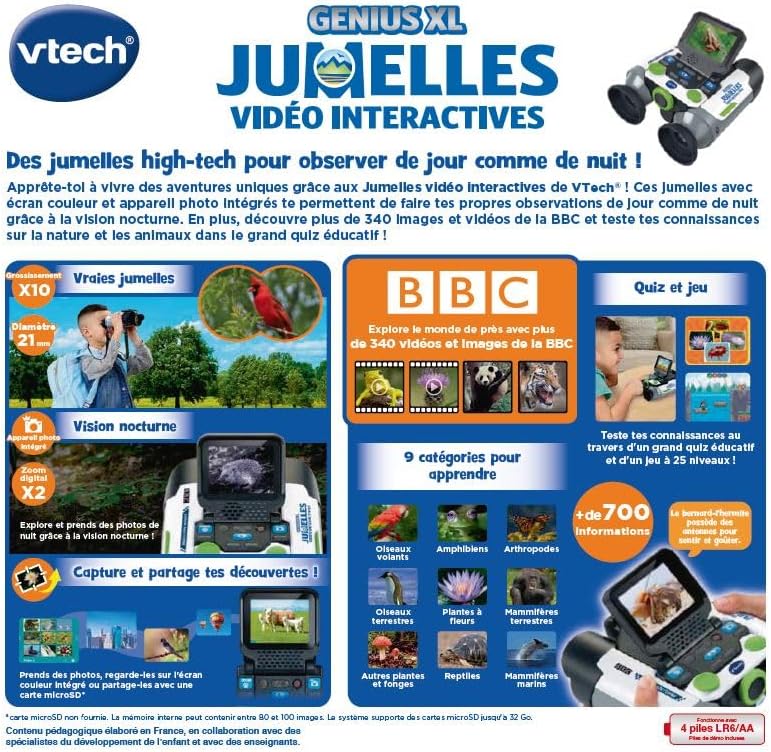
Image: A child holding the VTech Genius XL Interactive Video Binoculars, playing an adventure game on its screen, demonstrating the interactive game feature.
8. Hljóðstyrkur
Adjust the sound volume using the dedicated controls on the device.
Samþætting fjölmiðla
Opinber vörumyndbönd
The following video demonstrates the key features and interactive capabilities of the VTech Genius XL Interactive Video Binoculars.
Myndband: Stutt kynningview myndbandssýningasing children using the VTech Genius XL Interactive Video Binoculars to observe nature, take photos, play games, and utilize the night vision mode. It highlights the educational BBC content and interactive features.
This video provides a broader overview of the Genius XL range, including the Interactive Video Binoculars and the Interactive Video Globe.
Video: A preview video demonstrating both the VTech Genius XL Interactive Video Binoculars and the Interactive Video Globe. It shows children engaging with both products, highlighting their educational and interactive aspects, including exploring animals and geography.
Viðhald
Þrif
Þurrkaðu tækið með örlítið damp klút. Notið ekki sterk efni eða slípiefni. Gangið úr skugga um að tækið sé þurrt áður en það er geymt.
Geymsla
Store the binoculars in a cool, dry place away from direct sunlight. Remove batteries if the device will not be used for an extended period.
Úrræðaleit
- Tækið kveikir ekki á sér: Check battery installation and ensure batteries are not depleted. Replace with new batteries if necessary.
- Skjárinn er tómur eða frystur: Try turning the device off and on again. If the issue persists, remove and reinsert the batteries.
- Hljóð virkar ekki: Check the volume settings. If the issue persists after checking volume and restarting, contact customer support.
- Photos lost or unable to access gallery: Ensure a micro-SD card is properly inserted if you are relying on external storage. If using internal storage and experiencing issues, a factory reset might be necessary, but this will erase all stored photos. It is recommended to regularly transfer important photos to an external micro-SD card.
- Image blurry: Stilltu fókushjólið þar til myndin er skýr.
Tæknilýsing
| Eiginleiki | Smáatriði |
|---|---|
| Vörumál | 12.1 x 6.9 x 16.2 cm |
| Þyngd | 170 grömm |
| Ráðlagður aldur | 5 ára og eldri |
| Uppeldislegt gildi | Learning, Creativity, Animal Discoveries, Interaction |
| Tungumál | French (Note: Product content is in French as per specifications) |
| Tilvísun framleiðanda | 618605 |
| Fjöldi stykkja | 1 |
| Rafhlöður nauðsynlegar | Yes (4 x LR6-AA) |
| Rafhlöður fylgja | Já |
| Aðalefni | Plast |
| Litur | Grátt |
| Sérstakur eiginleiki | Nætursýn |
| Þvermál hlutlægra linsu | 21 millimetrar |
| Hámarksstækkun | 10x |
| Gerð uppsetningar | Collar (Neck Strap) |
| Nafn líkans | X 21 |
| Binocular Prism Description | Porro Prisma |
Ábyrgð og stuðningur
Fyrir upplýsingar um ábyrgð og þjónustu við viðskiptavini, vinsamlegast skoðið skjöl sem fylgja kaupunum eða heimsækið opinberu vefsíðu VTech. webGeymið kaupkvittunina ef þið viljið gera kröfur um ábyrgð.
Product support and spare parts availability may vary by region. The manufacturer states that spare parts are unavailable for this product.