
1. Inngangur
Thank you for choosing the GAOMON Commercial Refrigerator Display Case. This manual provides essential information for the safe and efficient operation, installation, and maintenance of your new appliance. Please read this manual thoroughly before use and retain it for future reference.
1.1 Öryggisupplýsingar
Always follow basic safety precautions when using electrical appliances to reduce the risk of fire, electric shock, and injury. This appliance is intended for commercial use only.
- Gakktu úr skugga um að aflgjafinn passi við voltage kröfur (110V).
- Ekki nota heimilistækið með skemmda snúru eða kló.
- Haltu loftræstiopum lausum við hindrun.
- Ekki geyma sprengifim efni eins og úðabrúsa með eldfimu drifefni í þessu tæki.
- Aftengdu tækið áður en þú þrífur eða framkvæmir viðhald.

Figure 1.1: GAOMON Commercial Refrigerator Display Case in a typical commercial environment.
2. Vörueiginleikar
The GAOMON Commercial Refrigerator Display Case is designed for optimal product visibility and preservation, featuring:
- Aukinn sýnileiki: Glass panels on all four sides and vibrant LED lighting maximize the attractiveness of displayed items, encouraging impulse purchases.
- Sérsniðnar hillur: Adjustable PVC shelves allow for personalized organization and accommodate items of various sizes, providing a versatile display.
- Nákvæm hitastýring: A thermostatic control panel with a range of 32-53.6°F (0-12°C) enables precise temperature selection for stored foods.
- Freshness Maintenance & Anti-Fog: A ventilation cooling system and automatic defrost function maintain stable temperatures. Double-layer tempered glass and ventilation holes prevent condensation and fogging.
- Skilvirk rýmisnýting: Compact dimensions optimize space in bakeries, cafes, and coffee shops while enhancing product presentation.
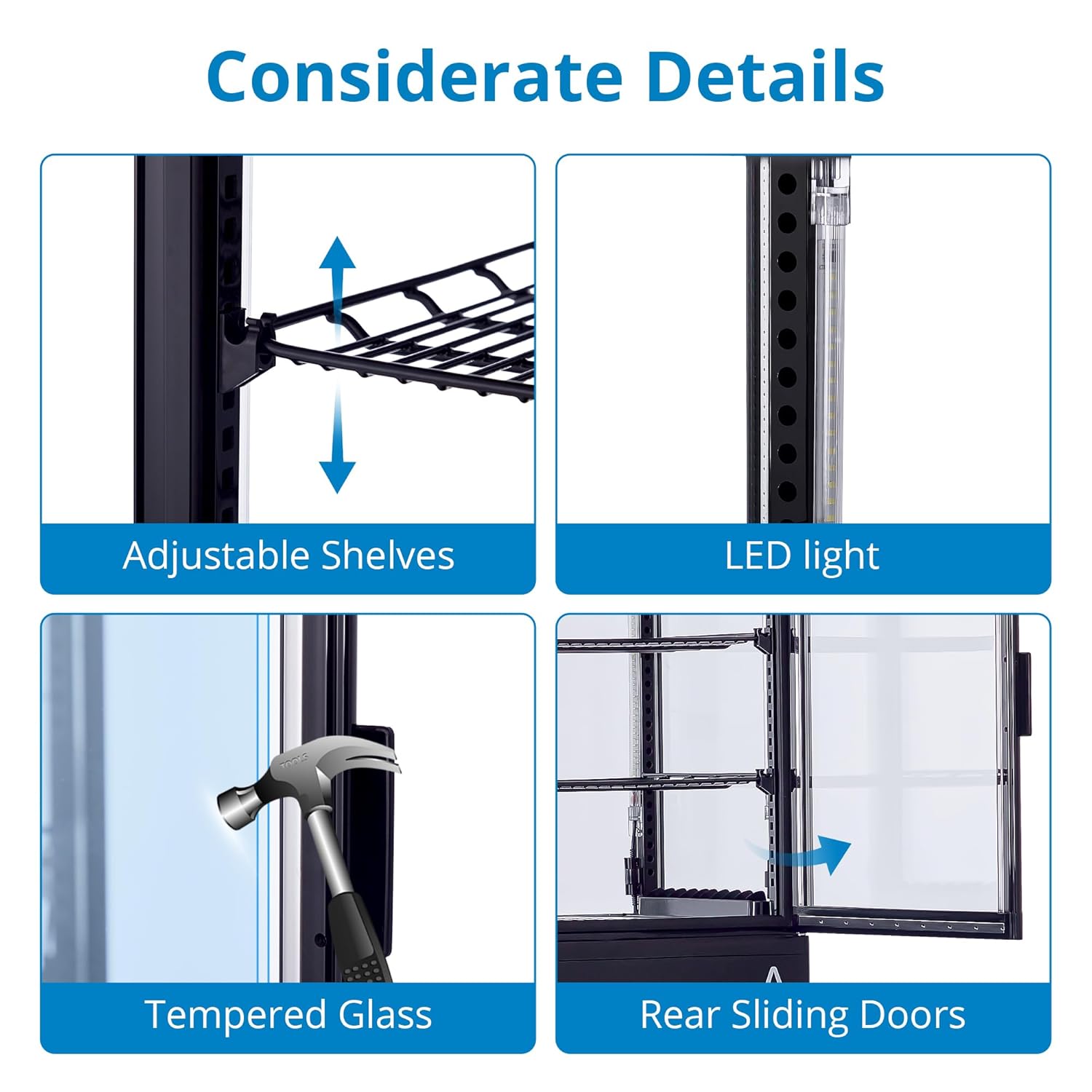
Figure 2.1: Key design details including adjustable shelves, LED lighting, tempered glass, and convenient rear sliding doors.

Figure 2.2: The display case maintains a temperature range of 35.6-53.6°F (2-12°C) with features for fast cooling and energy efficiency.
3. Tæknilýsing

Mynd 3.1: Vöruvíddir og helstu tæknilegar upplýsingar.
| Forskrift | Gildi |
|---|---|
| Vörumál | 18.9" D x 17.8" B x 34.57" H |
| Vörumerki | GAÓMON |
| Getu | 2.1 rúmfætur |
| Stillingar | Frystir á botni |
| Stjörnugjöf BEE | 3 stjörnur |
| Litur | Svartur |
| Sérstakur eiginleiki | Stillanlegar hillur |
| Gerð uppsetningar | Frjálst |
| Fjöldi hurða | 1 |
| Upptímakerfi | Sjálfvirk |
4. Uppsetning
- Upptaka: Carefully remove the display case from its packaging. Inspect for any shipping damage. Retain packaging materials for future transport if needed.
- Staðsetning: Place the unit on a firm, level surface capable of supporting its weight when fully loaded. Ensure there is adequate ventilation around the unit (at least 4 inches from walls or other appliances) to allow for proper heat dissipation. Avoid direct sunlight or heat sources.
- Efnistaka: Notið stillanlegu fæturna neðst á tækinu til að tryggja að það sé fullkomlega lárétt. Þetta er mikilvægt fyrir rétta þéttingu hurðarinnar og skilvirka notkun.
- Upphafsþrif: Þurrkið af að innan og utan með auglýsingu fyrir fyrstu notkun.amp klút og milt þvottaefni. Þurrkaðu vel.
- Rafmagnstenging: Plug the unit into a dedicated 110V grounded electrical outlet. Do not use extension cords or adapters. Allow the unit to stand for at least 2 hours before plugging it in to allow refrigerants to settle.
5. Notkunarleiðbeiningar
5.1 Stjórnborð yfirview

Figure 5.1: The digital control panel for temperature and settings.
The display case features an intuitive digital control panel. The main display shows the current internal temperature. Buttons allow for temperature adjustment, LED lighting control, and defrost mode activation.
5.2 Stilla hitastig
- Press the 'SET' button once. The temperature display will flash.
- Use the 'Up' or 'Down' arrows to adjust the desired temperature. The recommended range for most products is 32-53.6°F (0-12°C).
- Press 'SET' again to confirm the new temperature. The display will return to showing the current internal temperature.
5.3 LED lýsingarstýring
Press the 'Light' button (often indicated by a light bulb icon) on the control panel to turn the interior LED lighting on or off.
5.4 Hleðsla á vörum
Ensure products are not blocking the internal air vents to allow for proper air circulation and consistent cooling. Arrange items neatly on the adjustable shelves for optimal display and temperature distribution.
6. Viðhald
6.1 Þrif
- Innrétting: Regularly clean the interior with a mild, non-abrasive detergent and warm water. Rinse with clean water and dry thoroughly to prevent odors and mold growth.
- Að utan: Þurrkaðu ytri yfirborð með mjúku, damp cloth. For glass surfaces, use a glass cleaner.
- Þéttiefnisspóla: The condenser coil, typically located at the bottom rear of the unit, should be cleaned periodically (every 3-6 months) to ensure efficient operation. Unplug the unit, then use a brush or vacuum cleaner to remove dust and debris.
6.2 Automatic Defrosting System

Figure 6.1: The internal airflow for air-cooling and the automatic defrosting process.
This unit features an automatic defrost function. During defrost cycles, ice buildup on the evaporator coil is melted, and the water drains into an evaporation tray. Ensure the drain is not blocked. If excessive ice builds up, manually initiate a defrost cycle via the control panel (refer to control panel instructions for specific button).
7. Bilanagreining
| Vandamál | Möguleg orsök | Lausn |
|---|---|---|
| Einingin kveikir ekki á | No power supply; tripped circuit breaker; faulty plug/cord. | Check power outlet; reset circuit breaker; inspect plug/cord for damage. |
| Hitastig er of hátt | Door not closed properly; condenser coil dirty; insufficient ventilation; overloaded with warm products. | Ensure door is sealed; clean condenser coil; provide adequate space around unit; allow warm products to cool before loading. |
| Óhóflegur hávaði | Einingin er ekki lárétt; vifta er stífluð; lausir íhlutir. | Látið tækið standa jafnt; athugið hvort hindranir séu í kringum viftuna; hafið samband við þjónustuver ef hávaðinn heldur áfram. |
| Condensation/Fogging on glass | High humidity; frequent door opening; faulty door seal. | Ensure proper ventilation; minimize door openings; check and clean door seals. |
Ef vandamálið heldur áfram eftir að þessar lausnir hafa verið prófaðar, vinsamlegast hafið samband við þjónustuver.
8. Ábyrgð og stuðningur
Your GAOMON Commercial Refrigerator Display Case comes with a manufacturer's warranty. Please refer to the warranty card included with your purchase for specific terms and conditions, including coverage duration and what is covered. For technical support, parts, or service inquiries, please contact GAOMON customer service through the retailer where the product was purchased or visit the official GAOMON websíða fyrir upplýsingar um tengiliði.