1. Inngangur
This manual provides detailed instructions for the setup, operation, and maintenance of your Cheerlux C50 Projector. Please read this manual thoroughly before using the product to ensure proper function and to prevent damage.
The Cheerlux C50 is a high-performance projector featuring Android 9.0, Wi-Fi 5.0G, Bluetooth 5.1, autofocus, and 4P keystone correction. It offers a brightness of 4000 Lumens and a contrast ratio of 2500:1, delivering a full HD 1920x1080 resolution display.
2. Öryggisupplýsingar
- Do not block the ventilation openings of the projector. Ensure adequate space around the device for proper airflow.
- Forðastu að horfa beint inn í linsu skjávarpa þegar lamp er kveikt, þar sem bjart ljós getur valdið augnskaða.
- Setjið ekki skjávarpann á óstöðugt yfirborð.
- Haldið skjávarpanum frá vatni, raka og miklum hita.
- Notið aðeins straumbreytinn sem fylgir skjávarpanum.
- Ekki reyna að taka skjávarpann í sundur eða gera við hann sjálfur. Hafðu samband við hæft þjónustufólk til að fá aðstoð.
- Geymið þar sem börn ná ekki til.
3. Innihald pakka
Gakktu úr skugga um að allir hlutir séu til staðar í pakkanum:
- Cheerlux C50 skjávarpi
- Fjarstýring
- Rafmagnstengi
- AV merkjasnúra
- Notendahandbók (þetta skjal)
- Support Base (1x)
- Þrif á linsu
- VGA snúru
- Þrifasett
4. Vöru lokiðview
Kynntu þér íhluti og tengi skjávarpans.
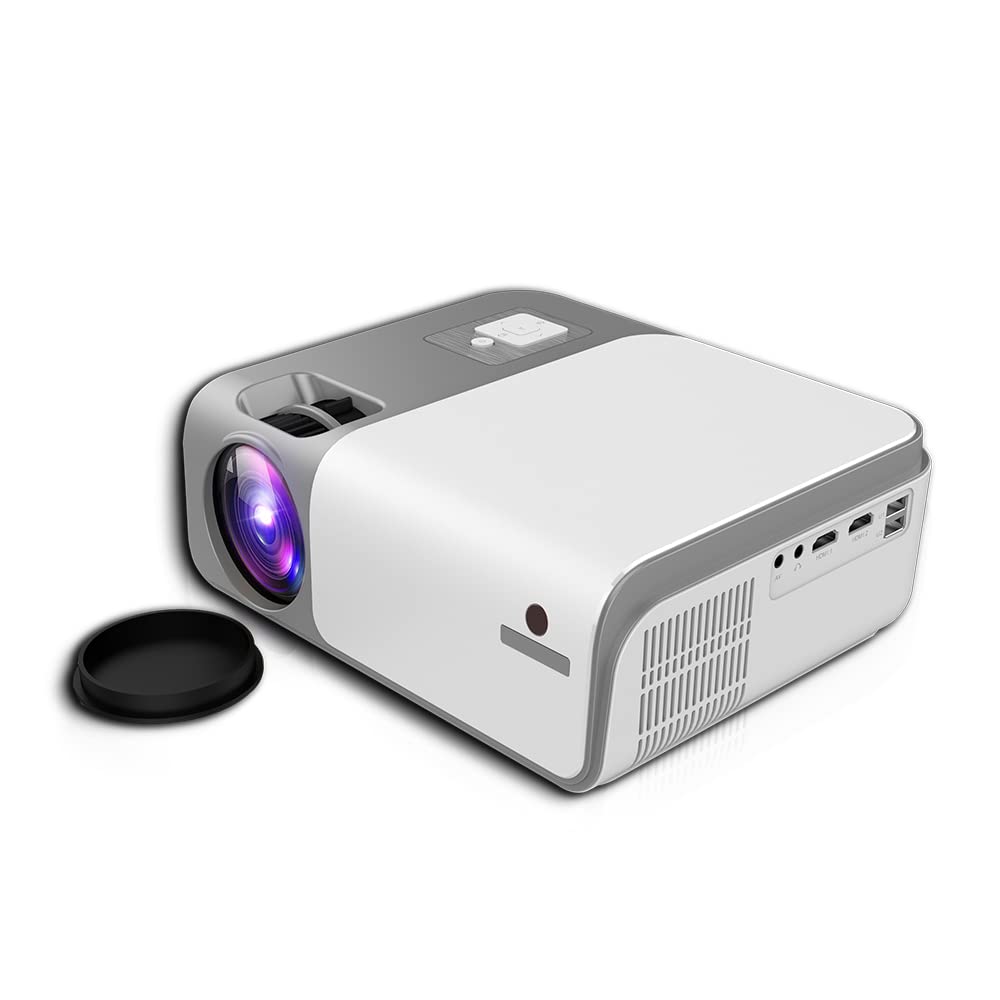
Mynd 4.1: Framan og hliðin view of the Cheerlux C50 Projector. This image shows the projector's lens, ventilation grilles, and various input ports on the side, including USB and HDMI.

Mynd 4.2: The Cheerlux C50 Projector demonstrating screen mirroring with a smartphone. A wireless signal icon indicates the mirroring function, allowing content from a mobile device to be displayed on the projector.
Inntaks-/úttaksport:
- 2x USB Sockets: Til að tengja USB-drif eða önnur USB-tæki.
- 2x HDMI Sockets: For connecting HDMI-enabled devices like laptops, gaming consoles, or media players.
- 1x Composite AV Socket: For connecting older devices using AV cables.
- Heyrnartólstengi: Til að tengja utanaðkomandi hljóðtæki eða heyrnartól.
5. Uppsetning
5.1 Staðsetning
Position the projector on a stable, flat surface or mount it securely. Ensure the projector lens is perpendicular to the projection surface for optimal image quality.
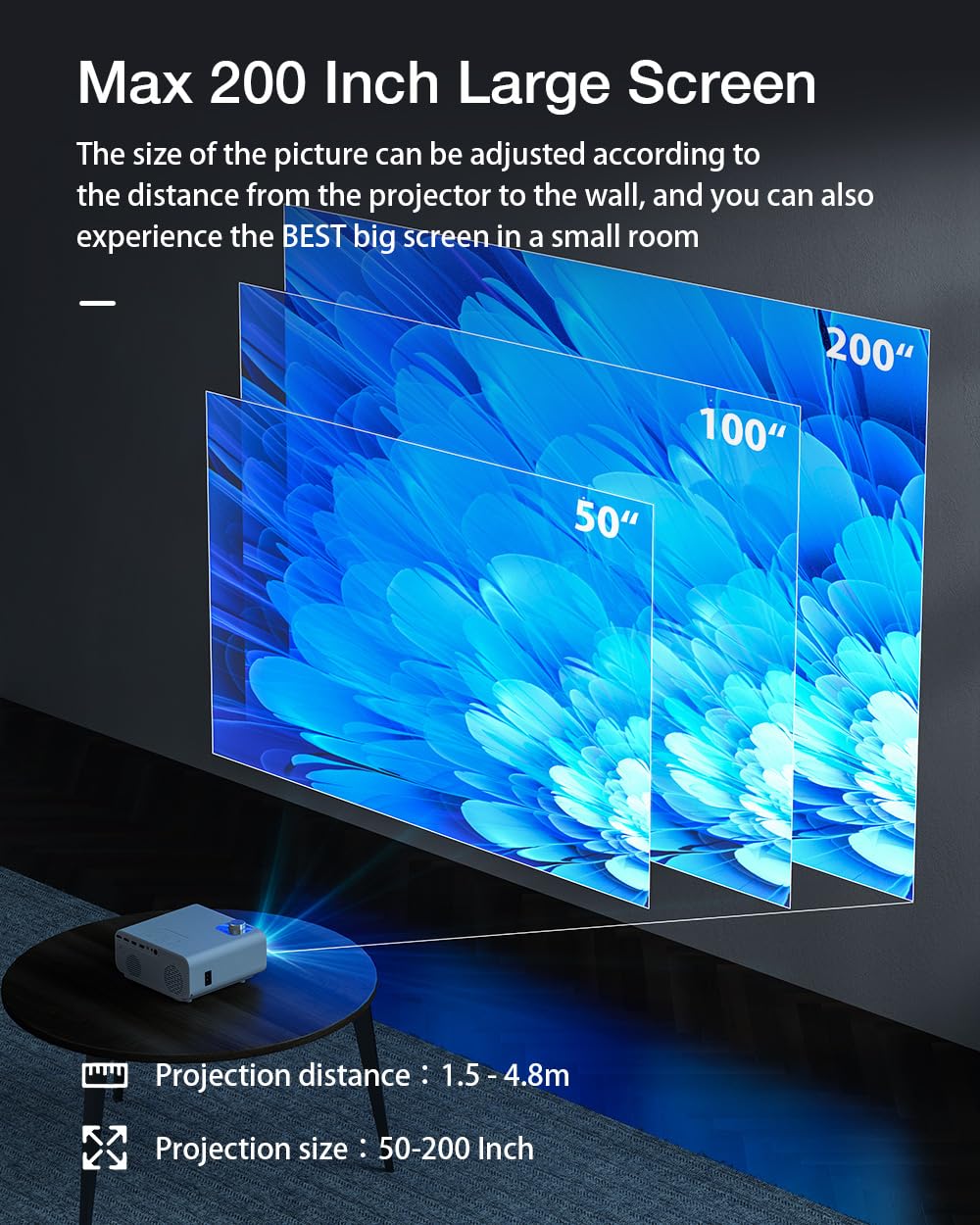
Mynd 5.1: Projection distance and screen size guide. The projector can achieve a screen size of 50 to 200 inches with a projection distance ranging from 1 to 8 meters (approximately 3.3 to 26.2 feet).
- Myndvarpsfjarlægð: 1 - 8 metrar (3.3 - 26.2 fet)
- Áætluð myndstærð: 50 - 200 tommur
- Hlutfall: 16:9
5.2 Rafmagnstenging
- Tengdu rafmagnssnúruna við aflgjafainntak skjávarpans.
- Stingdu hinum enda rafmagnssnúrunnar í viðeigandi rafmagnsinnstungu.
- Rafmagnsljósið á skjávarpanum ætti að lýsa upp.
5.3 Fókus og leiðrétting á lykilþráðum
- Sjálfvirkur fókus: The Cheerlux C50 features an autofocus function. The projector will automatically adjust the image clarity upon startup or movement.
- 4P Keystone Correction: If the projected image appears distorted (trapezoidal), use the 4P keystone correction feature to adjust each corner of the image independently until it forms a perfect rectangle. This is particularly useful when the projector is not perfectly aligned with the screen. Refer to the on-screen menu for keystone adjustment options.
6. Notkunarleiðbeiningar
6.1 Kveikt/slökkt
- Kveikt á: Press the power button on the projector or the remote control. The projector will start up and display the Android 9.0 home screen.
- Slökkva á: Press the power button again. A shutdown confirmation prompt may appear. Select "Power Off" to safely shut down the projector.
6.2 Android 9.0 OS
The Cheerlux C50 Projector runs on Android 9.0, providing access to a smart interface and various applications.

Mynd 6.1: The Android 9.0 operating system interface on the Cheerlux C50 Projector. The screen shows various streaming and social media application icons, indicating smart functionality.
- Leiðsögn: Notaðu fjarstýringuna til að fletta í gegnum Android viðmótið.
- Umsóknir: Access pre-installed applications or download new ones from the app store (if available) to watch videos, browse the internet, and more.
- Stillingar: Adjust system settings, network connections, display options, and other preferences through the settings menu.
6.3 Skjáspeglun
The projector supports screen mirroring from compatible smartphones and tablets.
- Gakktu úr skugga um að bæði snjalltækið þitt og skjávarpinn séu tengd sama Wi-Fi neti.
- On the projector's Android interface, select the "Mirroring" or "Screen Share" application.
- On your mobile device, activate its screen mirroring feature (e.g., "Smart View" on Samsung, "Screen Cast" on Android, "AirPlay" on iOS).
- Select the projector's name from the list of available devices on your mobile device.
- The mobile device's screen content will now be displayed on the projector.
7. Tengingar
7.1 Wi-Fi tenging
Connect the projector to a wireless network to access online content and enable screen mirroring.
- Go to the projector's "Settings" menu.
- Veldu „Net og internet“ eða „Wi-Fi“.
- Kveiktu á Wi-Fi og veldu netið sem þú vilt nota af listanum.
- Sláðu inn Wi-Fi lykilorðið ef beðið er um það og tengstu.
7.2 Bluetooth-tenging
Connect Bluetooth speakers, headphones, or other compatible devices for audio output.
- Go to the projector's "Settings" menu.
- Select "Connected Devices" or "Bluetooth".
- Turn on Bluetooth and put your Bluetooth device into pairing mode.
- Select your device from the list of available devices on the projector and pair.
7.3 Tengingar með snúru (HDMI, USB, AV)
- HDMI: Connect an HDMI cable from your source device (e.g., laptop, gaming console) to one of the projector's HDMI ports. Select the corresponding HDMI input source from the projector's input menu.
- USB: Insert a USB flash drive or external hard drive into a USB port. The projector's media player will typically detect the device, allowing you to browse and play media files.
- AF: Connect an AV cable from your source device to the projector's AV input. Select the AV input source from the projector's input menu.
8. Viðhald
- Linsuhreinsun: Use the provided lens cleaning cloth or a soft, lint-free cloth to gently wipe the projector lens. Do not use abrasive cleaners or solvents.
- Rykhreinsun: Hreinsið loftræstiop skjávarpans reglulega með mjúkum bursta eða þrýstilofti til að koma í veg fyrir rykuppsöfnun, sem getur haft áhrif á afköst og líftíma.
- Geymsla: Þegar skjávarpinn er ekki í notkun í langan tíma skal geyma hann á köldum, þurrum stað, varinn fyrir ryki og beinu sólarljósi.
9. Bilanagreining
- Enginn kraftur:
- Ensure the power cable is securely connected to both the projector and a working power outlet. Check if the power indicator light is on.
- Engin mynd:
- Verify that the correct input source (HDMI, AV, USB) is selected. Check cable connections. Ensure the lens cap is removed.
- óskýr mynd:
- Allow the autofocus to adjust. If still blurry, manually adjust focus if an option is available, or ensure the projector is within the recommended projection distance.
- Distorted Image (Trapezoid):
- Use the 4P keystone correction feature in the projector's settings menu to adjust the image corners.
- Ekkert hljóð:
- Check the volume settings on both the projector and the source device. Ensure external speakers or headphones are properly connected if used. Verify that the correct audio output is selected in settings.
- Vandamál með skjáspeglun:
- Ensure both devices are on the same Wi-Fi network. Restart both the projector and the mobile device. Check for compatibility issues with your mobile device's mirroring protocol.
10. Tæknilýsing
| Vörumerki | Almennt |
| Nafn líkans | Cheerlux C50 |
| Stýrikerfi | Android 9.0 |
| Birtustig | 4000 lúmen |
| Andstæðuhlutfall | 2500:1 |
| Innfæddur upplausn | 1920 x 1080 pixlar (Full HD) |
| Skjár Tegund | LED |
| Hlutfall | 16:9 |
| Myndvarpsfjarlægð | 1 - 8 metrar |
| Projected Image Size | 50 - 200 tommur |
| Tengitækni | Wi-Fi 5.0G, Bluetooth 5.1 |
| Vélbúnaðarviðmót | 2x HDMI, 2x USB, 1x Composite AV, Headphone Socket |
| Sérstakir eiginleikar | Autofocus, 4P Keystone Correction, Screen Mirroring, Built-In Wi-Fi |
| Samhæf tæki | Gaming Console, Smartphone, Laptop, TV, Speakers |
| Vörumál | 260 x 210 x 102 mm (21 x 26 x 10 cm) |
| Þyngd hlutar | 1 kg |
| Hvaðtage | 150 Watt |
| Endurnýjunartíðni | 480 MHz |
11. Ábyrgð og stuðningur
Til að fá upplýsingar um ábyrgð og tæknilega aðstoð, vinsamlegast skoðið skjöl sem fylgdu með kaupunum eða hafið samband við söluaðila. Geymið kaupkvittunina vegna hugsanlegra ábyrgðarkröfu.


