
Inngangur
Thank you for choosing the Oakcastle HIFI150 Stereo System. This manual provides essential information for setting up, operating, and maintaining your device. Please read it thoroughly before use and retain it for future reference.
Öryggisupplýsingar
Til að tryggja örugga notkun og koma í veg fyrir skemmdir skal fylgja eftirfarandi öryggisráðstöfunum:
- Ekki láta tækið verða fyrir rigningu, raka eða miklum hita.
- Ekki opna casing. Látið hæft starfsfólk sjá um alla þjónustu.
- Tryggið góða loftræstingu í kringum tækið. Ekki loka neinum loftræstiopum.
- Notaðu aðeins straumbreytinn sem fylgir með tækinu.
- Keep the unit away from heat sources such as radiators, stoves, or other heat-producing appliances.
- Hreinsaðu tækið aðeins með þurrum klút.
Innihald pakka
Vinsamlegast athugið hvort allir hlutir séu í pakkanum ykkar:
- Oakcastle HIFI150 Stereo System
- Fjarstýring
- Rafhlöður fyrir fjarstýringu
- Rafmagnssnúra
- Notendahandbók
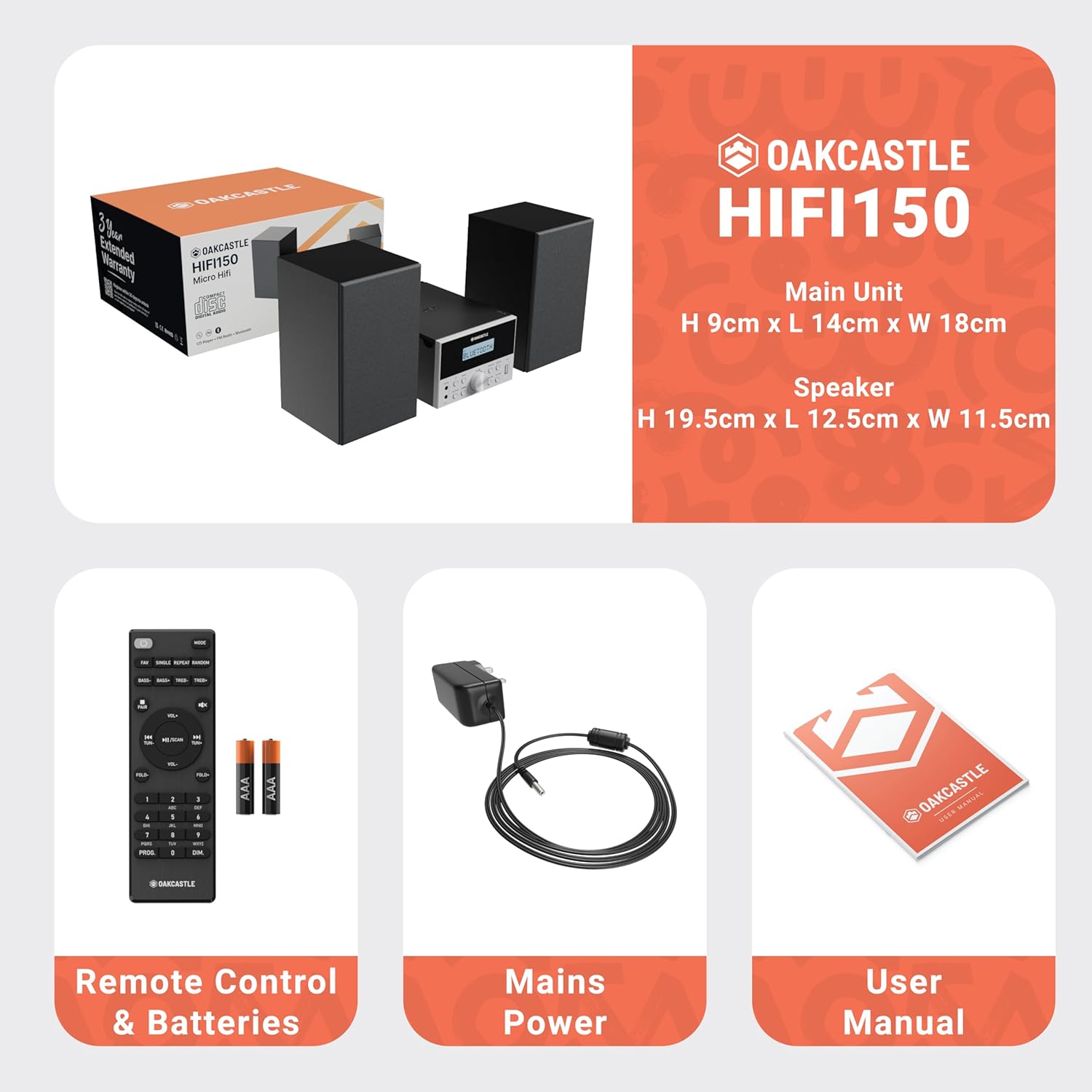
Image: The Oakcastle HIFI150 package contents, showing the main unit, two speakers, remote control with batteries, power adapter, and user manual.
Vara lokiðview
The Oakcastle HIFI150 features a compact design with intuitive controls and multiple connectivity options.
Stjórnborð og skjár að framan

Image: A close-up of the Oakcastle HIFI150 main unit's front panel, highlighting the digital display, central volume knob, mode selection buttons, and front-facing AUX In and USB ports. The display shows 'BLUETOOTH'.
- Skjár: Sýnir núverandi stillingu, upplýsingar um lag og útvarpstíðni.
- Aflhnappur: Kveikir eða slekkur á tækinu.
- Hnappur fyrir ham: Cycles through input sources (CD, FM, Bluetooth, AUX, USB).
- Hljóðstyrkur: Stillir aðalstyrk.
- Spila/hlé hnappur: Stýrir spilun fyrir geisladiska, USB og Bluetooth.
- Hnappar fyrir sleppa/stilla: Navigates tracks or tunes radio frequencies.
- AUX í höfn: Til að tengja utanaðkomandi hljóðtæki með 3.5 mm snúru.
- USB tengi: Til að spila hljóð files frá USB drifi.
Tengingar að aftan
The rear panel includes connections for speakers and power.
Uppsetning
1. Að tengja hátalarana
Connect the included speakers to the speaker terminals on the rear of the main unit. Ensure correct polarity (red to red, black to black) for optimal sound quality.
2. Rafmagnstenging
Plug the power cable into the AC inlet on the rear of the main unit, then plug the other end into a standard wall outlet.
Notkunarleiðbeiningar
Kveikt/slökkt
Ýttu á Kraftur hnappinn á framhliðinni eða fjarstýringunni til að kveikja eða slökkva á tækinu.
Stillingarval
Ýttu á Mode button on the front panel or remote control repeatedly to cycle through the available input sources: CD, FM útvarp, Bluetooth, AUX, og USB.
Bluetooth aðgerð
- Veldu Bluetooth mode using the Mode button. The display will show 'BLUETOOTH' and the unit will enter pairing mode.
- Virkjaðu Bluetooth í snjallsímanum þínum eða öðru Bluetooth-tæki og leitaðu að tiltækum tækjum.
- Select 'OAKCASTLE HIFI150' from the list. Once connected, the unit will confirm the connection.
- You can now stream audio wirelessly from your device to the HIFI150.
CD spilun

Image: The Oakcastle HIFI150 with its top-loading CD player mechanism open, revealing a compact disc placed inside. The display shows 'CD'.
- Opnaðu lokið á geisladiskahólfinu.
- Place a CD (MP3, CD, WMA, or CD-R format) onto the spindle with the label side facing up.
- Lokaðu geisladiskahólfinu.
- Veldu CD mode. The unit will read the disc and begin playback automatically.
- Notaðu Spila/Hlé og Sleppa hnappana til að stjórna spilun.
Rekstur FM útvarps

Image: The Oakcastle HIFI150 main unit with its telescopic antenna extended, displaying an FM radio frequency on its screen. The unit is placed between two speakers.
- Veldu FM útvarp ham.
- Færið út sjónaukann til að fá betri móttöku.
- Sjálfvirk skönnun: Press and hold the Play/Pause button to automatically scan and save available FM stations (up to 30 presets).
- Handvirk stilling: Use the Skip/Tune buttons to manually adjust the frequency.
- Muna forstillingar: Use the 'FAV/PROG' button on the remote to cycle through saved stations.
USB spilun
- Settu USB -drif í USB -tengið á framhliðinni.
- Veldu USB mode. The unit will automatically detect and begin playing compatible audio files (MP3, WMA).
- Notaðu Spila/Hlé og Sleppa hnappana til að stjórna spilun.
AUX inntak
- Tengdu utanaðkomandi hljóðtæki (t.d. MP3 spilara, snjallsíma) við AUX inn port on the front panel using a 3.5mm audio cable (not included).
- Veldu AUX ham.
- Stjórnaðu spilun frá tengdu ytra tæki.
Hljóðstyrkstýring
Snúðu Magnhnappur á framhliðinni eða notaðu VOL +/- hnappana á fjarstýringunni til að stilla hljóðstyrkinn.
Notkun fjarstýringar
The included remote control provides full functionality for the HIFI150. Ensure batteries are correctly inserted. Point the remote control towards the front panel of the main unit for optimal response.
Viðhald
Þrif
- Þurrkið tækið með mjúkum, þurrum klút.
- Notið ekki slípiefni, vax eða leysiefni þar sem þau geta skemmt áferðina.
Geymsla
Ef tækið er ekki notað í langan tíma skal taka það úr sambandi við rafmagn og geyma það á köldum, þurrum stað.
Úrræðaleit
If you encounter issues with your HIFI150, please refer to the following common problems and solutions:
| Vandamál | Möguleg orsök | Lausn |
|---|---|---|
| Enginn kraftur | Rafmagnssnúra ekki tengd; Rafmagnsinnstunga biluð | Gakktu úr skugga um að rafmagnssnúran sé vel tengd; Prófaðu aðra rafmagnsinnstungu. |
| Ekkert hljóð | Volume too low; Incorrect input mode; Speakers not connected | Increase volume; Select correct input mode; Check speaker connections. |
| Geisladiskurinn spilar ekki | CD inserted incorrectly; Disc scratched/dirty; Incorrect format | Reinsert CD correctly; Clean or replace disc; Ensure disc is compatible (MP3, CD, WMA, CD-R). |
| Bluetooth tengist ekki | Bluetooth mode not selected; Device too far; Device already connected to another unit | Veldu Bluetooth-stillingu; Færðu tækið nær; Aftengdu þig við önnur tæki og reyndu aftur. |
| Léleg FM móttaka | Loftnet ekki útdregin; Veikt merki | Fully extend the telescopic antenna; Try repositioning the unit. |
Tæknilýsing
| Gerðarnúmer | 1000002971 |
| Vörumerki | Oakcastle |
| Tengingar | Bluetooth 5.2, USB, AUX |
| Hljóðúttak | 20W |
| Styður fjölmiðlar | CD, MP3, WMA, CD-R, USB |
| Útvarp | FM Radio with 30 Presets |
| Samhæf tæki | MP3 spilari, snjallsími, spjaldtölva |
| Efni í skáp | Viður |
| Litur | Svartur |
| Stærðir hlutar (L x B x H) | 13.7 x 17.8 x 9 cm |
| Þyngd hlutar | 2 kíló |
Ábyrgð og stuðningur
The Oakcastle HIFI150 comes with an extended 3-year warranty. Registration is required to activate the full warranty period. Please refer to the warranty card included in your package or visit the official Oakcastle website for registration details and support information.
For technical assistance or further inquiries, please contact Oakcastle customer support through their official channels.