
LIECTROUX M7S PRO
Notendahandbók fyrir LIECTROUX M7S Pro ryksuguvél
Model: M7S Pro
1. Inngangur
Þakka þér fyrir kaupinasing the LIECTROUX M7S Pro Robot Vacuum Cleaner. This manual provides essential information for the safe operation, maintenance, and troubleshooting of your device. Please read this manual thoroughly before using the product and retain it for future reference.
Öryggisleiðbeiningar
- Gakktu úr skugga um að vélmenni sé fullhlaðin fyrir fyrstu notkun.
- Ekki nota vélmennið í röku umhverfi eða nálægt vökvum.
- Haldið lausum snúrum, gluggatjöldum og smáhlutum frá vélmenninu til að koma í veg fyrir að þeir flækist í þeim.
- Hafið eftirlit með börnum og gæludýrum þegar vélmennið er í notkun.
- Ekki nota vélmennið til að taka upp stórt rusl, hvassa hluti eða brennandi efni.
- Notið aðeins upprunalegu hleðslustöðina og straumbreytinn sem fylgja með vélmenninu.
- Turn off the robot and unplug it from the charging dock before performing any maintenance.
2. Innihald pakka
Gakktu úr skugga um að allir hlutir séu til staðar í pakkanum:
- LIECTROUX M7S Pro Robot Vacuum Cleaner
- Hleðslustöð
- Rafmagns millistykki
- Hliðarburstar (sett)
- HEPA sía (fyrirfram uppsett eða vara)
- Hreinsunarverkfæri
- Fjarstýring
- Notendahandbók
3. Vöru lokiðview
Familiarize yourself with the components of your LIECTROUX M7S Pro robot vacuum cleaner.

Mynd 3.1: The LIECTROUX M7S Pro robot vacuum cleaner, showcasing its sleek black design, along with its remote control and a smartphone displaying the cleaning map via the app.
Helstu þættir:
- Efsta spjaldið: Power button, Wi-Fi indicator, charging indicator.
- Framstuðara: Obstacle detection sensors.
- Hliðarburstar: Safnið ryki og rusli af brúnum og hornum.
- Drifhjól: Allow movement across various floor types.
- Rusl: Safnar saman þurrum rusli.
- Water Tank (for mopping): Holds water for wet cleaning.
- Hleðsla tengiliðir: Tengist við hleðslustöðina.
- Klettskynjarar: Detects drops and prevents falls.
4. Uppsetning
4.1 Staðsetning hleðslustöðva
Settu hleðslustöðina upp við vegg á opnu svæði og vertu viss um að engar hindranir séu innan eins metra (3 feta) frá hliðunum og tveggja metra (6 feta) frá stöðinni. Tengdu straumbreytinn við hleðslustöðina og stingdu honum í samband.
4.2 Upphafshleðsla
Place the robot onto the charging dock, ensuring the charging contacts align. The robot will begin charging automatically. For first use, allow the robot to charge completely (approximately 4-5 hours) before operation.

Mynd 4.1: The robot vacuum cleaner automatically returning to its charging dock when its battery is low, ensuring it is always ready for the next cleaning cycle.
4.3 App Connection (TUYA App)
- Download the "TUYA Smart" app from your smartphone's app store (iOS or Android).
- Register or log in to your TUYA account.
- Ensure your robot is charged and powered on.
- Follow the in-app instructions to add your LIECTROUX M7S Pro robot vacuum cleaner. This typically involves pressing and holding a button on the robot to enter pairing mode and connecting to your home Wi-Fi network.
- Þegar þú hefur tengst geturðu stjórnað vélmenninu, view cleaning maps, and set schedules via the app.
4.4 Samþætting raddaðstoðarmanns
The LIECTROUX M7S Pro supports voice control via Amazon Alexa and Google Home. Refer to the respective app (Alexa app or Google Home app) for instructions on how to link your TUYA Smart account and control your robot with voice commands.
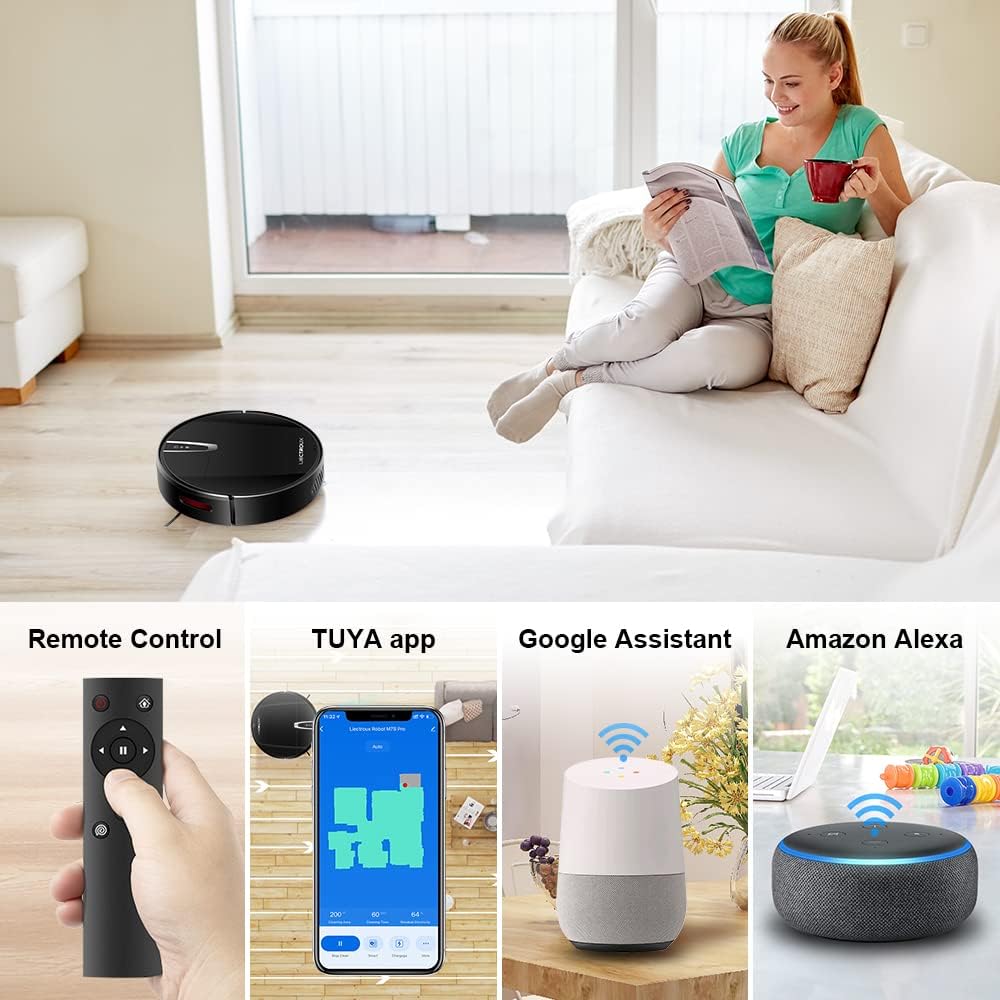
Mynd 4.2: Various control methods for the robot vacuum, including a physical remote control, the TUYA smartphone application displaying a cleaning map, and integration with voice assistants like Google Assistant and Amazon Alexa.
5. Notkunarleiðbeiningar
5.1 Hreinsunarstillingar
The robot offers multiple cleaning modes to suit different needs, accessible via the app, remote control, or voice commands:
- Sjálfvirk þrif: Róbotinn ræðst snjallt um og þrífur allt gólfflötinn.
- Þrif á blettum: Einbeitir sér að tilteknu óhreinu svæði og þrífur í spíralmynstri.
- Kanthreinsun: Hreinsar meðfram veggjum og brúnum húsgagna.
- Moppunarstilling: For wet cleaning, attach the water tank and mopping cloth.

Mynd 5.1: The robot vacuum cleaner operating on a floor with scattered debris, illustrating its powerful suction and various cleaning modes: Scheduled Cleaning, Auto Cleaning, Edge Cleaning, and Spot Cleaning.
5.2 Leiðsögn og kortlagning
The M7S Pro utilizes smart gyroscope navigation to create a 2D map of your environment, allowing for precise positioning and efficient route planning. This ensures comprehensive coverage and minimizes missed spots.

Mynd 5.2: The robot vacuum cleaner navigating a room, with a grid overlay illustrating its smart gyroscope navigation system for precise positioning and thorough cleaning.

Mynd 5.3: A visual comparison showing the efficient, systematic cleaning path generated by the LIECTROUX M7S Pro's gyroscope navigation versus a less organized common route planning method, highlighting intelligent route planning.
5.3 Sjálfvirk endurhleðsla
When the battery level is low or a cleaning task is complete, the robot will automatically return to its charging dock to recharge. Ensure the charging dock is always powered on and accessible.
5.4 Anti-Drop System
The robot is equipped with cliff sensors to detect stairs and elevated surfaces, preventing it from falling. It also intelligently detects different floor types and adjusts its direction within 10 milliseconds.
6. Viðhald
Reglulegt viðhald tryggir bestu mögulegu afköst og lengir líftíma ryksugunnar þinnar.
6.1 Tæming ruslatunnunnar
Empty the dustbin after each cleaning cycle or when the 'full' indicator appears. Open the top cover, remove the dustbin, and dispose of the collected debris.
6.2 Þrif á síunni
The HEPA filter should be cleaned regularly (e.g., weekly) using the provided cleaning tool or a soft brush. Replace the HEPA filter every 3-6 months, depending on usage, to maintain suction efficiency.
6.3 Þrif á hliðarburstum
Inspect and clean the side brushes regularly. Remove any tangled hair or debris. If brushes are worn or damaged, replace them with new ones.
6.4 Þrif á skynjurum og hleðslutengjum
Wipe the cliff sensors and charging contacts on both the robot and the charging dock with a clean, dry cloth to ensure proper function and charging.
6.5 Brush-less Suction Nozzle
The M7S Pro features an advanced brush-less suction nozzle designed to minimize hair entanglement, reducing the frequency of cleaning the main suction path.

Mynd 6.1: An illustration of the robot vacuum's underside, highlighting the advanced brush-less suction nozzle designed to prevent hair entanglement and ensure consistent cleaning performance.
7. Bilanagreining
Ef þú lendir í vandræðum með ryksuguna þína skaltu skoða eftirfarandi algeng vandamál og lausnir:
| Vandamál | Möguleg orsök | Lausn |
|---|---|---|
| Vélmenni kviknar ekki. | Lítil rafhlaða; slökkt á tækinu. | Charge the robot; ensure the main power switch is on. |
| Vélmennið hleðst ekki. | Charging contacts dirty; charging dock not powered. | Clean charging contacts; ensure charging dock is plugged in. |
| Vélmennið festist oft. | Obstacles (cables, rugs); narrow spaces. | Clear the cleaning area; use virtual walls if available. |
| Léleg þrifaárangur. | Ruslatunna full; sía stífluð; burstar flæktir. | Empty dustbin; clean/replace filter; clean brushes. |
| Vandamál með tengingu við forrit. | Incorrect Wi-Fi password; robot not in pairing mode; 5GHz Wi-Fi network. | Verify Wi-Fi details; re-enter pairing mode; ensure 2.4GHz Wi-Fi is used. |
8. Tæknilýsing
| Eiginleiki | Smáatriði |
|---|---|
| Vörumerki | LIECTROUX |
| Nafn líkans | M7S PRO |
| Litur | Svartur |
| Vörumál | 32L x 32W x 7.8H cm |
| Þyngd hlutar | 4 kíló |
| Hámarks sogkraftur | 4000Pa |
| Rafhlöðugeta | 2500mAh litíumjón |
| Runtime | Allt að 120 mínútur |
| Síugerð | HEPA |
| Gerð stjórnanda | App Control, Touchpad Control, Voice Control |
| Samhæfni raddaðstoðarmanns | Google Home, Amazon Alexa |
| Tegund leiðsögu | Gyroscope Navigation (2D Map) |
| Sérstakur eiginleiki | Anti-drop system, Brush-less suction nozzle |
| Yfirborðsráðgjöf | Low-pile carpet, hard floors, ceramic tiles |
9. Ábyrgð og stuðningur
The LIECTROUX M7S Pro Robot Vacuum Cleaner comes with a standard manufacturer's warranty. Please refer to the warranty card included in your package for specific terms and conditions, including the warranty period and coverage details.
For technical support, troubleshooting assistance, or warranty claims, please contact the seller or LIECTROUX customer service. Contact information can typically be found on the product packaging, the seller's website, or within the TUYA Smart app.
When contacting support, please have your product model number (M7S Pro) and purchase details readily available.
Ask a question about this manual
Ask about setup, troubleshooting, compatibility, parts, safety, or missing instructions. Manuals+ will review the question and use this page’s manual context to help answer it.