
1. Inngangur
This manual provides essential information for the safe and efficient operation of your VEVOR 5-in-1 Heat Press Machine. Please read all instructions carefully before use to ensure proper setup, operation, and maintenance. Retain this manual for future reference.

Figure 1.1: VEVOR 5-in-1 Heat Press Machine with included attachments.
2. Öryggisleiðbeiningar
Fylgið alltaf eftirfarandi öryggisráðstöfunum til að koma í veg fyrir meiðsli eða skemmdir á vélinni:
- Rafmagnsöryggi: Gakktu úr skugga um að vélin sé tengd við jarðtengda rafmagnsinnstungu með réttri hljóðstyrksmælingu.tage. Do not operate with wet hands or in damp aðstæður. Aftengdu rafmagnið áður en þú þrífur eða framkvæmir viðhald.
- Hár hiti: The heating elements reach very high temperatures. Avoid direct contact with hot surfaces. Use heat-resistant gloves when handling materials near the heating plate.
- Klípupunktar: Keep hands and fingers clear of moving parts, especially when lowering the heat platen.
- Loftræsting: Operate the machine in a well-ventilated area to dissipate any fumes from materials being pressed.
- Stöðugleiki: Place the machine on a stable, heat-resistant surface.
- Börn og gæludýr: Keep children and pets away from the machine during operation and when cooling down.
- Neyðarstopp: Kynntu þér staðsetningu rofans til að slökkva fljótt á tækinu í neyðartilvikum.
3. Innihald pakka
Staðfestið að allir íhlutir séu til staðar við upppakkningu:
- Main Heat Press Unit (15x15 inch platen)
- Hat Press Attachment (6x3 inch)
- Tumbler Press Attachment (30 oz)
- Plate Press Attachments (8 inch and 10 inch)
- Rafmagnssnúra
- Notendahandbók
4. Vöru lokiðview og íhlutir
The VEVOR 5-in-1 Heat Press Machine is designed for versatile heat transfer applications. Key components include:
- Main Heat Platen: The primary heating surface for flat items.
- Bottom Platen: The silicone pad where items are placed.
- Stjórnborð: Digital display for temperature and time settings.
- Þrýstistillingarhnappur: Located at the top, used to adjust pressure.
- Rekstrarhandfang: For lowering and raising the heat platen.
- Swing-Away Arm: Allows the heat platen to rotate 360 degrees for safe item placement.
- Slide-Out Drawer: Provides additional space for easier and safer material placement.
- Skiptanlegur viðhengi: Hat, tumbler, and plate presses.

Figure 4.1: Key features of the heat press machine.

Mynd 4.2: Yfirview of the machine's multi-functional capabilities.
5. Uppsetning
- Taktu upp: Fjarlægðu alla íhluti varlega úr umbúðunum.
- Staðsetning: Position the main unit on a sturdy, level, and heat-resistant surface. Ensure adequate clearance around the machine for ventilation and operation.
- Festu íhluti: Depending on your project, attach the desired press (T-shirt, hat, tumbler, or plate) to the main unit. Follow the specific instructions for each attachment to ensure it is securely fastened.
- Rafmagnstenging: Plug the power cord into the machine and then into a grounded electrical outlet.
- Upphafsskoðun: Before first use, ensure the thermocouple (temperature sensor wire) is securely plugged into the control panel. Some units may require this to be connected during setup.
6. Notkunarleiðbeiningar
6.1 Almennur rekstur
- Kveikt á: Flip the main power switch (usually located on the side or back of the control panel). The digital display will illuminate.
- Stilla hitastig: Press the 'SET' button. Use the '+' and '-' buttons to adjust the desired temperature. Press 'SET' again to confirm. The machine will begin heating.
- Stilla tíma: After setting the temperature, press 'SET' again to enter time setting mode. Use '+' and '-' to adjust the desired pressing time in seconds. Press 'SET' to confirm.
- Hitastigseining: To switch between Celsius (℃) and Fahrenheit (°F), press the '+/-' button on the control panel.
- Forhitun: Allow the machine to reach the set temperature. The 'WORK' indicator will typically turn off or change color when the target temperature is reached.
6.2 T-Shirt and Flat Item Pressing
- Undirbúa hlut: Place your T-shirt or flat item on the silicone pad of the bottom platen. Ensure it is smooth and free of wrinkles.
- Position Design: Place your transfer design onto the item.
- Stilla þrýsting: Use the pressure adjustment knob to set the appropriate pressure. For most flat items, medium to firm pressure is required. Test on a scrap piece if unsure.
- Swing Away/Slide Out: Utilize the 360° swing-away arm or the slide-out drawer to safely position your item without contact with the hot platen.
- Ýttu á: Swing the heat platen back over the item or slide the drawer in. Lower the operating handle firmly until it locks into place. The timer will start automatically.
- Gefa út: Once the timer alarms, raise the operating handle and swing the heat platen away or slide the drawer out. Carefully remove your item.
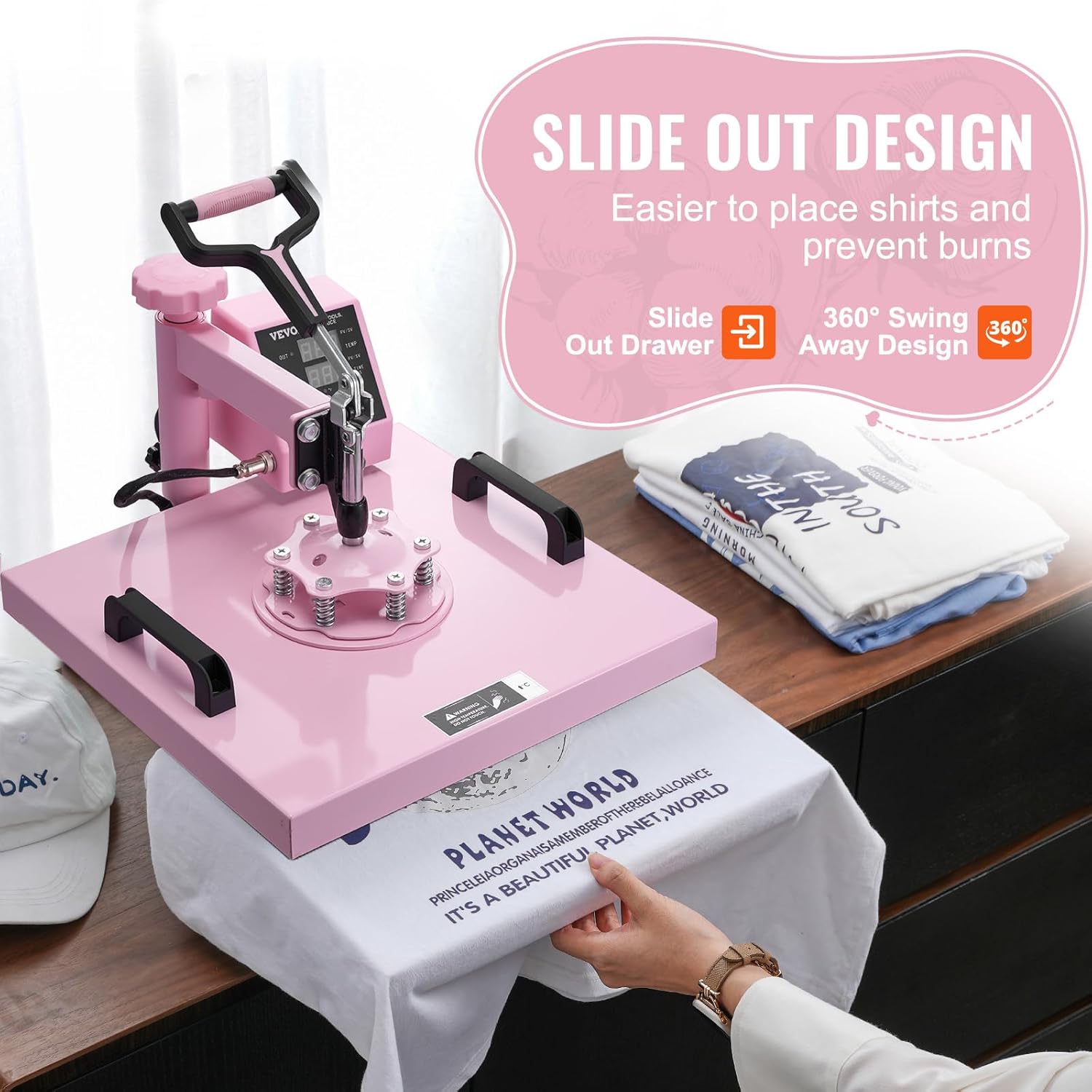
Figure 6.1: Using the slide-out design for T-shirt pressing.
6.3 Hat Pressing
- Attach Hat Press: Securely attach the hat press attachment to the main unit.
- Prepare Hat: Place the hat onto the curved platen, ensuring it fits snugly.
- Position Design: Place your transfer design onto the hat.
- Stilla þrýsting: Adjust the pressure knob to achieve firm contact between the heating element and the hat.
- Ýttu á: Lower the heating element onto the hat. The timer will start.
- Gefa út: After the timer, raise the heating element and carefully remove the hat.

Figure 6.2: Hat press attachment in use.
6.4 Tumbler/Mug Pressing
- Attach Tumbler Press: Securely attach the 30 oz tumbler press attachment.
- Prepare Tumbler/Mug: Wrap your transfer design around the tumbler or mug. Secure with heat-resistant tape.
- Insert Item: Carefully insert the tumbler or mug into the heating element of the tumbler press.
- Stilla þrýsting: Adjust the pressure mechanism on the tumbler press to ensure firm, even contact around the entire surface of the item.
- Ýttu á: Close the tumbler press. The timer will start.
- Snúa (valfrjálst): For optimal results, especially with larger tumblers, you may rotate the item halfway through the pressing time and press again.
- Gefa út: After the timer, open the press and carefully remove the hot tumbler/mug using heat-resistant gloves.

Figure 6.3: 30 oz tumbler press attachment.
6.5 Plate Pressing
- Attach Plate Press: Securely attach the appropriate size plate press (8-inch or 10-inch) to the main unit.
- Prepare Plate: Place your plate onto the silicone pad of the plate press.
- Position Design: Place your transfer design onto the plate.
- Stilla þrýsting: Adjust the pressure knob to ensure firm contact with the plate.
- Ýttu á: Lower the heating element onto the plate. The timer will start.
- Gefa út: After the timer, raise the heating element and carefully remove the hot plate using heat-resistant gloves.

Figure 6.4: Plate press attachments are included (shown in the bottom left of the image).
7. Viðhald
- Þrif: Allow the machine to cool completely before cleaning. Wipe down exterior surfaces with a damp cloth. For the heat platen, use a non-abrasive cleaner specifically designed for heat press platens. Do not use harsh chemicals or abrasive pads.
- Geymsla: Geymið vélina á þurrum, ryklausum stað.
- Skoðun: Regularly inspect the power cord for any damage. Check all attachments and connections for security.
8. Bilanagreining
| Vandamál | Möguleg orsök | Lausn |
|---|---|---|
| Vélin kveikir ekki á sér. | Power cord unplugged, power switch off, faulty outlet. | Check power connections, ensure switch is on, test outlet with another device. |
| Ójöfn hitadreifing. | Faulty heating element, incorrect pressure. | Ensure even pressure across the platen. Contact support if problem persists. |
| Temperature drops during pressing. | Thermocouple not properly connected, machine malfunction. | Verify thermocouple connection. Allow machine to recover temperature between presses. |
| Tímamælir virkar ekki. | Incorrect setting, internal fault. | Ensure timer is set correctly. If issue persists, contact support. |
| Insufficient pressure for tumblers. | Tumbler press not adjusted correctly, incompatible tumbler size. | Adjust the tumbler press mechanism for tighter fit. Ensure tumbler diameter is within specified range (2.6-3.4 inches). |
| Wire issues when switching attachments. | Loose connection, wear and tear. | Ensure all wires are securely connected. Handle attachments carefully during changes. |
9. Tæknilýsing
| Eiginleiki | Smáatriði |
|---|---|
| Gerðarnúmer | HJ21A |
| Stærð hitaplötu | 15 x 15 tommur (380 x 380 mm) |
| Tumbler Press getu | 30 oz (suitable for 2.6-3.4 inch diameter items) |
| Hat Press Stærð | 6 x 3 tommur |
| Stærðir plötupressa | 8 tommur, 10 tommur |
| Hitastig | 32-480 ° F / 0-250 ° C |
| Tímabil | 0-999 sekúndur |
| Kraftur | 1400W (US) / 1250W (AU/EU) |
| Efni | Ál, málmur, sílikon |
| Vörumál (LxBxH) | 19.3 x 15.4 x 18.1 tommur (490 x 390 x 460 mm) |
| Þyngd hlutar | 31 pund (17.5 kg) |
| Litur | Bleikur |
Mynd 9.1: Vöruvíddir og helstu upplýsingar.
10. Ábyrgð og stuðningur
The VEVOR 5-in-1 Heat Press Machine comes with a 2 árs ábyrgð framleiðanda. For technical support, warranty claims, or any operational questions not covered in this manual, please contact VEVOR customer service through their official websíðunni eða söluaðilanum þar sem varan var keypt.
Please have your model number (HJ21A) and purchase information ready when contacting support.