
1. Inngangur
Welcome to the user manual for your Emerson CKSS7071 Sunrise Smartset Alarm Clock Radio. This device is designed to enhance your daily routine with its unique features, including a sunrise simulation, soothing sound options, Bluetooth connectivity, and an 8-color dimmable LED display. Please read this manual thoroughly to understand the full functionality and ensure proper use and care of your new alarm clock radio.
Video 1: Yfirview of the Emerson CKSS7071 Sunrise Smartset Alarm Clock Radio. This video demonstrates the key features and design of the product.
2. Mikilvægar öryggisupplýsingar
- Lestu allar leiðbeiningar áður en tækið er notað.
- Geymdu þessar leiðbeiningar til síðari viðmiðunar.
- Ekki nota þetta tæki nálægt vatni.
- Hreinsið aðeins með þurrum klút.
- Ekki loka neinum loftræstiopum. Setjið upp í samræmi við leiðbeiningar framleiðanda.
- Ekki setja upp nálægt neinum hitagjöfum eins og ofnum, hitatöflum, ofnum eða öðrum tækjum (þ. amplyftara) sem framleiða hita.
- Verndaðu rafmagnssnúruna gegn því að ganga á hana eða klemma hana, sérstaklega við innstungur, innstungur og staðinn þar sem þau fara út úr tækinu.
- Notaðu aðeins viðhengi/aukahluti sem framleiðandi tilgreinir.
- Taktu þetta tæki úr sambandi í eldingum eða þegar það er ónotað í langan tíma.
- Látið alla þjónustu til hæfs þjónustufólks. Þjónusta er nauðsynleg þegar tækið hefur skemmst á einhvern hátt, svo sem að rafmagnssnúra eða kló er skemmd, vökvi hefur hellst niður eða hlutir hafa fallið inn í tækið, tækið hefur orðið fyrir rigningu eða raka, virkar ekki eðlilega , eða hefur verið fellt niður.
3. Innihald pakka
Gakktu úr skugga um að allir hlutir séu til staðar þegar pakkinn er opnaður:
- Emerson CKSS7071 Sunrise Smartset Alarm Clock Radio
- Rafmagns millistykki
- Notendahandbók
4. Vöru lokiðview
4.1 Framhlið View

Mynd 1: Framan view of the alarm clock, featuring the digital time display and the sunrise simulation light panel.
The front of the unit features the main 1.2-inch LED time display and the large circular light panel for sunrise simulation and ambient lighting. Indicators for AM/PM, Alarm 1/2, and Bluetooth status are also visible.
4.2 hlið View (Stýringar)
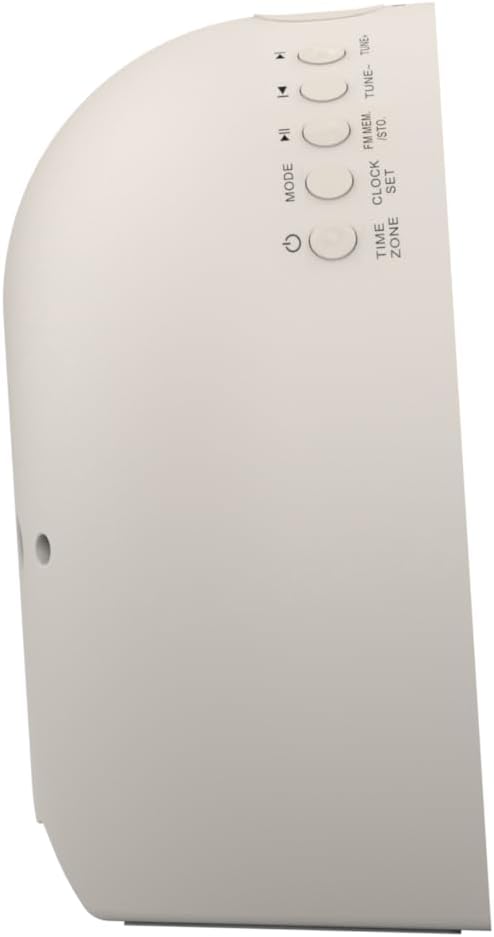
Mynd 2: Hlið view of the alarm clock, highlighting the control buttons for various functions.
The side panel houses the primary control buttons, including Power, Mode, Clock Set, Time Zone, Tune/Skip, and Volume controls. These buttons are used for setting time, alarms, and navigating audio functions.
4.3 Aftan View

Mynd 3: Aftan view of the alarm clock, showing the speaker grille and power connection port.
The rear of the unit features the main speaker grille and the power input port for connecting the AC adapter.
5. Uppsetning
5.1 Rafmagnstenging
- Plug the AC power adapter into the DC IN jack located on the back of the unit.
- Plug the other end of the adapter into a standard wall outlet (AC 100-240V, 50/60Hz).
- Einingin mun kveikjast sjálfkrafa.
5.2 SmartSet Automatic Time Setting
The SmartSet system automatically sets the correct time and date as soon as you plug in the unit. It also maintains time and alarm settings during power disruptions or outages, provided the button cell battery is installed.
5.3 Uppsetning varaafls
A button cell battery (CR2032, included) is required for battery backup. This ensures that time and alarm settings are retained during a power outage.
- Finndu rafhlöðuhólfið neðst á tækinu.
- Opnaðu hlífina á rafhlöðuhólfinu.
- Insert one CR2032 button cell battery, ensuring the correct polarity (+/-).
- Lokaðu rafhlöðuhólfinu tryggilega.
6. Notkunarleiðbeiningar
6.1 Setting the Clock Manually
- Ýttu á og haltu inni ÚRSETT hnappinn. Tölustafirnir munu blikka.
- Notaðu TUNE -/+ hnappar til að stilla klukkustundina. Ýttu á ÚRSETT að staðfesta.
- Mínútustafirnir munu blikka. Notaðu TUNE -/+ hnappana til að stilla mínúturnar. Ýttu á ÚRSETT að staðfesta.
- Continue this process to set the year, month, and day.
- Ýttu á ÚRSETT aftur til að fara úr tímastillingarstillingu.
6.2 Stilling viðvörunar (Viðvörun 1 og Viðvörun 2)
The unit features dual alarms. Follow these steps for each alarm:
- Ýttu á og haltu inni VÖKUR 1 or VÖKUR 2 hnappinn. Tölurnar fyrir klukkustund vekjaraklukkunnar munu blikka.
- Notaðu TUNE -/+ buttons to adjust the alarm hour. Press the respective VÖRUN hnappinn til að staðfesta.
- The alarm minute digits will flash. Use the TUNE -/+ buttons to adjust the alarm minutes. Press the respective VÖRUN hnappinn til að staðfesta.
- Select the alarm source (Buzzer, FM Radio, or Soothing Sound). Press the respective VÖRUN hnappinn til að staðfesta.
- Stilltu hljóðstyrk vekjaraklukkunnar með því að nota RÁÐ -/+ hnappar. Ýttu á viðkomandi VÖRUN hnappinn til að staðfesta.
- The alarm is now set. The alarm indicator (AL1 or AL2) will appear on the display.
6.3 Sólarupprásarlíking
The sunrise simulation feature gradually brightens the light panel before your set alarm time, mimicking a natural sunrise to gently wake you.
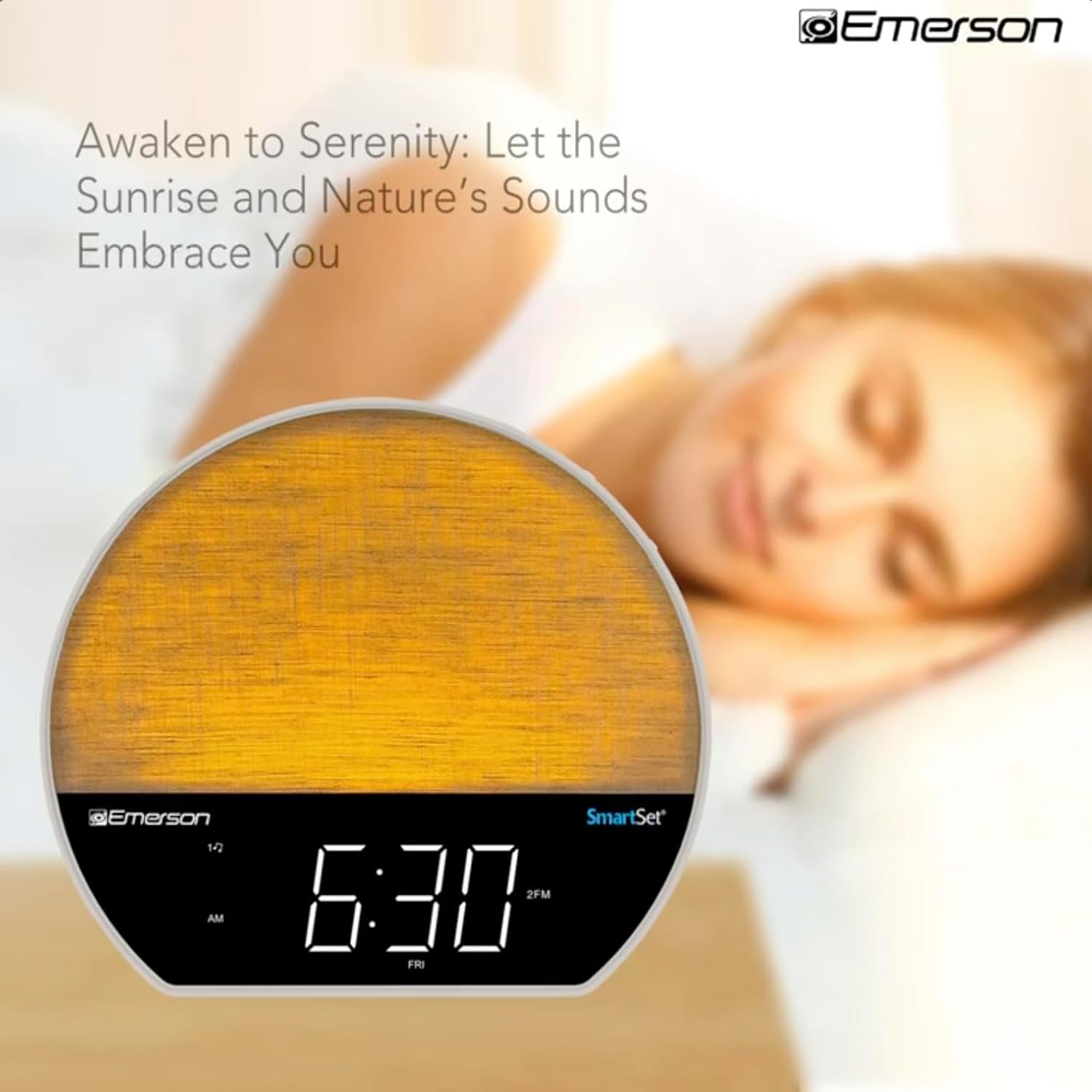
Mynd 4: The alarm clock simulating a sunrise with a warm, increasing ljósstyrkur.
To activate, ensure the sunrise option is selected during alarm setup. The light will begin to brighten 30 minutes before the alarm sounds.
6.4 Soothing Sounds and White Noise
The unit includes 6 soothing sounds and white noise to help with relaxation or waking up.
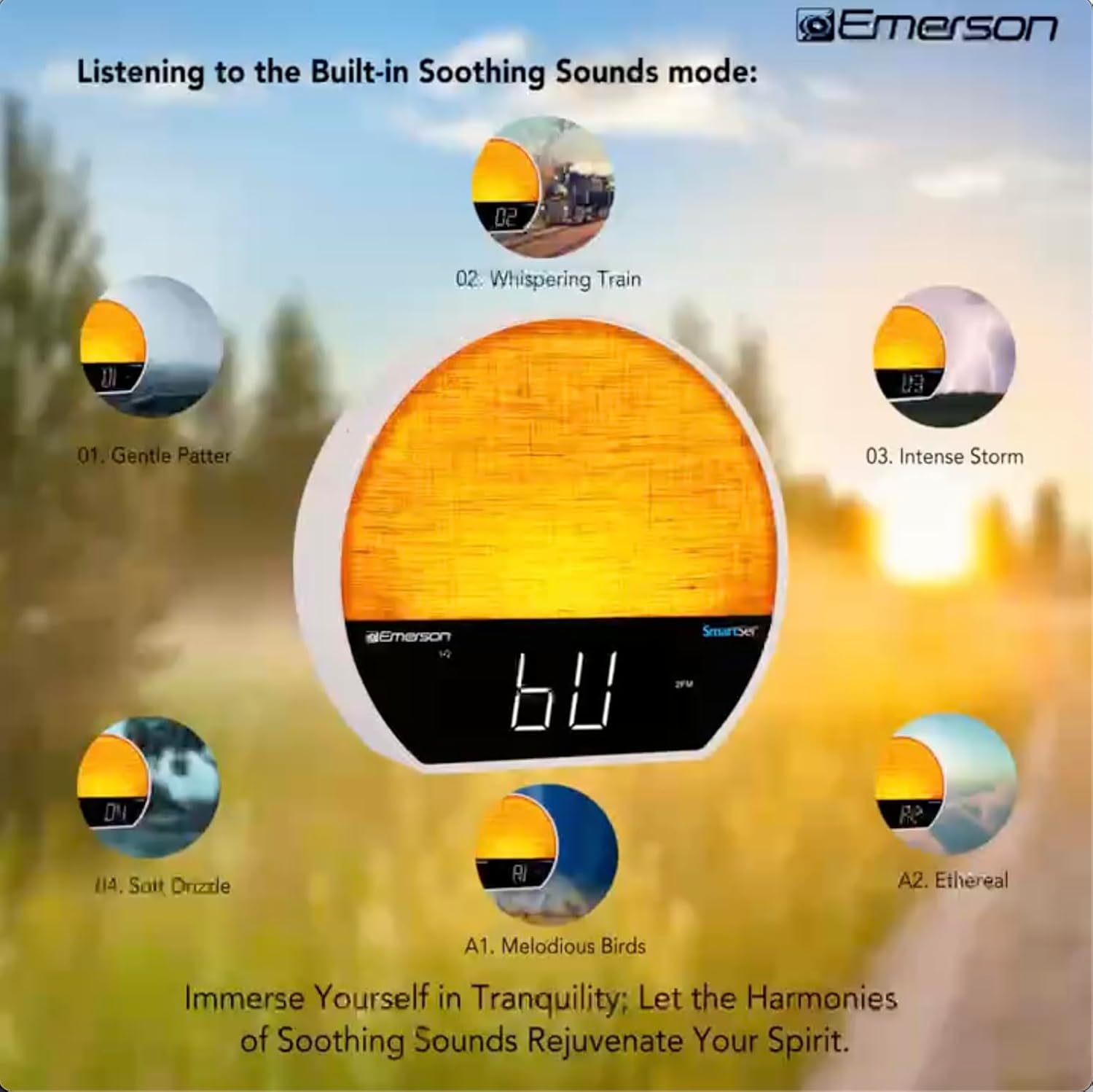
Mynd 5: Visual representation of the six soothing sound modes available on the alarm clock.
- Ýttu á MODE button repeatedly until the Soothing Sound mode is selected.
- Notaðu TUNE -/+ buttons to cycle through the available sounds (e.g., Gentle Patter, Whispering Train, Intense Storm, Soft Drizzle, Melodious Birds, Ethereal, White Noise).
- Stilltu hljóðstyrkinn með því að nota RÁÐ -/+ hnappa.
6.5 Bluetooth hátalara virkni
Tengdu snjallsímann þinn eða annað Bluetooth-tæki til að streyma hljóði þráðlaust.

Mynd 6: The alarm clock in Bluetooth mode, paired with a mobile device for audio streaming.
- Ýttu á MODE button until 'BT' appears on the display, indicating Bluetooth mode.
- On your device, enable Bluetooth and search for 'Emerson CKSS7071'.
- Select the device to pair. A confirmation tone will sound upon successful pairing.
- Þú getur nú spilað hljóð úr tækinu þínu í gegnum hátalara vekjaraklukkunnar.
6.6 Notkun FM útvarps
Stilltu inn á uppáhalds FM útvarpsstöðvarnar þínar.
- Ýttu á MODE hnappinn þar til „FM“ birtist á skjánum.
- Ýttu á TUNE -/+ buttons briefly to manually tune to a station.
- Ýttu á og haltu inni TUNE -/+ hnappana til að leita sjálfkrafa að næstu tiltæku stöð.
- Til að vista stöð, ýttu á og haltu inni FM MEM hnappinn þar til forstillta númerið blikkar. Notið TUNE -/+ til að velja forstillta númer, ýttu síðan á FM MEM aftur til að spara.
6.7 LED Decor and Dimmer Control
Customize the ambient light with 8 different colors and adjust the brightness.

Mynd 7: The alarm clock demonstrating its 8-color dimmable LED decor options.
- Ýttu á LJÓS button to cycle through the 8 available colors or turn the light off.
- To adjust the brightness of the LED decor light, press and hold the LJÓS button. The brightness will cycle through 5 levels. Release the button at your desired brightness.
6.8 Stýring skjádeyfingar
Adjust the brightness of the 1.2-inch LED time display.

Mynd 8: The alarm clock illustrating the five distinct levels of display luminescence.
Ýttu á DIMMER button (often combined with another function, refer to button labels) to cycle through 4 levels of display brightness (Bright, Moderate, Dim, Faint).
6.9 Svefntímamælir
Set a timer for the audio to automatically turn off after a specified duration.

Mynd 9: The alarm clock set for a sunset sleep timer, providing a harmonious end to the day.
- While audio is playing (FM or Soothing Sound), press the SVEFNA hnappinn.
- Ýttu endurtekið á SVEFNA button to cycle through available sleep timer durations (e.g., 15, 30, 60, 90 minutes, or OFF).
- The audio will automatically turn off after the selected time.
6.10 Snooze virka
Þegar viðvörun hljómar, ýttu á BLUGA button (usually a large button on top) to temporarily silence the alarm for a few minutes. The alarm will sound again after the snooze period.
7. Viðhald
7.1 Þrif
- Taktu tækið alltaf úr sambandi við rafmagnsinnstunguna áður en þú þrífur.
- Notið mjúkan, þurran klút til að þrífa ytri yfirborðin.
- Ekki nota fljótandi hreinsiefni, slípiefni eða efnaúða, þar sem þau geta skemmt áferðina.
7.2 Skipt um rafhlöðu
Ef tíma- og vekjarastillingarnar haldast ekki við rafmagnsleysitage, the button cell backup battery may need to be replaced. Follow the instructions in section 5.3 to replace the CR2032 battery.
8. Bilanagreining
| Vandamál | Möguleg orsök | Lausn |
|---|---|---|
| Eining kveikir ekki á. | Rafmagnsbreytir ekki tengdur eða bilaður. | Gakktu úr skugga um að riðstraumsbreytirinn sé vel tengdur við tækið og virkan innstungu. |
| Tíma-/vekjarastillingar glatast eftir að rafmagnið var slökkttage. | Vararafhlaðan er dauð eða ekki sett í. | Install or replace the CR2032 button cell battery (see section 5.3). |
| Viðvörunin hljómar ekki. | Viðvörunin er ekki virk eða hljóðstyrkurinn er of lágur. | Ensure the alarm is set and activated (AL1/AL2 indicator on). Increase alarm volume. |
| Bluetooth tækið getur ekki parast. | Unit not in Bluetooth mode or device too far. | Ensure the unit is in Bluetooth mode ('BT' displayed). Move your device closer to the unit. Try unpairing and re-pairing. |
| Léleg FM útvarpsmóttaka. | Loftnetið er ekki útrétt eða truflun kemur upp. | Extend the FM wire antenna fully and reposition it for better reception. Avoid placing near other electronic devices. |
| Skjárinn er of bjartur/dökkur. | Þarf að stilla skjádimmann. | Ýttu á DIMMER button to cycle through brightness levels (see section 6.8). |
9. Tæknilýsing
| Eiginleiki | Smáatriði |
|---|---|
| Gerðarnúmer | CKSS7071 |
| Aflgjafi | AC 100-240V, 50/60Hz (via AC adapter) |
| Afritun rafhlöðu | 1 x CR2032 Button Cell Battery (included) |
| Skjár Tegund | 1.2-inch LED Display |
| Bluetooth útgáfa | V5.4 |
| Róandi hljóð | 6 Nature Sounds + White Noise |
| LED Decor Colors | 8 Dimmable Colors |
| Vöruvídd (B x D x H) | 7.09" x 3.15" x 6.37" |
| Þyngd | Ekki tilgreint |
10. Upplýsingar um ábyrgð
Emerson products are manufactured to the highest quality standards. This product is covered by a limited warranty against defects in materials and workmanship for a period of one (1) year from the original date of purchase. This warranty does not cover damage caused by misuse, accident, unauthorized modification, or normal wear and tear. Proof of purchase is required for all warranty claims. Please retain your receipt.
11. Þjónustudeild
If you have any questions, require assistance, or experience issues with your Emerson CKSS7071 Sunrise Smartset Alarm Clock Radio, please contact our customer support team.
- Websíða: Heimsæktu opinbera Emerson webvefsíða fyrir algengar spurningar og stuðningsúrræði.
- Netfang: Vísaðu til umbúða vörunnar eða opinberra websíða fyrir tölvupóstsamskipti við þjónustuver.
- Sími: Vísaðu til umbúða vörunnar eða opinberra websíða fyrir símanúmer þjónustuver viðskiptavina.
Please have your model number (CKSS7071) and proof of purchase ready when contacting support.