
1. Mikilvægar öryggisupplýsingar
Please read all safety instructions carefully before using your COLORROOM A30 tablet. Keep this manual for future reference.
- Ekki láta tækið verða fyrir miklum hita, beinu sólarljósi eða miklum raka.
- Forðist að láta spjaldtölvuna detta eða verða fyrir hörðum höggum.
- Notið aðeins viðurkennd hleðslutæki og fylgihluti til að koma í veg fyrir skemmdir og tryggja öryggi.
- Ekki reyna að taka tækið í sundur eða gera við það sjálfur. Hafðu samband við þjónustuver til að fá aðstoð.
- Geymið töfluna þar sem börn og gæludýr ná ekki til til að koma í veg fyrir að smáhlutir berist inn fyrir slysni.
2. Innihald pakka
Gakktu úr skugga um að allir hlutir séu til staðar í pakkanum:
- COLORROOM A30 Tablet
- USB Type-C kapall
- Power Adapter (18W PD compatible)
- Notendahandbók
- Hlífðarmál
- Skjávörn (fyrirfram sett á eða innifalin)
- SIM Ejector Tool (SD pin)

Image: The COLORROOM A30 tablet and its included accessories, such as the USB-C cable, power adapter, and documentation, neatly arranged in the product box.
3. Tæki lokiðview
Familiarize yourself with the physical components of your COLORROOM A30 tablet.
- Myndavél að framan: Staðsett efst í miðjunni þegar það er haldið lárétt, notað fyrir myndsímtöl og sjálfsmyndir.
- Skjár: 10.1-inch IPS screen for clear visuals.
- Aflhnappur: Venjulega á hliðinni, notað til að kveikja/slökkva á tækinu eða vekja/svæfa skjáinn.
- Hljóðstyrkshnappar: Við hliðina á rofanum, til að stilla hljóðstyrk.
- USB Type-C tengi: Fyrir hleðslu og gagnaflutning.
- MicroSD kortarauf: Til að stækka geymslurýmið um allt að 2 TB.
- Myndavél að aftan: Staðsett að aftan, notað til að taka myndir og myndbönd.
- Hátalarar: Tvöfaldur hátalari fyrir betri hljóðupplifun.
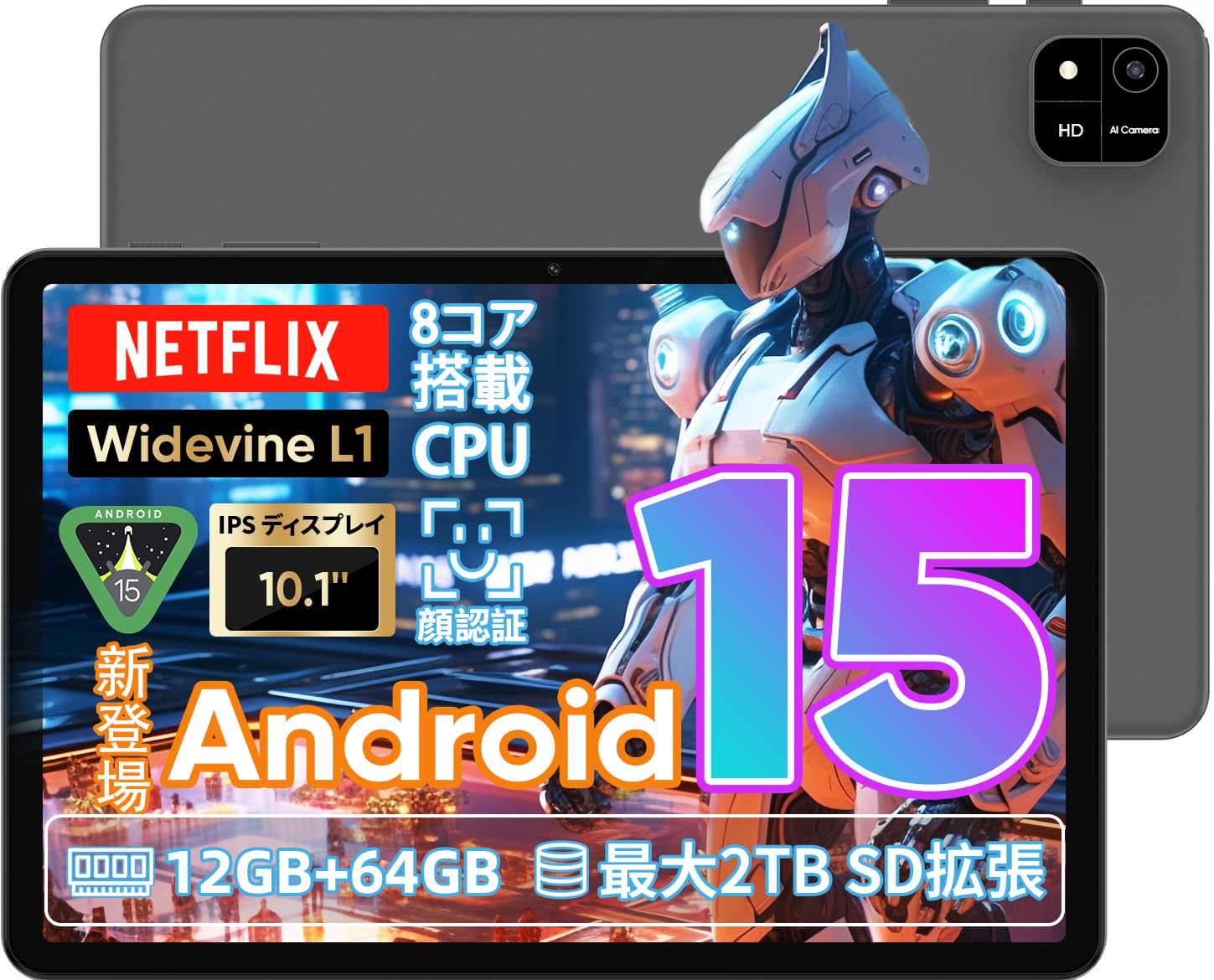
Image: A visual representation of the COLORROOM A30 tablet, highlighting its 10.1-inch display, Android 15 OS, T606 8-core CPU, 12GB RAM, 64GB ROM, 6000mAh battery, 5MP front camera, 8MP rear camera, 2.4G/5G WiFi, Bluetooth 5.0, GPS, and Widevine L1 support.
4. Uppsetning
4.1 Fyrsta ræsing og tungumálaval
- Press and hold the Power button until the COLORROOM logo appears.
- Follow the on-screen prompts to select your preferred language (e.g., Japanese).
- Tap 'Start' or 'Next' to proceed.
4.2 Wi-Fi tenging
- Veldu Wi-Fi netið sem þú vilt af listanum.
- Sláðu inn Wi-Fi lykilorðið ef beðið er um það.
- Tap 'Connect'.
4.3 Uppsetning Google reiknings
- Skráðu þig inn með Google reikningnum þínum eða stofnaðu nýjan. Þetta er nauðsynlegt til að hlaða niður forritum úr Google Play Store.
- Review and accept the Google Terms of Service and Privacy Policy.
4.4 Set Screen Lock (PIN/Pattern/Password)
- For security, set a screen lock method (PIN, pattern, or password). A 6-digit PIN is recommended.
- You may choose to skip this step, but it is not recommended for device security.
Video: This video demonstrates the initial setup process for an Android 15 tablet, including language selection, Wi-Fi connection, Google account setup, and setting a screen lock. While the video features an M30 tablet, the setup steps are generally applicable to the COLORROOM A30.
5. Notkunarleiðbeiningar
5.1 Grunnaðgerðir
- Búnaður: Long-press on an empty area of the home screen to add widgets like a clock or calendar for quick access to information.
- Kveikt/slökkt á skjánum: The tablet can be configured to turn on the screen automatically when lifted, allowing you to quickly check notifications. This setting can be found under System > Gestures.
Video: This video illustrates basic Android tablet functions, including adding and removing widgets from the home screen, and enabling the 'lift to wake' feature for notifications. Although shown on an M30 tablet, these features are common to Android 15 devices like the COLORROOM A30.
5.2 Skjáreiginleikar
The COLORROOM A30 features a 10.1-inch IPS display with 1280x800 resolution, offering clear and vibrant visuals for all your content. It supports Widevine L1, enabling high-definition streaming from platforms like Netflix and Hulu.

Image: The COLORROOM A30 tablet showcasing its 10.1-inch IPS display with vivid colors and sharp details, ideal for watching movies and reading e-books.
5.3 Frammistaða
Powered by an 8-core T606 CPU, the COLORROOM A30 delivers smooth performance for multitasking, gaming, and media consumption. It comes with 12GB (virtual) RAM and 64GB of internal storage, expandable up to 2TB via a TF (MicroSD) card.

Mynd: Ítarleg view of the COLORROOM A30 tablet's internal components, emphasizing the T606 8-core CPU and the 6000mAh large-capacity battery, indicating high performance and extended usage.
5.4 Myndavél
The tablet is equipped with an 8MP rear camera for capturing photos and videos, and a 5MP front camera for video calls and selfies. Face recognition is supported for convenient unlocking.

Image: The COLORROOM A30 tablet displayed from the front and back, showcasing its 8MP rear camera and 5MP front camera, designed for capturing moments and facilitating video communication.
5.5 Tengingar
Enjoy seamless connectivity with 2.4G/5G dual-band Wi-Fi, Bluetooth 5.0, and built-in GPS for navigation and location services.
5.6 Rafhlöðustjórnun
The 6000mAh battery provides extended usage, and with Type-C and 18W PD fast charging, you can quickly recharge your device.
5.7 Kids Space
The tablet includes a Kids Space feature, offering a safe and curated environment for children. Parents can manage content, set usage limits, and monitor activities remotely.
Video: This video demonstrates the Kids Space feature on a tablet, showing how children can access age-appropriate content and how parents can manage settings like usage time and content restrictions remotely. While shown on a T10 tablet, the functionality is similar for the COLORROOM A30.
5.8 Multitasking and Split Screen
Android 15 enhances multitasking capabilities. You can use the split-screen feature to run two applications simultaneously, improving productivity. For example, watch a video while browsing the web.
Video: This video showcases the unboxing of an Android 15 tablet and demonstrates various features including reading comics, watching videos, using split-screen mode for multitasking, and taking screenshots. While the video features an AvidPad S60, the demonstrated features are applicable to the COLORROOM A30.
6. Viðhald
- Þrif: Notið mjúkan, lólausan klút til að þrífa skjáinn og spjaldtölvuna. Forðist að nota sterk efni eða slípiefni.
- Hugbúnaðaruppfærslur: Athugaðu reglulega hvort kerfisuppfærslur séu tiltækar og settu upp þær til að tryggja bestu mögulegu afköst, öryggi og aðgang að nýjum eiginleikum. Farðu í Stillingar > Kerfi > Kerfisuppfærsla.
- Geymslustjórnun: Hreinsa reglulega óþarfa fileog forrit til að losa um geymslurými og viðhalda hraða tækisins.
7. Bilanagreining
| Vandamál | Lausn |
|---|---|
| Spjaldtölvan kveikir ekki á sér | Gakktu úr skugga um að rafhlaðan sé hlaðin. Tengdu hleðslutækið og bíddu í nokkrar mínútur áður en þú reynir að kveikja aftur. Ef tækið bregst ekki við skaltu framkvæma þvingaða endurræsingu með því að halda inni rofanum í 10-15 sekúndur. |
| Vandamál með Wi-Fi tengingu | Athugaðu hvort Wi-Fi sé virkt í stillingunum. Endurræstu leiðina og spjaldtölvuna. Gakktu úr skugga um að þú sért innan seilingar Wi-Fi merkisins. |
| Forrit eru að hrynja eða frjósa | Close and reopen the app. Clear the app's cache (Settings > Apps > [App Name] > Storage > Clear cache). Ensure the app is updated to the latest version. Restart the tablet. |
| Hægur árangur | Lokaðu ónotuðum forritum. Hreinsaðu skyndiminnið og tímabundna files. Check for system updates. Consider a factory reset if the issue persists (backup data first). |
8. Tæknilýsing
| Eiginleiki | Smáatriði |
|---|---|
| Vörumerki | LITAHÚS |
| Fyrirmynd | A30 |
| Stýrikerfi | Android 15 |
| Örgjörvi | Unisoc T606 8-core CPU |
| vinnsluminni | 12GB (Virtual) |
| ROM | 64GB |
| Stækkanlegt geymsla | Up to 2TB via TF (MicroSD) card |
| Skjár | 10.1-inch IPS, 1280x800 resolution, Widevine L1 support |
| Rafhlöðugeta | 6000mAh |
| Hleðsla | Type-C, 18W PD |
| Myndavél að aftan | 8MP |
| Myndavél að framan | 5MP |
| Tengingar | 2.4G/5G WiFi, Bluetooth 5.0, GPS |
| Mál | 32.29 x 19.8 x 3.7 cm (pakkningastærð) |
| Þyngd | 1.04 kg (þyngd pakkans) |
9. Ábyrgð og stuðningur
Your COLORROOM A30 tablet comes with a manufacturer's warranty. Please refer to the warranty card included in your package for specific terms and conditions.
For technical support, troubleshooting, or warranty claims, please contact COLORROOM customer service through the retailer where you purchased the product or visit the official COLORROOM websíða fyrir upplýsingar um tengiliði.
Always provide your product model (A30) and purchase details when seeking support.