
DEVAISE ABGY012
DEVAISE Ergonomic Mesh Desk Chair User Manual
Model: ABGY012
1. Vöru lokiðview
The DEVAISE Ergonomic Mesh Desk Chair (Model ABGY012) is designed for comfort and support during extended periods of sitting. It features a breathable mesh design, adjustable lumbar support, a 3D adjustable headrest, and space-saving flip-up armrests. The chair is built with a durable metal frame and silent wheels, supporting a maximum weight of 300 pounds.

Mynd 1: Framan view of the DEVAISE Ergonomic Mesh Desk Chair.
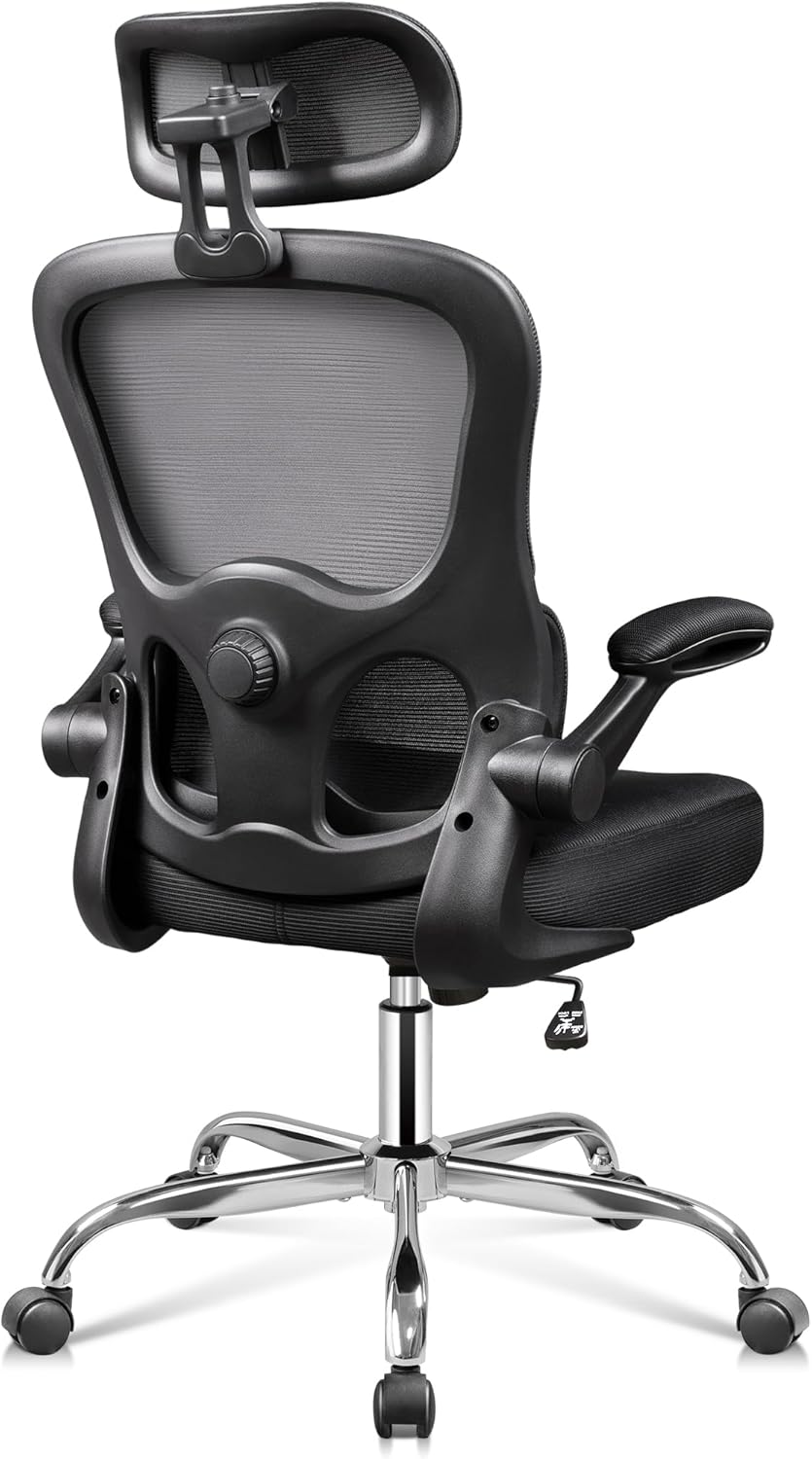
Mynd 2: Til baka view of the DEVAISE Ergonomic Mesh Desk Chair, highlighting the mesh backrest and lumbar support mechanism.
2. Mikilvægar öryggisupplýsingar
This product has a maximum weight capacity of 300 lbs. Always ensure that the chair is used within this limit. Be cautious when adjusting the headrest, lumbar support, and armrests to prevent any potential injuries. Always follow the assembly instructions carefully to ensure the stability and safety of the chair.
3. Uppsetning og samsetning
The DEVAISE Ergonomic Mesh Desk Chair is designed for easy assembly, typically taking around 20 minutes. While assembly can be done by one person, having a second person may assist with certain steps, such as attaching the arms to the backrest and seat cushion.
Samsetningarskref (almennar leiðbeiningar):
- Taka upp íhluti: Carefully remove all parts from the packaging and lay them out on a clean, flat surface. Verify all components are present against the included parts list.
- Festið hjólin við botninn: Setjið hjólin fimm í götin á enda hvors fótar stólbotnsins. Ýtið fast þar til þau smella á sinn stað.
- Setjið inn gaslyftu: Setjið gaslyftistútinn í miðjugatið á samsetta stólgrunninum.
- Festa vélbúnaðinn við sæti: Secure the seat plate mechanism to the underside of the seat cushion using the provided screws. Ensure the front of the mechanism faces the front of the seat.
- Tengdu sæti við gaslyftu: Place the assembled seat onto the gas lift cylinder, ensuring it is securely seated.
- Festu armpúða: Festið armleggina við sætispúðann og bakstuðninginn með tilgreindum skrúfum.
- Festu bakstoð: Connect the backrest to the seat mechanism and armrests.
- Setja upp höfuðpúða: Slide the headrest into the top of the backrest and adjust to your preferred height.
Refer to the detailed assembly instructions included in your product packaging for specific diagrams and screw placements.
4. Notkunarleiðbeiningar
The DEVAISE Ergonomic Mesh Desk Chair offers multiple adjustment features to customize your seating experience for optimal comfort and support.
4.1. Sætishæðarstilling
To adjust the seat height, locate the lever on the right side beneath the seat. Pull the lever upwards while taking your weight off the seat to raise it. To lower the seat, pull the lever upwards while remaining seated.

Figure 3: Location of the seat height adjustment lever.
4.2. Aðlögun mjóbaksstuðnings
The chair features separated-adjustable lumbar support. Use the knob located on the side of the backrest to adjust the depth of the lumbar support, allowing you to customize it to fit your waist and provide precise support for your lower back.
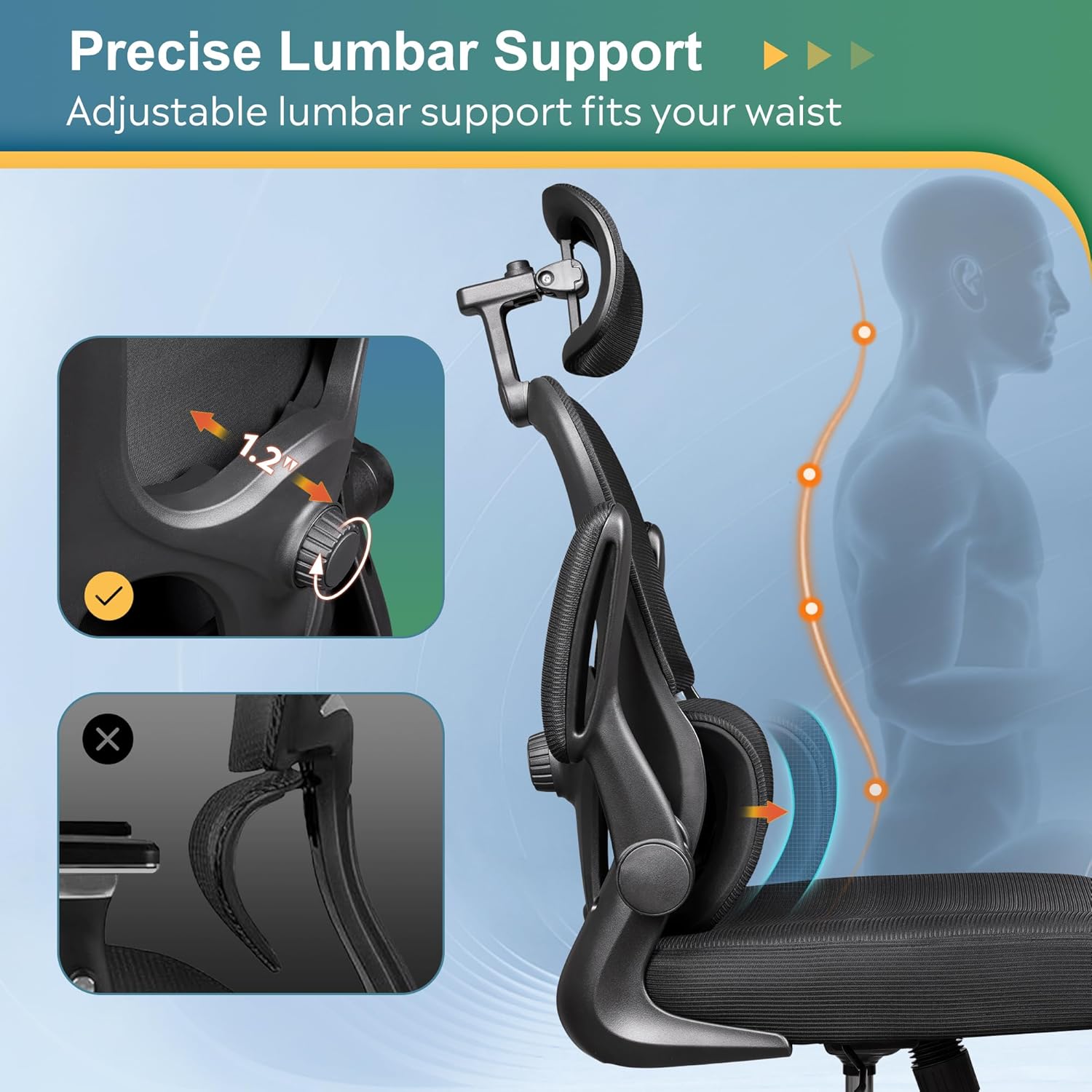
Figure 4: Adjusting the precise lumbar support with the side knob.

Figure 5: Close-up of the lumbar adjustment dial.
4.3. 3D Headrest Adjustment
The 3D headrest can be adjusted in multiple ways for optimal neck and head support:
- Hæðarstilling: Slide the headrest up or down to find the ideal height.
- Stilla halla: Tilt the headrest forward or backward to support your head's natural curve.
- Snúningur: Rotate the headrest up to 55 degrees for personalized comfort.
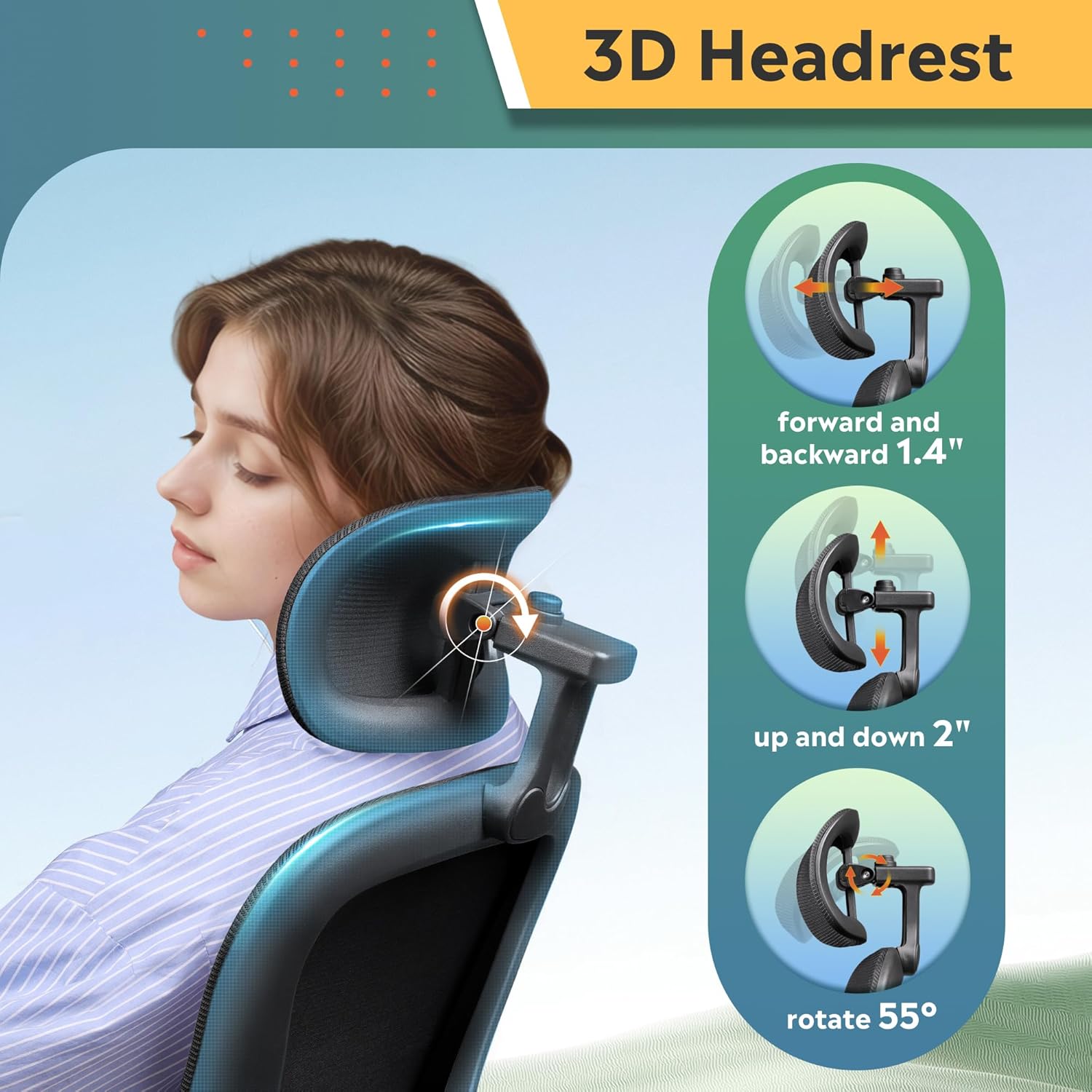
Figure 6: Illustrations of the 3D headrest's height, tilt, and rotation adjustments.

Figure 7: Close-up of the headrest adjustment mechanism.
4.4. Uppfellanlegir armpúðar
The armrests can be flipped up by 90 degrees. This feature allows you to push the chair closer to your desk, saving space in smaller work areas, or to easily move the chair out of the way when not in use.

Figure 8: The chair demonstrating its 90-degree flip-up armrests for space-saving.

Figure 9: A user demonstrating the flip-up armrest feature.
4.5. Rocking and Tilt Function
The chair offers a 90-125° rocking tilt function. To activate the rocking motion, pull out the lever located on the left side beneath the seat. Push the lever in to lock the chair in an upright position. The tension of the rocking motion can be adjusted using the round knob located at the front underside of the seat.

Figure 10: The tilt tension adjustment knob located under the seat.
4.6. Snúningsvirkni
The chair features BIFMA 5.1-Certified 360° swivel castors, allowing for smooth and silent movement across various floor types without causing damage.

Figure 11: The chair's durable base with 360° swivel casters.
5. Viðhald
To maintain the longevity and appearance of your DEVAISE Ergonomic Mesh Desk Chair, follow these simple care instructions:
- Þrif: Þurrkaðu af með auglýsinguamp klút. Forðist sterk efni eða slípiefni sem geta skemmt möskvann eða rammann.
- Regluleg skoðun: Athugið reglulega allar skrúfur og bolta til að tryggja að þær séu vel hertar. Herðið ef þörf krefur til að viðhalda stöðugleika og öryggi.
- Umhirða hjóla: Haldið hjólunum lausum við hár og rusl til að tryggja mjúka rúllun.
6. Bilanagreining
If you encounter any issues with your DEVAISE Ergonomic Mesh Desk Chair, please refer to the following common solutions or contact customer support.
- Ískur eða vaggar í stól: Check all assembly screws and bolts. Tighten any loose fasteners. Ensure the chair is on a flat, even surface.
- Erfiðleikar við að stilla hæð: Ensure the height adjustment lever is fully engaged. If the gas lift is unresponsive, it may require replacement.
- Hjól rúlla ekki vel: Inspect casters for trapped debris (hair, lint, etc.) and clean them thoroughly.
- Lendarstuðningur stillist ekki: Verify the adjustment knob is turning freely and not obstructed.
For further assistance, please contact DEVAISE Customer Support.
7. Tæknilýsing
| Eiginleiki | Smáatriði |
|---|---|
| Vörumerki | DEVAISE |
| Nafn líkans | ABGY012 Home Office Desk Chair |
| Litur | Svartur |
| Vörumál | 24.8" D x 26.57" B x 47.05" H |
| Ráðlegging um hámarksþyngd | 300 pund |
| Efni | Foam (Seat), Foam & Mesh (Back) |
| Bakstíll | Skipta aftur |
| Arm stíll | Rounded, Flip-up (90°) |
| Tala liggjandi stöðu | 1 (90-125° rocking tilt) |
| Hjólhjól | BIFMA 5.1-Certified 360° Swivel Castors |
| Þyngd hlutar | 26.6 pund |
| Samkoma | Krefjast samsetningar |
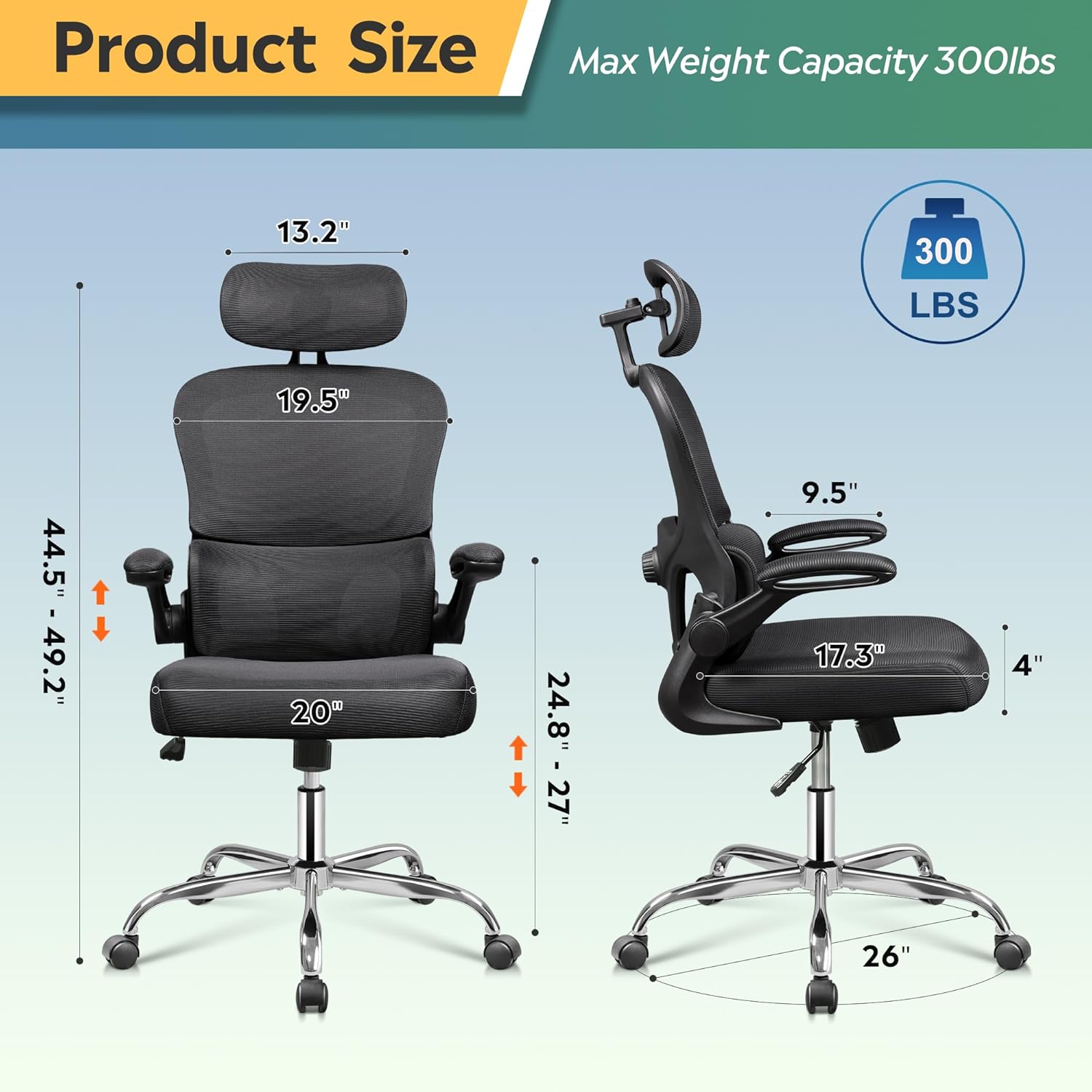
Figure 12: Detailed product dimensions and maximum weight capacity.
8. Opinbert vörumyndband
Watch the official product video from DEVAISE for a visual guide on the chair's features and functionality.
Video 1: DEVAISE office chair 012 - A demonstration of the chair's features and adjustments.
9. Ábyrgð
The DEVAISE Ergonomic Mesh Desk Chair comes with a 2-year warranty, providing peace of mind for lasting quality and support.
10. Þjónustudeild
For any questions, concerns, or assistance with your DEVAISE Ergonomic Mesh Desk Chair, please contact our customer support team:
- Websíða: Visit the official DEVAISE webvefsíða fyrir algengar spurningar og stuðningsúrræði.
- Netfang: Vísaðu til umbúða vörunnar eða opinberra websíða fyrir tölvupóstþjónustu við viðskiptavini.
- Sími: Vísaðu til umbúða vörunnar eða opinberra websíða fyrir símanúmer þjónustuver.