
1. Mikilvægar öryggisupplýsingar
Vinsamlegast lesið allar leiðbeiningar vandlega fyrir samsetningu og notkun. Ef þessum leiðbeiningum er ekki fylgt getur það valdið meiðslum eða skemmdum á vörunni.
- Always keep children and pets away from the desk when in motion.
- Use the child lock feature (if available) to prevent unintended height adjustments.
- Be aware of the anti-collision feature; do not force the desk to move if it encounters an obstacle.
- Gakktu úr skugga um að allir kaplar séu rétt meðhöndlaðir til að koma í veg fyrir að þeir flækist við hæðarstillingar.
- Ekki ofhlaða skrifborðið. Hámarksþyngdargeta er 180 kg.
- Notið skrifborðið aðeins á sléttu yfirborði.
2. Innihald pakka
Gakktu úr skugga um að allir íhlutir séu til staðar áður en samsetning hefst. Ef einhverjir hlutar vantar eða eru skemmdir, vinsamlegast hafðu samband við þjónustuver.
- Desktop (0.6" thick, Rustic Brown)
- Skrifborðsfætur (2)
- Foot Pads (2)
- Crossbar/Frame Assembly
- Control Panel with LED Touchscreen
- Rafmagnsbreytir og kapall
- Krókur fyrir heyrnartól
- Assembly Hardware (screws, L-shaped installation tools)
- Notendahandbók
3. Samsetningarleiðbeiningar
The DEVAISE ASJZ021 desk is designed for quick and simple assembly, typically within 15 minutes. All holes are pre-drilled, and accessories are clearly labeled.
Verkfæri sem þarf:
- Phillips skrúfjárn (fylgir ekki með)
- L-shaped installation tools (included)
Skref-fyrir-skref samsetning:
- Taka upp íhluti: Takið alla hluta varlega úr umbúðunum og leggið þá á hreint, mjúkt yfirborð til að koma í veg fyrir rispur.
- Festið fótapúða: Secure the foot pads to the bottom of each desk leg using the provided screws.
- Settu saman ramma: Connect the desk legs to the crossbar/frame assembly. Ensure all connections are tight and secure.
- Tengdu skjáborð: Carefully place the desktop onto the assembled frame. Align the pre-drilled holes on the desktop with the frame. Secure the desktop to the frame using the provided screws.
- Setja upp stjórnborð: Mount the LED touchscreen control panel to the underside of the desktop in the designated location. Connect the control panel cable to the motor.
- Tengdu rafmagn: Plug the power adapter into the desk's motor and then into a wall outlet.
- Festa heyrnartólakrókinn: Install the headphone hook to the side of the desk as desired.

Mynd: Sprengd view of desk components illustrating the 15-minute quick installation process.
4. Notkunarleiðbeiningar
The DEVAISE ASJZ021 Electric Standing Desk features a tri-motor system for smooth and quiet height adjustments and a smart LED touchscreen controller.
Stjórnborði lokiðview:

Mynd: Ítarleg view of the multi-function control panel with LED display, up/down arrows, memory presets (1, 2, 3), and 'S' button.
- LED skjár: Shows the current desk height in real-time.
- Upp/niður örvar (▲ / ▼): Press and hold to adjust the desk height manually. Release to stop at the desired height.
- Forstillingar minnis (1, 2, 3): Store and recall up to three personalized height settings.
- 'S' hnappur: Used for saving memory presets and activating the child lock function.
Hæðarstilling:
The desk can be adjusted between 28.35 inches (sitting height) and 46.45 inches (standing height).

Image: Comparison of the desk at its minimum height of 28.35 inches and maximum height of 46.45 inches.
- Handvirk stilling: Press and hold the ▲ (Up) or ▼ (Down) button until the desk reaches your desired height.
- Stilling á forstillingum minnis:
- Adjust the desk to your preferred height using the Up/Down buttons.
- Press the 'S' button. The LED display will show 'S-'.
- Immediately press one of the memory buttons (1, 2, or 3). The display will show 'S-1', 'S-2', or 'S-3' to confirm the height is saved.
- Að kalla fram forstillingar í minni: Simply press the corresponding memory button (1, 2, or 3) once. The desk will automatically move to the saved height.
Hljóðlát aðgerð:
The tri-motor system operates quietly, typically below 50dB, ensuring minimal disruption in your workspace.

Image: Graphic illustrating the quiet operation of the desk, comparing its sound level (below 50dB) to soft breaths (10dB), whisper (25dB), and car horns (80dB).
5. Tæknilýsing
Detailed technical specifications for the DEVAISE ASJZ021 Electric Standing Desk.
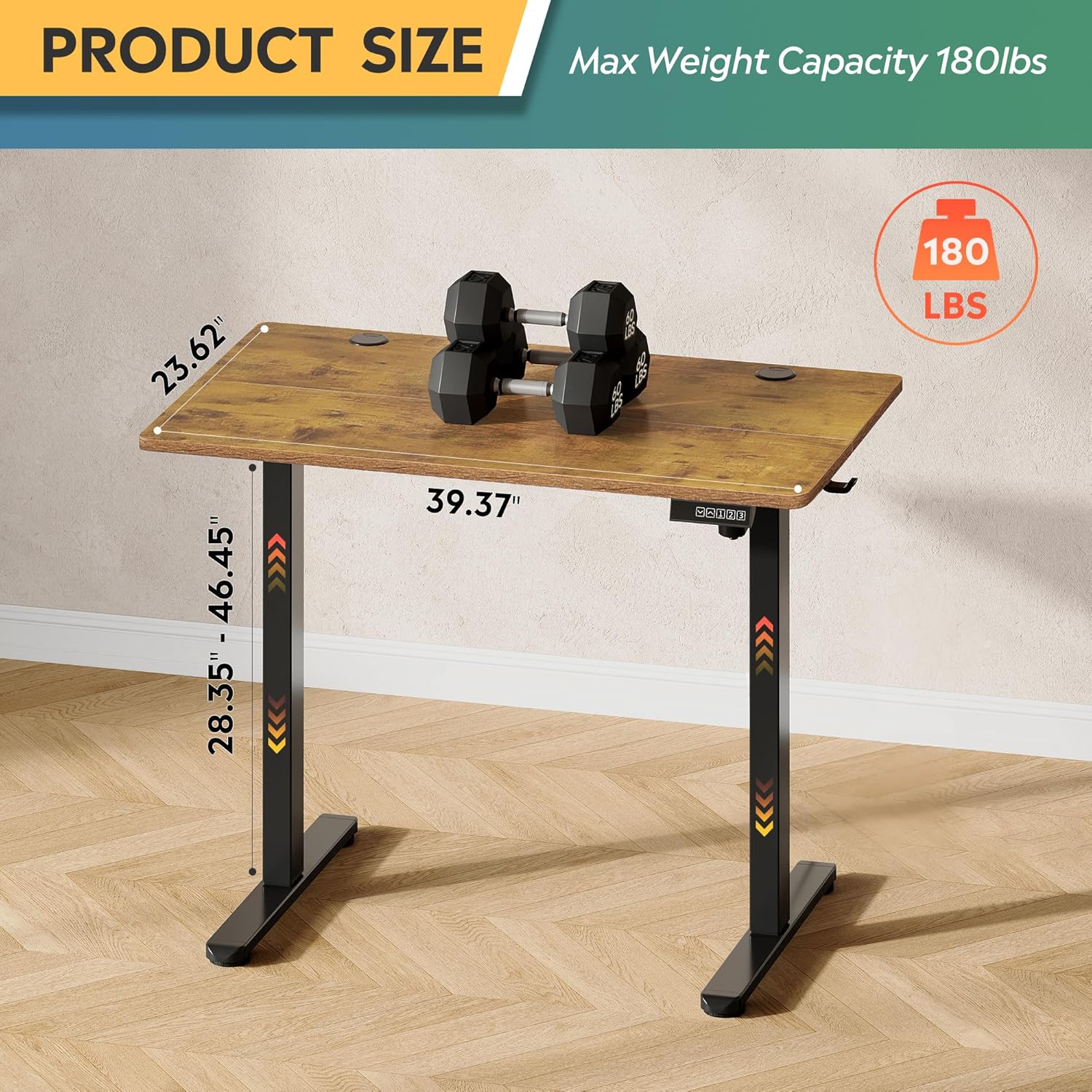
Image: Product dimensions (39.37"W x 23.62"D) and height range (28.35"-46.45"), highlighting the 180 lbs maximum weight capacity.
| Eiginleiki | Forskrift |
|---|---|
| Gerðarnúmer | ASJZ021 |
| Vörumál (D x B x H) | 23.62" D x 39.37" B x 28.34" H |
| Lágmarkshæð | 28.35 tommur |
| Hámarkshæð | 46.45 tommur |
| Þykkt borðplötu | 0.6 tommur |
| Ráðlegging um hámarksþyngd | 180 pund |
| Þyngd hlutar | 37 pund |
| Lyftibúnaður | Electric (Tri-motor system) |
| Fjöldi hæðarstaða | 3 Forstillingar minnis |
| Hávaðastig | <50dB |
| Efsta gerð efnis | Hannaður viður |
| Grunnefni | Járn |
| Litur | Rustic Brown (Desktop), Black (Base) |
| Sérstakir eiginleikar | Adjustable Height, Compact, Electric, LED Touchscreen |
6. Viðhald
Regular maintenance helps ensure the longevity and optimal performance of your standing desk.
- Þrif: Þurrkið af skjáborðinu og rammanum með mjúkum klút.amp klút. Forðist sterk efni eða slípiefni sem gætu skemmt áferðina.
- Kapalstjórnun: Periodically check and organize cables to prevent them from snagging or getting pinched during height adjustments.
- Skrúfuþéttleiki: Athugið reglulega allar skrúfur og bolta til að tryggja að þær séu þéttar. Herðið ef þörf krefur.
- Skoðun á mótor: Listen for any unusual noises during operation. If you notice any issues, refer to the troubleshooting section or contact support.
7. Bilanagreining
If you encounter any issues with your DEVAISE ASJZ021 Electric Standing Desk, please refer to the following common problems and solutions.
| Vandamál | Möguleg orsök | Lausn |
|---|---|---|
| Skrifborðið hreyfist ekki | Rafmagnssnúra aftengd; Ofhleðsla; Mótorvilla | Athugið rafmagnstengingar. Minnkið þyngdina á borðinu. Takið úr sambandi í 10 sekúndur og stingið síðan aftur í samband. |
| Ójöfn hæðarstilling | Obstruction; Sensor issue | Clear any obstructions. Perform a reset (refer to control panel instructions or contact support). |
| Skjárinn sýnir villukóða | Specific system error | Note the error code and consult the DEVAISE support websíðuna eða hafið samband við þjónustuver viðskiptavina til að fá nánari leiðbeiningar. |
| Desk stops moving unexpectedly | Anti-collision activated; Overheating protection | Check for obstructions. Allow the motor to cool down for 20 minutes before attempting to operate again. |
If the problem persists after attempting these solutions, please contact DEVAISE customer support.
8. Ábyrgð og stuðningur
DEVAISE is committed to providing quality products and customer satisfaction. Your purchase is backed by our support services.
- Þjónustudeild: For any questions, concerns, or assistance with assembly or operation, please contact our 24/7 US-based support team. Refer to your purchase documentation for contact details.
- Upplýsingar um ábyrgð: Specific warranty terms and conditions may vary. Please refer to the warranty card included with your product or visit the official DEVAISE websíðu fyrir nákvæmar upplýsingar.