
1. Inngangur
Thank you for choosing the DEVAISE ASJZ025 Electric Standing Desk. This manual provides detailed instructions for the safe assembly, operation, and maintenance of your new electric standing desk. Please read this manual thoroughly before use and retain it for future reference.

Figure 1.1: The DEVAISE 71-inch electric standing desk in maple finish, showcasing its spacious desktop accommodating multiple monitors and office accessories.
2. Mikilvægar öryggisupplýsingar
VIÐVÖRUN: Ef þessum öryggisleiðbeiningum er ekki fylgt getur það valdið meiðslum eða skemmdum á vörunni.
- Always keep children and pets away from the desk when it is in motion.
- Utilize the child lock feature to prevent unintended height adjustments.
- Be aware of the anti-collision feature. Do not force the desk to move if it encounters an obstacle.
- Gakktu úr skugga um að allir kaplar séu rétt meðhöndlaðir til að koma í veg fyrir að þeir flækist við hæðarstillingar.
- Ekki ofhlaða skrifborðið. Hámarksþyngdargeta er 180 kg.
- Notið skrifborðið eingöngu í tilætluðum tilgangi sem vinnustöð.
3. Innihald pakka
Gakktu úr skugga um að allir íhlutir séu til staðar áður en samsetning hefst. Ef einhverjir hlutar vantar eða eru skemmdir skaltu hafa samband við þjónustuver.
- Desktop (Maple, 71 x 28 inches)
- Desk Legs (2) with Dual Motors
- Stjórnborð með LED skjá
- Rafmagnsbreytir og kapall
- Crossbars and Support Frames
- Krókur fyrir heyrnartól
- Samsetningarbúnaður (skrúfur, boltar, verkfæri)
- Leiðbeiningarhandbók

Mynd 3.1: Sprungið view showing all components for the DEVAISE Electric Standing Desk, including the desktop, leg frames, control panel, and various hardware pieces, indicating a quick installation process.
4. Uppsetning og samsetning
Assembly is designed to be straightforward with pre-drilled holes and labeled parts. It is recommended to have a Phillips head screwdriver for some placements. For detailed visual guidance, refer to the included assembly instructions booklet.
- Taka upp íhluti: Fjarlægið alla hluta varlega úr umbúðunum. Athugið hvort þeir séu skemmdir.
- Settu saman ramma: Attach the crossbars and support frames to the desk legs using the provided hardware. Ensure all connections are secure.
- Tengdu skjáborð: Place the desktop upside down on a soft, clean surface. Align the pre-drilled holes on the desktop with the frame. Secure the desktop to the frame using the provided screws.
- Setja upp stjórnborð: Mount the control panel to the underside of the desktop in the designated area. Connect the motor cables and power cable to the control panel.
- Kapalstjórnun: Use the included cable ties or clips to organize and secure all cables, preventing them from interfering with the desk's movement.
- Upphafsvirkjun: Connect the power adapter to the desk and then to a power outlet.

Figure 4.1: The DEVAISE Electric Standing Desk set up in an office environment, showcasing its spacious maple desktop and white frame, accommodating multiple monitors and accessories.
5. Notkunarleiðbeiningar
5.1. Stjórnborð yfirview
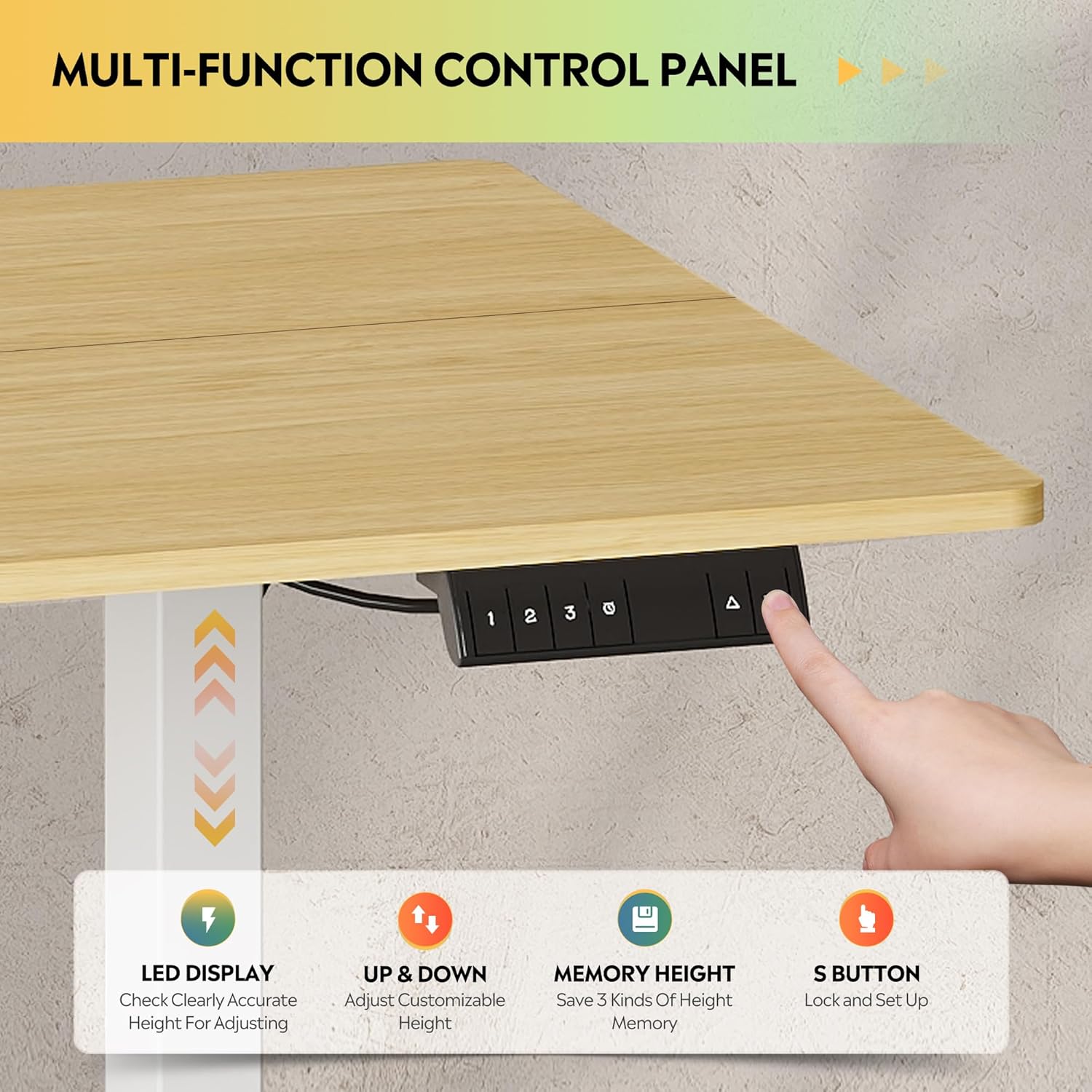
Mynd 5.1: Ítarleg view of the multi-function control panel, featuring an LED display, up/down adjustment buttons, three memory preset buttons (1, 2, 3), and an 'S' button for saving settings and child lock.
- LED skjár: Sýnir núverandi hæð skrifborðsins í tommum.
- Upp/niður hnappar (▲/▼): Press and hold to adjust the desk height manually. Release to stop.
- Memory Preset Buttons (1, 2, 3): Quickly move the desk to a saved height.
- 'S' hnappur: Used to save height presets and activate the child lock.
5.2. Hæðarstilling
The desk features a tri-motor system for quiet and smooth height transitions.
- Handvirk stilling: Press and hold the ▲ button to raise the desk or the ▼ button to lower it. The desk will move smoothly between 28.35 inches and 46.45 inches.
- Notkun minnisforstillinga: Press one of the preset buttons (1, 2, or 3) to automatically move the desk to the corresponding saved height.

Figure 5.2: Illustration of the DEVAISE Electric Standing Desk's adjustable height range, demonstrating its ability to transition from a sitting height of 28.35 inches to a standing height of 46.45 inches.
5.3. Setting Memory Presets
- Adjust the desk to your desired height using the ▲ or ▼ buttons.
- Press the 'S' button. The LED display will show "S-".
- Within 3 seconds, press the desired memory preset button (1, 2, or 3). The display will show "S-1", "S-2", or "S-3" to confirm the height has been saved.
5.4. Barnalæsingaraðgerð
To prevent accidental adjustments, activate the child lock:
- Virkja: Press and hold the 'S' button for 5 seconds until "LOC" appears on the LED display. All buttons will be disabled.
- Slökkva á: Press and hold the 'S' button again for 5 seconds until "LOC" disappears and the current height is displayed.
6. Viðhald
- Þrif: Þurrkið af skjáborðinu og rammanum með mjúkum klút.amp klút. Forðist slípiefni eða sterk efni.
- Kapalstjórnun: Gakktu reglulega úr skugga um að allir snúrur séu örugglega festar og trufli ekki hreyfingu skrifborðsins.
- Athugun á festingum: Occasionally check all screws and bolts to ensure they remain tight.
- Þyngdargeta: Do not exceed the maximum weight capacity of 180 lbs to ensure longevity and proper function.
7. Bilanagreining
| Vandamál | Möguleg orsök | Lausn |
|---|---|---|
| Skrifborðið hreyfist ekki. | Power cable disconnected; Child lock active; Overload; Motor error. | Check power connection. Deactivate child lock (see Section 5.4). Reduce weight on desk. Unplug for 10 seconds, then plug back in to reset. |
| Skrifborðið hreyfist ójafnt eða gefur frá sér óvenjuleg hljóð. | Loose fasteners; Obstruction; Uneven weight distribution. | Check and tighten all assembly fasteners. Remove any obstructions. Distribute weight evenly on the desktop. |
| Anti-collision feature activates frequently. | Obstruction in path; Sensitivity setting (if adjustable, not specified). | Ensure clear path for desk movement. If problem persists, contact support. |
| LED skjár sýnir villukóða. | Sérstök kerfisbilun. | Refer to the full troubleshooting guide in the included manual or contact DEVAISE customer support with the error code. |
8. Tæknilýsing
| Eiginleiki | Smáatriði |
|---|---|
| Vörumerki | DEVAISE |
| Gerðarnúmer | ASJZ025 |
| Vörumál (D x B x H) | 27.59" D x 70.86" B x 29.13" H |
| Litur | Maple (Desktop), White (Frame) |
| Lágmarkshæð | 28.35 tommur |
| Hámarkshæð | 46.45 tommur |
| Efsta gerð efnis | Hannaður viður |
| Grunnefni | Járn |
| Ráðlegging um hámarksþyngd | 180 pund |
| Sérstakir eiginleikar | 3-Button Memory Presets, Adjustable Height, Dual Motors, Electric, LED Touchscreen |
| Hávaðastig | Under 50dB during adjustment |
| Innifalið íhlutir | Krókur fyrir heyrnartól |
| Nauðsynleg samkoma | Já |
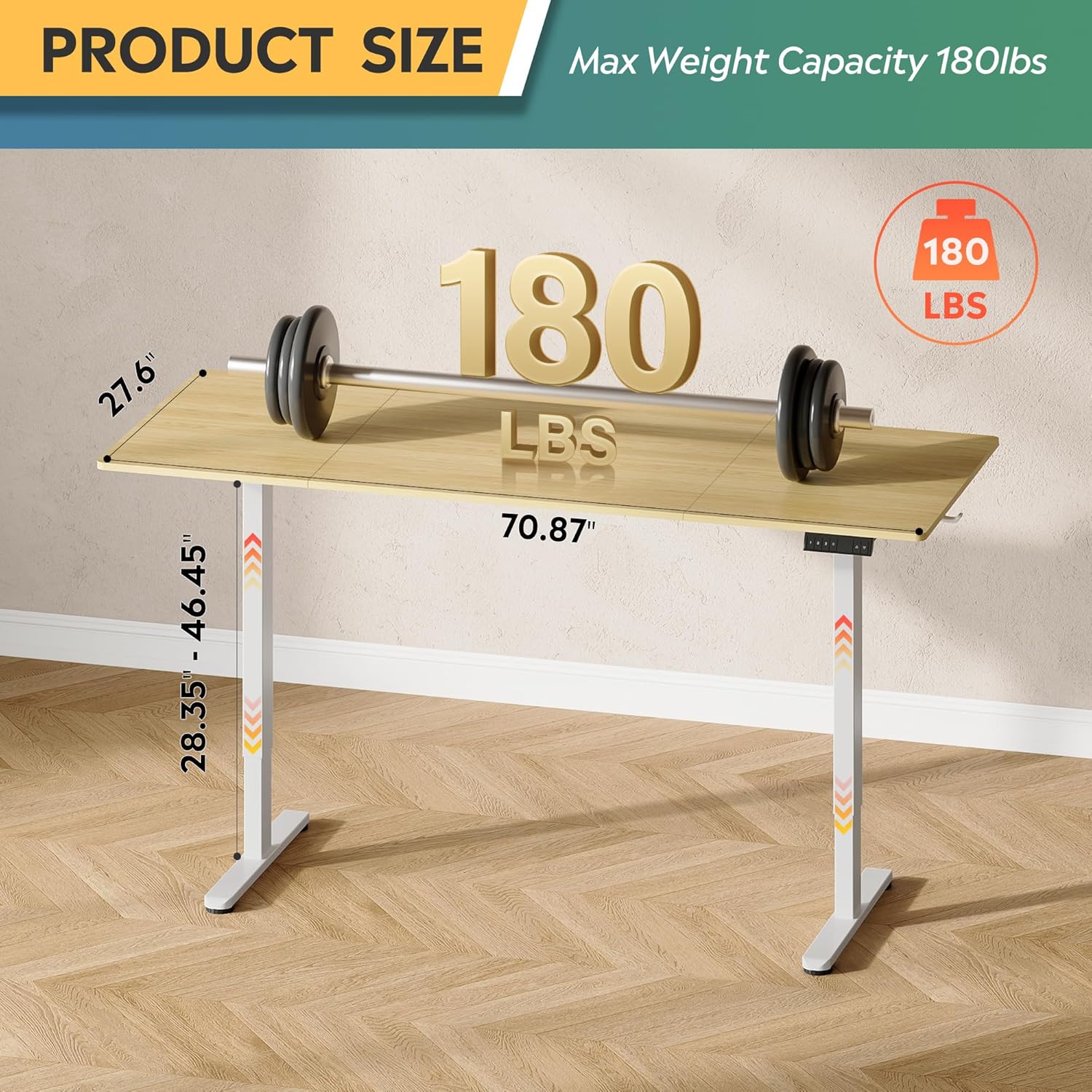
Figure 8.1: Diagram illustrating the product dimensions (70.87" width, 27.6" depth) and height adjustment range (28.35" - 46.45"), along with its maximum weight capacity of 180 lbs.
9. Ábyrgð og stuðningur
9.1. Upplýsingar um ábyrgð
This DEVAISE Electric Standing Desk comes with a Takmörkuð ábyrgð. Please refer to the warranty card included in your package for specific terms and conditions. Retain your proof of purchase for warranty claims.
9.2. Þjónustudeild
For any questions regarding assembly, operation, troubleshooting, or product selection, please contact our U.S.-based product support team. Contact information can be found on the DEVAISE official websíðuna eða í umbúðum vörunnar.
You can also visit the official DEVAISE store for more information: DEVAISE Store