
DEVAISE ASJZ032
DEVAISE 48x24 Inch Electric Standing Desk with Drawers (Model ASJZ032) User Manual
Ítarlegar leiðbeiningar um samsetningu, notkun og viðhald.
Mikilvægar öryggisupplýsingar
Vinsamlegast lesið allar leiðbeiningar vandlega fyrir samsetningu og notkun. Geymið þessa handbók til síðari viðmiðunar.
- Always ensure that the total weight on the desk does not exceed 180 lbs (81.6 kg).
- Be cautious of obstructions when adjusting the desk height to avoid potential damage or injury.
- Utilize the anti-collision feature to prevent collisions with objects or people during height adjustments.
- Haldið börnum og gæludýrum frá borðinu meðan á notkun stendur.
- Ensure all screws and bolts are securely tightened before use. Periodically check for loose connections.
- Ekki sitja eða standa á skrifborðinu.
- Taktu úr sambandi fyrir þrif eða viðhald.
Innihald pakka
Gakktu úr skugga um að allir íhlutir séu til staðar áður en samsetning hefst. Vísaðu í samsetningarmyndbandið til að sjá sjónræna auðkenningu á hlutunum.
Video: "Fast Assembly for DEVAISE Standing Desk with Drawers" - This video provides a visual guide to all included parts and the assembly process.
Pakkinn ætti að innihalda:
- Desktop (1 piece)
- Fætur (2 stykki)
- Crossbar/Frame components
- Motor and control box
- Stjórnborð
- Straumbreytir og snúrur
- Drawers (2 pieces)
- Geymsluhilla
- Headphone hooks (2 pieces)
- Samsetningarbúnaður (skrúfur, boltar, insexlykill)
- Leiðbeiningarhandbók
Samsetningarleiðbeiningar
Follow these steps carefully for proper assembly. All parts are clearly labeled, and pre-drilled holes are provided for convenience. An Allen wrench is included for assembly.
- Step 1: Attach the Drive Rod to the Motor.
Insert the drive rod (part 4 in video) into the motor (part 5 in video). Ensure it is securely seated.

Mynd: Sprengd view of desk components, illustrating the quick installation process with labeled parts.
- Step 2: Assemble the Desk Legs.
Attach the foot supports to the bottom of each leg (parts 3 and 10 in video) using the provided screws (A) and Allen wrench (E).
- Step 3: Connect Legs with Crossbar.
Position the legs upright and connect them using the main crossbar (part 1 in video). Secure with screws (B) and Allen wrench (E).
- Step 4: Install Side Brackets.
Attach the side brackets (part 2 in video) to the top of the leg assembly, securing them with screws (B) and Allen wrench (E).
- Step 5: Prepare the Desktop.
Place the desktop (parts 7 and 18 in video) face down on a soft, clean surface. Attach the connecting plates (N) and wooden dowels (H) to join the desktop sections if applicable.
- Step 6: Attach Leg Assembly to Desktop.
Carefully align the assembled leg frame with the pre-drilled holes on the underside of the desktop. Secure the frame to the desktop using screws (C) and Allen wrench (E).
- Step 7: Connect Control Box and Cables.
Mount the control box (G) and connect all motor and control panel cables (F) as shown in the diagram. Ensure all connections are firm.
- Step 8: Assemble the Storage Shelf.
Assemble the storage shelf components (parts 11, 12, 13, 14, 15 in video) using screws (I), wooden dowels (H), and the provided tools (E, K, L).
- Step 9: Attach Storage Shelf to Desktop.
Carefully place the assembled storage shelf onto the desktop, aligning it with the designated holes. Secure it with screws (I) and wooden dowels (H).
- Step 10: Install Drawers and Hooks.
Insert the fabric drawers (part 16 in video) into their compartments. Attach the headphone hooks (part 8 in video) to the sides of the desk.

Image: Fully assembled DEVAISE Electric Standing Desk with two monitors, a laptop, and various office accessories, highlighting its functional design.
Notkunarleiðbeiningar
This section details how to use the electric height adjustment and integrated features of your DEVAISE standing desk.
Rafmagns hæðarstilling
The desk features a smooth electric height adjustment system, allowing you to switch between sitting and standing positions effortlessly. The height range is from 28.35 inches to 46.45 inches.
- Notaðu Upp (▲) og Niður (▼) örvarnar á stjórnborðinu til að stilla hæð skrifborðsins handvirkt.
- The LED display will show the current height in inches.
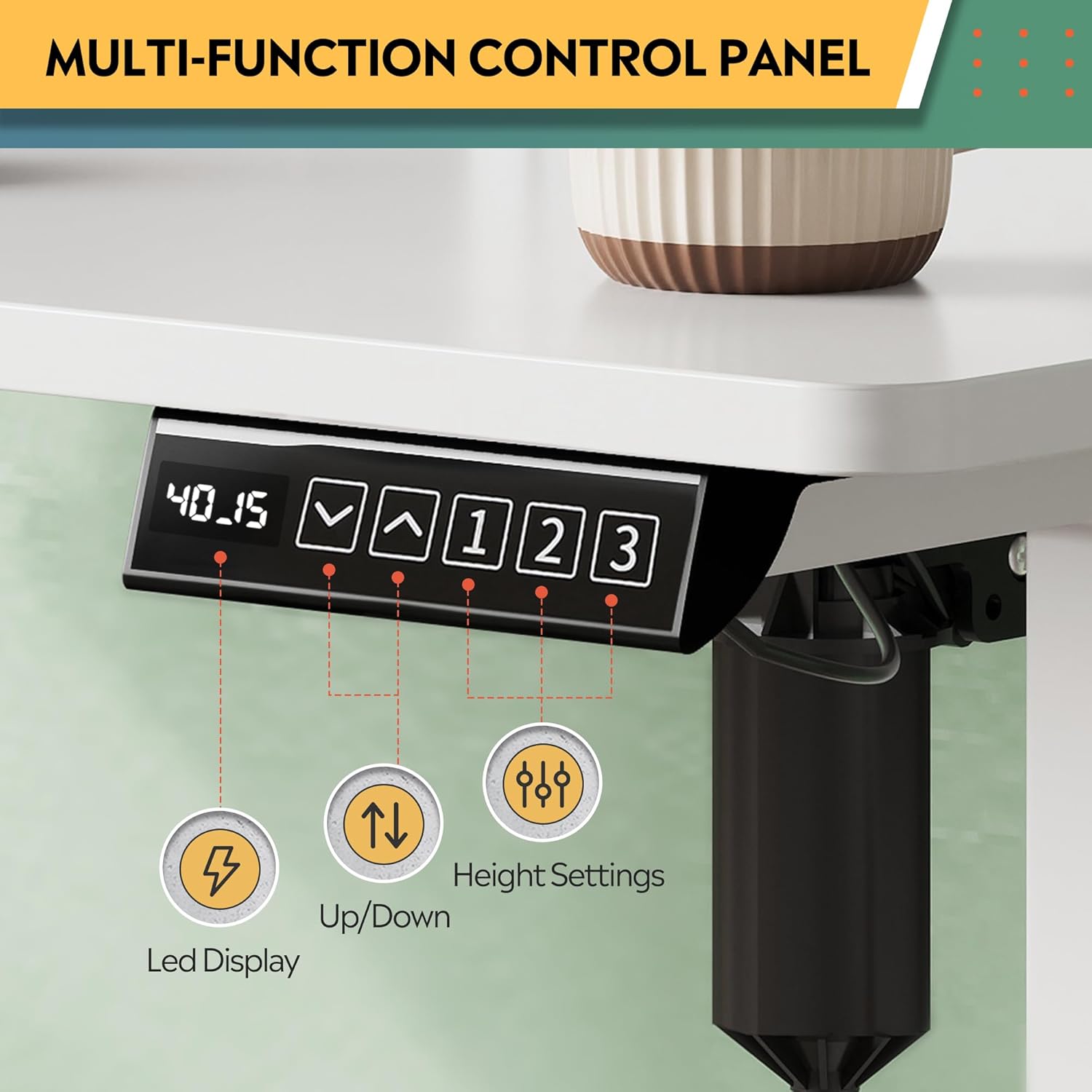
Image: Multi-function control panel showing LED display, up/down arrows, and memory preset buttons.
Forstillingar á minni
The desk includes three programmable height settings for quick, one-touch adjustments to your preferred sitting or standing heights.
- Stilltu borðið í þá hæð sem þú vilt með því að nota upp/niður örvarnar.
- Ýttu á M hnappinn (eða svipaður minnisstillingarhnappur, ef hann er til staðar) og síðan einn af númeruðu forstillingarhnappunum (1, 2 eða 3) to save the current height.
- To recall a saved height, simply press the corresponding numbered preset button (1, 2 eða 3).
Innbyggðar rafmagnsinnstungur og USB tengi
The desk is equipped with 2 AC outlets and 2 USB ports (12A, 110~125V) for convenient power access for your devices.
- Plug your monitors, laptops, and other devices directly into the AC outlets.
- Use the USB ports to charge smartphones, tablets, and other USB-powered accessories.
Video: "DEVAISE Standing Desk with S" - Demonstrates the integrated power outlets, USB ports, and headphone hooks.
Árekstrarvörn
The smart anti-collision feature automatically stops and reverses the desk's movement if an obstruction is detected, protecting both the desk and your belongings.
Video: "DEVAISE Electric Standing Desk for Home Office" - Illustrates the sit-to-stand functionality and the anti-collision system.
Viðhald
Reglulegt viðhald tryggir langlífi og bestu mögulegu afköst standandi skrifborðsins.
- Þrif: Þurrkaðu yfirborð skrifborðsins með mjúku, damp klút. Forðist sterk efni eða slípiefni sem geta skemmt áferðina.
- Skoðanir: Athugið reglulega allar skrúfur og tengingar til að tryggja að þær séu vel festar. Herðið ef þörf krefur.
- Kapalstjórnun: Ensure cables are neatly organized and not interfering with the desk's movement. Use the provided cable management features.
- Mótorumhirða: The motor system is designed for maintenance-free operation. Do not attempt to open or service the motor or control box.
Úrræðaleit
If you encounter any issues with your DEVAISE standing desk, refer to the following common problems and solutions.
| Vandamál | Möguleg orsök | Lausn |
|---|---|---|
| Skrifborðið hreyfist ekki. | Power cable disconnected, motor cable loose, control box error. | Check all power and motor connections. Unplug the desk for 10 seconds, then plug it back in to reset. |
| Skrifborðið hreyfist ójafnt eða gefur frá sér óvenjuleg hljóð. | Ójöfn álag, lausar skrúfur, fyrirstaða. | Ensure weight is evenly distributed. Check and tighten all assembly screws. Clear any obstructions. |
| Árekstrarvörnin virkjast of oft. | Sensitivity setting too high, minor obstruction. | Check the area for any subtle obstructions. Refer to the control panel manual for adjusting anti-collision sensitivity (if available). |
| Forstillingar minnis virka ekki. | Forstillingar ekki vistaðar rétt. | Re-program the memory presets following the "Memory Presets" instructions in this manual. |
Ef vandamálið er viðvarandi, vinsamlegast hafið samband við þjónustuver.
Tæknilýsing
| Eiginleiki | Smáatriði |
|---|---|
| Vörumerki | DEVAISE |
| Gerðarnúmer | ASJZ032 |
| Skrifborðshönnun | Standandi skrifborð |
| Vörumál (D x B x H) | 70.1 cm D x 120 cm B x 72 cm H (27.6" Þ x 47.24" B x 28.35" H) |
| Litur | Hvítur |
| Lágmarkshæð | 28.35 tommur (72 cm) |
| Hámarkshæð | 46.45 tommur (118 cm) |
| Hámarksþyngdargeta | 180 pund (81.6 kg) |
| Grunnefni | Iron, Alloy Steel Frame |
| Efsta gerð efnis | Hannaður viður |
| Fjöldi skúffa | 2 |
| Rafmagnsinnstungur | 2 AC Outlets, 2 USB Ports (12A, 110~125V) |
| Sérstakir eiginleikar | Adjustable Height, Electric, Headphone Hooks, Storage Shelf |
| Samsetning krafist | Já |
Ábyrgð og stuðningur
Your DEVAISE Electric Standing Desk comes with a limited warranty. For specific details regarding the warranty period and coverage, please refer to the warranty card included in your package or contact DEVAISE customer support.
Þjónustudeild: Should you require assistance with assembly, product operation, or any other inquiries, our U.S.-based customer support team is available to help. Please refer to the contact information provided in your product packaging or on the official DEVAISE websíða.
Optional protection plans are available for purchase, offering extended coverage for 2-year or 3-year durations, or a monthly complete protect plan. Details can be found where the product was purchased.