
1. Inngangur
This manual provides detailed instructions for the proper use and maintenance of your Oakcastle HIFI500 Remote Control. This remote is designed as a replacement or spare for the Oakcastle HIFI500 audio system, ensuring seamless control over its functions. Please read this manual thoroughly before use to ensure optimal performance and longevity of your remote control.
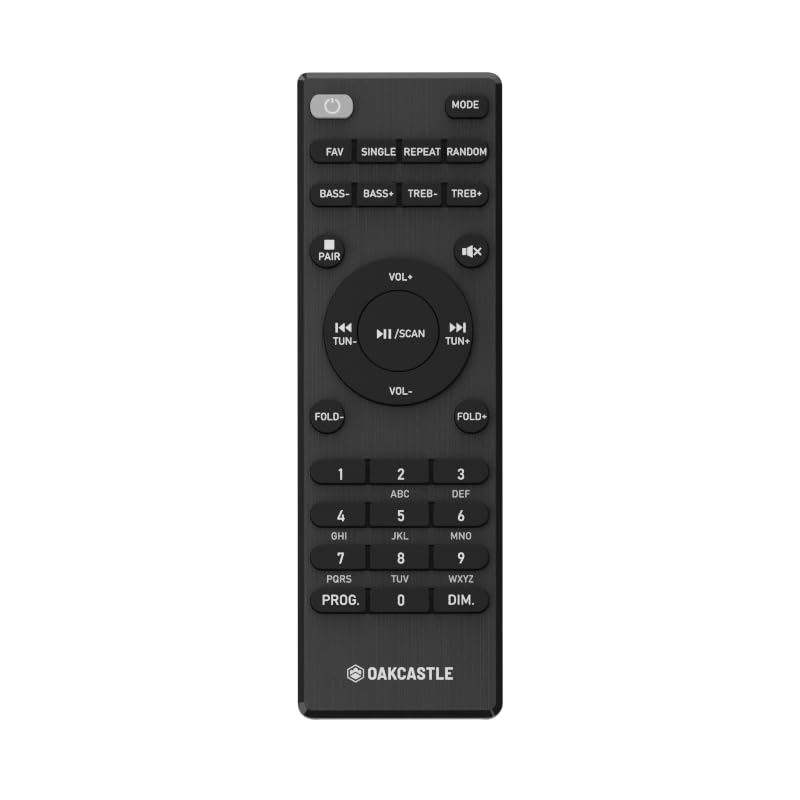
Mynd 1.1: Framan view of the Oakcastle HIFI500 Remote Control. This image displays the compact design and button layout, including power, volume, source selection, and playback controls, typical for operating the HIFI500 audio system.
2. Uppsetning
2.1. Uppsetning rafhlöðu
The Oakcastle HIFI500 Remote Control requires two AAA batteries (not included) for operation. Follow these steps to install the batteries:
- Finndu rafhlöðuhólfið aftan á fjarstýringunni.
- Ýttu niður á flipann og renndu rafhlöðulokinu niður til að opna það.
- Settu tvær AAA rafhlöður í og vertu viss um að plús (+) og neikvæðu (-) tengipunktarnir passi rétt við merkingarnar inni í hólfinu.
- Renndu rafhlöðulokinu aftur á sinn stað þar til það smellur örugglega.
Athugið: Always use new batteries and dispose of old batteries responsibly. Do not mix old and new batteries, or different types of batteries.
2.2. Upphafleg notkun
Once batteries are installed, the remote control is ready for use with your Oakcastle HIFI500 audio system. Point the remote directly at the infrared (IR) receiver on your HIFI500 system. No additional pairing is typically required for this replacement remote.
3. Notkun fjarstýringarinnar
The Oakcastle HIFI500 Remote Control provides full functionality for your HIFI500 audio system. Below is a general guide to common button functions:
- Aflhnappur (⏻): Turns the HIFI500 system on or off.
- Hljóðstyrkur upp/niður (Vol+ / Vol-): Stillir hljóðúttaksstigið.
- Þagga (🔇): Þaggar tímabundið hljóðúttakið.
- Source/Input (Heimild): Cycles through available audio inputs (e.g., CD, FM, Bluetooth, AUX).
- Spilunarstýringar (▶ / ⏸ / ⏹ / ⏪ / ⏩): Controls media playback (Play, Pause, Stop, Rewind, Fast Forward) for compatible sources like CD or USB.
- Siglingarhnappar (▲ / ▼ / ◀ / ▶): Used to navigate menus and selections on the HIFI500 system display.
- Í lagi/Enter hnappur: Staðfestir val.
- Talnatakkaborð (0-9): For direct input of radio frequencies, track numbers, or other numerical data.
Refer to your Oakcastle HIFI500 audio system's main user manual for specific functions and advanced operations.
4. Viðhald
4.1. Þrif
To clean your remote control, gently wipe the surface with a soft, dry cloth. For stubborn dirt, slightly dampÞurrkið klútinn með vatni eða mildu, ekki slípandi hreinsiefni. Forðist að nota sterk efni, leysiefni eða slípandi efni, þar sem þau geta skemmt áferð eða innri íhluti fjarstýringarinnar.
4.2. Skipt um rafhlöðu
Replace batteries when the remote's response becomes sluggish or stops working. Follow the battery installation steps outlined in Section 2.1. Always replace both batteries simultaneously with new ones.
4.3. Geymsla
Þegar fjarstýringin er ekki í notkun í langan tíma er mælt með því að fjarlægja rafhlöðurnar úr henni til að koma í veg fyrir leka sem getur valdið skemmdum. Geymið fjarstýringuna á köldum, þurrum stað fjarri beinu sólarljósi og miklum hita.
5. Bilanagreining
If you encounter issues with your Oakcastle HIFI500 Remote Control, please refer to the following common problems and solutions:
- Fjarstýring svarar ekki:
- Athugaðu hvort rafhlöðurnar séu rétt settar í með réttri pólun.
- Skiptu um rafhlöður fyrir nýjar.
- Ensure there are no obstructions between the remote control and the HIFI500 system's IR receiver.
- Make sure you are within the effective range and pointing the remote directly at the HIFI500 system.
- Hlévirk virkni:
- Þetta bendir oft til þess að rafhlaðan sé lítil. Skiptu um rafhlöður.
- Ensure the remote's IR emitter is clean and free from dirt or smudges.
If the problem persists after trying these solutions, please contact Oakcastle customer support.
6. Tæknilýsing
| Eiginleiki | Forskrift |
|---|---|
| Fyrirmynd | HIFI500 Remote Control |
| Vörumerki | Oakcastle |
| Tengitækni | Innrautt (IR) |
| Aflgjafi | 2 x AAA rafhlöður (fylgir ekki) |
| Hámarksfjöldi studdra tækja | 1 (Oakcastle HIFI500 Audio System) |
| Sérstakur eiginleiki | Léttur |
| Þyngd hlutar | 2.82 aura (u.þ.b. 80 grömm) |
| Stærðir pakka | 8 x 3.2 x 2.5 tommur (u.þ.b. 20.3 x 8.1 x 6.3 cm) |
| Framleiðandi | MEIRIHLUTI |
7. Ábyrgð og stuðningur
7.1. Upplýsingar um ábyrgð
This Oakcastle HIFI500 Remote Control is covered by a manufacturer's warranty. Please refer to the warranty card included with your original Oakcastle HIFI500 audio system or visit the official Oakcastle webvefsíðunni fyrir ítarlegar ábyrgðarskilmála. Geymið kaupkvittunina vegna ábyrgðarkröfu.
7.2. Þjónustudeild
For technical assistance, troubleshooting beyond this manual, or warranty inquiries, please contact Oakcastle customer support. You can typically find contact information, including phone numbers, email addresses, and support portals, on the official Oakcastle websíða.
Please have your product model (HIFI500 Remote Control) and purchase details ready when contacting support.