
EVERSOLO DMP-A6 Master Gen 2-Black
Notendahandbók fyrir Eversolo DMP-A6 Master Gen 2-Black Hi-Fi tónlistarstraumspilara
Model: DMP-A6 Master Gen 2-Black
Inngangur
This manual provides comprehensive instructions for the setup, operation, and maintenance of your Eversolo DMP-A6 Master Gen 2-Black Hi-Fi Music Streamer. Please read this manual thoroughly before using the device to ensure optimal performance and longevity.
The Eversolo DMP-A6 Master Gen 2-Black is an advanced Hi-Fi music streamer designed for high-fidelity audio playback. It features an upgraded Op-amp Chip OPA1612 for enhanced sound output and a newly designed linear power supply for ultra-low noise operation. It supports a wide range of audio formats and streaming services, offering versatile connectivity options for integration into various audio systems.
Öryggisupplýsingar
Always adhere to the following safety guidelines to prevent damage to the device or personal injury:
- Ekki láta tækið verða fyrir vatni eða miklum raka.
- Gakktu úr skugga um rétta loftræstingu til að koma í veg fyrir ofhitnun. Ekki loka fyrir loftræstiop.
- Notið aðeins meðfylgjandi rafmagnssnúruna og fylgihluti.
- Reynið ekki að opna eða gera við tækið sjálfur. Látið hæft starfsfólk sjá um alla þjónustu.
- Haldið tækinu frá beinu sólarljósi, hitagjöfum og sterkum segulsviðum.
- Þrífið tækið með mjúkum, þurrum klút. Forðist að nota slípiefni eða leysiefni.
Innihald pakka
Gakktu úr skugga um að allir hlutir séu í umbúðunum:
- Eversolo DMP-A6 Master Gen 2-Black Unit
- Rafmagnssnúra
- USB snúru
- Screwdriver (for internal storage installation, if applicable)
- Notendahandbók (þetta skjal)
- Kveikjukapall
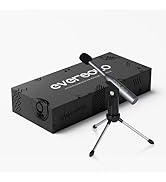
Image: Illustration of the Eversolo DMP-A6 Master Gen 2-Black package contents.
Uppsetning
1. Staðsetning
Place the DMP-A6 Master Gen 2-Black on a stable, flat surface with adequate ventilation. Ensure there is sufficient space around the unit for airflow, especially at the rear and sides where heat dissipation occurs.
2. Rafmagnstenging
Connect the provided power cable to the AC inlet on the rear of the unit and then to a suitable power outlet. Ensure the power switch is in the OFF position before connecting.
3. Hljóðtengingar
The DMP-A6 Master Gen 2-Black offers various audio input and output options:
- Analog úttak: Use XLR or RCA outputs to connect to active speakers or power amplífskraftar.
- Stafræn framleiðsla: Optical, Coaxial, and HDMI (for audio only, no video output).
- Stafræn inntak: Coaxial, Optical, Type-C USB, and HD Bluetooth for connecting external digital audio sources.
- HDMI ARC: Connect your TV's HDMI ARC port to the DMP-A6's HDMI ARC input to transmit TV audio directly.

Image: Rear panel connections of the DMP-A6 Master Gen 2-Black.
4. Nettenging
Connect the unit to your network via Ethernet cable for the most stable connection, or use the built-in Wi-Fi for wireless connectivity. A stable network connection is essential for streaming services and firmware updates.
5. Fyrsta ræsing
After all connections are made, switch on the power. The device will boot up, and the 6-inch LCD color touchscreen will display the initial setup wizard.
Notkunarleiðbeiningar
1. User Interface and Control
The DMP-A6 Master Gen 2-Black can be controlled via its integrated 6-inch LCD color touchscreen or through the dedicated mobile application for Android and iOS devices.

Image: Front panel and touchscreen display.
2. Farsímaforrit
Download the official Eversolo mobile application from your device's app store. The app provides comprehensive control over the streamer, including music playback, settings adjustment, and personalized playlist management.

Image: Eversolo mobile application interface.
3. Music Playback and Streaming
The device supports a wide array of music services and streaming protocols:
- Integrated Services: Access Amazon Music, TIDAL, Qobuz, HIRESAUDIO, Deezer, Tuneln Radio, and more directly from the device.
- Þráðlaus streymi: Compatible with Roon Ready, TIDAL Connect, and DLNA for seamless streaming from compatible devices and servers.
- Local/Network Playback: Spila tónlist files from local drives (USB) or network storage (NAS). The device supports cross-platform addition of music files.
- Stuðningur snið: Plays almost all ultra-high sampling master recording formats, including FLAC, WAV, APE, DSD512 (dsf/.dff/.iso/.dst) stereo/multichannel, and MQA.
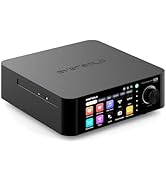
Image: Supported music services and streaming platforms.
4. Ítarlegir eiginleikar
- EOS Audio Engine: Utilizes an innovative audio processing engine that bypasses SRC limitations for high-resolution audio direct output.
- HDMI ARC & TRIGGER: HDMI ARC allows direct TV audio transmission. The TRIGGER function enables linked devices to automatically power on/off with the streamer.
- Professional EQ: Fine-tune your audio output with the built-in professional equalizer.
- OPA1612 Op-amp Chip: Features an upgraded Op-amp chip for a warmer voice output and improved audio quality.
- Ultra-Low Noise Linear Power Supply: Ensures a clean audio signal with noise levels below 40uV.

Image: Key technical features and specifications.
Viðhald
1. Þrif
Regularly clean the exterior of the unit with a soft, dry, lint-free cloth. Do not use liquid cleaners, aerosols, or solvents, as they may damage the finish or internal components.
2. Fastbúnaðaruppfærslur
Eversolo frequently releases firmware updates to improve performance, add features, and fix bugs. It is recommended to keep your device's firmware up to date. Updates can typically be performed directly through the device's settings menu when connected to the internet.
3. Geymsla
If storing the device for an extended period, disconnect it from power and store it in a cool, dry place, away from direct sunlight and extreme temperatures.
Úrræðaleit
| Vandamál | Möguleg orsök | Lausn |
|---|---|---|
| Enginn kraftur | Power cable not connected; Power switch off; Power outlet issue. | Ensure power cable is securely connected. Check power switch. Test power outlet with another device. |
| Ekkert hljóðúttak | Rangt hljóðúttak valið; Kaplar ekki rétt tengdir; Amplifier/speaker issue. | Verify correct output in settings. Check all audio cable connections. Test amplifier/speakers with another source. |
| Get ekki tengst netinu | Incorrect Wi-Fi password; Router issue; Ethernet cable disconnected. | Re-enter Wi-Fi password. Restart router. Check Ethernet cable connection. |
| Streymisþjónustur hleðst ekki inn | Poor internet connection; Service outage; App issue. | Check internet speed. Verify service status online. Restart the streamer and the app. |
| Tæki svarar ekki | Tímabundin hugbúnaðarvilla. | Perform a soft reset by holding the power button, or disconnect power for 30 seconds and reconnect. |
If the problem persists after attempting these solutions, please contact Eversolo customer support.
Tæknilýsing
| Eiginleiki | Smáatriði |
|---|---|
| Nafn líkans | DMP-A6 Master Gen 2-Black |
| Mál (L x B x H) | 10.63 x 7.36 x 5.34 tommur (u.þ.b.) |
| Þyngd | 9.24 pund |
| Stýrikerfi | Android 11 (deeply tailored system) |
| Skjár | 6-inch LCD Color Touchscreen |
| vinnsluminni | 4 GB |
| Tengingar | Bluetooth, Ethernet, HDMI, IR |
| Hljóðinntak | Coaxial, Optical, Type-C USB, HD Bluetooth |
| Hljóðútgangur | HDMI (audio only), USB, Optical, Coaxial, XLR, RCA |
| Stuðningsþjónustur fyrir streymi | Amazon Music, Deezer, HIRESAUDIO, Qobuz, Tidal, Tuneln Radio, Roon Ready, TIDAL Connect, DLNA |
| Stutt hljóðsnið | FLAC, WAV, APE, DSD512, MQA, PCM768kHz/32Bit |
| Sérstakir eiginleikar | Professional EQ, Roon Ready, Squeezelite, TIDAL Connect, HDMI ARC, TRIGGER, OPA1612 Op-amp, Ultra-Low Noise Linear Power Supply |
Ábyrgð og stuðningur
Upplýsingar um ábyrgð
The Eversolo DMP-A6 Master Gen 2-Black typically comes with a 1 ára takmörkuð ábyrgð frá kaupdegi. Þessi ábyrgð nær yfir framleiðslugalla og vinnugalla við eðlilega notkun. Vinsamlegast geymið kaupkvittunina vegna ábyrgðarkröfu.
The warranty does not cover damage caused by misuse, accident, unauthorized modification, improper installation, or natural disasters. For detailed warranty terms and conditions, please refer to the official Eversolo websíðuna eða hafðu samband við þjónustuver þeirra.
Þjónustudeild
For technical assistance, troubleshooting, or warranty inquiries, please contact Eversolo customer support through their official channels. You can typically find contact information on the Eversolo website, including support forums, email addresses, or phone numbers.
Eversolo aims to provide monthly firmware updates and encourages users to submit comments or questions via their official service channels (webspjallborð, Facebook, Instagram, or email) for prompt responses.
Ask a question about this manual
Ask about setup, troubleshooting, compatibility, parts, safety, or missing instructions. Manuals+ will review the question and use this page’s manual context to help answer it.