1. Inngangur
This manual provides essential information for the proper setup, operation, and maintenance of your new Generic Replacement Remote Control. This infrared (IR) remote is designed to function as a direct replacement for the original remote controls of ALBA T-701, AXXION AXX-1028, and Polaroid T-901 portable DVD players. No programming or setup is required; simply insert batteries and begin use.
2. Vöru lokiðview
The replacement remote control is designed to replicate the primary functions of your original remote. It features a standard layout for DVD player controls, including number input, navigation, playback, and volume adjustments. Please compare the appearance of this remote with your original to ensure compatibility.
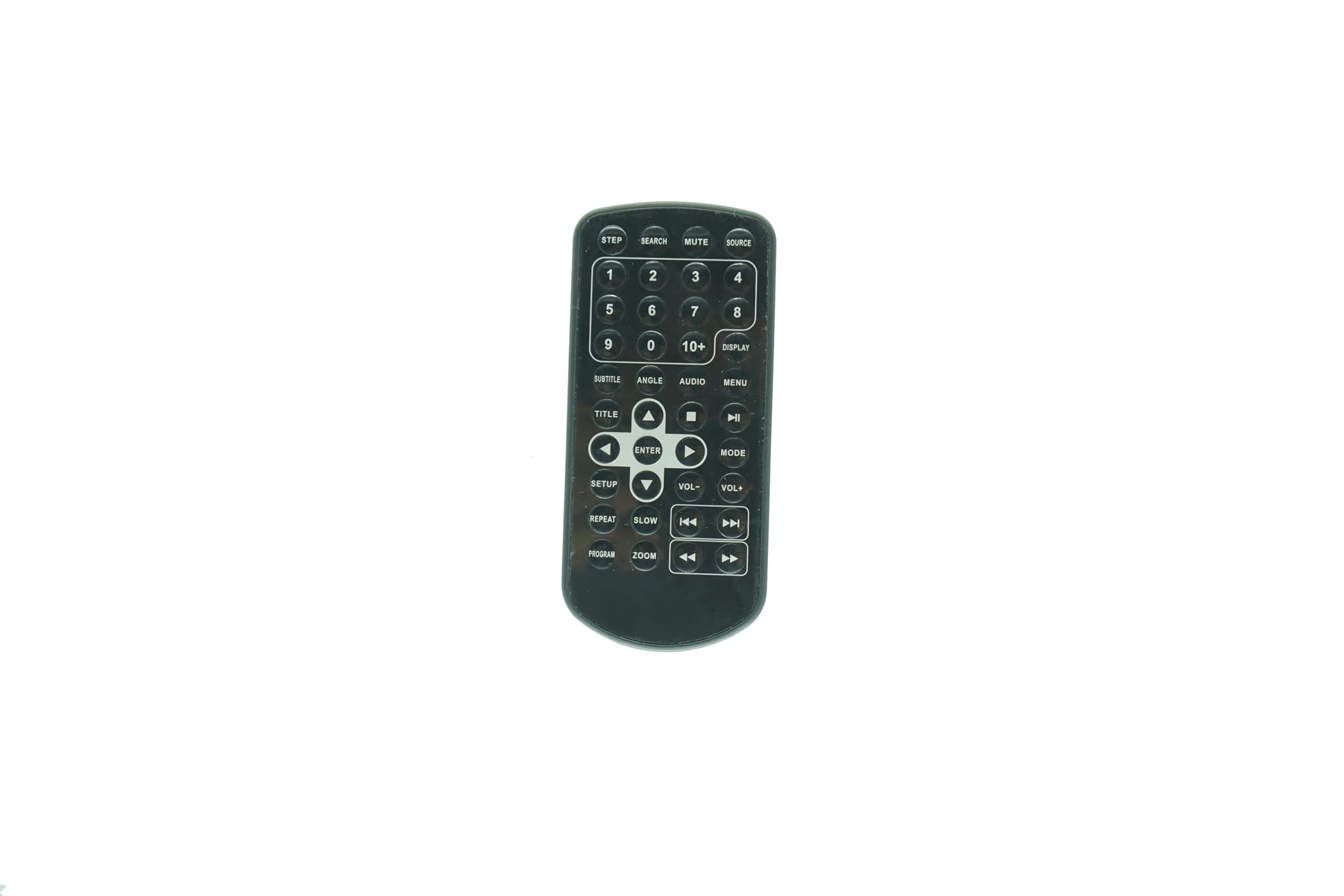
Mynd 2.1: Framan view of the Generic Replacement Remote Control. This image displays the overall shape and button layout of the remote, confirming its design for compatibility.
3. Uppsetning: Uppsetning rafhlöðu
Your remote control requires two (2) AAA batteries (not included) for operation. Follow these steps to install the batteries:
- Finndu rafhlöðuhólfið aftan á fjarstýringunni.
- Gently slide the battery compartment cover downwards or outwards to open it.
- Settu tvær AAA rafhlöður í og vertu viss um að plús (+) og neikvæðu (-) tengipunktarnir passi rétt við merkingarnar inni í hólfinu. Röng ísetning getur komið í veg fyrir að fjarstýringin virki.
- Rennið rafhlöðulokinu aftur á sinn stað þar til það smellur örugglega.

Mynd 3.1: Til baka view of the remote control, showing the battery compartment area and a small clip. This clip is part of the battery cover mechanism.
4. Notkunarleiðbeiningar
This remote control operates via infrared (IR) signals. Point the remote directly at the IR receiver on your portable DVD player for optimal performance. No programming is needed; the remote is ready for use once batteries are installed.

Mynd 4.1: Ítarlegt view of the remote control's buttons. This image provides a clear reference for identifying each button and its label.
Hnappar aðgerðir:
- Number Pad (0-9, 10+): Notað til að velja beint lag eða slá inn töluleg gildi.
- HEIMILD: Selects the input source (if applicable to your DVD player model).
- ÞAGGA: Silences the audio output. Press again to restore sound.
- LEIT: Initiates a search function within the DVD content.
- DISPLAY: Shows on-screen information such as current track, time, or settings.
- Matseðill: Accesses the DVD's main menu.
- HLJÓÐ: Cycles through available audio tracks or languages.
- HÖNGUR: Changes the camera angle during playback (if supported by the DVD).
- Undirtitill: Cycles through available subtitle options.
- TITILL: Returns to the DVD's title menu.
- Leiðsagnarhnappar (upp, niður, vinstri, hægri): Used to navigate menus and selections.
- KOMA INN: Staðfestir val eða aðgerð.
- SPILA/GERA HLAÐ (►/❚❚): Byrjar eða gerir hlé á spilun.
- STÖÐVA (■): Stöðvar spilun.
- SPÓLA ÁFRAM (►►): Advances playback quickly.
- REWIND (◄◄): Rewinds playback quickly.
- NEXT (►❚): Skiptir yfir í næsta kafla eða lag.
- PREVIOUS (❚◄): Skips to the beginning of the current chapter or track, or to the previous one.
- VOL+ / VOL-: Eykur eða lækkar hljóðstyrkinn.
- Uppsetning: Accesses the system setup menu of the DVD player.
- HÆGT: Initiates slow-motion playback.
- ENDURTAKA: Repeats the current track, chapter, or entire disc.
- FORRIT: Allows programming of track playback order.
- ZOOM: Zooms in or out on the video display.
- SKREF: Advances playback frame by frame.
5. Viðhald
- Þrif: Notið mjúkan, þurran klút til að þrífa fjarstýringuna. Notið ekki fljótandi hreinsiefni eða slípiefni, þar sem þau geta skemmt yfirborðið eða innri íhluti.
- Skipt um rafhlöðu: Replace batteries when the remote's performance degrades or stops working. Always replace both batteries at the same time with new ones of the same type (AAA).
- Geymsla: Ef fjarstýringin verður ekki notuð í langan tíma skal fjarlægja rafhlöðurnar til að koma í veg fyrir leka og hugsanlega skemmdir. Geymið á köldum og þurrum stað.
6. Bilanagreining
If your remote control is not functioning as expected, consider the following:
- Fjarstýring svarar ekki:
- Gakktu úr skugga um að rafhlöðurnar séu rétt settar í með réttri pólun (+/-).
- Skiptu út gömlum rafhlöðum fyrir nýjar AAA rafhlöður.
- Check for any obstructions between the remote and the DVD player's IR receiver.
- Ensure you are pointing the remote directly at the DVD player.
- Sumar aðgerðir virka ekki:
- While this remote is a replacement, some advanced or unique functions of your original DVD player's remote may not be fully supported. The remote is designed for core playback and navigation.
- Verify that the function you are trying to use is supported by your specific DVD player model.
7. Tæknilýsing
- Samhæfni: ALBA T-701, AXXION AXX-1028, Polaroid T-901 Portable DVD Players
- Tegund: Innrauð (IR) fjarstýring
- Aflgjafi: 2 x AAA rafhlöður (fylgir ekki)
- Litur: Svartur
- Hámarksfjöldi studdra tækja: 1
- Framleiðandi: Auðvelt að prófa
8. Ábyrgð og stuðningur
As a generic replacement product, specific warranty details may vary. Please refer to the retailer's return policy for information regarding exchanges or refunds. For any operational questions or concerns not covered in this manual, please contact the seller directly through your purchase platform. It is recommended to verify your original remote's appearance against the product images before purchase to ensure full compatibility.


