
1. Inngangur
This manual provides essential information and instructions for the proper use and maintenance of your ZWYING HL1568 Dual Screen Laptop. Please read this manual thoroughly before operating the device to ensure optimal performance and longevity.

Image 1.1: ZWYING HL1568 Dual Screen Laptop overview. This image displays the laptop with its main 15.6-inch screen and the smaller 7-inch touch screen, highlighting its dual-display capability.
2. Innihald pakka
Gakktu úr skugga um að allir hlutir séu til staðar í pakkanum:
- 1 x ZWYING HL1568 Dual Screen Laptop
- 1 x hleðslutæki
- 1 x Notendahandbók
3. Uppsetning
3.1 Byrjunarkveikt
- Connect the power charger to the laptop's power port and a wall outlet.
- Ýttu á rofann sem er staðsettur á hlið fartölvunnar.
- Follow the on-screen instructions to complete the initial Windows 11 Pro setup. This laptop comes with Windows 11 Pro pre-installed.
3.2 Tengja jaðartæki
Utilize the available ports to connect external devices such as a mouse, keyboard, or external storage. Refer to Section 4.4 for port details.
4. Notkun fartölvunnar
4.1 Tvöfaldur skjár
The ZWYING HL1568 features a 15.6-inch Full HD IPS main screen (1920x1080 resolution) and a 7-inch touch screen (1920x1200 resolution). These screens can operate simultaneously, allowing for enhanced multitasking. You can extend your desktop across both screens or duplicate content as needed through Windows display settings.

Image 4.1: Dual screen display. This image illustrates the 15.6-inch main screen and the 7-inch secondary touch screen, detailing their respective resolutions and narrow bezel design.
4.2 Baklýsing lyklaborðs
The laptop is equipped with a color backlit keyboard. To control the backlight:
- Ýttu á FN + F6 simultaneously to toggle the keyboard backlight on or off.
- Ýttu á FN + F7 simultaneously to cycle through the 7 available backlight colors.
4.3 Facial Recognition Security
The laptop supports facial recognition for secure and quick system access. Configure this feature through Windows Hello settings in your operating system.

Image 4.3: Keyboard backlight and facial recognition. This image shows the laptop's keyboard with indicators for backlight control (FN+F6, FN+F7) and a visual representation of the facial recognition feature.
4.4 Tengitengi
Tölvan býður upp á fjölbreytt úrval af tengimöguleikum:
- USB 3.0 tengi (x2)
- Lítil HDMI tengi
- Heyrnartólstengi
- TF kortarauf
- Tegund C tengi
- Aflhöfn
Wireless connectivity includes built-in dual-band Wi-Fi (2.4G/5G) and Bluetooth 4.2.

Image 4.4: Connectivity ports. This image details the various input/output ports available on the ZWYING HL1568 laptop, including USB 3.0, HDMI, Type-C, headphone, and TF card slot.
4.5 Myndavél og hljóð
The laptop features a detachable 2-megapixel high-definition camera, built-in speakers, and a microphone for video calls and audio communication.

Image 4.5: Camera and audio features. This image highlights the laptop's 2-megapixel detachable camera, built-in speakers, and microphone, demonstrating their use in a video call scenario.
5. Tæknilýsing
Key technical specifications for the ZWYING HL1568 Dual Screen Laptop:
| Eiginleiki | Forskrift |
|---|---|
| Stærð aðalskjás | 15.6 tommur |
| Main Screen Resolution | 1920x1080 pixlar |
| Snertiskjástærð | 7 tommur |
| Upplausn snertiskjás | 1920x1200 pixlar |
| Örgjörvi | Intel Alder Lake N95 (up to 3.4GHz) |
| vinnsluminni | 16GB DDR4 |
| Geymsla | 1TB SSD (expandable via TF card) |
| Grafískur hjálpargjörvi | Intel UHD grafík |
| Stýrikerfi | Windows 11 Pro |
| Wi-Fi | Tvöfalt band (2.4G/5G) |
| Bluetooth | 4.2 |
| Rafhlaða | 5400mA |
| Þyngd hlutar | 5.7 pund (u.þ.b. 2.59 kg) |
| Vörumál | 14.17 x 9.06 x 0.67 tommur |

Image 5.1: Storage and RAM. This image visually represents the laptop's 16GB DDR4 RAM and 1TB SSD, highlighting its capacity and speed.
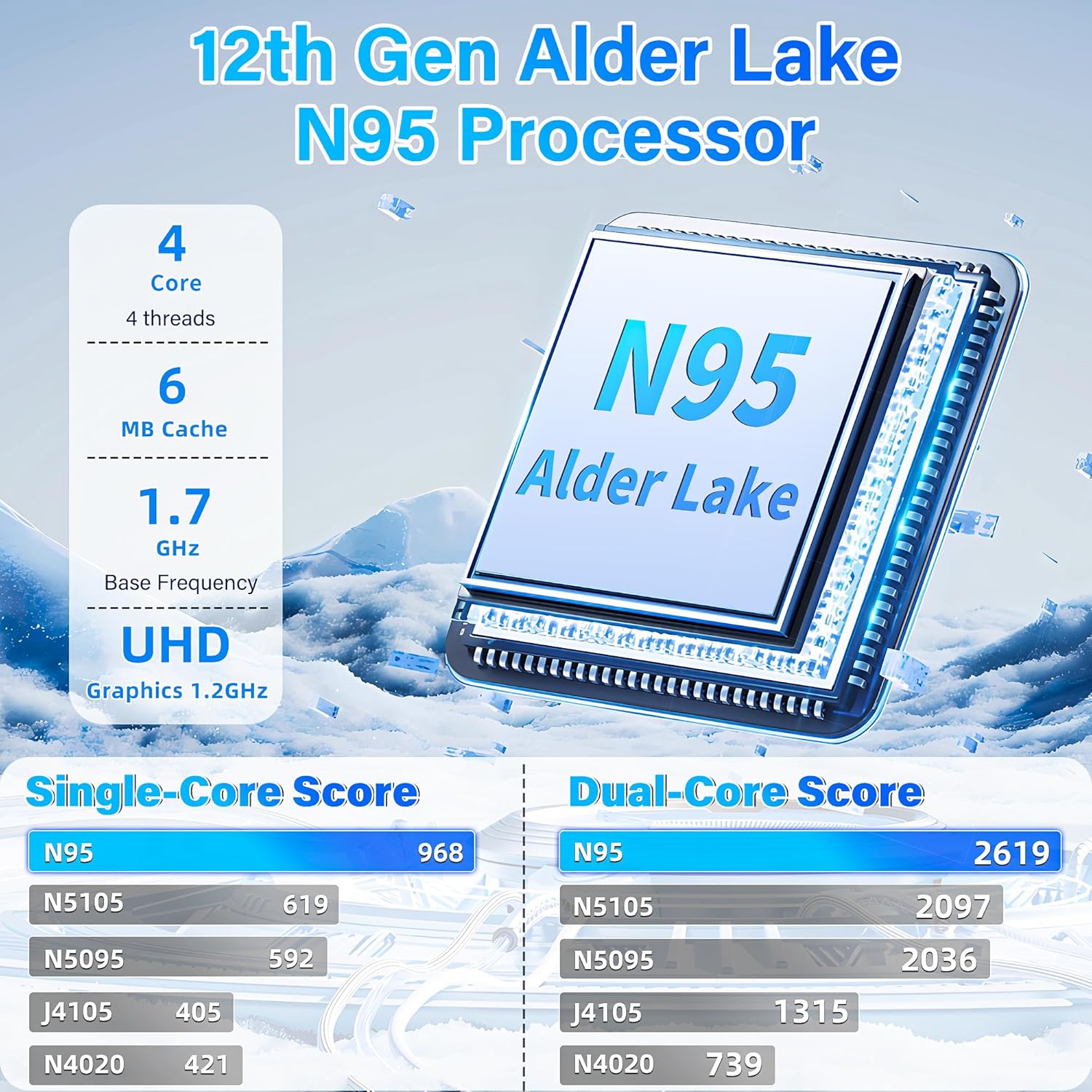
Image 5.2: Processor information. This image provides details about the 12th Gen Intel Alder Lake N95 processor, including core count, cache, base frequency, and graphics.
6. Viðhald
6.1 Þrif
- Notið mjúkan, lólausan klút til að þrífa skjáinn og ytra yfirborð.
- Forðist að nota sterk efni eða slípiefni.
- Fyrir þrjósk óhreinindi, þurrkaðu léttampÞurrkið klútinn með vatni eða skjáhreinsilausn.
6.2 Umhirða rafhlöðu
- Forðastu að tæma rafhlöðuna alveg oft.
- Geymið fartölvuna á köldum og þurrum stað ef hún er ekki notuð í langan tíma.
- Use only the provided charger to prevent damage.
7. Bilanagreining
7.1 Algeng vandamál og lausnir
- Tölvan kveikir ekki á sér: Ensure the charger is securely connected and the power outlet is functional. Try pressing the power button for 10-15 seconds.
- Skjárinn er auður: Check if the laptop is powered on. If using an external display, ensure it is connected correctly and the display mode is set appropriately (e.g., Extend, Duplicate).
- Vandamál með Wi-Fi tengingu: Verify that Wi-Fi is enabled in Windows settings. Restart your router and the laptop.
- Lyklaborð eða snertiflötur svarar ekki: Endurræstu fartölvuna. Gakktu úr skugga um að engin utanaðkomandi tæki trufli.
Ef vandamál koma upp aftur, vinsamlegast skoðið upplýsingar um stuðning í 8. kafla.
8. Ábyrgð og stuðningur
Your ZWYING HL1568 Dual Screen Laptop is backed by a 12 mánaða ábyrgð framleiðanda frá kaupdegi. Þessi ábyrgð nær til galla í efni og framleiðslu við venjulega notkun.
For technical assistance, warranty claims, or customer support, please contact us via the customer support email provided at the time of purchase. Please have your product model and purchase details ready when contacting support.