
1. Vöru lokiðview
The VERMESS 47" L-Shaped Gaming Computer Desk is designed for versatility and functionality, suitable for gaming, studying, or office work. It features a reversible design, allowing the L-shape configuration to be set up on either the left or right side to fit various room layouts. Integrated power outlets, a monitor stand, and ample storage solutions enhance its utility.
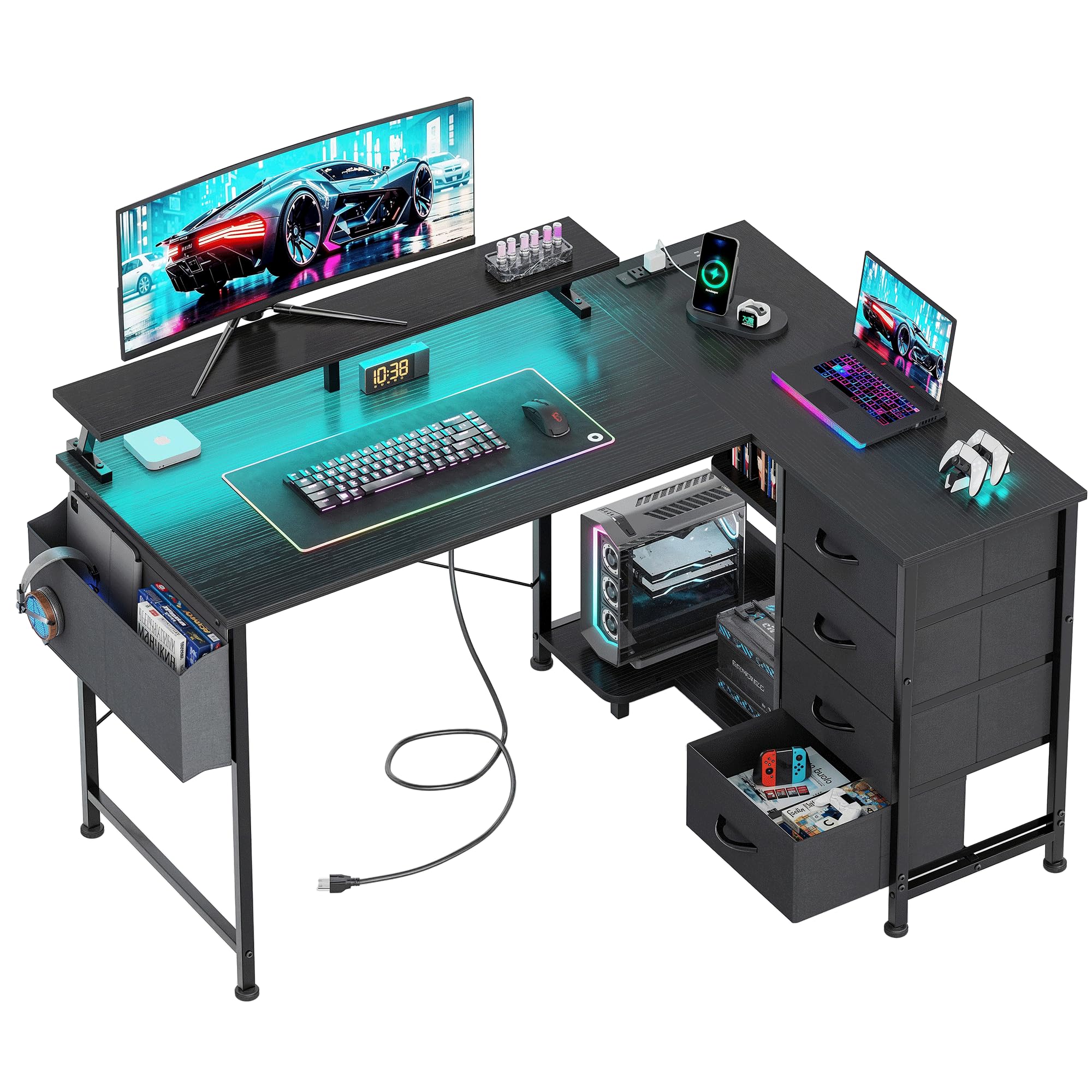
Mynd 1.1: Yfirview of the VERMESS 47" L-Shaped Gaming Computer Desk.
Helstu eiginleikar:
- AmpGeymslurými: Includes four generously sized fabric drawers and two iron hooks for organizing files, stationery, and personal items.
- Innbyggður rafmagnsinnstunga: Features a recessed power outlet with 3 AC outlets, 1 USB port, and 1 Type-C port for convenient device charging.
- Reversible Design with Host Stand: The desk can be configured for left or right-hand orientation. A dedicated CPU stand protects your computer host from moisture and dust.
- Stöðug og sterk smíði: Constructed from durable, waterproof engineered wood and a lightweight, strong iron frame. Adjustable feet ensure stability on uneven surfaces.
- Innbyggður skjástandur: Elevates your computer monitor for an ergonomic viewing horn.
- LED ljós: Features LED lighting with 7 color changes and 20 lighting modes to customize your workspace ambiance.
2. Öryggisupplýsingar
Vinsamlegast lesið og skiljið allar öryggisleiðbeiningar fyrir samsetningu og notkun. Ef þessum leiðbeiningum er ekki fylgt getur það valdið meiðslum eða skemmdum á vörunni.
- Fylgdu alltaf samsetningarleiðbeiningunum sem fylgja með.
- Keep electrical components away from water and other liquids to prevent electric shock.
- Do not overload the desk or place heavy objects on the edges to prevent tipping.
- Always unplug electrical components when not in use or when leaving the desk unattended.
- Ensure all connections are secure before using the power outlets.
- Haldið litlum hlutum og umbúðum frá börnum til að koma í veg fyrir köfnunarhættu.
3. Innihald pakka
Áður en samsetning hefst skal ganga úr skugga um að allir hlutar sem taldir eru upp hér að neðan séu til staðar og óskemmdir. Ef einhverjir hlutar vantar eða eru skemmdir skal hafa samband við þjónustuver.
- Desk Boards (various sizes for L-shape configuration)
- Málmgrindarhlutar (fætur, stuðningsstangir)
- Skúffur úr efni (4 einingar)
- Skjár standa
- CPU standur
- Rafmagnsinnstunga með rafmagnssnúru
- LED ljósastrimi
- Fabric Storage Bag
- Iron Hooks (2 units)
- Samsetningarbúnaður (skrúfur, boltar, hnetur o.s.frv.)
- Assembly Tool Kit (e.g., Allen wrench, screwdriver)
- Leiðbeiningarhandbók
4. Leiðbeiningar um uppsetningu og samsetningu
Assembly is designed to be straightforward. Please follow the numbered steps and refer to the diagrams. It is recommended to assemble the desk on a soft, clean surface to prevent scratches.
4.1. Choose Your Desk Orientation
The VERMESS L-shaped desk is reversible. Decide whether you want the longer section of the L-shape on the left or right side of your workspace before starting assembly. This will determine the placement of certain frame components and desk boards.

Figure 4.1: The desk can be assembled with the L-section on either side.
4.2. General Assembly Steps (Refer to included manual for detailed diagrams):
- Taktu upp og auðkenndu hlutana: Raðið öllum íhlutum og vélbúnaði saman. Paraðu þá saman við hlutalistann í meðfylgjandi handbók.
- Settu saman málmgrind: Connect the main metal frame components using the provided screws and tools. Ensure all connections are finger-tight initially.
- Attach Desk Boards: Secure the engineered wood desk boards to the assembled metal frame. Pay attention to the pre-drilled holes and the chosen orientation.
- Setja upp skúffur og hillur: Insert the fabric drawers into their designated compartments. Attach any open storage shelves or the CPU stand as per the manual.
- Festa skjástand: Place the monitor stand on the desktop in your desired position. It is a free-to-place assembly.
- Setja upp rafmagnsinnstungu: Secure the recessed power outlet unit into its designated slot on the desktop.
- Settu á LED ljósræmu: Adhere the LED light strip to the underside of the monitor stand or desk edge as desired.
- Festu fylgihluti: Install the fabric storage bag and iron hooks to the side of the desk.
- Lokaspenning: Once all components are in place, carefully tighten all screws and bolts using the provided tools. Do not overtighten.
- Stilla jöfnunarfætur: Adjust the feet at the bottom of the desk legs to ensure the desk is stable and level on your floor.
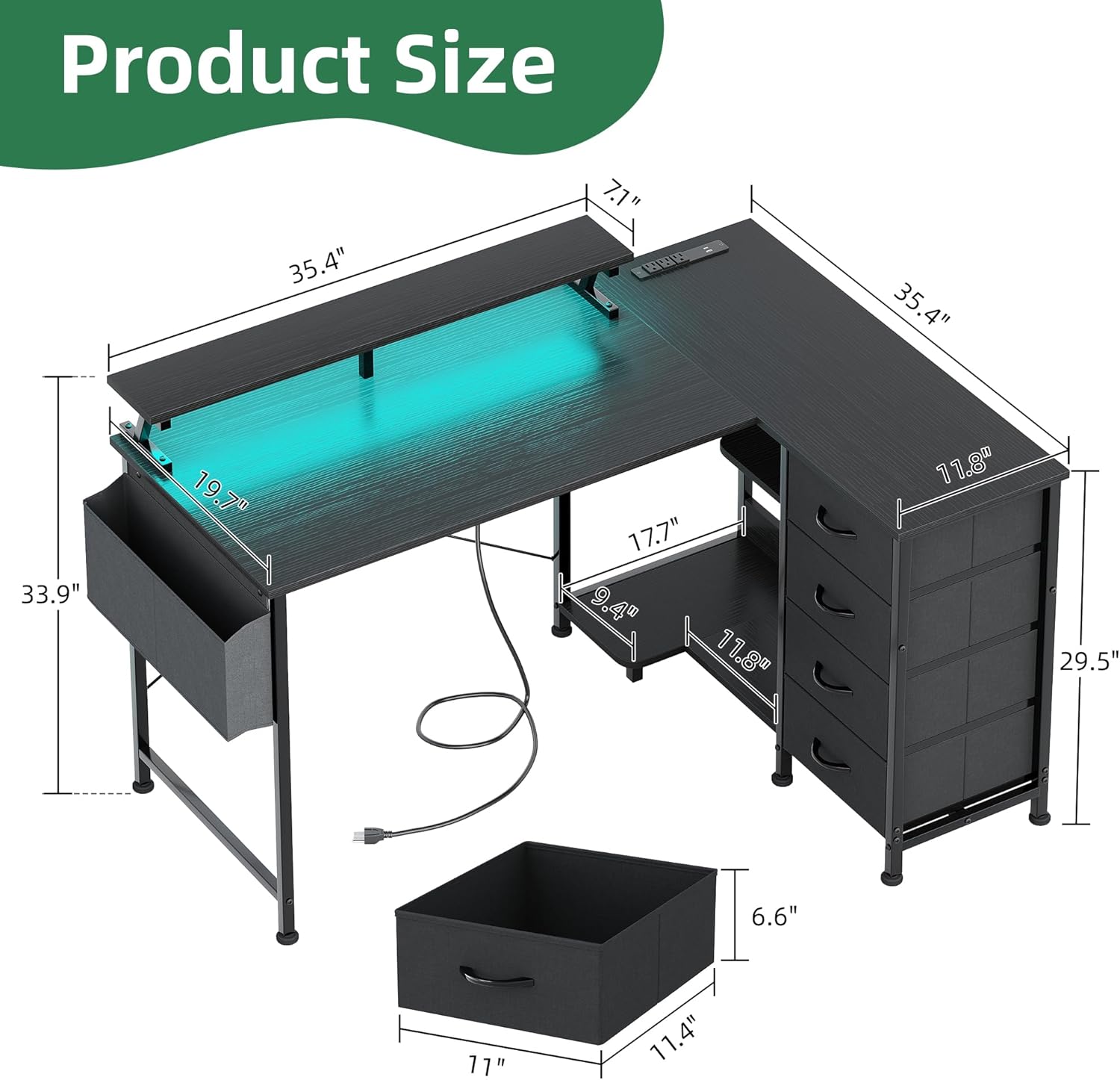
Mynd 4.2: Vöruvíddir til að skipuleggja rýmið.
5. Notkunarleiðbeiningar
5.1. Notkun innbyggðra rafmagnsinnstungna
The desk includes a convenient power outlet unit to power your devices directly from your workspace.
- Tengjast við innstungu: Plug the desk's power cord into a standard wall electrical outlet.
- Hleðslutæki: Use the 3 AC outlets for laptops, monitors, or other electronics. The 1 USB port and 1 Type-C port are suitable for charging smartphones, tablets, and other USB-powered devices.
- Öryggisráðstöfun: Do not exceed the maximum power rating of the outlet unit. Unplug devices when not in use.

Figure 5.1: Integrated power outlets for convenient charging.
5.2. Stjórnun LED ljósanna
The integrated LED light strip allows you to customize the ambiance of your workspace.
- Kveikt/slökkt: Use the control button on the LED strip or remote (if included) to turn the lights on or off.
- Breyta litum: Cycle through the 7 available colors using the designated button.
- Veldu lýsingarstillingar: Choose from 20 different lighting modes to create dynamic effects.

Figure 5.2: Customize your gaming or work environment with LED lights.
5.3. Utilizing Storage Features
The desk offers various storage options to keep your workspace organized.
- Efnaskúffur: Use the four fabric drawers for documents, office supplies, or personal items.
- Fabric Storage Bag: The side storage bag is ideal for headphones, cables, or small accessories.
- Opnar geymsluhillur: Utilize the open shelves for frequently accessed items or decorative elements.
- Iron Hooks: Hang headphones, bags, or other items on the two iron hooks.

Figure 5.3: Fabric storage drawers for organized storage.

Figure 5.4: Fabric storage bag and open shelves for additional organization.
6. Viðhald
Proper care and maintenance will extend the life and appearance of your VERMESS desk.
- Þrif á yfirborði: Wipe desk surfaces with a soft, damp cloth. Avoid harsh chemicals or abrasive cleaners that may damage the laminated engineered wood finish.
- Efnaskúffur: The fabric drawers can be spot cleaned with a mild detergent and water. Allow to air dry completely. Do not machine wash.
- Málmrammi: Hreinsið málmgrindina með auglýsinguamp klút. Þurrkið strax til að koma í veg fyrir ryð.
- Rafmagns íhlutir: Ensure the power outlet unit and LED lights are unplugged before cleaning. Wipe with a dry cloth only.
- Reglulegar athuganir: Athugið reglulega allar skrúfur og bolta til að tryggja að þær séu haldnar vel hertar. Herðið ef þörf krefur.
- Forðastu beint sólarljós: Prolonged exposure to direct sunlight may cause fading or damage to the desk materials.
7. Bilanagreining
If you encounter any issues with your desk, refer to the following common problems and solutions.
| Vandamál | Möguleg orsök | Lausn |
|---|---|---|
| Skrifborðið er óstöðugt eða óstöðugt. | Ójafnt gólf; lausar tengingar. | Adjust the leveling feet at the bottom of the legs. Check and tighten all assembly screws and bolts. |
| Rafmagnsinnstungurnar virka ekki. | Desk power cord not plugged in; wall outlet issue; overloaded circuit. | Ensure the desk's power cord is securely plugged into a functional wall outlet. Test the wall outlet with another device. Reduce the number of devices plugged into the desk's outlets. |
| LED lights are not turning on or changing colors. | LED strip not connected to power; faulty connection; control button issue. | Check that the LED strip is properly connected to its power source. Ensure the power outlet is functional. Try pressing the control button firmly. |
| Skúffur eru erfiðar að opna/loka. | Overloaded drawer; obstruction; improper installation. | Reduce the contents of the drawer. Check for any items obstructing the drawer's movement. Ensure the drawer is inserted correctly into its compartment. |
If the problem persists after attempting these solutions, please contact VERMESS customer support for further assistance.
8. Tæknilýsing
Detailed specifications for the VERMESS 47" L-Shaped Gaming Computer Desk.
| Eiginleiki | Smáatriði |
|---|---|
| Vörumerki | VERMESS |
| Gerðarnúmer | VMS-4CTJCB-BK |
| Litur | Svartur |
| Vörumál | 90D x 120W x 86.2H Centimetres (35.4"D x 47.2"W x 34"H) |
| Þyngd hlutar | 18.3 kg |
| Efni | Verkfræðilegt tré, málmur |
| Gerð klára | Lagskipt |
| Skrifborðshönnun | L-laga tölvuborð |
| Sérstakir eiginleikar | Reversible, Built-In USB Outlet (3 AC, 1 USB, 1 Type-C), Monitor Stand, 4 Fabric Drawers, Host Stand, LED Lights |
9. Ábyrgð og stuðningur
VERMESS is committed to customer satisfaction. While specific warranty details are not provided in this manual, a professional after-sales team is available to assist you.
Þjónustudeild:
If you have any questions, require assistance with assembly, or encounter any issues with your VERMESS desk, please contact our customer support team. We aim to reply to your message within 24 hours and resolve any concerns to your satisfaction.
Vinsamlegast vísið til söluaðilans website or your purchase documentation for contact information or any applicable warranty terms.