
Inngangur
This manual provides comprehensive instructions for the OMAIC EN2Q36H replacement remote control, designed for Hisense Smart TVs. It covers essential information regarding setup, operation, and maintenance to ensure optimal performance and user experience. This remote offers a direct replacement solution without the need for complex programming.
Uppsetning
The OMAIC EN2Q36H remote control is designed for immediate use with compatible Hisense Smart TVs. No programming or pairing is required.
Uppsetning rafhlöðu
- Finndu rafhlöðuhólfið aftan á fjarstýringunni.
- Renndu rafhlöðulokinu niður eða í þá átt sem örin gefur til kynna til að opna það.
- Insert two AAA alkaline batteries (not included), ensuring the positive (+) and negative (-) terminals align correctly with the markings inside the compartment.
- Settu rafhlöðulokið aftur á sinn stað með því að renna því aftur á sinn stað þar til það smellur örugglega.
Once batteries are installed, the remote is ready to operate your Hisense Smart TV.

Notkunarleiðbeiningar
This remote control utilizes infrared (IR) technology for communication with your Hisense Smart TV. Ensure a clear line of sight between the remote and the TV's IR receiver for optimal performance.
Helstu eiginleikar
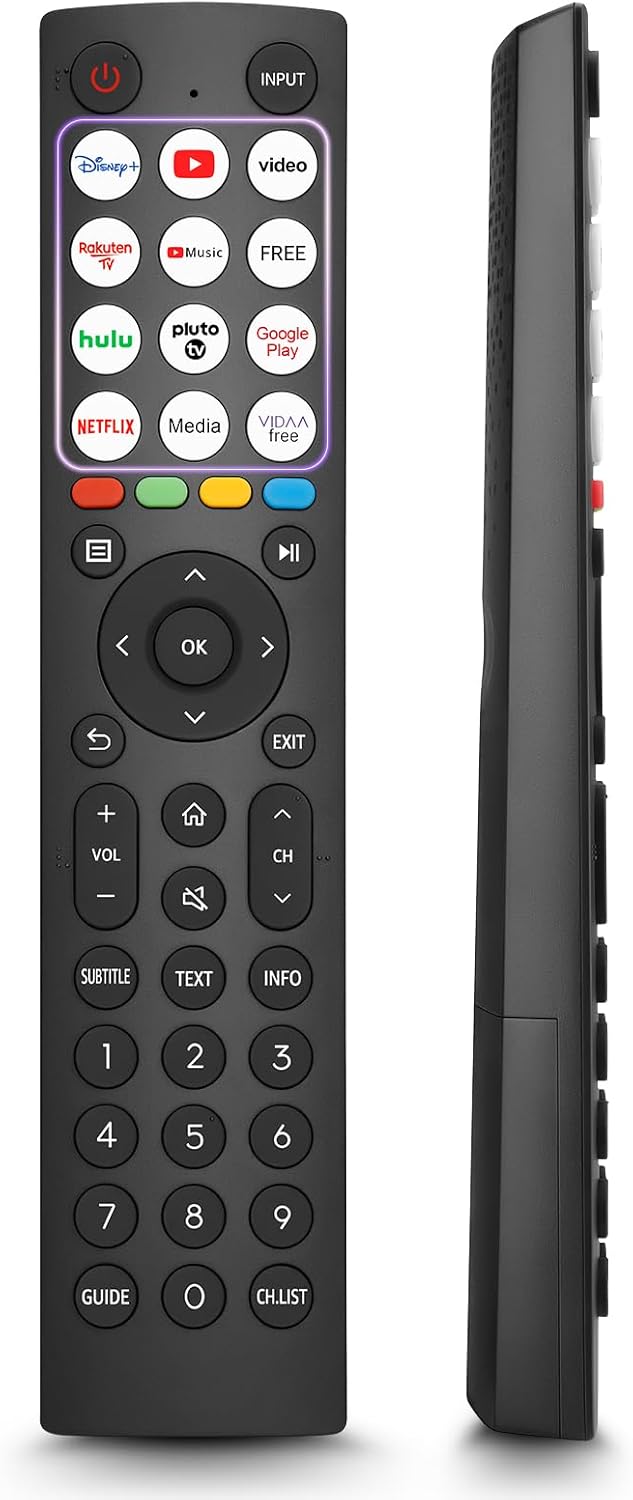
- 12 Shortcut Buttons: Quickly access popular streaming services and applications with dedicated buttons.
- Strong IR Signal: Provides a longer transmission distance and quick response without noticeable delay.
- Varanlegur smíði: Made from high-quality ABS and silicone materials for extended lifespan.

Hnappar aðgerðir
Familiarize yourself with the functions of each button on your OMAIC EN2Q36H remote control:
| Hnappur | Virka |
|---|---|
| KRAFTUR | Switches the TV on or into standby mode. |
| INNSLAG | Velur inntaksgjafa (HDMI, AV, o.s.frv.). |
| APP Buttons | Quick access buttons for specific applications (e.g., Disney+, Netflix, YouTube). |
| MENU | Displays the Quick Setup menu. |
| FJÖLMIÐLASTJÓRN | Buttons for Play, Pause, Stop, Fast Forward, Rewind. |
| Leiðsögn (upp/niður/vinstri/hægri) | Navigates on-screen menus and adjusts system settings. |
| OK | Confirms selection in on-screen menus. |
| AFTUR | Snýr aftur að fyrri valmyndinni. |
| HÆTTA | Lokar núverandi valmynd. |
| VOL +/- | Stillir hljóðstyrkinn. |
| HEIM | Enters the Home screen. |
| ÞAGGA | Þaggar eða endurheimtir sjónvarpshljóðið. |
| CH ^/v | Switches channels. |
| SUBTITLE | Activates or deactivates subtitle mode. |
| TEXTI | Turns teletext function on and off. |
| UPPLÝSINGAR | Sýnir upplýsingar um núverandi forrit. |
| NUMBER Buttons (0-9) | Direct channel selection or number input. |
| LEIÐBEININGAR | Displays the Electronic Programme Guide (DTV input). |
| CH.LIST | Displays the Channel List on the screen. |

Compatible Hisense TV Models
The OMAIC EN2Q36H replacement remote control is compatible with the following Hisense VIDAA 4K HDTV Smart TV series:
- 32A4K, 40A4K, 43A4K
- 32A5KQ, 40A5KQ
- 43A6K, 50A6K, 55A6K, 58A6K, 65A6K, 70A6K, 75A6K, 85A6K
- 55U6KQ, 65U6KQ
- 43A7KQ, 50A7KQ, 55A7KQ, 65A7KQ, 75A7KQ
- 43E7KQ, 50E7KQ, 55E7KQ, 65E7KQ, 75E7KQ
Viðhald
Til að tryggja endingu og rétta virkni fjarstýringarinnar skaltu fylgja þessum viðhaldsleiðbeiningum:
- Þrif: Use a soft, dry cloth to clean the remote. Avoid using liquid cleaners or abrasive materials, as they may damage the surface or internal components.
- Skipt um rafhlöðu: Replace batteries when the remote's response becomes sluggish or stops working. Always replace both batteries at the same time with new ones of the same type (AAA alkaline).
- Geymsla: Geymið fjarstýringuna á köldum, þurrum stað fjarri beinu sólarljósi, miklum hita og miklum raka.
- Forðastu dropa: Verjið fjarstýringuna gegn höggum, þar sem fall geta skemmt innri rafrásir.
Úrræðaleit
If you encounter issues with your remote control, refer to the following troubleshooting steps:
| Vandamál | Möguleg orsök | Lausn |
|---|---|---|
| Fjarstýring svarar ekki | Rafhlöður sem eru tómar eða rangt settar í. | Skiptið um rafhlöður fyrir nýjar AAA alkalískar rafhlöður og gætið þess að þær snúi rétt. |
| Fjarstýring svarar ekki | Hindrun milli fjarstýringar og sjónvarps. | Ensure a clear line of sight to the TV's IR receiver. Remove any objects blocking the path. |
| Fjarstýring svarar ekki | Remote is too far from the TV. | Move closer to the TV. The remote has an extended range, but extreme distances may affect performance. |
| Hnappar eru klístraðir eða svara ekki | Óhreinindi eða rusl undir hnöppum. | Gently clean around the buttons with a soft, dry cloth. Avoid liquids. |
| Sérstakar aðgerðir virka ekki | TV model incompatibility (rare). | Verify your Hisense TV model is listed in the 'Compatible Hisense TV Models' section. |
Tæknilýsing
| Eiginleiki | Smáatriði |
|---|---|
| Nafn líkans | EN2Q36H |
| Vörumerki | OMAIC |
| Samhæf tæki | Hisense Smart TVs |
| Tengitækni | Innrautt (IR) |
| Fjöldi hnappa | 48 |
| Gerð stjórna | Hnappastýring |
| Sérstakir eiginleikar | Universal, Comfortable |
| Litur | Svartur |
| Lýsing á rafhlöðu | AAA (Alkaline) |
| Supported Devices (Max) | 1 |
| Vöruvídd (u.þ.b.) | 34.7 x 24.7 x 2.2 cm |
| Vöruþyngd (u.þ.b.) | 80 grömm |

Ábyrgð og stuðningur
OMAIC is committed to the quality and compatibility of its replacement remote controls. We provide professional after-sales support to ensure customer satisfaction.
If you have any questions or concerns regarding your OMAIC EN2Q36H remote control or your order, please contact us directly. Our support team aims to respond to inquiries within 12 working hours.