
1. Öryggisleiðbeiningar
Please read all instructions carefully before using the IMIPAW Automatic Smart Pet Feeder. Keep this manual for future reference.
- Use only dry pet food with a diameter between 2-10mm. Do not use wet food, canned food, or treats larger than 10mm to prevent clogging.
- Ensure the feeder is placed on a stable, level surface to prevent tipping.
- Do not immerse the main feeder unit (base with electronic components) in water. Only the food tank, lid, and feeding bowl are washable.
- Haldið fóðrara frá beinu sólarljósi og hitagjöfum.
- Always supervise pets during initial use to ensure they adapt to the feeder.
- Keep all packaging materials out of reach of children and pets.
- Aðeins til notkunar innandyra.
- Use only the original power adapter provided.
2. Innihald pakka
Staðfestið að allir íhlutir séu til staðar og í góðu ástandi:
- IMIPAW Automatic Smart Pet Feeder (Main Unit with Food Tank)
- Fóðurskál úr ryðfríu stáli
- Rafmagns millistykki
- Desiccant Bag (pre-installed in lid)
- Notendahandbók

Image: Components of the IMIPAW Automatic Smart Pet Feeder.
3. Vöru lokiðview
Familiarize yourself with the main parts of your pet feeder:
- Matartankur: Gagnsætt ílát til að geyma þurrfóður fyrir gæludýr (3.5 lítrar rúmmál).
- Lok: Securely covers the food tank, featuring a desiccant compartment to keep food fresh.
- Stjórnborð: Buttons for manual feeding, setting, and locking, with indicator lights.
- Matvöruverslun: Dispenses food into the bowl. Features a dual rotor anti-clog design.
- Feeding Bowl: Removable stainless steel bowl for easy cleaning.
- Aflhöfn: Located at the bottom for connecting the power adapter.
- Rafhlöðuhólf: Located at the bottom for optional D-size batteries (not included) as backup power.
Mynd: Yfirview of the IMIPAW Automatic Smart Pet Feeder.
4. Uppsetningarleiðbeiningar
4.1 Samsetning
- Setjið aðalfóðrunareininguna á slétt og stöðugt yfirborð.
- Attach the stainless steel feeding bowl to the front of the main unit. It should click securely into place.
- Ensure the desiccant bag is placed in the compartment under the lid to maintain food freshness.
- Close the lid securely by rotating it to the locked position.
4.2 aflgjafi
The feeder supports dual power options:
- AC Power: Connect the provided power adapter to the power port at the bottom of the feeder and plug it into a wall outlet.
- Afritun rafhlöðu: Fyrir ótruflaðan mat þegar rafmagn er rofiðtages, install 3 x D-size alkaline batteries (not included) into the battery compartment at the bottom of the feeder.

Image: Dual power supply options for the feeder.
4.3 Að fylla matartankinn
- Rotate the lid to the "OPEN" position and lift it off.
- Pour dry pet food into the tank. Ensure the kibble size is between 2-10mm to prevent clogging. The tank has a 3.5L capacity.
- Replace the lid and rotate it to the "CLOSE" (locked) position to secure the food.
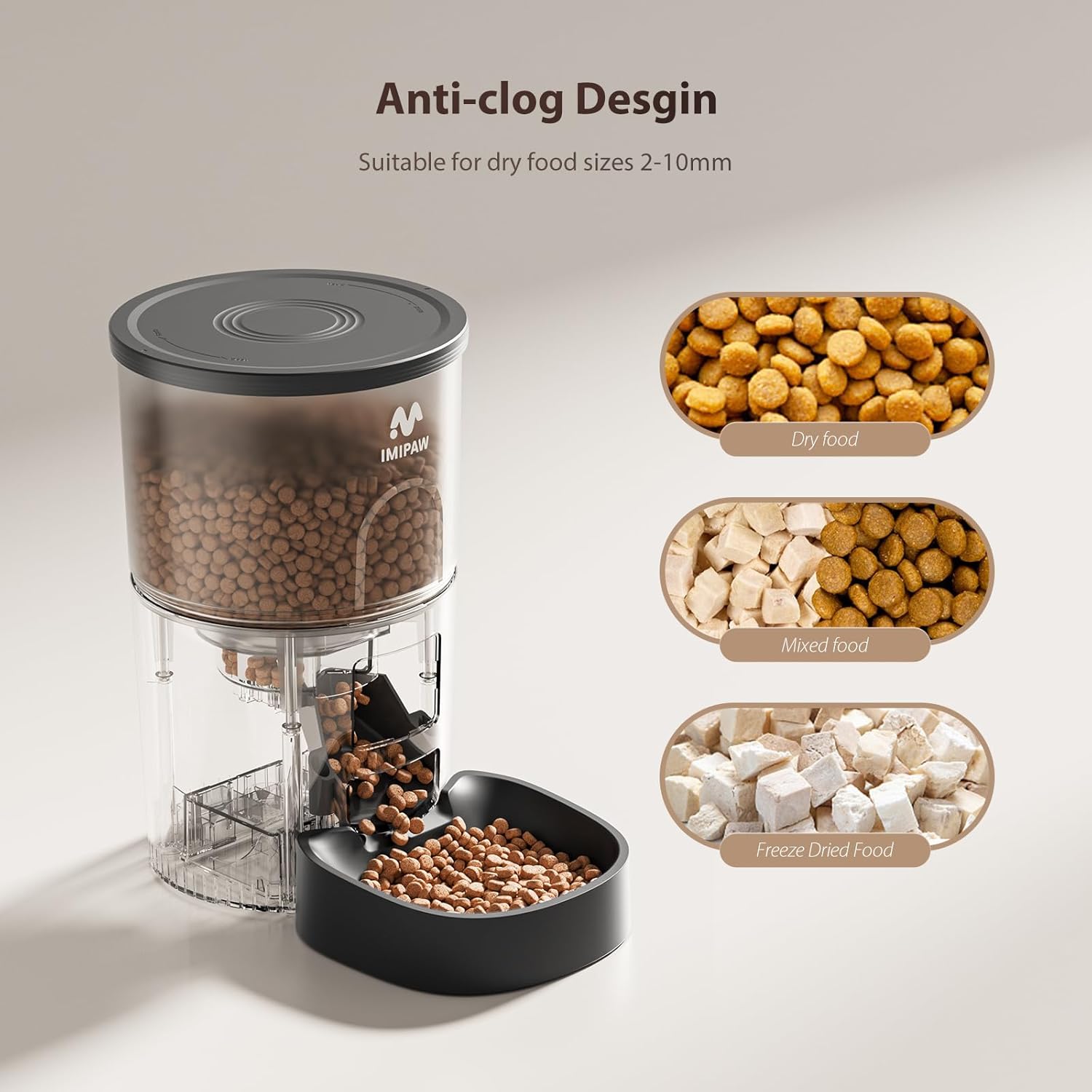
Image: Anti-clog design and suitable food types for the feeder.
4.4 Niðurhal og tenging appsins
The IMIPAW feeder connects via the "PetTech" app. Ensure your home Wi-Fi is 2.4GHz, as 5GHz is not supported.
- Download the "PetTech" app from the App Store (iOS) or Google Play Store (Android).
- Skráðu þig eða skráðu þig inn á reikninginn þinn.
- Gakktu úr skugga um að Bluetooth sé virkt í símanum þínum og hann tengdur við 2.4 GHz Wi-Fi net.
- Plug in the feeder. The indicator light should flash blue, indicating Wi-Fi pairing mode.
- In the app, tap "Add Device" or the "+" icon. The app should automatically discover the feeder.
- Select the feeder, enter your 2.4GHz Wi-Fi network name and password, then confirm.
- Once connected, the indicator light will turn solid blue. You can then customize the device name.

Image: Wi-Fi compatibility for the feeder (2.4GHz only).
Video: IMIPAW Automatic Cat Feeder 5G WiFi - Demonstrates app connection and features.
5. Notkunarleiðbeiningar
5.1 Setting a Feeding Schedule
Use the "PetTech" app to create a customized feeding plan:
- In the app, navigate to the feeder's control interface and select "Meal Plan" or "Feeding Schedule".
- Tap "Add" to create a new feeding time.
- Set the desired feeding time (up to 10 meals per day).
- Choose the days of the week for this meal (e.g., Everyday, Weekdays, Weekends, or specific days).
- Select the number of portions (1-20 portions per meal).
- Save the schedule. You can view feeding logs to ensure meals are dispensed as planned.

Image: Mobile app control for setting feeding schedules.
5.2 Handvirk fóðrun
You can dispense food instantly without affecting the set schedule:
- Í gegnum app: On the feeder's app interface, tap the "Feed Now" or "Manual" button and select the number of portions to dispense.
- Via Feeder: Press the "Feed" button on the feeder's control panel to dispense one portion of food.
5.3 Slow Feed Function
The feeder includes a slow-feed option to prevent pets from eating too quickly:
- Activate the "Slow Feed" setting within the "PetTech" app. This will dispense food in smaller increments over a longer period.
5.4 ViewFóðrunarskrár
To monitor your pet's feeding history:
- In the "PetTech" app, select "Feed Record" from the feeder's main interface to view a log of all dispensed meals.
5.5 Að deila aðgangi að tæki
Allow multiple family members to control the feeder:
- From the feeder's main interface in the app, tap the settings icon (usually a gear or three dots) in the upper right corner.
- Select "Share Device" and follow the prompts to add other users by entering their "PetTech" account details.
5.6 Resetting Settings
To restore the feeder to factory settings:
- On the feeder's control panel, press and hold the "SET" button for approximately 6 seconds until the indicator lights change, signaling a reset.
Video: IMIPAW Automatic Pet Feeder - Demonstrates setup and basic operation.
6. Viðhald og þrif
Regular cleaning ensures hygiene and extends the life of your feeder:
- Í sundur: Remove the feeding bowl, rotate and lift the lid, and detach the food tank from the main unit.
- Þvottur: The food tank, lid, and feeding bowl can be washed with mild soap and water. Rinse thoroughly.
- Þurrkun: Ensure all washable parts are completely dry before reassembling to prevent moisture from affecting the food or electronics.
- Aðaleining: Wipe the main feeder unit (base) with a dry or slightly damp klút. EKKI sökkva aðaleiningunni í vatn.
- Þurrkefni: Replace the desiccant bag every 1-2 months, or as needed, to maintain food freshness.
7. Bilanagreining
- Fóðrari tengist ekki Wi-Fi:
- Gakktu úr skugga um að Wi-Fi netið þitt sé 2.4 GHz. 5 GHz net eru ekki studd.
- Check that the feeder is within range of your Wi-Fi router.
- Staðfestu að Wi-Fi lykilorðið sem slegið var inn í appið sé rétt.
- Reset the feeder to factory settings and try connecting again.
- Matur ekki gefinn út:
- Check if the food tank is empty.
- Ensure the kibble size is appropriate (2-10mm) to prevent jamming.
- Verify that the feeder is powered on (AC or battery backup).
- Clean the food outlet and rotor mechanism for any obstructions.
- Scheduled meals not dispensing:
- Confirm the feeding schedule is correctly set and saved in the app.
- Check the feeder's time setting to ensure it is accurate.
- Ensure the feeder is connected to Wi-Fi and has power.
- Pet accessing food outside of schedule:
- Ensure the lid is securely locked by rotating it to the "CLOSE" position.
- The feeder's control panel can be locked via the app to prevent manual dispensing by curious pets.
8. Tæknilýsing
| Eiginleiki | Smáatriði |
|---|---|
| Vörumerki | IMIPAW |
| Fyrirmynd | Snjall sjálfvirkur gæludýrafóður |
| Mál | 19 x 19 x 40 cm |
| Þyngd | 1.4 kg |
| Efni | Akrýlónítríl bútadíen styren |
| Stærð matartanks | 3.5 lítrar |
| Samhæfni við Kibble stærð | 2-10 mm (dry food only) |
| Fóðrunaráætlun | Up to 10 meals/day, 1-20 portions/meal |
| Aflgjafi | AC Adapter (included) / 3 x D-size Batteries (not included) |
| Tengingar | 2.4GHz Wi-Fi (5GHz ekki stutt) |
| App Control | PetTech App (iOS/Android) |