
Veement GT803
Veement GT803 Dual Dash Cam User Manual
Gerð: GT803
1. Inngangur
The Veement GT803 Dual Dash Cam is designed to provide comprehensive recording of your driving environment, both outside and inside your vehicle. Featuring high-resolution cameras, advanced night vision, and smart connectivity, it ensures critical moments are captured for your safety and peace of mind.
2. Öryggisupplýsingar
- Ensure the dash cam is installed securely and does not obstruct the driver's view eða trufla stjórntæki ökutækis.
- Do not operate the device while driving. Adjust settings only when the vehicle is safely parked.
- Haldið tækinu frá miklum hita, beinu sólarljósi í langan tíma og raka.
- Use only the original car charger provided to prevent damage to the device.
- Ekki reyna að taka tækið í sundur eða gera við það sjálfur. Hafðu samband við þjónustuver til að fá aðstoð.
- Fargið tækinu og íhlutum þess á ábyrgan hátt í samræmi við gildandi reglugerðir.
3. Innihald pakka
Vinsamlegast hakaðu við reitinn fyrir eftirfarandi atriði:
- Veement GT803 Dash Cam Unit
- Car Charger (11 ft)
- 32GB MicroSD kort
- 2 x Límpúðar
- Anti-static Sticker
- Easy Lift Tool
- Flýtileiðarvísir
- Notendahandbók

Mynd: Framan view of the Veement GT803 Dash Cam product box, showing the device and model number.
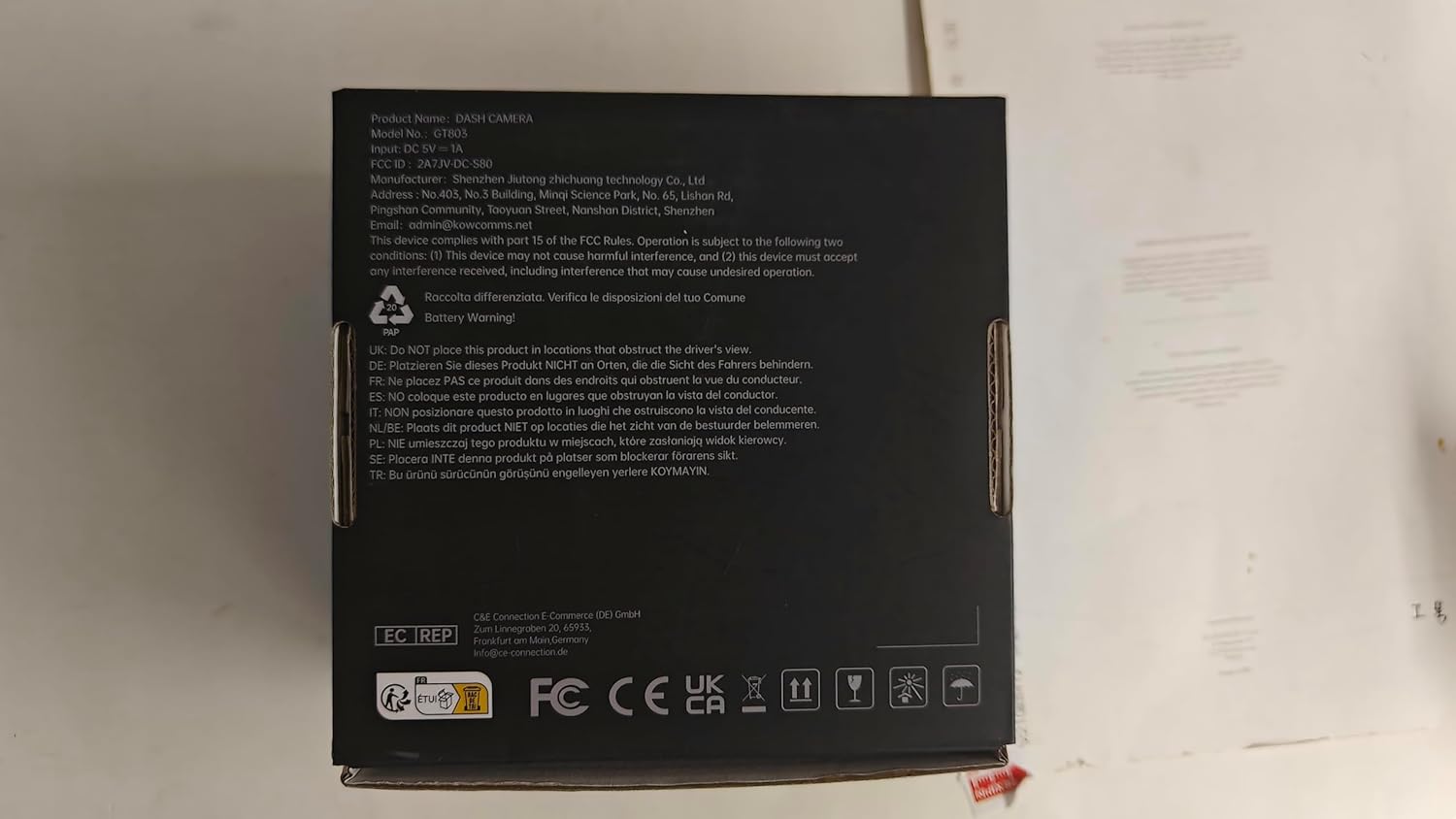
Mynd: Aftur view of the Veement GT803 Dash Cam product box, displaying product information and regulatory marks.
4. Vöru lokiðview
The Veement GT803 is a compact dual-lens dash camera designed for discreet installation. It features a front-facing camera for road recording and an interior-facing camera for cabin monitoring.

Image: The Veement GT803 Dual Dash Cam shown alongside a smartphone, illustrating its compact design and Wi-Fi connectivity with the companion app.
Helstu eiginleikar:
- Tvöfalt myndavélakerfi: 2.5K QHD (2560x1440p) front camera and 1080P Full HD interior camera.
- Breiðlinsur: 165° front view and 160° interior view fyrir alhliða umfjöllun.
- Háþróuð nætursjón: Interior camera equipped with 4 IR LEDs and Wide Dynamic Range (WDR) for clear recordings in low light.
- Innbyggt Wi-Fi: Connects to a smartphone app for live view, video playback, download, and settings adjustment.
- G-skynjari: Automatically detects sudden impacts or collisions and locks the current video footage til að koma í veg fyrir yfirskrift.
- 24 tíma bílastæðaeftirlit: Records motion or impacts when the vehicle is parked (requires hardwire kit, not included).
- Loop Recording: Continuously records by overwriting the oldest unsecured files þegar minniskortið er fullt.
- Fyrirferðarlítil hönnun: Discreetly mounts behind the rearview spegil.
5. Uppsetning
5.1 Að setja upp microSD-kortið
- Gakktu úr skugga um að bílmyndavélin sé slökkt.
- Locate the MicroSD card slot on the side of the GT803 unit.
- Insert the provided 32GB MicroSD card into the slot until it clicks into place. Ensure the correct orientation.
- Til að fjarlægja kortið, ýttu því varlega inn þar til það smellur og slepptu því síðan til að skjóta því út.
5.2 Uppsetning mælaborðsmyndavélarinnar
- Clean the windshield area behind your rearview mirror thoroughly.
- Apply the anti-static sticker to the cleaned area on the windshield. This helps with easy removal and prevents residue.
- Attach one of the adhesive pads to the dash cam mount.
- Press the dash cam firmly onto the anti-static sticker on the windshield, ensuring the lenses have a clear view af veginum og skálanum.
- Stilltu myndavélarhornið eftir þörfum.
5.3 Kveikt á Dash Cam
- Connect the small end of the provided car charger cable to the power input port on the dash cam.
- Plug the larger end of the car charger into your vehicle's 12V power outlet (cigarette lighter socket).
- Route the cable neatly along the windshield edge and trim using the easy lift tool to tuck it under the car's interior trim.
- Mælaborðsmyndavélin kviknar sjálfkrafa á og byrjar að taka upp þegar vél bílsins ræsist.
6. Notkunarleiðbeiningar
6.1 Grunnaðgerð
- Sjálfvirk upptaka: The GT803 automatically starts recording when powered on (engine starts) and stops when powered off (engine turns off).
- Loop Recording: Videos are recorded in segments (e.g., 1, 3, or 5 minutes). When the MicroSD card is full, the oldest unsecured files eru sjálfkrafa yfirskrifuð.
- G-skynjari (neyðarupptaka): In case of a sudden impact or collision, the G-sensor will trigger emergency recording, locking the current video file to prevent it from being overwritten by loop recording.
6.2 Wi-Fi tenging og stjórnun með forritum
The GT803 features built-in 2.4GHz Wi-Fi for seamless connection to your smartphone via a dedicated app. This allows for easy viewað hlaða niður, hlaða niður og deila mattage, as well as adjusting settings.
- Sækja appið: Leitaðu að the "Veement Dash Cam" app on your smartphone's app store (iOS App Store or Google Play Store).
- Virkja Wi-Fi á bílmyndavélinni: Refer to the Quick Start Guide or the app for specific instructions on activating Wi-Fi on the GT803.
- Tengjast Wi-Fi: On your smartphone, go to Wi-Fi settings and connect to the GT803's Wi-Fi network (e.g., "GT803_XXXX"). The default password is usually "12345678" or found in the Quick Start Guide.
- Opnaðu appið: Launch the Veement Dash Cam app. You should now see a live view from the dash cam.
- Aðgerðir apps:
- Live Preview: View rauntíma footage from both front and interior cameras.
- Spilun myndbands: Access recorded videos stored on the MicroSD card.
- Download & Share: Download important video clips directly to your phone and share them as needed (e.g., with police or insurance).
- Stillingar: Adjust various dash cam settings, including video resolution, loop recording duration, G-sensor sensitivity, parking monitor mode, and more.
6.3 Parking Monitor (Optional)
The 24-hour parking monitor feature provides surveillance when your vehicle is parked. It requires a hardwire kit (not included) to ensure continuous power supply from your car battery.
- When enabled and properly hardwired, the dash cam will automatically detect motion or impacts around your parked vehicle and begin recording.
- Time-lapse parking mode records at a lower frame rate (e.g., 1 frame per second) to save storage space while still capturing events.
7. Viðhald
- Hreinar linsur: Hreinsið linsurnar á myndavélinni reglulega með mjúkum, lólausum klút til að tryggja skýra myndgæði. Forðist slípandi efni.
- Viðhald á microSD korti:
- Format the MicroSD card monthly to maintain optimal performance and prevent data corruption. This can usually be done via the dash cam's app settings.
- Replace the MicroSD card every 6-12 months, especially if used frequently, as memory cards have a limited lifespan for continuous recording.
- Uppfærsla vélbúnaðar: Check the Veement website or app periodically for firmware updates. Keeping your dash cam's firmware up-to-date can improve performance and add new features.
- Geymsluskilyrði: Þegar bílmyndavélin er ekki í notkun í langan tíma skal geyma hana á köldum, þurrum stað fjarri beinu sólarljósi.
8. Bilanagreining
| Vandamál | Möguleg orsök | Lausn |
|---|---|---|
| Mælaborðsmyndavélin kviknar ekki. | No power from car charger; faulty charger/cable; loose connection. | Check car charger connection and vehicle's 12V outlet. Try another charger if available. Ensure engine is running. |
| Upptaka stöðvast eða frýs. | MicroSD card full or corrupted; low-quality MicroSD card; firmware issue. | Format the MicroSD card. Use a high-speed (Class 10 or U3) MicroSD card from a reputable brand. Update firmware. |
| Myndgæðin eru léleg/óskýr. | Óhrein linsa; hlífðarfilma enn á linsunni; röng upplausnarstilling. | Hreinsið myndavélarlinsurnar. Fjarlægið allar hlífðarfilmur. Athugaðu stillingar fyrir myndbandsupplausn í appinu. |
| Vandamál með Wi-Fi tengingu. | Rangt Wi-Fi lykilorð; appið ekki uppfært; truflanir. | Verify Wi-Fi password. Ensure the app is the latest version. Try restarting both the dash cam and your phone. |
| G-sensor too sensitive/not sensitive enough. | G-sensor sensitivity setting needs adjustment. | Adjust the G-sensor sensitivity level via the app settings. |
9. Tæknilýsing
| Eiginleiki | Smáatriði |
|---|---|
| Nafn líkans | GT803 |
| Vörumerki | Veement |
| Upplausn myndavélar að framan | 2.5K QHD (2560 x 1440 pixels) |
| Upplausn innanhússmyndavélar | 1080P Full HD |
| Framhliðarmyndavél | 165 gráður |
| Innri myndavélarhorn | 160 gráður |
| Tengingar | Wi-Fi (2.4GHz) |
| Stuðningur við geymslu | MicroSD card up to 256GB (32GB included) |
| Gerð uppsetningar | Aftanview Mirror Mount (Adhesive) |
| Vörumál | 4.2 x 4 x 8.3 cm (1.65 x 1.57 x 3.27 tommur) |
| Þyngd | 250 grömm (0.55 lbs) |
| Innifalið íhlutir | Dash Cam, Car Charger, 32GB MicroSD Card, 2x Adhesive Pads, Anti-static Sticker, Easy Lift Tool, Quick Start Guide, User Manual |
10. Ábyrgð og stuðningur
Veement products are designed for reliability and performance. For warranty information, technical support, or service inquiries, please refer to the contact details provided in your Quick Start Guide or visit the official Veement websíða.
Vinsamlegast geymdu sönnunina þína fyrir kaupum fyrir ábyrgðarkröfur.
For the latest support resources and FAQs, visit: www.veement.com/support (Example link, please refer to actual manufacturer's websíða)
Ask a question about this manual
Ask about setup, troubleshooting, compatibility, parts, safety, or missing instructions. Manuals+ will review the question and use this page’s manual context to help answer it.