
1. Inngangur
The Amazon Echo Dot Kids (5th Gen) is a smart speaker designed for children, offering a screen-free experience with Alexa. It provides access to kid-friendly audio content, educational skills, and interactive experiences, all managed through parental controls. This device is not a toy but a tool to support learning and entertainment in a safe environment.

Image: The Amazon Echo Dot Kids (5th Gen) in a vibrant Rainbow Swirl pattern, positioned on a stack of colorful books.
2. Uppsetning
To set up your Echo Dot Kids, follow these steps:
- Kveikt á: Connect the included glacier white power adapter (15W) to your Echo Dot Kids and plug it into a power outlet.
- Sæktu Alexa appið: Install the Alexa app on a compatible Fire OS, Android, or iOS device. The app is also accessible via a web vafra.
- Tengjast Wi-Fi: Open the Alexa app and follow the on-screen instructions to connect your Echo Dot Kids to your dual-band Wi-Fi network (supports 802.11a/b/g/n/ac on 2.4 and 5 GHz). The device supports Amazon Wi-Fi simple setup for easy connection. Ad-hoc (peer-to-peer) Wi-Fi networks are not supported.
- Link Amazon Kids+ (Optional): Your device includes 1 year of Amazon Kids+. Follow the prompts in the Alexa app or Amazon Kids Parent Dashboard to activate and manage this subscription.
3. Notkunarleiðbeiningar
The Echo Dot Kids is primarily voice-controlled. Here are common operations:
- Vakið orð: Say "Alexa" to activate the device. The light ring will illuminate to indicate it is listening.
- Spila tónlist: Request songs from Amazon Music, Apple Music, Spotify, or Pandora. Explicit lyrics are filtered for age-appropriate listening. Example: "Alexa, play kids' music."
- Stories and Audiobooks: Access thousands of kid-friendly audiobooks and podcasts through Amazon Kids+. Example: "Alexa, tell me a story."
- Fræðsluefni: Engage with interactive conversations, fun facts, and educational Alexa skills. Example: "Alexa, can you quiz me about dinosaurs?"

Image: A child with braided hair sits at a desk, with the Rainbow Swirl Echo Dot Kids nearby, illustrating interaction with Alexa for educational content.
- Creating Stories: Alexa+ allows kids to co-create unique stories by asking about characters and themes. Example: "Alexa, let's create a story together."

Image: A child lies in bed with a plush toy, looking towards an Owl-themed Echo Dot Kids, suggesting bedtime story interaction.
- Routines and Alarms: Set morning alarms and daily routines to support independence. Example: "Alexa, set an alarm for 7 AM."
- Bluetooth tenging: Stream audio from your mobile device to the Echo Dot Kids (A2DP) or from the Echo Dot Kids to a Bluetooth speaker (AVRCP). Bluetooth speakers requiring PIN codes are not supported.
4. Parental Controls and Privacy
The Echo Dot Kids is designed with multiple layers of privacy and parental controls:
- Hnappur til að slökkva á hljóðnema: A physical button on the device allows you to instantly turn off the microphone.
- Streymisvísar: Visual indicators show when Alexa is listening or responding.
- Amazon Kids Parent Dashboard: Use the app to remotely monitor what kids are listening to and creating. You can view and delete voice recordings, manage content, and set daily screen time limits.
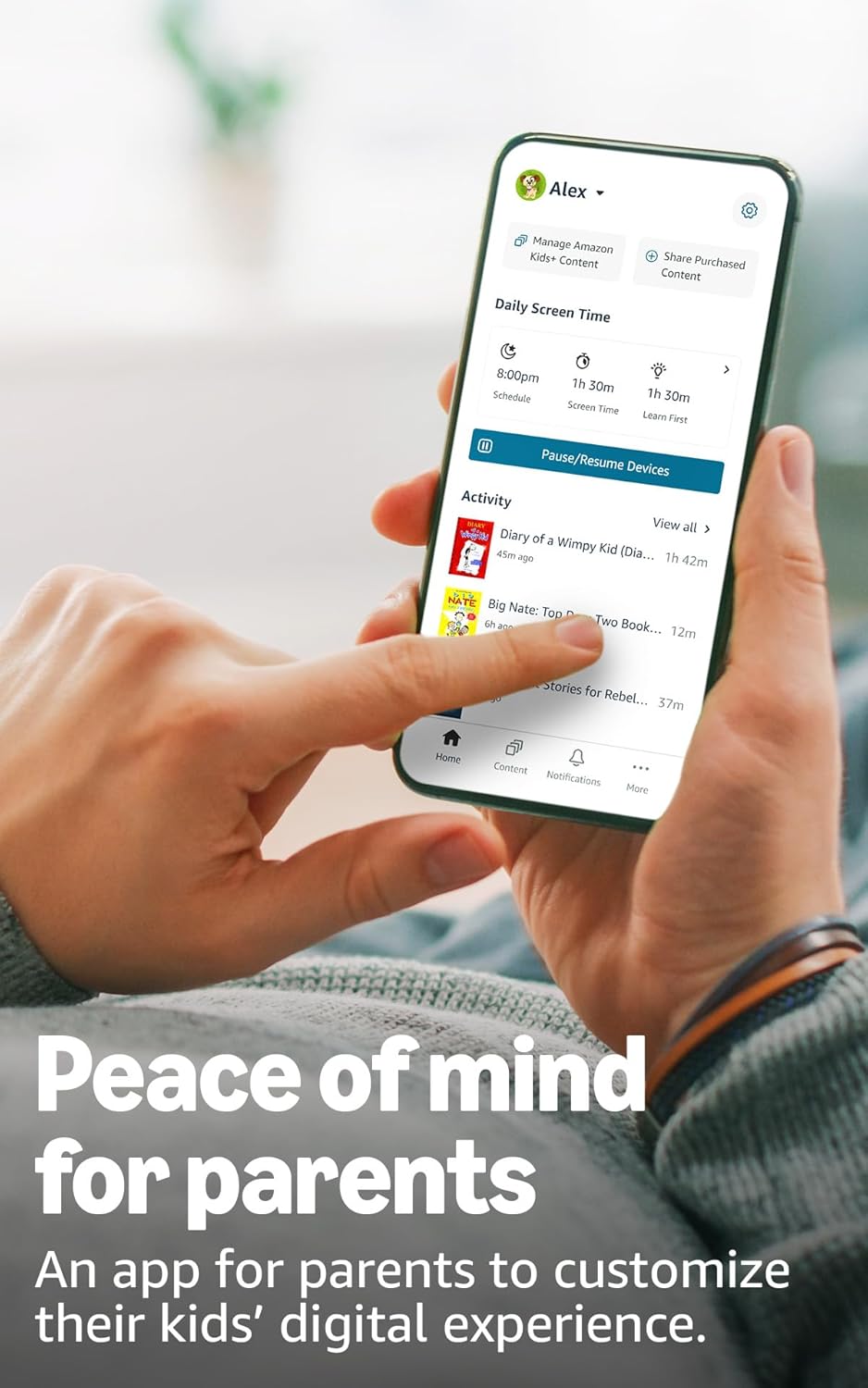
Image: A smartphone displaying the Amazon Kids Parent Dashboard app, showing options for managing content, daily screen time, and activity logs.
- Alexa Privacy Hub: Visit the Alexa Privacy Hub for detailed information on how Alexa and Echo devices protect your privacy.
- Gangstétt á Amazon: This feature uses Echo and Ring devices to securely keep other devices connected. It is turned on by default but can be turned off at any time through the Alexa app.
5. Content and Features
Your Echo Dot Kids comes with a 1-year subscription to Amazon Kids+, offering a wealth of age-appropriate content:
- Hljóðbækur og hlaðvörp: Access popular books from Disney, fiction classics, and ad-free podcasts from Wondery Kids & Family.
- Interactive Games and Skills: Engage with educational Alexa skills and interactive games.
- Ad-Free Radio: Enjoy ad-free radio stations from iHeart Radio Family.

Image: A collage of book and podcast covers, including Disney, Barbie, Audible, and Marvel titles, illustrating the variety of kid-friendly content available through Amazon Kids+.
After the first year, the Amazon Kids+ subscription automatically renews monthly. You can cancel at any time via the Amazon Kids Parent Dashboard or by contacting Customer Service.
6. Viðhald
To ensure the longevity and optimal performance of your Echo Dot Kids:
- Þrif: Gently wipe the device with a soft, dry, lint-free cloth. Do not use abrasive cleaners or solvents.
- Staðsetning: Setjið tækið á stöðugt, slétt yfirborð fjarri beinu sólarljósi, hitagjöfum og raka.
- Rafmagnsbreytir: Notið aðeins upprunalega straumbreytinn sem fylgir tækinu.
7. Bilanagreining
If you encounter issues with your Echo Dot Kids, consider the following:
- Enginn kraftur: Gakktu úr skugga um að rafmagnsmillistykkið sé vel tengd bæði við tækið og virkan rafmagnsinnstungu.
- Engin Wi-Fi tenging: Check your Wi-Fi router and ensure it is working correctly. Restart your router and the Echo Dot Kids. Verify Wi-Fi settings in the Alexa app.
- Alexa svarar ekki: Ensure the microphone is not muted (the light ring will be red if muted). Speak clearly and ensure you are within range of the device.
- Hljóðvandamál: Check the volume level. If connected to a Bluetooth speaker, ensure the speaker is paired and powered on.
- Vandamál með foreldraeftirlit: Review settings in the Amazon Kids Parent Dashboard to ensure content filters and time limits are configured as desired.
- Endurræstu tæki: Unplug the power adapter from the device for a few seconds, then plug it back in to restart.
8. Tæknilýsing
| Eiginleiki | Smáatriði |
|---|---|
| Stærð | 3.9" x 3.9" x 3.5" (100 mm x 100 mm x 89 mm) |
| Þyngd | 10.7 oz (304g) |
| Hljóð | 1.73" (44 mm) framhátalari, taplaus háskerpa |
| Wi-Fi tenging | Dual-band Wi-Fi (802.11a/b/g/n/ac, 2.4 and 5 GHz) |
| Bluetooth tenging | A2DP stuðningur fyrir hljóðstreymi, AVRCP fyrir raddstýringu |
| Snjallheimilisreglur | Wi-Fi, Bluetooth lágorkumótun |
| Kerfiskröfur | Alexa app compatible with Fire OS, Android, iOS, web vafra |
| Innifalið í kassanum | Echo Dot (5th Gen) Kids, glacier white power adapter (15W), Quick Start Guide, Alexa Guide for kids |
| Kynslóð | Echo Dot (5. kynslóð) fyrir börn - útgáfa 2022 |
| Tungumál | Alexa speaks English and Spanish (Spanish not available in Amazon Kids) |
| Aldursbil | 3 ára og eldri (VIÐVÖRUN: KÆFINGARHÆTTA – Smáir hlutar. Ekki ætlað börnum yngri en 3 ára.) |
9. Ábyrgð og stuðningur
Your Echo Dot Kids (5th Gen) is covered by a 2 ára áhyggjulaus ábyrgð. If it breaks, Amazon will replace it for free. For more details on this coverage, please refer to the terms provided at the time of purchase or contact Amazon Customer Service.
Use of Echo Dot Kids is subject to the terms found on the Amazon websíða.
Fyrir frekari aðstoð, heimsækja Amazon Help pages or contact Amazon Customer Service directly.


