
Oakcastle IR200
Oakcastle IR200 Internet Radio User Manual
Gerð: IR200
1. Inngangur
Thank you for choosing the Oakcastle IR200 Internet Radio. This manual provides essential information for the safe and efficient operation of your device. Please read it thoroughly before use and retain it for future reference.
The Oakcastle IR200 is a versatile audio system offering multiple listening options, including Internet Radio, DAB+, FM, Bluetooth 5.3, and AUX input. It features a color display, remote control, and podcast support for a comprehensive audio experience.
2. Innihald pakka
Takið kassann vandlega úr og gangið úr skugga um að allir hlutir sem taldir eru upp hér að neðan séu til staðar og í góðu ástandi:
- Oakcastle IR200 Internet Radio Unit
- Rafmagnssnúra
- Fjarstýring
- Notendahandbók (þetta skjal)
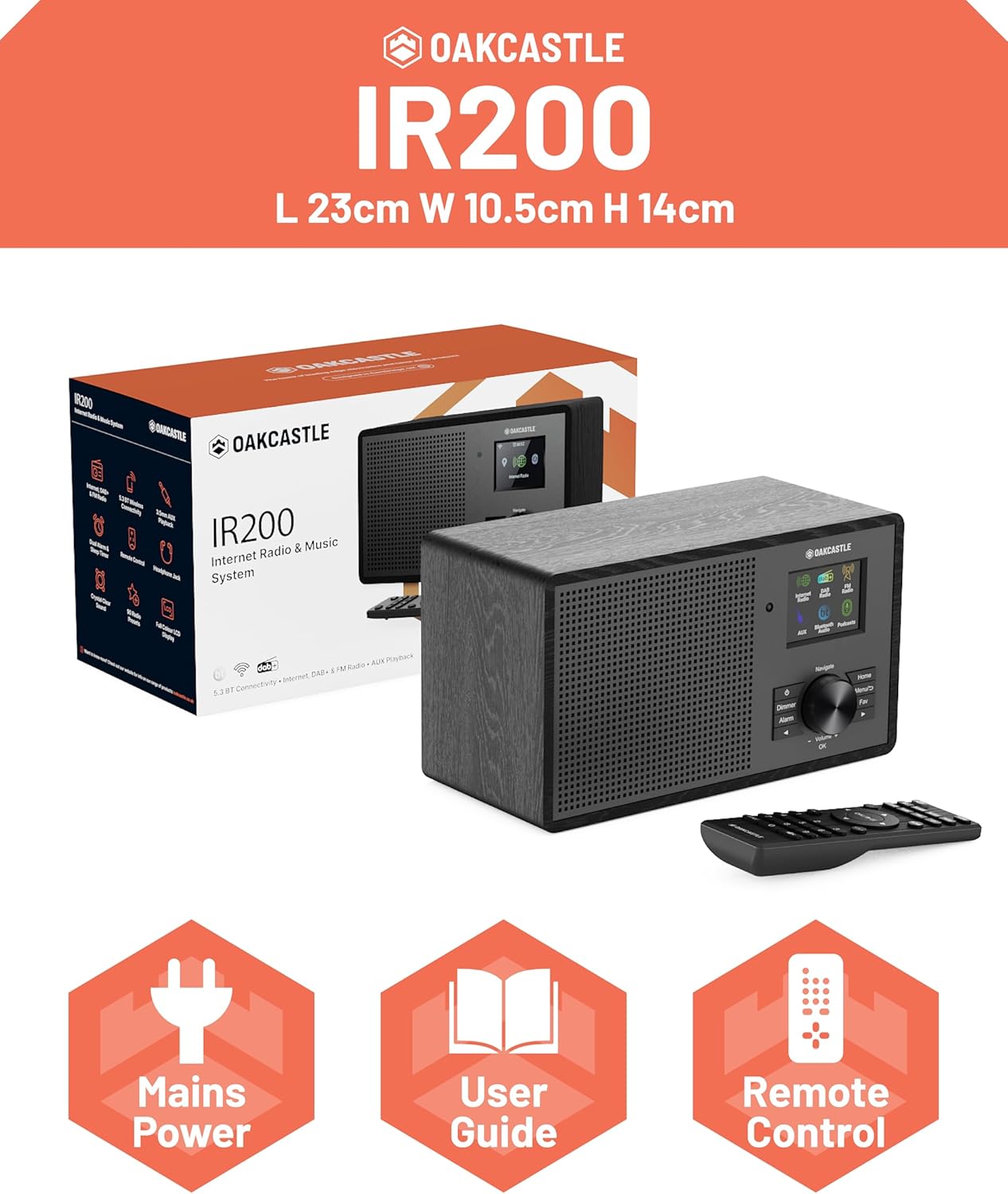
Image 2.1: Contents of the Oakcastle IR200 package, including the radio unit, its box, power cable, remote control, and user manual.
3. Vöru lokiðview
Familiarize yourself with the main components and controls of your Oakcastle IR200 radio.
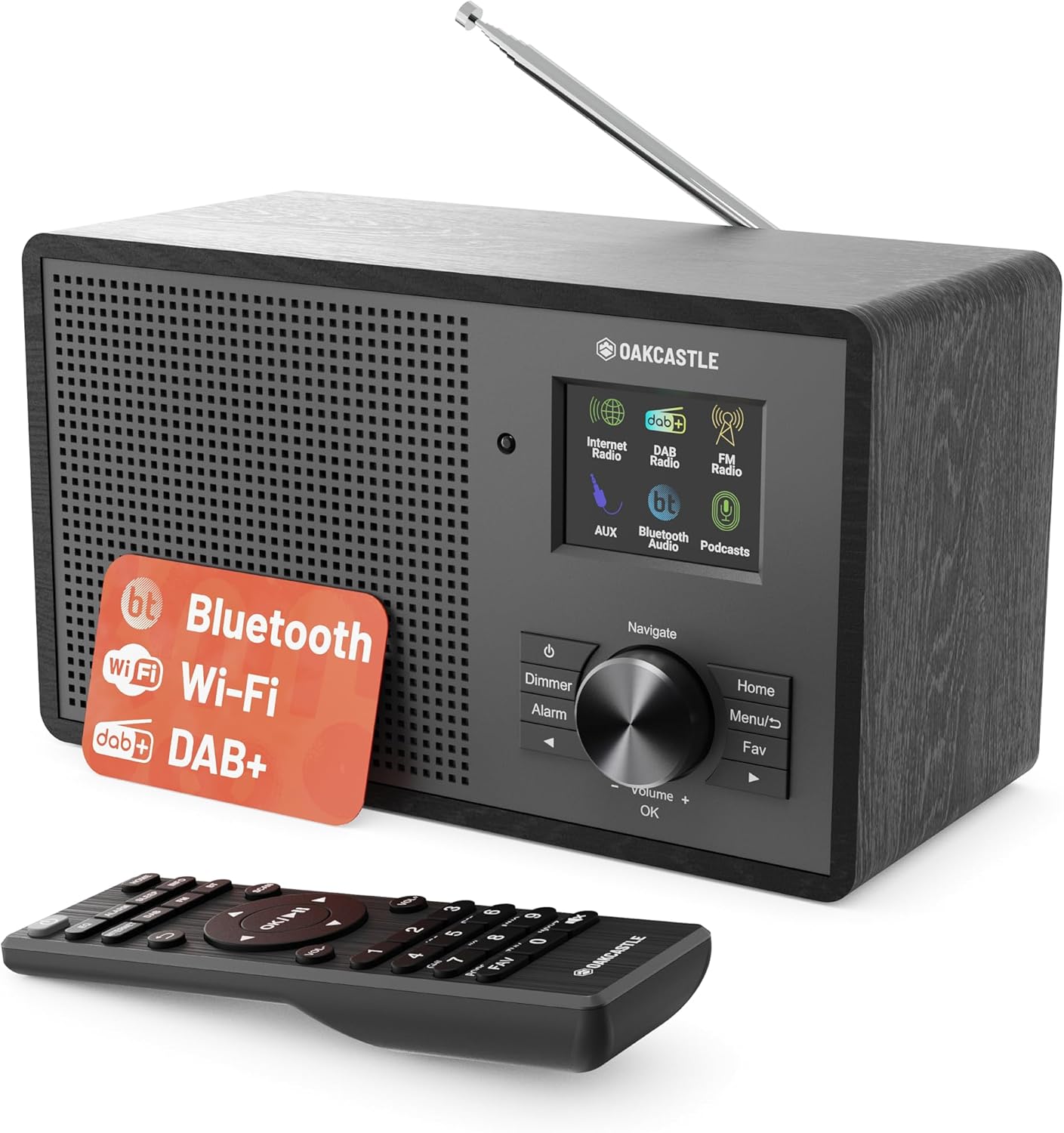
Mynd 3.1: Framan view of the Oakcastle IR200 radio, showcasing the display, control knob, buttons, and the included remote control.
3.1 Stjórnborð á framhlið
- Skjár skjár: Sýnir upplýsingar um stöðvar, tíma og valmöguleika í valmyndinni.
- Navigate/Volume/OK Knob: Rotate to navigate menus or adjust volume; press to confirm selections.
- Aflhnappur: Turns the unit on/off or puts it into standby.
- Dimmer hnappur: Stillir birtustig skjásins.
- Viðvörunartakki: Opnar stillingar fyrir vekjaraklukku.
- Heimahnappur: Farið aftur í aðalvalmyndina.
- Valmyndarhnappur: Accesses mode-specific menus.
- Uppáhaldshnappur: Opnar forstillingar á uppáhaldsstöðvum.
3.2 Tengingar að aftan

Mynd 3.2: Aftan view of the Oakcastle IR200, highlighting the headphone output and AUX input ports.
- Sjónauka loftnet: Fyrir DAB+ og FM móttöku.
- AUX inntak: Tengdu ytri hljóðtæki.
- Útgangur heyrnartóla: Tengdu heyrnartól til að hlusta á einkaaðila.
- DC IN: Tenging fyrir rafmagns millistykki.
4. Upphafsuppsetning
4.1 Rafmagnstenging
- Insert the power cable into the DC IN port on the rear of the radio.
- Plug the other end of the power cable into a wall socket.
- Ýttu á aflhnappinn á framhliðinni eða fjarstýringunni til að kveikja á útvarpinu.
4.2 Stilling loftnets
For optimal DAB+ and FM reception, fully extend the telescopic antenna located at the rear of the unit.
4.3 Network Connection (for Internet Radio)
- Upon first power-on, the radio will guide you through the network setup.
- Select "Network Wizard" or "Wi-Fi Setup" from the menu.
- Útvarpið mun leita að tiltækum Wi-Fi netum. Veldu netið þitt af listanum.
- Enter your Wi-Fi password using the navigation knob and OK button.
- Þegar tengingin er komin birtist staðfestingarskilaboð á útvarpinu.
5. Rekstraraðferðir
The Oakcastle IR200 offers several listening modes. Press the "Home" button to access the main menu and select your desired mode.
5.1 Netútvarp
Access thousands of global radio stations via your Wi-Fi connection.

Image 5.1: The radio's display screen in Internet Radio mode, showing station information.
- Í aðalvalmyndinni skaltu velja „Netútvarp“.
- You can browse stations by location, genre, or search by name.
- Rotate the Navigate knob to scroll through options and press OK to select.
- To save a station as a favorite, press the "Fav" button during playback.
5.2 DAB+ útvarp
Njóttu hágæða stafrænna útvarpsútsendinga.

Image 5.2: The radio's display screen in DAB+ Radio mode, showing the current station.
- From the main menu, select "DAB+ Radio".
- The radio will automatically scan for available DAB+ stations.
- Use the Navigate knob to select a station from the list.
- To save a station as a favorite, press the "Fav" button during playback.
5.3 FM útvarp
Stilltu inn á hefðbundnar hliðrænar FM útsendingar.
- Í aðalvalmyndinni skaltu velja „FM útvarp“.
- To auto-scan for stations, press and hold the OK button or use the scan function via the menu.
- To manually tune, rotate the Navigate knob.
- To save a station as a favorite, press the "Fav" button during playback.
5.4 Bluetooth-tenging
Streymdu hljóði þráðlaust úr Bluetooth-tækjum þínum.

Image 5.3: The radio's display screen in Bluetooth mode, indicating readiness for pairing.
- Í aðalvalmyndinni skaltu velja „Bluetooth“. Útvarpið fer í pörunarstillingu.
- On your external device (e.g., smartphone), enable Bluetooth and search for "Oakcastle IR200".
- Select "Oakcastle IR200" to pair. Once connected, you can stream audio.
5.5 AUX inntak
Tengdu utanaðkomandi hljóðgjafa með 3.5 mm hljóðsnúru.
- Tengdu annan endann á 3.5 mm hljóðsnúru við AUX IN tengið aftan á útvarpinu.
- Tengdu hinn endann við heyrnartólatengið eða hljóðútganginn á ytra tækinu þínu.
- From the main menu, select "AUX".
- Stjórnaðu spilun frá ytra tækinu þínu.
5.6 Podcast
Browse and listen to a wide range of podcasts.
- From the main menu, select "Podcasts".
- Browse podcasts by category or search for specific titles.
- Select a podcast to start listening.
6. Stillingar og eiginleikar
6.1 Kerfisstillingar
Access general system settings via the main menu to configure time, language, display, and more.
- Tími/dagsetning: Set time format, synchronize time.
- Tungumál: Veldu tungumálið sem þú vilt nota fyrir valmyndina.
- Skjár: Adjust backlight, color scheme.
- Net: Reconfigure Wi-Fi settings.
- Hugbúnaðaruppfærsla: Athugaðu hvort uppfærslur á vélbúnaðarforriti séu til staðar og settu upp þær.
6.2 Tónjafnari (EQ)
Customize the audio output to your preference using the equalizer settings, accessible via the remote control or system menu.
6.3 Forstillingar
The radio supports over 90 presets for your favorite Internet, DAB+, and FM stations. To recall a preset, press the "Fav" button and select from the list.
6.4 Viðvörun
Set alarms to wake up to your favorite radio station or a buzzer sound. Access alarm settings via the "Alarm" button on the front panel or remote.
7. Fjarstýring
The included remote control provides convenient access to all radio functions from a distance.
Ensure batteries are correctly inserted. Point the remote control towards the front of the radio for optimal response.
7.1 Aðgerðir fjarstýringar
- Kraftur: On/Off/Standby.
- Bindi +/-: Stilltu hljóðstyrk.
- Leiðsagnarhnappar (upp/niður/vinstri/hægri): Fletta í gegnum valmyndir.
- Allt í lagi: Staðfestu val.
- Mode Buttons (Internet, DAB, FM, Bluetooth, AUX): Skiptu á milli stillinga.
- Preset Buttons (1-90+): Directly select saved favorite stations.
- EQ: Fáðu aðgang að tónjafnarastillingum.
- Matseðill: Access mode-specific menus.
- Uppáhald: Access favorite station list.
8. Viðhald
8.1 Þrif
To clean the radio, use a soft, dry cloth. Do not use abrasive cleaners, waxes, or solvents as these may damage the finish.
8.2 Almenn umönnun
- Haldið tækinu frá beinu sólarljósi, hitagjöfum og raka.
- Forðist að láta tækið detta eða verða fyrir hörðum höggum.
- Tryggðu rétta loftræstingu í kringum eininguna.
9. Bilanagreining
| Vandamál | Möguleg orsök | Lausn |
|---|---|---|
| Enginn kraftur | Power cable not connected; wall socket not active. | Check power cable connection; try a different wall socket. |
| Ekkert hljóð | Hljóðstyrkur of lágur; Hljóðnemi virkjaður; Rangur uppspretta valinn. | Hækka hljóðstyrk; Athuga stöðu hljóðlausrar hljóðnema; Veldu rétta inntaksstillingu. |
| Netútvarp tengist ekki | Incorrect Wi-Fi password; Weak Wi-Fi signal; Router issue. | Re-enter Wi-Fi password; Move radio closer to router; Restart router. |
| Léleg DAB+/FM móttaka | Antenna not extended; Poor signal area. | Fully extend antenna; Reposition radio for better signal. |
| Bluetooth parast ekki | Radio not in pairing mode; Device too far; Device already paired. | Ensure radio is in Bluetooth mode; Move device closer; Unpair from other devices. |
10. Tæknilýsing
| Eiginleiki | Smáatriði |
|---|---|
| Vörumerki | Oakcastle |
| Fyrirmynd | IR200 |
| Litur | Svartur |
| Tengitækni | Wi-Fi, Bluetooth 5.3, AUX |
| Stillingartækni | Netútvarp, DAB+, FM |
| Sérstakir eiginleikar | Bluetooth, EQ, Podcasts, Internet Radio, Remote Control |
| Aflgjafi | Electric Cable (Mains) |
| Vörumál (H x B x D) | 14 cm x 10.5 cm x 23 cm (u.þ.b.) |
| Vöruþyngd | 0.94 kg |
| Samhæf tæki | MP3 spilari, snjallsími, spjaldtölva |
11. Ábyrgð og stuðningur
11.1 Upplýsingar um ábyrgð
The Oakcastle IR200 comes with a standard warranty. An extended 3-year warranty is available upon product registration on the manufacturer's website. Please refer to the warranty card included in your package or visit the official Oakcastle webvefsíðu fyrir nánari upplýsingar.
11.2 Þjónustuver
For technical assistance, troubleshooting, or further inquiries, please contact Oakcastle customer support. Contact details can typically be found on the official Oakcastle websíðunni eða á ábyrgðarkortinu.
Ask a question about this manual
Ask about setup, troubleshooting, compatibility, parts, safety, or missing instructions. Manuals+ will review the question and use this page’s manual context to help answer it.