
Inngangur
Thank you for choosing the RHM L268 Karaoke Machine. This manual provides detailed instructions for setting up, operating, and maintaining your device to ensure optimal performance and enjoyment. The RHM L268 is designed to deliver clear, powerful audio with adjustable bass and treble, supporting up to four microphones and featuring colorful LED lights for an enhanced karaoke experience.
Pökkunarlisti
Vinsamlegast athugið innihald pakkans til að ganga úr skugga um að allir hlutir séu til staðar:
- 1 x RHM L268 Karaoke Machine
- 2 x þráðlausir hljóðnemar
- 1 x straumbreytir
- 1 x Charging Cable for Wireless Microphones
- 1 x Bag for Wireless Microphones
- 1 x Notendahandbók (þetta skjal)

Image: Contents of the RHM L268 Karaoke Machine package.
Uppsetning
1. Rafmagnstenging
Connect the provided power adapter to the karaoke machine's power input and then to a standard electrical outlet. The machine is designed for indoor use and requires continuous power via the adapter.
2. Connecting to a TV (HDMI ARC or Optical)
The RHM L268 offers HDMI and Optical connections for TV audio output. Ensure your TV has an HDMI ARC port for optimal sound transmission. Only one HDMI port on your TV will typically be designated as HDMI ARC.

Image: RHM L268 Karaoke Machine connected to a television, highlighting the HDMI ARC and Optical input ports on the TV.
For detailed instructions on connecting to your TV and configuring sound settings, please watch the following video:
Video: Guide on how to set up the RHM L268 Karaoke Machine if it doesn't work when connecting to a TV, focusing on HDMI ARC and sound settings.
3. Bluetooth-tenging
To connect via Bluetooth, turn on the karaoke machine. Activate Bluetooth on your smartphone, iPad, or tablet and search for "RHM L268". Select it to pair. You can then play music from your device's singing apps through the karaoke machine.

Image: RHM L268 Karaoke Machine demonstrating multiple connection methods including Bluetooth, HDMI, and Optical.
4. Uppsetning hljóðnema
The RHM L268 comes with two rechargeable wireless microphones. These microphones will automatically sync with the karaoke machine when turned on. For optimal performance, keep the microphones within 10 feet of the machine. The wireless microphones take approximately 2 hours to fully charge and provide about 4 hours of play time.
Additionally, the machine features two built-in 6.5mm jacks, allowing you to connect two extra wired microphones (not included) for a total of four singers.

Image: RHM L268 Karaoke Machine supporting up to four microphones, showing two wireless mics and inputs for two wired mics.

Image: Details of the wireless microphones, including charging time and battery life.
Notkunarleiðbeiningar
1. Adjusting Echo Mode
The wireless microphones feature a DSP button to adjust the echo effect. There are three echo modes:
- N1: Longer echo effect.
- N2: Shorter echo effect, suitable for karaoke.
- N3: Flat (no echo), suitable for talking.
Press the DSP button on the microphone to cycle through these modes.
Video: Demonstration on how to adjust the echo settings for the RHM L268 Karaoke Machine's wireless microphones.
2. Adjusting Bass and Treble
You can adjust the bass and treble levels directly using the dedicated knobs on the karaoke machine. This allows you to customize the audio output to your preference for a rich and immersive sound experience.

Image: RHM L268 Karaoke Machine showing the bass and treble adjustment knobs on the control panel.
3. LED lýsingaráhrif
The RHM L268 features built-in LED lights with two lighting modes and seven color-changing options. Press the LED button on the speaker to turn the lights on/off or cycle through the modes. These lights synchronize with the music, enhancing the karaoke atmosphere. They can be turned off at any time if not desired.

Image: RHM L268 Karaoke Machine showcasing its seven colorful LED lighting effects.
Viðhald
- Þrif: Use a soft, dry cloth to clean the exterior of the karaoke machine and microphones. Do not use liquid cleaners or abrasive materials.
- Geymsla: When not in use, store the machine and microphones in a cool, dry place away from direct sunlight and extreme temperatures.
- Umhirða rafhlöðu (hljóðnemar): To prolong battery life, fully charge the wireless microphones before extended storage and recharge them periodically if stored for long periods.
Úrræðaleit
- No Sound from TV (HDMI/Optical):
- Ensure the HDMI cable is connected to the TV's HDMI ARC port.
- Verify that your TV's sound output settings are configured to HDMI ARC and the digital sound out format is set to PCM (not Auto or Pass Through). Refer to the "How to set up if the L268 doesn't work when connecting to TV" video in the Setup section.
- Check that the volume on both the TV and the karaoke machine is turned up.
- Microphone Not Working/Low Volume:
- Ensure the wireless microphones are fully charged.
- Check that the microphones are turned on and within 10 feet of the karaoke machine.
- Adjust the microphone volume knob on the karaoke machine.
- If using wired microphones, ensure they are securely plugged into the 6.5mm jacks.
- Excessive or No Echo:
- Press the DSP button on the wireless microphone to cycle through the echo modes (N1, N2, N3) until the desired effect is achieved. Refer to the "How to adjust the echo for RHM L268 Karaoke Machine" video in the Operating Instructions section.
- Vandamál með Bluetooth-tengingu:
- Ensure the karaoke machine is in Bluetooth mode.
- Slökktu og kveiktu á Bluetooth í tækinu þínu og reyndu síðan að para það aftur.
- Make sure no other devices are currently paired with the karaoke machine.
Tæknilýsing
| Eiginleiki | Smáatriði |
|---|---|
| Vörumerki | RHM |
| Nafn líkans | L268 |
| Tengitækni | HDMI, Optical, Bluetooth |
| Aflgjafi | Rafmagnstengi |
| Uppsetning hátalara | 2 x 15W Tweeters, 1 x 30W Subwoofer (Total 60W) |
| Stuðningur hljóðnemans | 2 Wireless Mics included, supports 2 additional wired mics (6.5mm jacks) |
| Wireless Mic Battery | 500mAh rechargeable, 2 hours charging for 4 hours play time |
| Sérstakir eiginleikar | Adjustable Bass & Treble, Color Changing LED Lights (2 modes, 7 colors) |
| Mál (D x B x H) | 14.88" x 10.43" x 7.76" |
| Þyngd | 13 pund |
| Samhæf tæki | Television, Smartphone, Tablet |

Image: Diagram illustrating the 60W powerful sound components of the RHM L268, including tweeters and subwoofer.
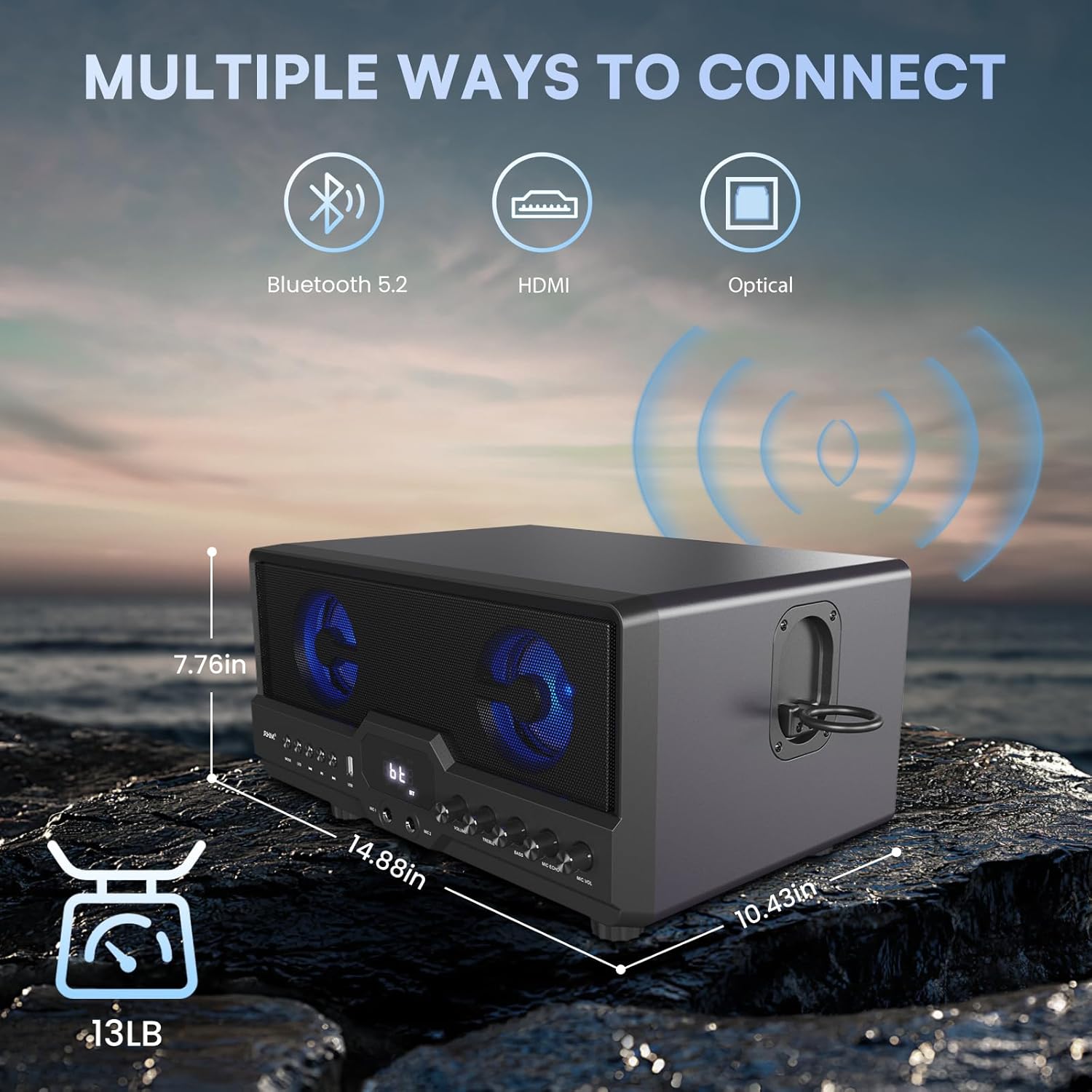
Image: RHM L268 Karaoke Machine displaying its physical dimensions and weight.
Ábyrgð og stuðningur
The RHM L268 Karaoke Machine comes with a 1 árs ábyrgð frá kaupdegi. Þessi ábyrgð nær yfir framleiðslugalla og bilanir við eðlilega notkun. Vinsamlegast geymið kaupkvittunina vegna ábyrgðarkröfu.
For technical support, troubleshooting assistance, or warranty inquiries, please contact RHM customer service through the retailer where you purchased the product or visit the official RHM websíða fyrir upplýsingar um tengiliði.