
Inngangur
This manual provides detailed instructions for the assembly, operation, and maintenance of your Cooler Master Elite 502 White ATX High Airflow Minimalist PC Case. Please read this manual thoroughly before beginning installation to ensure proper setup and optimal performance.
Vara lokiðview
The Cooler Master Elite 502 is an ATX mid-tower PC case designed for high airflow and compatibility with modern components. It features a high-performance mesh front panel and supports a wide range of hardware configurations.
Helstu eiginleikar:
- Samhæfni móðurborðs: Supports ATX and Micro-ATX motherboards.
- GPU úthreinsun: Tekur skjákort allt að 410 mm að lengd.
- Kælistuðningur: Supports up to a 360mm liquid cooler and seven fans for efficient thermal management.
- Útrýming íhluta: CPU coolers up to 170mm height, PSUs up to 170mm length.
- Loftflæðishönnun: Large, unrestricted intake grill for superior airflow.
- Framan I/O: Integrated USB Type-C port.

Figure 1: Motherboard Compatibility. This image illustrates the dimensions for ATX (12.0 in x 9.6 in) and Micro-ATX (9.6 in x 9.6 in) motherboards, demonstrating the case's support for both form factors.

Figure 2: GPU Clearance. Innri view of the case showing the maximum GPU length of 410mm, indicating ample space for high-performance graphics cards.

Figure 3: Cooling Support. This image highlights the areas within the case that support liquid coolers up to 360mm and multiple cooling fans for optimal thermal efficiency.
Uppsetning og uppsetning
Follow these steps for proper assembly of your PC components within the Elite 502 case.
- Undirbúið málið:
Carefully remove the side panels. The tempered glass side panel is typically secured with thumb screws at the rear. The opposite side panel may also use thumb screws or a latch mechanism. Place the case on a stable, flat surface.

Figure 4: Case Interior. An unobstructed view of the case's interior, showing the motherboard tray, drive bays, and cable management cutouts, ready for component installation.
- Setjið upp aflgjafann (PSU):
Mount the PSU into its designated compartment at the bottom rear of the case. Secure it with screws. Ensure proper cable routing through the PSU shroud cutouts.

Figure 5: PSU Shroud. This image displays the ventilated PSU cover, designed to efficiently cool the power supply unit regardless of its orientation.
- Setja upp móðurborðið:
Align your ATX or Micro-ATX motherboard with the standoffs inside the case. Secure the motherboard with screws. Connect the front panel headers (power, reset, USB, audio) to the motherboard. The case includes a USB Type-C port on the front I/O panel.

Figure 6: Front I/O Panel. A ítarlegt view of the integrated USB Type-C port and other front panel connectors, facilitating modern connectivity.
- Setja upp geymsludiska:
Install 2.5-inch SSDs or 3.5-inch HDDs into the designated drive bays. Refer to the case's internal layout for specific mounting points, often located behind the motherboard tray or within the PSU shroud area.
- Setja upp skjákort (GPU):
Insert your graphics card into the appropriate PCIe slot on the motherboard. Secure it with the retention clip and a screw to the case's expansion slots. Ensure the GPU length does not exceed 410mm.
- Setja upp kælibúnað:
Install CPU cooler (up to 170mm height) and any additional case fans or liquid cooling radiators. The case supports up to a 360mm liquid cooler. Ensure fans are oriented for optimal airflow (intake at front/bottom, exhaust at rear/top).

Figure 7: Unrestricted Airflow. This image demonstrates the effective airflow through the front mesh panel, highlighting the case's design for optimal cooling performance.

Figure 8: Large Intake Grill. A ítarlegt view of the front panel's large intake grill, designed to maximize air intake for efficient cooling.
- Kapalstjórnun:
Route all cables neatly behind the motherboard tray using the provided cutouts and tie-down points. This improves airflow and aesthetics.
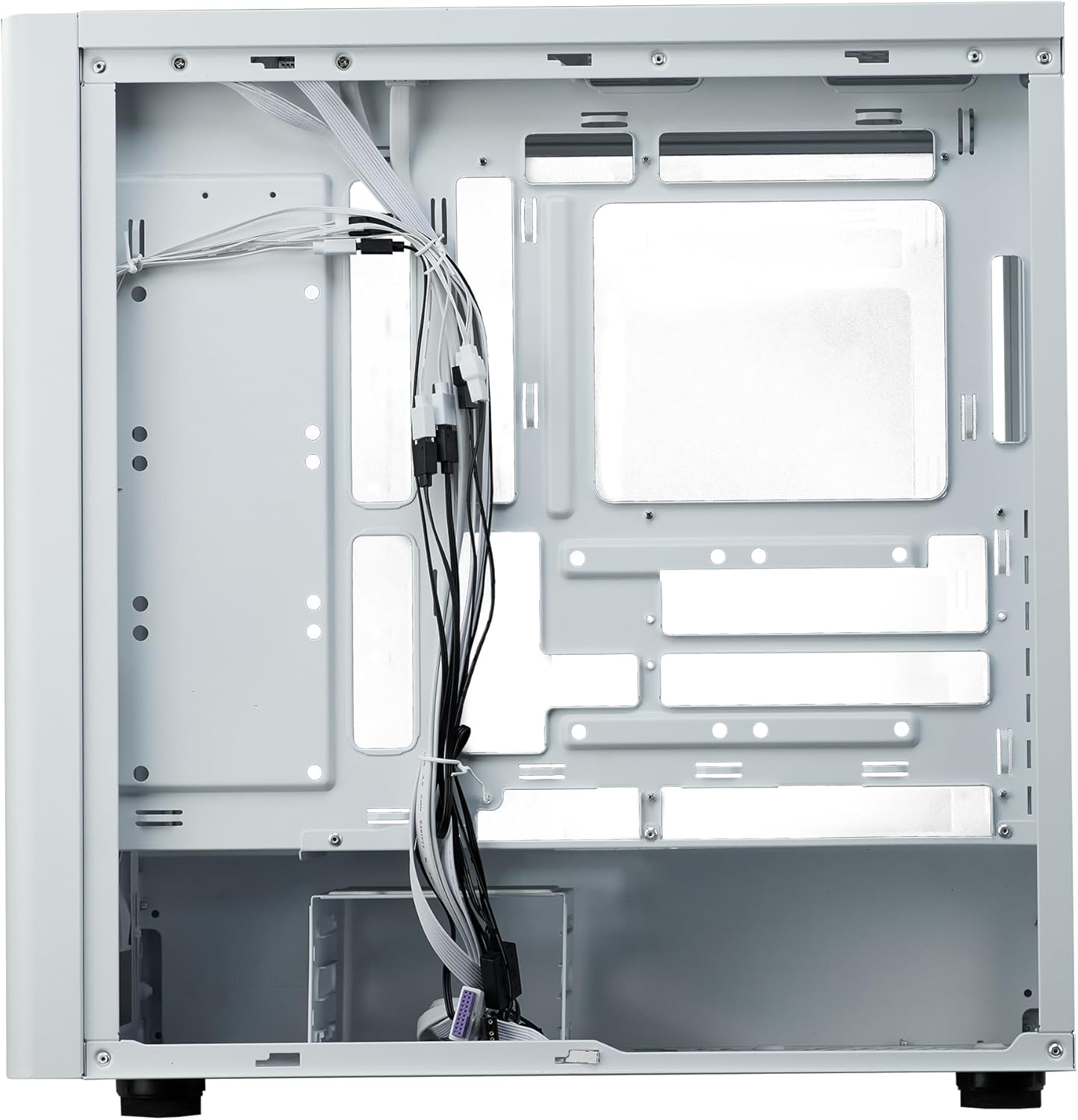
Figure 9: Cable Management. Innri view from the rear side of the case, illustrating the space and tie-down points available for organized cable routing.
- Lokaðu málinu:
Once all components are installed and cables are managed, reattach the side panels. Ensure they are securely fastened.
Notkunarleiðbeiningar
The Cooler Master Elite 502 is designed for continuous operation once components are properly installed. Ensure adequate ventilation around the case to maintain optimal temperatures.
- Kveikt á: Press the power button located on the front I/O panel to start your system.
- Loftflæði: The case's design prioritizes high airflow. Ensure the front mesh panel and any top/rear fan exhausts are not obstructed.
- Tengingar: Utilize the front panel USB ports, including the USB Type-C, for convenient peripheral connections.
Viðhald
Regular maintenance helps ensure the longevity and performance of your PC case and components.
- Rykhreinsun: Periodically clean dust filters (front, top, bottom) to maintain optimal airflow. The front mesh panel is removable for easy cleaning.
- Þrif innanhúss: Notið þrýstiloft til að fjarlægja ryk af innri íhlutum og viftublöðum. Gangið úr skugga um að kerfið sé slökkt og aftengt áður en það er hreinsað.
- Athugun á kapalstjórnun: Occasionally verify that internal cables remain neatly routed and do not obstruct airflow or fan operation.
Úrræðaleit
Ef þú lendir í vandræðum skaltu íhuga eftirfarandi algengar úrræðaleitarskref:
- Enginn kraftur:
Check all power connections, including the PSU to the wall outlet, PSU to motherboard, and front panel power switch header to the motherboard. Ensure the PSU switch is in the 'ON' position.
- Ofhitnun:
Verify all case fans and CPU cooler fans are spinning correctly. Clean any dust filters or internal components that may be obstructing airflow. Ensure proper fan orientation (intake/exhaust).
- USB/hljóð á framhliðinni virkar ekki:
Confirm that the front panel USB and audio headers are correctly connected to the motherboard. Check motherboard manual for correct pin assignments.
- Lausir íhlutir:
If experiencing intermittent issues, power down the system and check that all components (GPU, RAM, storage drives) are securely seated in their slots and properly fastened.
Tæknilýsing
| Eiginleiki | Smáatriði |
|---|---|
| Vörumerki | Cooler Master |
| Nafn líkans | Elite 502 White |
| Tegundarnúmer vöru | E502-WGNN-SAZ |
| Tegund máls | Mid Tower |
| Samhæfni móðurborðs | ATX, Micro ATX |
| GPU úthreinsun | Allt að 410 mm |
| Hæð CPU kælir | Allt að 170 mm |
| PSU lengd | Allt að 170 mm |
| Liquid Cooling Support | Allt að 360 mm ofn |
| Aðdáendastuðningur | Up to 7 fans |
| Fram / I / O höfn | 1x USB 3.0, 1x USB Type-C |
| Efni | Álfelgur, hert gler |
| Litur | Hvítur |
| Þyngd hlutar | 17.73 pund (8.04 kg) |
| Vörumál (LxBxH) | 18.66 x 18.94 x 9.06 tommur (47.4 x 48.1 x 23.0 cm) |

Mynd 10: Stærð vöru. An illustration detailing the length, width, and height of the Cooler Master Elite 502 case.
Ábyrgð og stuðningur
Fyrir upplýsingar um ábyrgð og tæknilega aðstoð, vinsamlegast vísið til opinberu Cooler Master. webvefsíðu eða hafðu samband við þjónustuver þeirra beint. Geymdu kaupkvittunina þína vegna ábyrgðarkröfu.
- Opinber Websíða: www.coolermaster.com
- Þjónustudeild: Vísaðu í stuðningshlutann á opinberu síðunni websíðu fyrir tengiliðaupplýsingar og algengar spurningar.