
1. Inngangur
Thank you for choosing the HUO JI CK608 Mechanical Gaming Keyboard. This full-size 104-key wired keyboard is designed for gaming, office work, and programming, offering a responsive typing experience with linear red switches and customizable rainbow LED backlighting. This manual provides essential information for setting up, operating, and maintaining your keyboard.
2. Uppsetningarleiðbeiningar
- Taktu lyklaborðið upp: Takið lyklaborðið varlega úr umbúðunum. Gangið úr skugga um að allir íhlutir séu til staðar.
- Tengdu USB snúruna: Locate the USB cable attached to the keyboard. Plug the USB connector into an available USB port on your computer or compatible device.
- Plug-and-Play: The keyboard is designed for plug-and-play functionality. Your operating system should automatically detect and install the necessary drivers. No additional software installation is typically required.
- Staðsetning: Place the keyboard on a stable, flat surface. Adjust the integrated feet on the underside of the keyboard for your preferred typing angle.

3. Notkunarleiðbeiningar
3.1 Grunnvirkni lyklaborðsins
The HUO JI CK608 is a full-size 104-key keyboard, including a dedicated numeric keypad (numpad), function keys (F1-F12), and directional keys. All standard typing and input functions operate as expected with a standard keyboard layout.
3.2 Baklýsingastýring
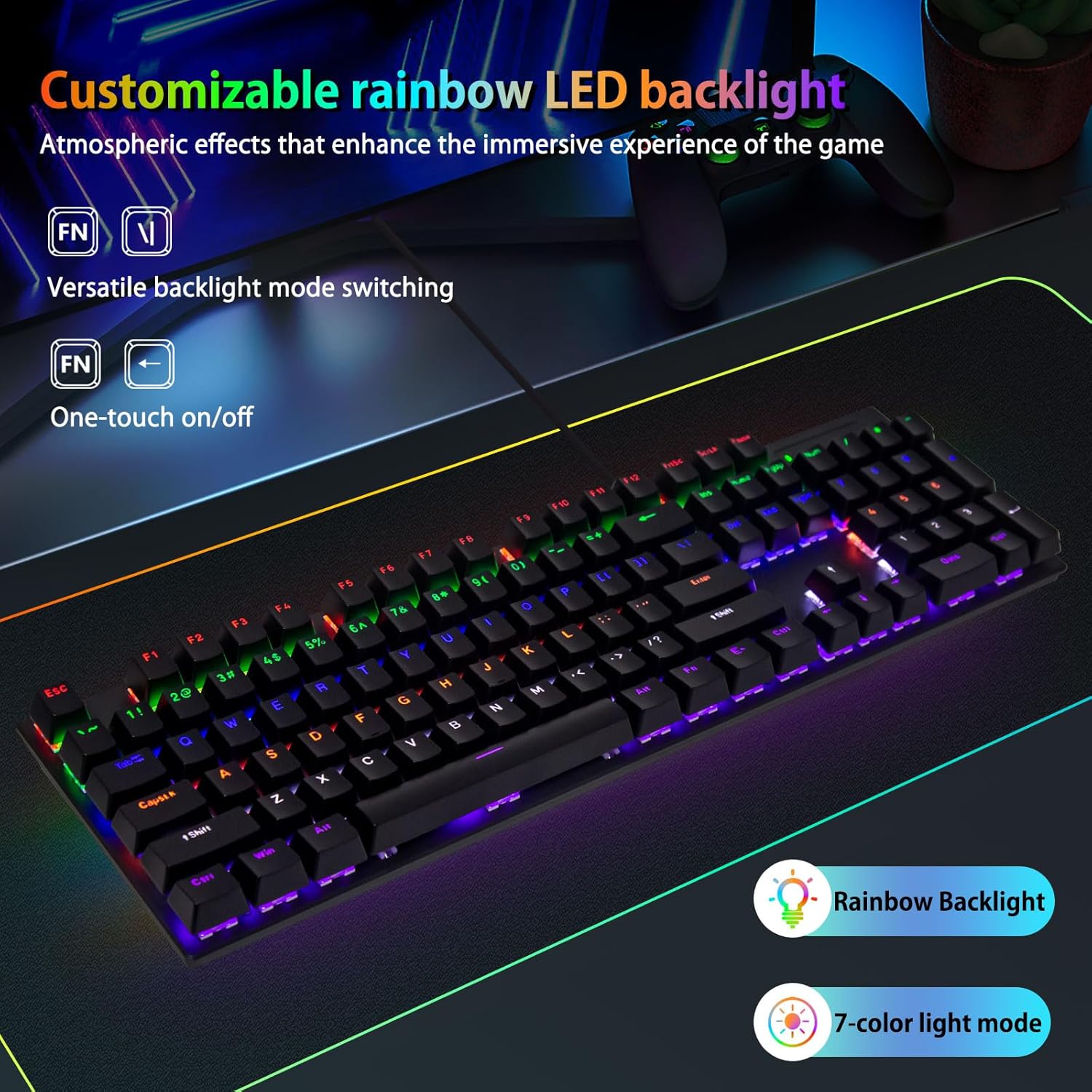
The keyboard features 7 attractive rainbow LED backlight modes. You can easily switch between these modes and control the lighting as follows:
- Switch Backlight Modes: Ýttu á FN lykillinn samtímis | key (located above the Enter key) to cycle through the available backlight modes.
- Kveikja/slökkva ljós: Ýttu á FN lykillinn samtímis ← key (left arrow key) to toggle the backlighting on or off.

4. Helstu eiginleikar
- Full-Size 104 Keys with Numpad: The keyboard features a complete 104-key layout, including a numeric keypad, function keys, and directional keys. This design ensures high operability for various tasks, from gaming to professional work, enhancing efficiency.
- High-Durability Red Switches & Silent Fast Response: Equipped with linear red switches, rated for 50 million keystrokes. These switches offer a short 2.0mm actuation distance and a light 45g actuation force, providing fast, smooth, and quiet keystrokes. The linear feel minimizes fatigue, making it suitable for extended use.
- Beautiful 7-Color Rainbow LED Backlighting: Enjoy 7 distinct backlight modes. Easily switch between them using FN + | and turn the lights off with FN + ←. Dual-shot molded keycaps ensure even light transmission, creating vivid colors that enhance the user experience.
- Vistvæn hönnun: The keyboard incorporates a scientifically designed scissor-step keycap arrangement and a lightweight touch. This ergonomic structure helps maintain a natural hand and finger position, reducing fatigue during long gaming or typing sessions and improving input accuracy and comfort.
- Samhæfni margra tækja: Connects via a USB cable, supporting plug-and-play without the need for drivers. It is compatible with Windows (2000/XP/Vista/7/8/10), Mac OS (some functions may be limited), and PS5/PS4 consoles. It also offers excellent connectivity with desktop PCs, laptops, and Chromebooks.

5. Viðhald
Rétt viðhald tryggir langlífi og bestu mögulegu virkni lyklaborðsins.
- Þrif: Regularly clean your keyboard to prevent dust and debris buildup. Use a soft, dry cloth to wipe the keycaps and chassis. For deeper cleaning, you may use compressed air to remove particles from between the keys. Avoid using harsh chemicals or abrasive materials.
- Forvarnir gegn leka: Keep liquids away from the keyboard to prevent damage. In case of a spill, immediately disconnect the keyboard from your device and allow it to dry completely before reconnecting.
- Kapalumhirða: Avoid bending or twisting the USB cable excessively. Store the cable neatly when not in use to prevent damage.
6. Bilanagreining
If you encounter any issues with your HUO JI CK608 keyboard, please refer to the following troubleshooting steps:
- Lyklaborðið svarar ekki:
- Ensure the USB cable is securely connected to both the keyboard and your device.
- Prófaðu að tengja lyklaborðið við aðra USB tengi á tækinu þínu.
- Test the keyboard on another computer or compatible device to determine if the issue is with the keyboard or the original device.
- Endurræstu tölvuna þína.
- Baklýsing virkar ekki eða er ekki rétt:
- Ensure the backlight is not turned off. Press FN + ← to toggle the lights.
- Cycle through different backlight modes by pressing FN + |.
- Check if the keyboard is receiving sufficient power from the USB port.
- Sérstakir lyklar skrá sig ekki:
- Inspect the affected key for any physical obstructions or debris. Use compressed air to clear any particles.
- Ef vandamálið er viðvarandi skaltu hafa samband við þjónustuver til að fá frekari aðstoð.
7. Tæknilýsing
| Vörumerki | HUO JI |
| Gerðarnúmer | CK608 |
| Tengitækni | USB-C (vírað) |
| Lýsing á lyklaborði | Vélrænn |
| Skiptategund | Línulegur rauður rofi |
| Virkjunarkraftur | 45gf ± 10gf |
| Key Travel | 2.0 mm ± 0.6 mm |
| Baklýsing | 7-Color Rainbow LED |
| Skipulag | Full-Size 104 Keys with Numpad |
| Samhæf tæki | PC (Windows 2000/XP/Vista/7/8/10), Mac OS (limited functions), PS5/PS4 |
| Vörumál | 16.6 x 5.98 x 1.53 tommur |
| Þyngd hlutar | 1.72 pund |
| Efni | Plast |
8. Ábyrgð og stuðningur
Your HUO JI CK608 Mechanical Gaming Keyboard comes with a standard manufacturer's warranty. For specific warranty details, please refer to the documentation included with your purchase or visit the official HUO JI website. If you require technical support or have questions not covered in this manual, please contact HUO JI customer service through their official channels.