
1. Inngangur og yfirview
The Henkion LT-600T is a versatile multifunction network cable tester designed for comprehensive network and cable diagnostics. It integrates various testing capabilities including UTP/STP cable testing, Time Domain Reflectometer (TDR), Digital Multimeter (DMM), Optical Power Meter (OPM), Visual Fault Locator (VFL), Power over Ethernet (PoE) detection, cable tracing, and a suite of network tools. This device is engineered to provide accurate and efficient solutions for network installation, maintenance, and troubleshooting.
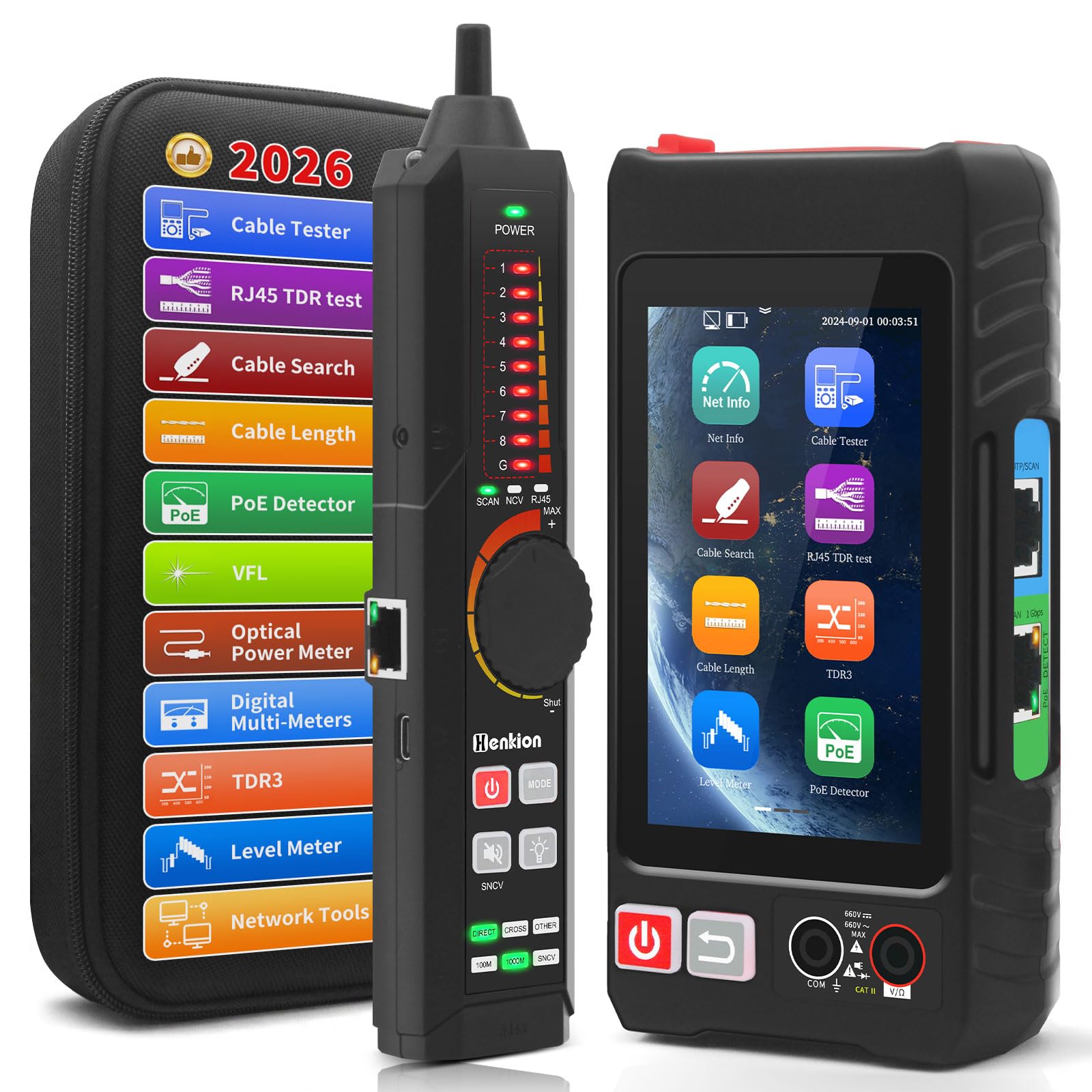
Figure 1: Henkion LT-600T Main Unit and Remote Receiver
The main unit features a 4-inch IPS touch screen for intuitive operation, while the remote unit assists in various cable tests. The LT-600T is equipped with rechargeable lithium-ion batteries for extended use in the field.
2. Vörueiginleikar
The LT-600T offers a wide array of functionalities:
- UTP/STP Cable Tester & Tracer: Checks wire sequence, cable type, and detects faults (near-end, mid-span, far-end) for RJ45 connectors. The digital cable tracer identifies target cables (BNC, network, telephone, metallic) and rejects noise.
- Digital Multimeter (DMM): Auto-ranging measurement of voltage, resistance, and continuity with isolation protection.
- Optical Power Meter (OPM): Tests signal power and insertion loss for various fiber optic components across wavelengths (850/1300/1310/1490/1550/1625nm) with a measurement range of -70 to +10 dBm.
- Visual Fault Locator (VFL): Class 2, 650nm wavelength, <1mW power for detecting fiber optic line breaks, cracks, and bends.
- PoE++ Detection: Supports IEEE 802.3BT/AT/AF and non-standard PoE protocols, displaying supply voltage, power pins, and pin polarity.
- Network Tools: Includes IP discovery, IP scanning, PING testing, LLDP/CDP detection, port flashing, and PPPoE dial-up.
- TDR (Time Domain Reflectometer): Locates breaks and short circuits in cables up to 1200 meters (3937 feet).
- Stigmælir: Measures peak level, sync level, and burst level of video signals for coaxial camera systems.
- RJ45 TDR Cable Test & Length Measurement: Tests pair status, length, attenuation, reflectivity, impedance, and skew for cables up to 180 meters (590 feet). Measures open circuits in network cables up to 3000 meters.
- Display & Battery: 4-inch IPS touch screen with 800*480 resolution. Emitter: 3.7V 4000mAh lithium-ion rechargeable battery (approx. 6 hours working time). Receiver: 3.7V 2000mAh lithium-ion rechargeable battery (approx. 12 hours working time).
3. Uppsetning
3.1. Upppakkning og innihald pakkans
Carefully unpack the device and verify all components are present. Refer to the packing list below:

Figure 2: Rechargeable Cable Tester and Packing List
- Handbók x1
- Type-C kapall x1
- RJ45 to BNC connector x1
- Skrúfjárn x1
- Snúra x1
- Tool Bag x1
- Host x1 (Main Unit)
- Móttökutæki x1
- BNC alligator clip x1
- RJ45 cable x1
- RJ11 cable x1
- Multimeter test cable x1
- Pökkunarkassi x1
3.2. Hleður tækið
Before first use, fully charge both the main unit and the receiver. Connect the provided Type-C cable to the charging port on each device and to a suitable USB power adapter (not included).
- Main Unit (Host): Features a 3.7V 4000mAh lithium-ion battery, providing approximately 6 hours of working time.
- Móttökutæki: Features a 3.7V 2000mAh lithium-ion battery, providing approximately 12 hours of working time.
3.3. Kveikt/slökkt
Press and hold the power button on the main unit to turn it on or off. The receiver typically powers on automatically when connected or when its tracing function is activated.
4. Notkunarleiðbeiningar
The LT-600T features a 4-inch IPS touch screen for navigation and displaying test results. The main interface provides access to various testing functions.

Figure 3: LT-600T Main Unit and Receiver Details
4.1. UTP Cable Test
This function tests the continuity and wiring sequence of UTP/STP RJ45 cables. It can detect faults at the near-end, mid-span, or far-end.
- Connect one end of the RJ45 cable to the 'RJ45 Network Port' on the main unit and the other end to the 'UTP Cable Test Port' on the receiver.
- On the main unit's touch screen, navigate to the 'Cable Tester' or 'UTP Test' function.
- The screen will display the connection sequence, cable type (e.g., 1000/100M), and identify any faults.

Figure 4: UTP Cable Test Interface and Results
The display will indicate if a core is faulty or if there is a breakpoint, specifying the location if possible.
4.2. TDR Cable Test
The TDR function is used to locate breaks and short circuits in various cables, including BNC, network, telephone, and RV cables.
- Connect the cable to be tested to the appropriate TDR port on the main unit (e.g., BNC for coaxial cables).
- Select the 'TDR' function from the main menu.
- Initiate the test. The device will display a graph and the distance to any detected fault. The maximum measurement range is 1.2 km (3937 feet).

Figure 5: TDR Cable Test and Level Meter Interfaces
4.3. Level Meter
This function measures the peak level, sync level, and burst level of video signals, useful for coaxial camera systems.
- Connect the coaxial video cable to the BNC port on the main unit.
- Select the 'Level Meter' function.
- The screen will display the measured levels and allow for parameter settings (e.g., TVI, AHD, CVI, CVBS PAL).
4.4. VFL Optical Power Meter (OPM)
The OPM measures signal power and insertion loss in fiber optic cables, while the VFL helps locate breaks and faults.
- For OPM, connect the fiber optic cable to the OPM port. Select the 'OPM' function and choose the appropriate wavelength.
- For VFL, connect the fiber optic cable to the VFL port. Activate the VFL function to emit a red laser light, which will be visible at breaks or faults.

Figure 6: VFL and OPM Functionality
4.5. Digital Multimeter (DMM)
The integrated DMM allows for basic electrical measurements.
- Connect the multimeter test leads to the DMM ports on the main unit.
- Select the 'Digital Multi-Meter' function.
- Choose the desired measurement mode (DC/AC voltage, DC/AC current, resistance, continuity, diode, capacitance). The device features auto-ranging.

Figure 7: Digital Multimeter and PoE Detect Interfaces
4.6. PoE Detect
This function identifies Power over Ethernet (PoE) presence and details.
- Connect the network cable from the PoE source to the 'PD Powered Test Port' on the main unit.
- Select the 'PoE Detect' function.
- The screen will display the PoE protocol (e.g., IEEE 802.3BT/AT/AF), supply voltage, power pins, and pin polarity.
4.7. Cable Tracer
The cable tracer helps identify specific cables within a bundle.
- Connect the cable to be traced to the main unit (e.g., RJ45 Network Port).
- Activate the 'Cable Search' or 'Cable Tracer' function on the main unit.
- Use the receiver unit to scan the cable bundle. The receiver's LED indicators and audio tone will guide you to the target cable. The device is designed to reject noise and false signals.

Figure 8: Cable Tracer, RJ45 TDR Test, and Cable Length Functions
4.8. RJ45 TDR Test
This test provides detailed analysis of RJ45 network cables, including pair status, length, attenuation, reflectivity, impedance, and skew.
- Connect the RJ45 cable to the main unit's RJ45 port.
- Select the 'RJ45 TDR Test' function.
- Initiate the test. The screen will display detailed parameters for each pair. This test is effective for cables up to 180 meters (590 feet).
4.9. Lengdarmæling snúru
Measures the length of network cables and can detect open circuits.
- Connect the network cable to the main unit's RJ45 port.
- Select the 'Cable Length' function.
- The device will measure and display the cable length. It can measure open circuits up to 3000 meters with an accuracy of ±1m.
4.10. Port Flashing
This feature helps quickly identify the port of an Ethernet switch or other connected devices.
- Connect the main unit to a network port on a switch or device.
- Select the 'Port Flashing' function.
- The corresponding port's LED on the connected switch will flash, allowing for easy identification.

Figure 9: Port Flashing and Network Tools Interfaces
4.11. Netverkfæri
The LT-600T includes a suite of network diagnostic tools:
- IP uppgötvun: Scans the network to find active IP addresses.
- IP Scanning: Performs a detailed scan of specified IP ranges.
- PING Testing: Tests network connectivity and latency to a target IP address.
- LLDP/CDP Detection: Detects Link Layer Discovery Protocol (LLDP) and Cisco Discovery Protocol (CDP) information from connected devices.
- PPPoE Dial-up: Supports PPPoE connection testing.
5. Viðhald
5.1. Þrif
Þurrkið tækið með mjúkum, þurrum klút. Notið örlítið þurran klút til að fjarlægja þrjósk óhreinindi.amp cloth with mild soap, then dry thoroughly. Do not use abrasive cleaners or solvents.
5.2. Umhirða rafhlöðu
Til að lengja líftíma rafhlöðunnar:
- Forðastu að tæma rafhlöðuna alveg oft.
- Hladdu tækið reglulega, jafnvel þótt það sé ekki í notkun, til að viðhalda heilbrigði rafhlöðunnar.
- Geymið tækið á köldum, þurrum stað þegar það er ekki í notkun í langan tíma.
5.3. Geymsla
Store the LT-600T and its accessories in the provided tool bag in a clean, dry environment away from direct sunlight, extreme temperatures, and corrosive substances.
6. Bilanagreining
If you encounter issues with your LT-600T, consider the following common troubleshooting steps:
- Kveikir ekki á tækinu: Ensure the battery is charged. Connect the Type-C cable and attempt to power on while charging.
- Ónákvæmar niðurstöður prófunar: Check all cable connections for proper seating. Ensure the correct test mode is selected for the cable type. Calibrate the device if a calibration option is available for the specific test.
- Snertiskjárinn svarar ekki: Reyndu að endurræsa tækið. Ef vandamálið heldur áfram skaltu ganga úr skugga um að skjárinn sé hreinn og þurr.
- Cable tracer not detecting: Verify the cable is properly connected to the main unit. Adjust the sensitivity knob on the receiver. Ensure there isn't excessive electromagnetic interference in the environment.
For persistent issues, refer to the official Henkion support resources or contact customer service.
7. Tæknilýsing
| Eiginleiki | Forskrift |
|---|---|
| Gerðarnúmer | LT-600T |
| Viðeigandi kaplar | UTP/STP/RJ45/RJ11, BNC, Network, Telephone, RV cable |
| Skjár | 4-inch IPS Touch Screen, 800*480 resolution |
| TDR Measurement Range | Max 1.2 km (3937 ft) |
| RJ45 TDR Cable Test Range | Allt að 180 metra (590 fet) |
| Lengdarmæling snúru | Up to 3000 meters (open circuits), Accuracy: ±1m |
| Optical Power Meter Wavelengths | 850/1300/1310/1490/1550/1625nm |
| Optical Power Meter Range | -70 ~ +10 dBm |
| Sjónvilluleitari | Class 2, Power <1mW, Wavelength: 650nm |
| PoE stuðningur | IEEE 802.3BT/AT/AF and non-standard PoE |
| Rafhlaða aðaleiningarinnar | 3.7V 4000mAh Lithium-ion (approx. 6 hours working time) |
| Móttökurafhlaða | 3.7V 2000mAh Lithium-ion (approx. 12 hours working time) |
| Dimensions (Emitter) | 150x86x40mm (5.91x3.39x1.57inch) |
| Net Weight (Emitter) | 0.3 kg (0.66 lbs) |
| Mál (móttakari) | 210x40x25mm (8.26x1.57x0.98inch) |
| Net Weight (Receiver) | 0.13 kg (0.3 lbs) |
| Vottanir | CE, ETL, RoHS |
8. Ábyrgð og stuðningur
Henkion products are designed for reliability and performance. For warranty information, technical support, or service inquiries, please refer to the contact details provided with your purchase or visit the official Henkion websíða. Vinsamlegast geymið kaupkvittunina vegna ábyrgðarkröfu.