
1. Yfirview
The Element 32-inch 720p HD Xumo Smart TV offers reliable performance and smart functionality in a compact design. Ideal for smaller spaces such as kitchens, dorm rooms, guest rooms, or offices, this television combines a clear HD display with a versatile smart platform and modern connectivity options.
Key features include a 720p resolution display, a 120Hz effective refresh rate for smooth motion, and the integrated Xumo OS for access to numerous streaming applications and free live channels. Connectivity is robust with multiple HDMI ports, USB, LAN, Bluetooth, and Apple AirPlay support. The TV also comes with a voice remote for convenient navigation.
2. Hvað er í kassanum
Upon unboxing your Element 32-inch Xumo Smart TV, please ensure all the following components are present:
- 32-inch Element Xumo TV
- Voice Remote + 2 AAA batteries
- TV Stand & Screws
- Flýtileiðarvísir

Image: The contents of the TV box, showing the 32-inch television, its remote control, two stand feet, and a bag of screws for assembly. Dimensions of the TV are also displayed.
3. Uppsetning
3.1 Festing sjónvarpsstandsins
- Leggið sjónvarpsskjáinn varlega með niður á mjúkan, hreinan flöt til að koma í veg fyrir rispur.
- Stilltu fótunum á hvorn stand við samsvarandi skrúfugöt neðst á sjónvarpinu.
- Secure each stand foot using the provided screws. Ensure they are tightened firmly but do not overtighten.
- Lyftu sjónvarpinu varlega upp og settu það á stöðugt, slétt yfirborð.
Alternatively, the TV supports VESA mounting for wall installation (wall mount hardware sold separately).
3.2 Rafmagnstenging
Connect the power cord to the TV's power input and then plug it into a standard electrical outlet. A pilot light on the TV will indicate that it is receiving power.
3.3 Initial Setup (Xumo OS)
Þegar sjónvarpið er fyrst kveikt á mun það leiða þig í gegnum upphafsuppsetningarferlið. Þetta felur í sér:
- Val á tungumáli: Veldu valið tungumál.
- Nettenging: Connect the TV to your home Wi-Fi network or via an Ethernet cable.
- Xumo OS Account Setup: Follow on-screen prompts to set up or log in to your Xumo OS account. This is necessary to access smart features and apps.
- Rásaskönnun: If connecting an antenna, the TV will scan for available channels.

Image: The Element 32-inch Xumo Smart TV is shown on a wooden TV stand, displaying its smart interface with various streaming app icons.
4. Tengingar
The Element Xumo Smart TV provides a variety of ports for connecting external devices:
- HDMI tengi (3): Connect high-definition devices such as Blu-ray players, gaming consoles, or cable/satellite boxes. One HDMI port supports eARC (enhanced Audio Return Channel) for simplified audio connections to compatible soundbars or AV receivers.
- USB tengi (1): Tengdu USB geymslutæki við view myndir, spila tónlist eða horfa á myndbönd.
- LAN (Ethernet) tengi: Fyrir snúrubundið internettengingu.
- Audio Out (Optical) / Headphone Jack: Til að tengja ytri hljóðkerfi eða heyrnartól.
- Composite Input / Analog Tuner: For connecting older devices or an antenna.
5. Að stjórna sjónvarpinu
5.1 Fjarstýring
The included voice remote allows for intuitive control of your TV. It features dedicated buttons for popular streaming services and a microphone for voice commands.
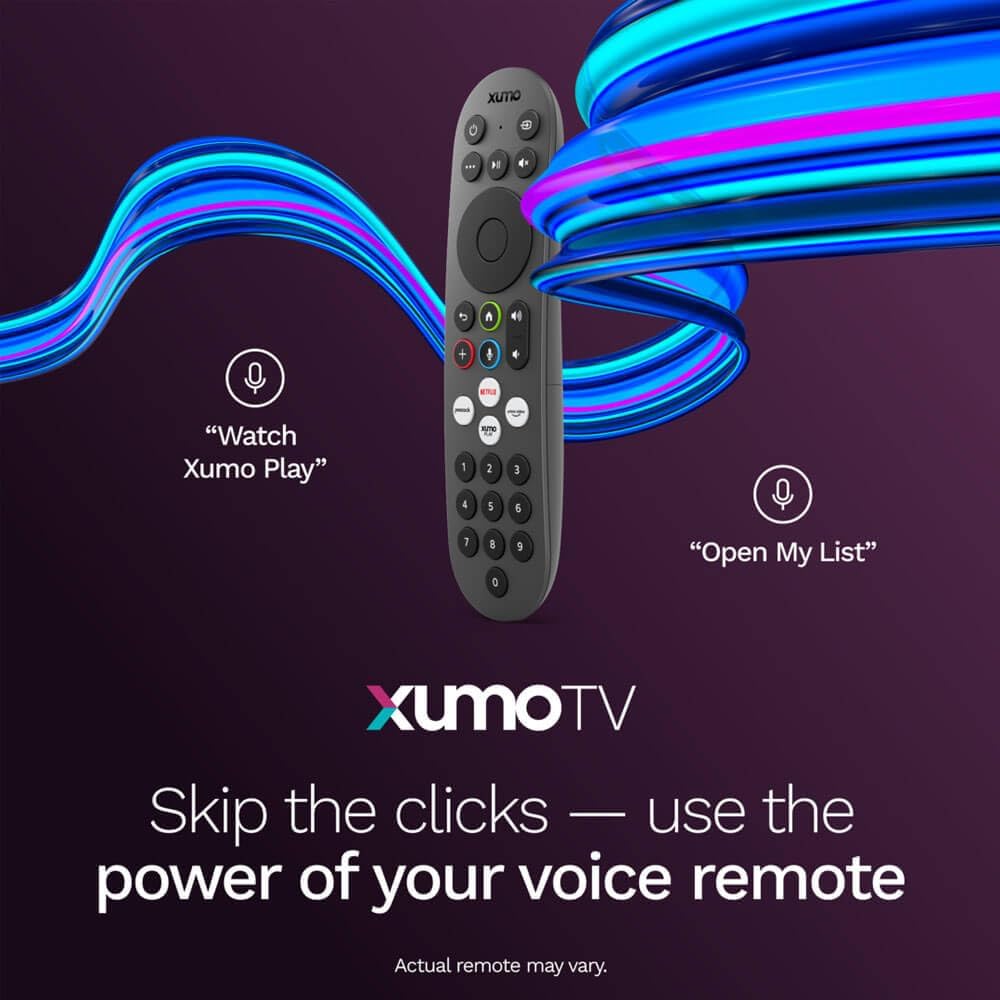
Image: A close-up of the Element Xumo Smart TV voice remote, highlighting its various buttons including a microphone for voice commands and quick access buttons for streaming services.
5.2 Smart Features & Streaming (Xumo OS)
The Xumo OS provides access to over 250 preloaded apps and more than 750 free live channels. You can:
- Search Content: Use the unified search function to find content across all your installed apps.
- My List: Curate your personal watchlist for easy access to your favorite shows and movies.
- Free On-Demand Libraries: Explore a wide selection of free on-demand content.
- Raddstýring: Use the voice remote to navigate, search, and control your TV hands-free.

Image: The Xumo TV interface showing a selection of popular streaming applications and content recommendations.
5.3 Mynd- og hljóðstillingar
Your TV delivers a crisp 720p HD display with a 120Hz effective refresh rate, minimizing motion blur for clear visuals. Dolby Audio processing enhances the sound experience. You can adjust picture and sound settings via the TV's menu to suit your preferences.
- Myndastillingar: Select from various preset picture modes (e.g., Standard, Vivid, Movie, Sports) or customize settings like brightness, contrast, and color.
- Hljóðstillingar: Choose from different sound modes (e.g., Standard, Music, Movie, Speech) or adjust bass and treble levels.
5.4 Apple AirPlay & Home Support
Seamlessly stream content or mirror your screen from your iPhone, iPad, or Mac directly to your Element TV using Apple AirPlay. With Apple Home support, you can integrate your TV into your Apple smart home ecosystem for convenient control.
6. Viðhald
To ensure the longevity and optimal performance of your Element Xumo Smart TV, follow these maintenance guidelines:
- Að þrífa skjáinn: Þurrkaðu skjáinn varlega með mjúkum, þurrum og lólausum klút. Ef þrjósk blettir eru til staðar skaltu þurrka létt.ampÞurrkið klútinn með vatni eða sérstakri hreinsilausn fyrir skjái (aldrei úða beint á skjáinn).
- Þrif á skápnum: Notið mjúkan, þurran klút til að þrífa sjónvarpsskápinn. Forðist að nota slípiefni eða leysiefni.
- Loftræsting: Gakktu úr skugga um að loftræstiopin á bakhlið sjónvarpsins séu ekki stífluð til að koma í veg fyrir ofhitnun.
- Slökkvið á þegar það er ekki í notkun: Slökkvið á sjónvarpinu þegar það er ekki í notkun til að spara orku og lengja líftíma þess.
7. Bilanagreining
If you encounter any issues with your Element Xumo Smart TV, refer to the following common troubleshooting tips:
- Enginn kraftur: Gakktu úr skugga um að rafmagnssnúran sé vel tengd bæði við sjónvarpið og rafmagnsinnstunguna. Gakktu úr skugga um að innstungan virki.
- Engin mynd/hljóð: Verify that the correct input source is selected. Check all cable connections (HDMI, antenna, etc.) for secure fit.
- Fjarstýring virkar ekki: Skiptu um AAA rafhlöður í fjarstýringunni. Gakktu úr skugga um að engar hindranir séu á milli fjarstýringarinnar og innrauða skynjarans í sjónvarpinu.
- Vandamál með nettengingu: Restart your Wi-Fi router. Check the TV's network settings to ensure it's connected to the correct network and the password is entered correctly.
- Smart App Problems: Try restarting the app. If the issue persists, clear the app's cache or reinstall it. Ensure your TV's software is up to date.
For persistent issues, please contact Element customer support.
8. Tæknilýsing
| Eiginleiki | Forskrift |
|---|---|
| Gerðarnúmer | E300AE32C |
| Skjástærð | 32 tommur |
| Skjáupplausn | 720p (1366x768) |
| Endurnýjunartíðni | 60 Hz (120Hz Effective) |
| Hlutfall | 1.78:1 |
| Stýrikerfi | Xumo OS |
| Tengingar | 3x HDMI (1x eARC), 1x USB, LAN (Ethernet), Optical Audio Out, Headphone Jack, Composite Input, Wi-Fi, Bluetooth |
| Sérstakir eiginleikar | Bezel-Less Design, Built-In Speaker, Voice Remote, Apple AirPlay & Home Support |
| TV with Stand Dimensions (W x H x D) | 28.8" x 19.2" x 7.0" |
| TV without Stand Dimensions (W x H x D) | 28.8" x 17.0" x 2.7" |
| Þyngd hlutar | 8.8 pund |
9. Ábyrgð og stuðningur
The Element 32-inch 720p HD Xumo Smart TV comes standard with a 2 árs framleiðandaábyrgðÞessi ábyrgð nær til galla í efni og framleiðslu við eðlilega notkun. Vinsamlegast geymið kaupkvittunina vegna ábyrgðarkröfu.
For technical support, warranty inquiries, or further assistance, please refer to the contact information provided in your Quick Start Guide or visit the official Element Electronics websíða.