1. Inngangur
This manual provides essential information for the safe and efficient use of your Baseus Picogo 100W USB C Charger. Please read this manual thoroughly before operating the device and retain it for future reference.

Figure 1: Baseus Picogo 100W USB C Charger and included cables.
The Baseus Picogo 100W USB C Charger is a multi-port power adapter designed for fast charging a variety of devices, including laptops, tablets, and smartphones. It features a smart digital display for real-time monitoring and incorporates advanced GaN technology for efficient and safe operation.
2. Vörueiginleikar
- 100W ofurhraðhleðsla: Delivers up to 100W power from either USB-C port, enabling rapid charging for compatible devices.
- Snjall stafrænn skjár: Provides real-time information on charging status, temperature, and individual port output.
- 3-in-1 Multi-Port Design: Equipped with two USB-C ports and one USB-A port for simultaneous charging of up to three devices.
- Samþjappað og samanbrjótanlegt: Features a compact design and foldable plug for enhanced portability, making it ideal for travel.
- Advanced GaN Technology with BCT: Utilizes Gallium Nitride (GaN) technology for high efficiency and reduced heat generation, complemented by AI-powered Baseus Cooling Technology (BCT) for continuous temperature monitoring.

Figure 2: The smart digital display provides real-time charging data.
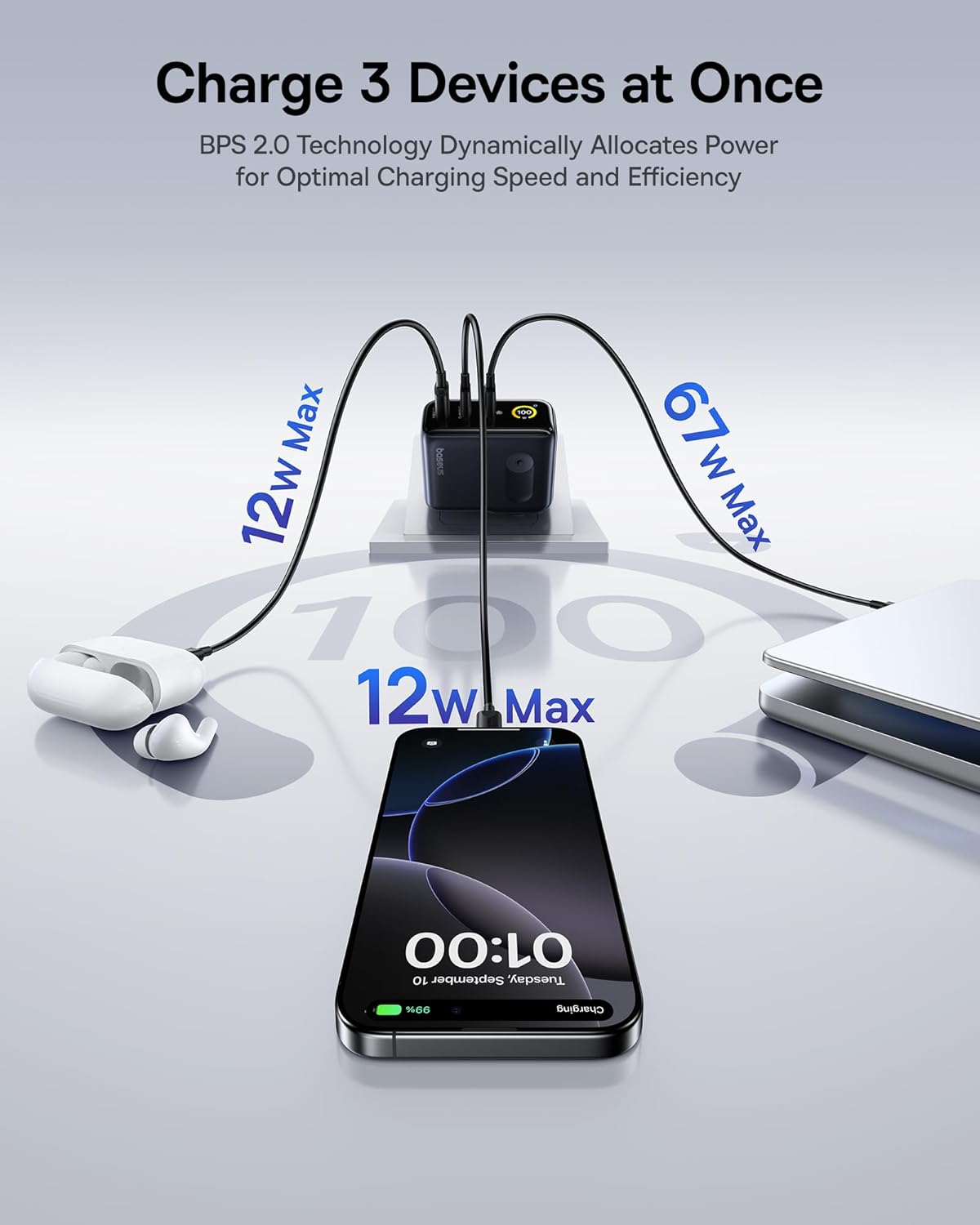
Figure 3: The charger supports simultaneous charging of multiple devices.
3. Uppsetning
- Taktu hleðslutækið upp: Carefully remove the Baseus Picogo 100W USB C Charger and the included 100W USB C cable from its packaging.
- Opnaðu klóna: If the AC prongs are folded, gently unfold them until they lock into place.
- Tengdu við rafmagnsinnstungu: Insert the charger's AC prongs into a standard wall outlet. The smart digital display will illuminate.
- Tengdu tæki: Use appropriate USB-C to USB-C or USB-C to USB-A cables to connect your devices to the available ports on the charger.
Video 1: Demonstrates connecting the Baseus Picogo 100W USB C Charger to a power outlet and observing the smart display.
4. Notkunarleiðbeiningar
4.1 Hleðslutæki
Once connected to a power outlet, plug your devices into the charger. The charger will automatically detect the connected devices and deliver optimal power. The smart digital display will show the real-time wattage output for each port and the overall charging status.
4.2 Understanding the Smart Digital Display
The display provides key information:
- Total Power Output (W): Sýnir samanlagðan vatnsmagntage er afhent öllum tengdum tækjum.
- Individual Port Output (W): Sýnir wattage for each active USB-C (C1, C2) and USB-A (A) port.
- Hitastig: Indicates the charger's operating temperature, monitored by BCT.
- Balanced Mode Indicator: A snowflake icon indicates the charger is in balanced cooling mode.
4.3 Skjárstýring
The charger features a touch-sensitive button on its side for display control:
- Einföld stutt: Switches between different display interfaces (e.g., total wattage, individual port details).
- Tvöfalt stutt: Rotates the display 90 degrees for better viewí stefnumörkun.
- Haltu inni: Turns the display off completely. Press again to turn it back on.
Myndband 2: Yfirview of the Baseus Picogo AE21 100W Charger Block, including its ports and display functionality.
5. Viðhald
- Þrif: Aftengdu hleðslutækið frá rafmagnsinnstungunni áður en þú þrífur það. Notaðu mjúkan, þurran klút til að þurrka yfirborðið. Ekki nota fljótandi hreinsiefni eða úðabrúsa.
- Geymsla: When not in use, store the charger in a cool, dry place away from direct sunlight and moisture. Ensure the foldable plug is retracted for compact storage.
- Meðhöndlun: Forðist að láta hleðslutækið detta eða verða fyrir hörðum höggum. Reynið ekki að taka hleðslutækið í sundur eða breyta því, því það ógildir ábyrgðina og getur valdið skemmdum eða meiðslum.
6. Bilanagreining
| Vandamál | Möguleg orsök | Lausn |
|---|---|---|
| Hleðslutækið kveikir ekki á sér. | Enginn rafmagn kemur úr innstungunni; laus tenging. | Check if the wall outlet is functional. Ensure the charger is firmly plugged in. |
| Tækið hleðst ekki eða hleðst hægt. | Incompatible cable; device not supporting fast charging; multiple high-power devices connected. | Use a certified fast-charging cable. Verify device compatibility. If charging multiple devices, power distribution may adjust; try charging fewer devices or check individual port outputs on the display. |
| Smart display is off. | Display turned off manually. | Press the side button once to reactivate the display. |
| Hleðslutækið er heitt við notkun. | Normal operation; high power output. | This is normal due to GaN technology and high power delivery. The BCT system actively monitors temperature to ensure safe operation. If it becomes excessively hot, disconnect immediately and contact support. |
7. Tæknilýsing
| Eiginleiki | Smáatriði |
|---|---|
| Vörumerki | Baseus |
| Gerðarnúmer | E0121C |
| Hvaðtage | 100 vött |
| Samtals USB tengi | 3 (2x USB gerð C, 1x USB gerð A) |
| Inntak Voltage | 240 volt |
| Þyngd hlutar | 9.9 aura |
| Stærðir pakka | 5.2 x 3.39 x 2.13 tommur |
| Sérstakir eiginleikar | Fast Charging, Multi Device Charging, Smart Display Screen, Travel-friendly |
| Samhæf tæki | Tablet, Laptop, Cell Phone, Headphone, Smart Watch, Switch, Steam Deck, ROG Ally |
| Innifalið íhlutir | Baseus Picogo AE21 100W USB C Charger, 100W USB C Cable, User Manual |
8. Ábyrgð og stuðningur
For warranty information and technical support, please refer to the documentation included with your product or contact Baseus directly.
Samskiptaupplýsingar:
- Alþjóðleg símaþjónusta: +1 800 220 8056
- Alþjóðleg tölvupóststuðningur: care@baseus.com
Please have your product model number (E0121C) and purchase details ready when contacting support.

Figure 4: Back of product packaging with support details and certifications.