
1. Inngangur
The iSo Tech H59MAX Smart Bracelet is a screenless activity and health fitness tracker designed for continuous monitoring of various health metrics and activity levels. This device provides 24/7 real-time data on heart rate, blood pressure, blood oxygen saturation (SpO2), heart rate variability (HRV), and stress levels. It also offers detailed sleep analysis and supports over 170 sports modes. Data synchronization and advanced features are managed through the companion QWatch Pro application on your smartphone. This manual provides essential information for setting up, operating, and maintaining your smart bracelet.

Image: The iSo Tech H59MAX Smart Bracelet, featuring its sleek, screenless design and comfortable band.
2. Hvað er í kassanum
Gakktu úr skugga um að allir eftirfarandi hlutir séu innifaldir í pakkanum þínum:
- 1 x iSo Tech H59MAX Smart Bracelet
- 1 x Nylon Band
- 1 x sílikonband
- 1 x USB segulhleðslusnúra
- 1 x Notendahandbók (þetta skjal)
3. Uppsetningarleiðbeiningar
3.1 Hleðsla tækisins
Before first use, fully charge your smart bracelet. Connect the USB magnetic charging cable to the charging contacts on the back of the bracelet and to a standard USB power adapter (not included) or a computer USB port. The device will vibrate to indicate charging has begun. A full charge typically takes approximately 1.5 hours.

Image: The iSo Tech H59MAX Smart Bracelet connected to its magnetic charging cable.
3.2 Downloading the QWatch Pro App
The iSo Tech H59MAX Smart Bracelet requires the QWatch Pro application for full functionality and data synchronization. The app is compatible with iOS 9.0+ and Android 4.4+ devices.
- Scan the QR code provided in the quick start guide or search for "QWatch Pro" in the Apple App Store (for iOS) or Google Play Store (for Android).
- Sæktu og settu upp forritið á snjallsímanum þínum.
- Alternatively, you can visit the official app download page: QWatch Pro Official Download

Image: Screenshots of the QWatch Pro app interface displaying various health monitoring data alongside the smart bracelet.
3.3 Para tækið
Gakktu úr skugga um að Bluetooth sé virkt í snjallsímanum þínum áður en þú heldur áfram.
- Open the QWatch Pro app on your smartphone.
- Fylgdu leiðbeiningunum á skjánum til að búa til reikning eða skrá þig inn.
- Farðu í hlutann „Tæki“ eða „Bæta við tæki“ í forritinu.
- The app will search for available devices. Select "H59MAX" or the corresponding device ID when it appears.
- Confirm the pairing request on both your phone and, if prompted, by a vibration on the bracelet.
- Once paired, the app will display "Connected" and begin synchronizing data.
3.4 Að bera tækið
For accurate health monitoring, wear the smart bracelet snugly but comfortably on your wrist, approximately one finger's width above your wrist bone. The sensor on the back of the device should be in contact with your skin. You can choose between the included nylon or silicone band for optimal comfort and activity.
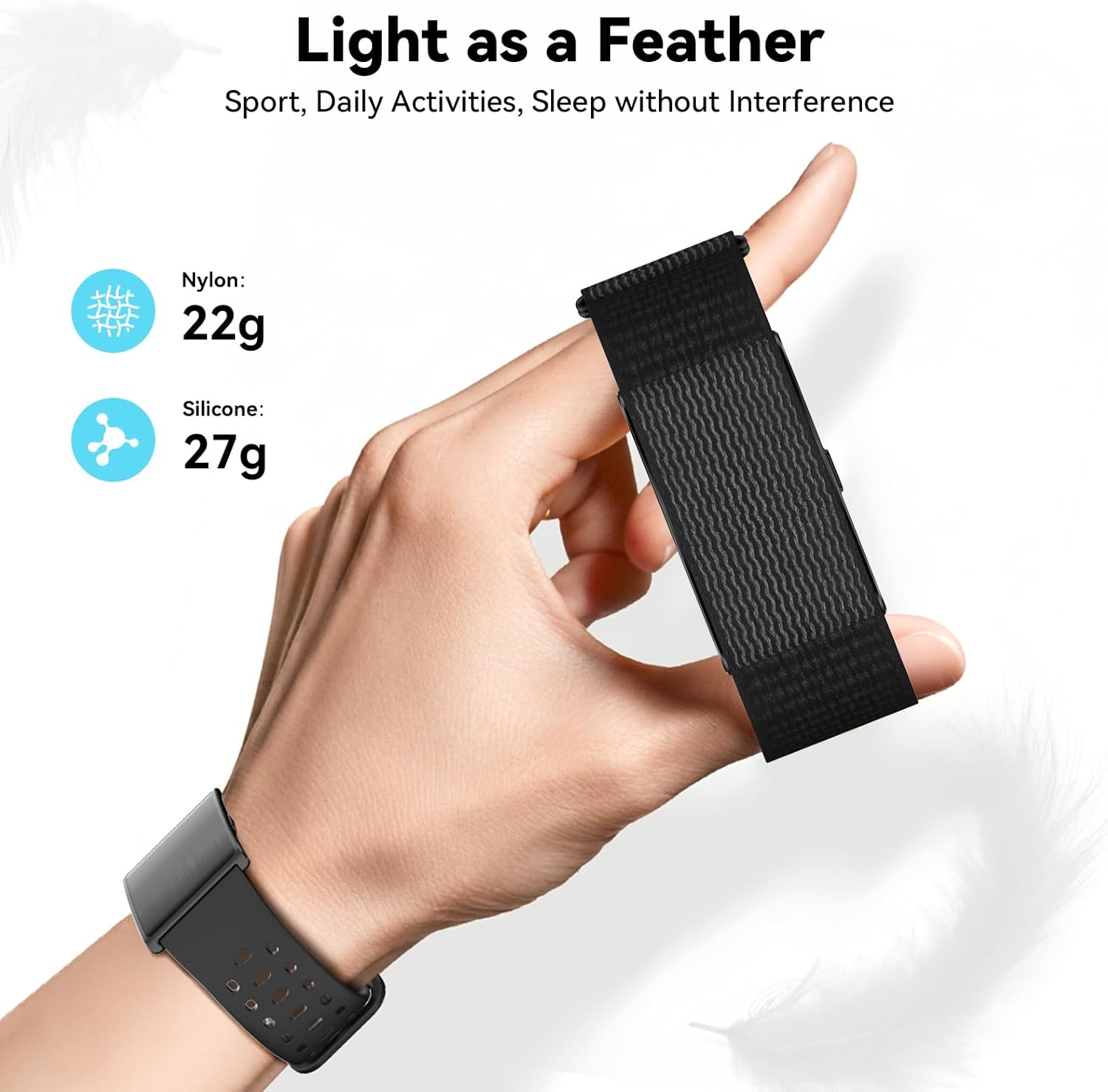
Image: A hand holding the lightweight smart bracelet, demonstrating its comfortable design.
4. Notkunarleiðbeiningar
The iSo Tech H59MAX Smart Bracelet operates primarily through its companion QWatch Pro app, as it features a screenless design. All data viewing, settings adjustments, and mode selections are performed within the app.
4.1 Heilbrigðiseftirlit
The bracelet continuously monitors various health metrics. Data is automatically synced to the QWatch Pro app.
- Hjartsláttur: 24/7 continuous monitoring. View real-time and historical data in the app.
- Blóðþrýstingur: Continuous monitoring. Note: This device is not a medical device; readings are for reference only.
- Súrefni í blóði (SpO2): Continuous monitoring.
- HRV (hjartsláttarbreytileiki): Monitors your heart rate variability to assess stress and recovery.
- Streitustig: Provides insights into your daily stress patterns.
- Svefnmæling: Automatically detects and analyzes sleep stages (light sleep, deep sleep, REM, wake-up times).
- Kvenkyns hjólamæling: Set up and track menstrual cycles within the app.

Image: A user wearing the smart bracelet, with the QWatch Pro app displaying various health metrics like steps, HRV, and heart rate.

Image: A person sleeping while wearing the smart bracelet, accompanied by a graphic representation of sleep stages (deep, light, REM, wake up) and duration metrics.
4.2 Virknimælingar
The bracelet supports over 170 sports modes. Select your desired activity within the QWatch Pro app to begin tracking. For outdoor activities like running or hiking, the app can utilize your smartphone's GPS to record routes and provide precise exercise data analysis.
- Skref, kaloríur, vegalengd: Automatically tracks daily activity.
- Íþróttastillingar: Manually select from a wide range of activities in the app for tailored tracking.
- GPS mælingar: For outdoor activities, ensure your phone's GPS is active and connected to the app.

Image: A man exercising while wearing the smart bracelet, with the QWatch Pro app displaying activity data such as steps, calories, distance, and a GPS-tracked route.
4.3 Smart AI Health Assistant
Leveraging built-in AI analysis, the QWatch Pro app interprets your steps, sleep, and activity data to provide personalized health advice and optimization plans. This feature helps you adjust lifestyle habits scientifically.

Image: A man stretching, with the smart bracelet on his wrist, and the QWatch Pro app displaying an AI-powered health analysis and score.
4.4 Tilkynningar og áminningar
The smart bracelet provides silent vibration alerts for important notifications and reminders, configurable through the QWatch Pro app.
- Innhringingar: The bracelet will vibrate to alert you of incoming calls.
- Messages & App Notifications: Receive vibration alerts for SMS messages and notifications from selected apps (e.g., WhatsApp, Facebook, Instaghrútur).
- Silent Alarm Clock: Set alarms in the app to wake you gently with vibrations without disturbing others.
- Áminningar um vökvainntöku: Configure reminders to drink water at regular intervals.
- Kyrrsetuáminningar: Receive alerts if you have been inactive for too long.
- Stýring myndavélar: Use the bracelet as a remote shutter for your phone's camera.
- Finndu tæki: Use the app to make your bracelet vibrate if you misplace it nearby.
- Ekki trufla stilling: Enable this mode in the app to silence notifications during specific times.

Image: A collage of icons illustrating additional features such as Do Not Disturb mode, Apple Health sync, call alerts, message notifications, camera control, find device, alarm, and sedentary reminders.
5. Viðhald
5.1 Vatnsþol
The iSo Tech H59MAX Smart Bracelet has an IP68 + 1ATM dual water resistance rating, supporting protection up to 10 meters underwater. This means it is resistant to rain, sweat, and daily hand washing splashes. It is suitable for use in various weather conditions and during high-intensity workouts.
Mikilvæg athugasemd: To extend product lifespan, avoid exposure to hot water, steam environments (e.g., hot showers, saunas), or diving activities. Water resistance is not a permanent condition and may decrease over time with normal wear.

Image: A man running in the rain, wearing the smart bracelet, illustrating its water resistance against rain, sweat, and handwashing.
5.2 Þrif á tækinu
Regular cleaning helps maintain the device's performance and prevents skin irritation.
- Wipe the bracelet and bands with a soft, damp, lófrír klút.
- For the charging contacts and sensor area, use a dry cotton swab to gently remove any dust or debris.
- Do not use harsh chemicals, abrasive cleaners, or ultrasonic cleaning devices.
- Gakktu úr skugga um að tækið sé alveg þurrt áður en það er hlaðið.
5.3 Umhirða rafhlöðu
Til að hámarka endingu rafhlöðunnar:
- Forðastu að tæma rafhlöðuna alveg oft.
- Hladdu tækið með meðfylgjandi segulhleðslusnúru.
- Geymið tækið á köldum, þurrum stað þegar það er ekki í notkun í langan tíma.
6. Bilanagreining
6.1 Device Not Turning On or Charging
- Ensure the charging cable is securely connected to both the bracelet and the power source.
- Check if the charging contacts on the bracelet and cable are clean and free of debris.
- Prófaðu annan USB straumbreyti eða tengi.
- Allow the device to charge for at least 10-15 minutes before attempting to turn it on.
6.2 Ekki er hægt að para við snjallsíma
- Gakktu úr skugga um að kveikt sé á Bluetooth á snjallsímanum þínum.
- Make sure the bracelet is sufficiently charged.
- Keep the bracelet close to your smartphone during the pairing process.
- Restart both your smartphone and the QWatch Pro app.
- If previously paired, try "forgetting" the device in your phone's Bluetooth settings and re-pairing.
6.3 Ónákvæmar heilsufarsupplýsingar
- Ensure the bracelet is worn correctly: snugly but comfortably, one finger's width above the wrist bone, with the sensor in full contact with the skin.
- Hreinsið skynjarann aftan á tækinu.
- Avoid excessive movement during measurements (e.g., blood pressure).
- Remember that this device is for general fitness and wellness purposes and is not a medical device. Consult a healthcare professional for medical advice.
6.4 Tilkynningar birtast ekki
- Check if the bracelet is successfully paired and connected to the QWatch Pro app.
- Verify that notification permissions are enabled for the QWatch Pro app in your smartphone's settings.
- Ensure that specific app notifications are enabled within the QWatch Pro app settings.
- Confirm that "Do Not Disturb" mode is not active on either your phone or the bracelet (via app settings).
7. Tæknilýsing
| Eiginleiki | Smáatriði |
|---|---|
| Gerðarnúmer | H59MAX |
| Vörumerki | iSo Tech |
| Tengingar | Bluetooth 5.0 |
| Rafhlöðugeta | 180 mAh |
| Rafhlöðuending (venjuleg notkun) | 45-60 dagar |
| Rafhlöðuending (biðstaða) | Allt að 100 dagar |
| Hleðslutími | U.þ.b. 1.5 klst |
| Vatnsþol | IP68 + 1ATM (up to 10 meters) |
| Samhæfni stýrikerfis | iOS 9.0+ / Android 4.4+ |
| Heilbrigðiseftirlit | Heart Rate, Blood Pressure, SpO2, HRV, Stress, Sleep Tracking, Female Cycle Tracking |
| Virknistillingar | 170+ íþróttastillingar |
| GPS | Í gegnum snjallsíma |
| Weight (Nylon Band) | U.þ.b. 22 g (0.05 lbs) |
| Weight (Silicone Band) | U.þ.b. 27 g (0.06 lbs) |
| Framleiðandi | IEDOU TECHNOLOGY SHENZHEN CO.,LTD. |
8. Ábyrgð og stuðningur
8.1 Upplýsingar um ábyrgð
iSo Tech products are manufactured to high quality standards. For specific warranty details, please refer to the warranty card included with your product or contact the retailer where you purchased the device. Keep your proof of purchase for warranty claims.
8.2 Þjónustuver
If you encounter any issues or have questions regarding your iSo Tech H59MAX Smart Bracelet, please refer to the troubleshooting section of this manual first. For further assistance, you may contact the manufacturer or retailer's customer support. You can also find more information and updates on the QWatch Pro app's official website or support sections.
QWatch Pro App Official Websíða: https://www.qcwireless.cn/QWatchPro/index.html