
1. Inngangur
Welcome to the user manual for your Hisense 32C35R 32-inch Smart Full HD TV. This television is designed to provide a rich entertainment experience with its Full HD display, smart features, and advanced audio processing. This manual will guide you through the setup, operation, and maintenance of your new TV, ensuring you get the most out of its capabilities.
2. Öryggisupplýsingar
Before operating your TV, please read all safety instructions carefully. Keep this manual for future reference. Always disconnect the power cord from the wall outlet before cleaning or servicing the TV. Do not expose the TV to rain or moisture to prevent fire or electric shock. Ensure proper ventilation and avoid blocking ventilation openings.
3. Innihald pakka
Vinsamlegast athugið hvort allir hlutir séu innifaldir í pakkanum:
- Hisense 32C35R 32-inch Smart Full HD TV
- Fjarstýring
- Rafmagnssnúra
- TV Stand and Screws
- Anti-tip bracket (for TV stand installation)
- Notendahandbók (þetta skjal)
4. Uppsetning
4.1 Líkamleg uppsetning
Place the TV on a stable, flat surface or mount it on a wall using a compatible VESA mount (sold separately). If using the included stand, attach it securely to the TV using the provided screws. For added safety, install the anti-tip bracket to prevent accidental tipping.
Athugið: Ensure the installation location is prepared in advance. Removal of existing products or wall mounts is not supported by the installation service.
4.2 Tengisnúrur
Connect the necessary cables to your TV:
- Antenna Cable: Connect your terrestrial digital, BS, or CS antenna cable to the TV's antenna input.
- Rafmagnssnúra: Stingdu rafmagnssnúrunni í sjónvarpið og síðan í innstungu.
- Ytri tæki: Connect any external devices such as Blu-ray players, game consoles, or sound systems using HDMI or other appropriate ports.
Athugið: Antenna cables and other connection cables are not included and must be prepared by the customer.
4.3 Upphafsuppsetning
After connecting all cables and powering on the TV for the first time, follow the on-screen instructions for initial setup:
- Insert the B-CAS card (if applicable).
- Set your region and postal code.
- Perform initial channel scanning and other basic settings.
Athugið: Network connection settings are not covered by the installation service and must be configured by the user.
5. Notkunarleiðbeiningar
5.1 Fjarstýring yfirview
Familiarize yourself with the TV remote control. It provides access to all TV functions, including power, volume, channel selection, smart TV apps, and voice control.
5.2 Smart TV eiginleikar (VIDAA OS)
Your Hisense 32C35R TV runs on VIDAA OS, offering quick access to popular streaming services like YouTube, Netflix, and more. It also supports AirPlay2 for seamless content sharing from Apple devices and Bluetooth for wireless audio.

Image: The Hisense TV displaying its VIDAA OS home screen with various streaming applications and content recommendations. The interface is designed for quick navigation and access to online videos.

Image: A close-up of the Hisense TV remote control, highlighting dedicated buttons for popular streaming services and a voice control button for easy access to smart features.
5.3 HI-VIEW Engine 2K+ (Image Quality)
The HI-VIEW Engine 2K+ enhances image quality, especially for online video content. It features a rich video menu allowing you to select optimal picture settings for different content types, such as sports, games, or PC monitor use. The TV also includes an automatic sensor that adjusts screen brightness based on room lighting conditions.

Image: A detailed diagram illustrating the Hisense HI-VIEW Engine 2K+ chip, which is responsible for advanced image processing and enhancing visual clarity, particularly for 4K content.
5.4 Hljóðeiginleikar
Experience high-quality audio with the TV's 2.0 speaker configuration and 12W practical maximum audio output. It incorporates eilex sound processing and supports Dolby Audio for an immersive sound experience.

Image: The Hisense TV screen showing various sound processing features such as Auto Volume for automatic volume adjustment, Clear Voice for enhanced dialogue, Sound Remaster for improved audio quality, and VIR Filter for better sound range.
5.5 Screen Share & Bluetooth
The TV supports screen sharing to display content from your smartphone. With Bluetooth connectivity, you can enjoy audio wirelessly through devices like soundbars, speakers, headphones, or wireless earphones without disturbing others.
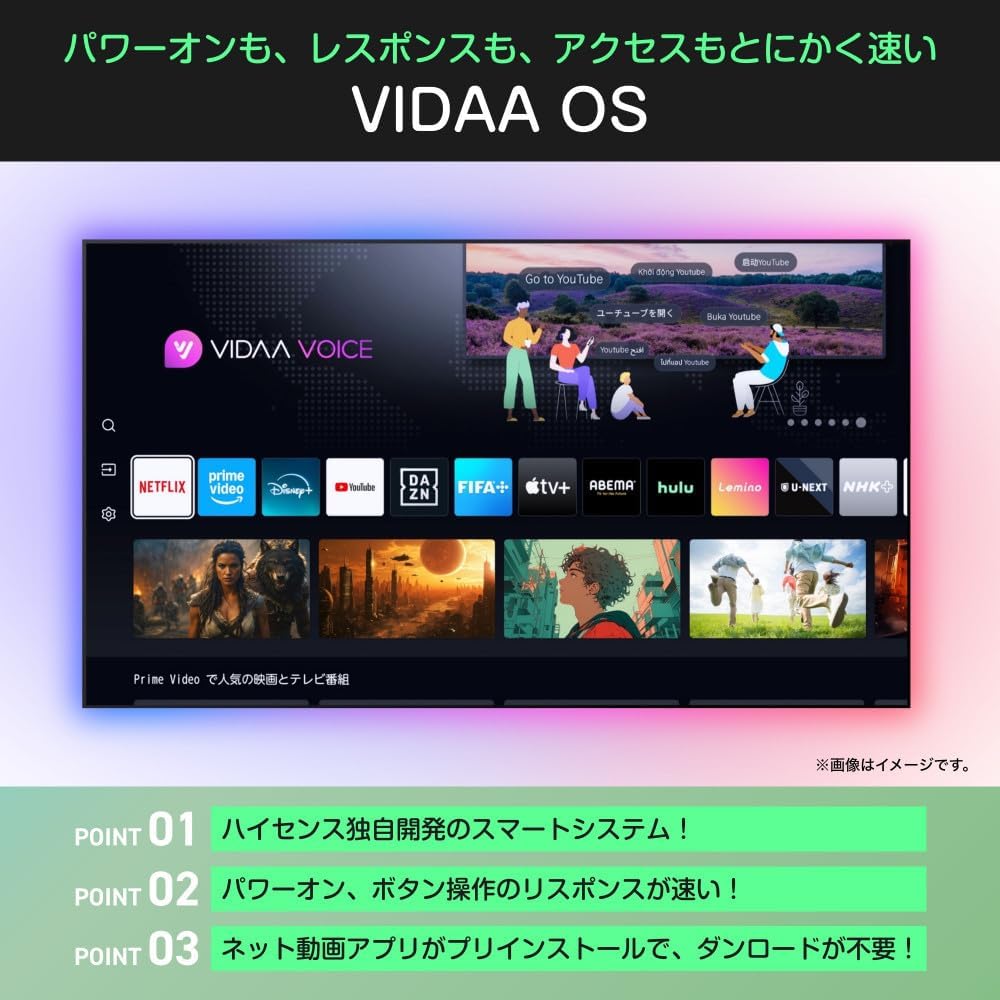
Image: An illustration demonstrating the TV's Bluetooth capabilities, allowing users to connect wireless headphones, soundbars, and speakers for private listening or enhanced audio.
5.6 Raddstýring (Alexa)
The Hisense 32C35R is compatible with Alexa voice control. By speaking to an Alexa-enabled smart speaker (sold separately), you can control TV functions such as power on/off, volume adjustment, and launching streaming services.

Image: A diagram illustrating the integration of the Hisense TV with Alexa. A user can issue voice commands to an Alexa smart speaker to control the TV, such as changing channels, while performing other tasks.
5.7 Game Mode (ALLM)
For gamers, the TV features a low-latency game mode and ALLM (Auto Low Latency Mode) support, ensuring a smoother and more responsive gaming experience by minimizing input lag.
5.8 Google TV Video
This video demonstrates the features and user experience of Google TV, which is integrated into some Hisense models, showcasing content aggregation, personalized recommendations, and voice search capabilities.
Myndband: Opinber myndbandssýning seljandaasing the Google TV interface, its ability to consolidate streaming services, personalized content recommendations, family profiles, and voice control features. It highlights how users can easily find and enjoy content across various platforms.
6. Viðhald
Til að tryggja endingu og bestu mögulegu virkni Hisense sjónvarpsins skaltu fylgja þessum viðhaldsleiðbeiningum:
- Að þrífa skjáinn: Þurrkaðu skjáinn varlega með mjúkum, þurrum og lólausum klút. Fyrir þrjósk bletti skaltu þurrka hann örlítið.ampÞurrkið klútinn með vatni eða sérstöku skjáhreinsiefni. Sprautið aldrei vökva beint á skjáinn.
- Þrif á skápnum: Notið mjúkan, þurran klút til að þrífa sjónvarpsskápinn. Forðist að nota slípiefni eða leysiefni.
- Loftræsting: Gakktu úr skugga um að loftræstiopin á bakhlið sjónvarpsins séu ekki stífluð til að koma í veg fyrir ofhitnun.
- Rafmagnssnúra: Athugið reglulega hvort rafmagnssnúran sé skemmd. Ef hún er skemmd skal skipta henni út strax.
7. Bilanagreining
Ef þú lendir í vandræðum með sjónvarpið þitt skaltu skoða eftirfarandi algengar úrræðaleitarskref:
| Vandamál | Möguleg lausn |
|---|---|
| Enginn kraftur | Check if the power cord is securely plugged into the TV and the wall outlet. Press the power button on the remote or TV. |
| Engin mynd, en hljóð er til staðar | Athugaðu inntaksuppsprettu. Gakktu úr skugga um að ytri tæki séu kveikt og rétt tengd. Prófaðu aðra HDMI snúru. |
| Ekkert hljóð, en mynd er til staðar | Check the volume level and mute settings. Ensure external audio devices are connected and configured correctly. |
| Fjarstýring virkar ekki | Skiptu um rafhlöður. Gakktu úr skugga um að engar hindranir séu á milli fjarstýringarinnar og sjónvarpsins. |
| Get ekki tengst Wi-Fi | Athugaðu beininn og mótaldið. Gakktu úr skugga um að Wi-Fi lykilorðið sé rétt. Reyndu að endurræsa sjónvarpið og netbúnaðinn. |
8. Tæknilýsing
| Eiginleiki | Forskrift |
|---|---|
| Gerðarnúmer | 32C35R |
| Skjástærð | 32 tommur |
| Skjátækni | LCD |
| Upplausn | Full HD (1920 x 1080) |
| Endurnýjunartíðni | 60 Hz |
| Myndvél | Hæ-VIEW Engine 2K+ |
| Baklýsing | Bein LED |
| Uppsetning hátalara | 2.0 Rás |
| Hljóðúttak | 12W (Practical Max) |
| Hljóðvinnsla | eilex Sound Processing, Dolby Audio |
| Snjallir eiginleikar | VIDAA OS, YouTube, Netflix, AirPlay2, Bluetooth, Alexa Voice Control, Game Mode (ALLM) |
| Málnotkun | 55W |
| Árleg orkunotkun | 60 kWh/ári |
| Main Unit Weight (without stand) | 3.4 kg |
| Main Unit Dimensions (W x H x D, without stand) | 725 x 429 x 78 mm |
| Þyngd (með standi) | 3.5 kg |
| Stærð (B x H x D, með standi) | 725 x 472 x 183 mm |
9. Ábyrgð og stuðningur
9.1 Upplýsingar um ábyrgð
Your Hisense 32C35R TV comes with a 3 árs ábyrgð from the date of purchase. Please retain your proof of purchase for warranty claims. The warranty covers manufacturing defects under normal use. It does not cover damage caused by misuse, accidents, unauthorized repairs, or natural disasters.
9.2 Þjónustuver
For technical assistance, troubleshooting, or warranty inquiries, please contact Hisense customer support. Refer to the contact information provided with your product documentation or visit the official Hisense websíðuna fyrir nýjustu upplýsingar um stuðning.