
1. Inngangur
Thank you for choosing the Angrox Backlit Universal Remote Control for LG Smart TVs. This remote is designed to provide a seamless and enhanced television viewing experience, especially in low-light conditions. It serves as a direct replacement for your original LG TV remote, offering broad compatibility and ease of use without requiring complex setup procedures. This manual provides detailed instructions for setting up, operating, maintaining, and troubleshooting your new remote control.
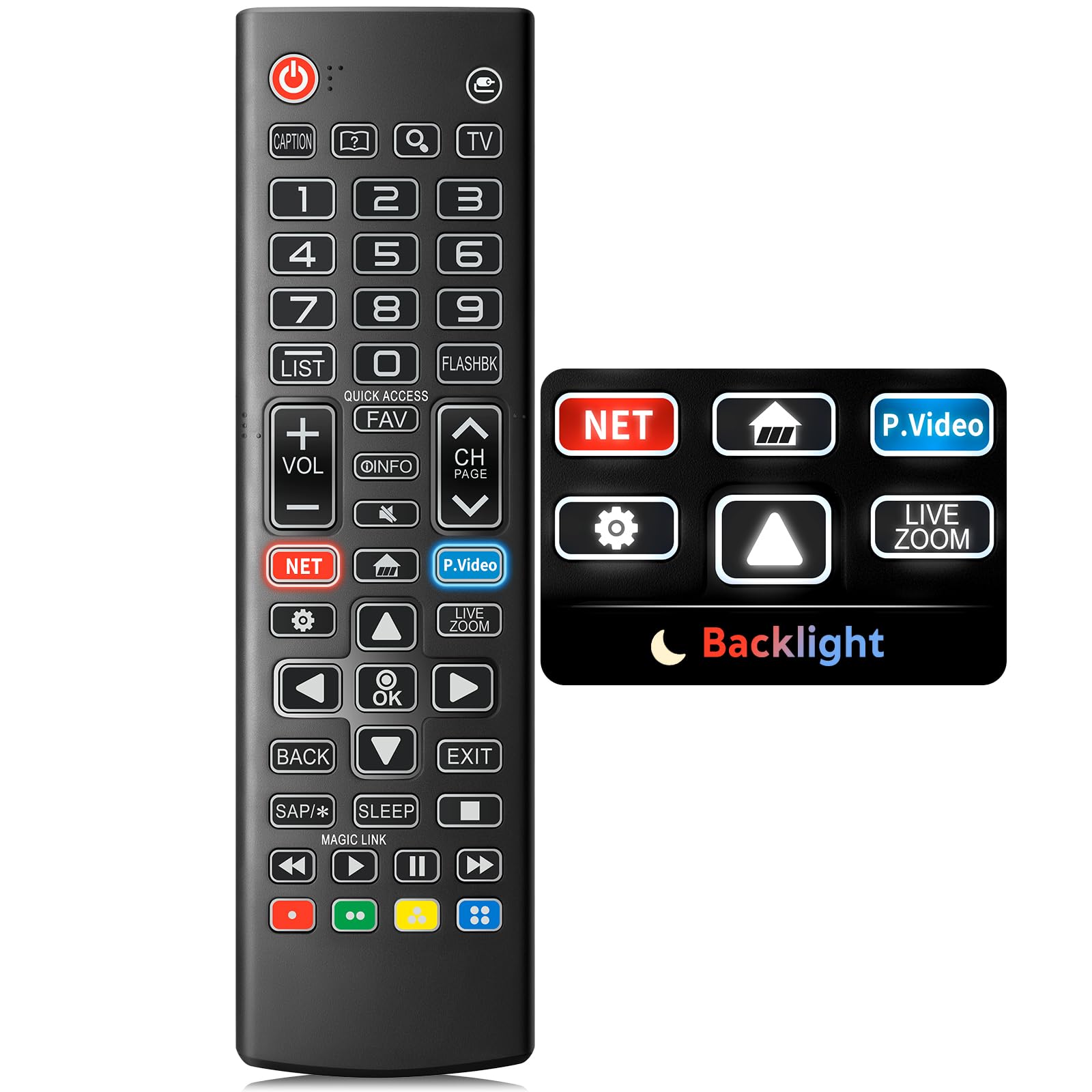
Image: The Angrox Backlit Universal Remote Control, a sleek black remote with clearly labeled buttons.
2. Helstu eiginleikar
- Easy Nighttime Operation: Features soft glow buttons that illuminate, allowing for clear visibility and use in dark environments without causing glare. The backlight activates with any button press and automatically turns off after 10 seconds of inactivity.
- Alhliða samhæfni: Designed as a direct replacement for LG TV remotes, compatible with all LG TV models. No programming or complex pairing is required; it works immediately out of the box.
- High-Quality Performance: Equipped with sensitive buttons and stable signal transmission for smooth and responsive operation.
- Vistvæn hönnun: Shaped to fit comfortably in the hand, reducing fatigue during extended use. The button layout is intuitive for users of all ages.
- Varanlegur og áreiðanlegur: Constructed from high-quality, sturdy materials to withstand daily use and accidental drops, ensuring a long lifespan.

Image: A comparison showing the remote control with its backlight off and then with its buttons illuminated, highlighting the easy nighttime operation feature.

Image: The remote control displayed alongside various LG TV models (OLED, UHD, QNED, NanoCell), illustrating its broad compatibility.
3. Uppsetningarleiðbeiningar
3.1 Uppsetning rafhlöðu
- Finndu hlífina á rafhlöðuhólfinu aftan á fjarstýringunni.
- Rennið lokið niður eða ýtið á lásinn til að opna hólfið.
- Settu í tvær (2) AAA rafhlöður og vertu viss um að plús (+) og neikvæðu (-) tengipunktarnir passi rétt við vísana inni í hólfinu.
- Settu lokið á rafhlöðuhólfið aftur með því að renna því aftur á sinn stað þar til það smellur örugglega.
Athugið: Rafhlöður fylgja ekki með fjarstýringunni. Vinsamlegast notið nýjar AAA basískar rafhlöður til að hámarka virkni.

Image: A visual guide demonstrating the correct insertion of two AAA batteries into the remote control's battery compartment.
3.2 Initial Use (No Pairing Required)
The Angrox Backlit Universal Remote Control is designed for immediate use with LG Smart TVs. No pairing or programming steps are necessary. Once batteries are installed, the remote is ready to control your LG television.
4. Notkunarleiðbeiningar
This section details the functions of the buttons on your Angrox remote control.

Image: A comprehensive layout of the remote control, with labels pointing to each button and describing its primary function.
4.1 Grunnaðgerðir
- Kraftur (
 ): Kveikir eða slekkur á sjónvarpinu.
 - Inntak (): Changes the input source (e.g., HDMI 1, HDMI 2).
- Hljóðstyrkur upp/niður (VOL +/-): Stillir hljóðstyrkinn.
- Rás upp/niður (CH Page): Skiptir um sjónvarpsrás.
- Þagga (): Þaggar eða slökktir á hljóði sjónvarpsins.
- Talnahnappar (0-9): Directly enters channel numbers or other numerical inputs.
- Leiðsagnarhnappar (upp/niður/vinstri/hægri): Notað til að fletta í gegnum valmyndir og valkosti.
- OK hnappur: Selects menu items or confirms your input.
4.2 Sérstakir virknihnappar
- Netflix hnappur: Ræsir Netflix forritið beint.
- Amazon Prime Video hnappur: Ræsir Amazon Prime Video forritið beint.
- Fljótur aðgangur: A feature that allows you to enter a specified app or Live TV directly by pressing and holding the number buttons.
- Listi: Opnar lista yfir vistuð forrit.
- Flashback: Snýr aftur til fyrra horfs viewed channel or input.
- Upplýsingar: Displays information on the current program.
- Uppáhald: Fáðu aðgang að uppáhaldsrásalistanum þínum.
- Stillingar (): Accesses the Quick Settings menu.
- Aftur: Hreinsar skjáinn og fer aftur í sjónvarpið viewing.
- Hætta: Lokar núverandi valmynd.
- Svefn: Accesses the sleep timer.
- Media Control Buttons (Play, Pause, Stop, Fast Forward, Rewind): Controls media content playback.
4.3 Baklýsingarvirkni
The remote control features a soft backlight for easy use in the dark. Simply press any button, and the backlight will turn on. It will automatically turn off after 10 seconds of inactivity to conserve battery life.
Video: A demonstration of the Angrox Backlit Remote for LG Smart TV, showcasing its easy nighttime use and responsive buttons. This video highlights the convenience of the backlit feature in dark environments.
5. Tæknilýsing
| Vörumerki | Angrox |
| Nafn líkans | AKB75095307 |
| Gerðarnúmer | AKB75095307 |
| Sérstakir eiginleikar | Backlit, Ergonomic, Lightweight, No Programming Required, Universal |
| Samhæf tæki | Television (All LG TV models) |
| Hámarksfjöldi studdra tækja | 1 |
| Tengitækni | Innrautt |
| Magn hnappa | 30 |
| Gerð stjórnanda | Hnappastýring |
| Hámarkssvið | 10 metrar (um það bil 33 fet) |
| Fjöldi rafhlaðna sem þarf | 2 AAA rafhlöður |
| Tegund rafhlöðu | Basískt |
| Stærðir hlutar (L x B x H) | 9.25" L x 1.89" B x 0.73" H |
6. Bilanagreining
Ef þú lendir í vandræðum með fjarstýringuna skaltu skoða eftirfarandi algengar lausnir:
- Fjarstýring svarar ekki:
- Gakktu úr skugga um að rafhlöðurnar séu rétt settar í með réttri pólun (+/-).
- Skiptu út gömlum rafhlöðum fyrir nýjar AAA alkalískar rafhlöður.
- Athugaðu hvort einhverjar hindranir séu á milli fjarstýringarinnar og innrauða móttakara sjónvarpsins.
- Ensure you are within the maximum operating range (10 meters) of the TV.
- Baklýsing virkar ekki:
- Verify battery power. Low batteries may affect backlight functionality.
- The backlight is designed to turn off after 10 seconds of inactivity. Press any button to reactivate it.
- Specific buttons not working (e.g., Netflix, Amazon Prime):
- Ensure your LG Smart TV is connected to the internet and the respective applications are installed and updated.
- Some smart TV features or app shortcuts may vary slightly depending on your TV's model and region.
- Fjarstýringin er hæg eða óviðbrögðsmikil:
- Skiptu um rafhlöður fyrir nýjar.
- Clean the remote's infrared emitter (at the top) and the TV's IR receiver with a soft, dry cloth to ensure a clear signal path.
7. Viðhald
To ensure the longevity and optimal performance of your Angrox remote control, follow these maintenance guidelines:
- Þrif: Use a soft, dry cloth to clean the remote's surface. Avoid using liquid cleaners, aerosols, or harsh chemicals, as they may damage the remote.
- Skipt um rafhlöðu: Replace batteries promptly when the remote's performance declines or if the backlight becomes dim. Remove batteries if the remote will not be used for an extended period to prevent leakage.
- Geymsla: Geymið fjarstýringuna á köldum, þurrum stað fjarri beinu sólarljósi, miklum hita og miklum raka.
- Forðastu dropa: Þótt fjarstýringin sé endingargóð geta endurtekin fall skemmt innri íhluti. Farðu varlega með hana.
8. Ábyrgð og stuðningur
8.1 Upplýsingar um ábyrgð
The Angrox Backlit Universal Remote Control (Model AKB75095307) is covered by a 90 daga ábyrgð from the date of purchase. This warranty covers manufacturing defects and ensures the product functions as described under normal use. It does not cover damage caused by misuse, accidents, unauthorized modifications, or normal wear and tear.
8.2 Þjónustuver
For any questions, technical assistance, or warranty claims, please contact Angrox customer support through the retailer where you purchased the product or visit the official Angrox store online. Please have your purchase receipt and product model number available when contacting support.