
Inngangur
Thank you for choosing the Jedel WD154 Wireless Mouse. This manual provides essential information for setting up, operating, and maintaining your new mouse. Please read these instructions carefully before use to ensure optimal performance and longevity of your device.
Innihald pakka
- Jedel WD154 Wireless Mouse
- USB-C hleðslusnúra
- 2.4 GHz USB móttakari
- Notendahandbók

Image: The retail packaging for the Jedel WD154 Wireless Mouse, displaying the mouse, its features, and technical specifications on the box.
Vara lokiðview
The Jedel WD154 features a transparent 6D design with RGB lighting and a digital LED battery display. It offers dual-mode connectivity for versatile use.
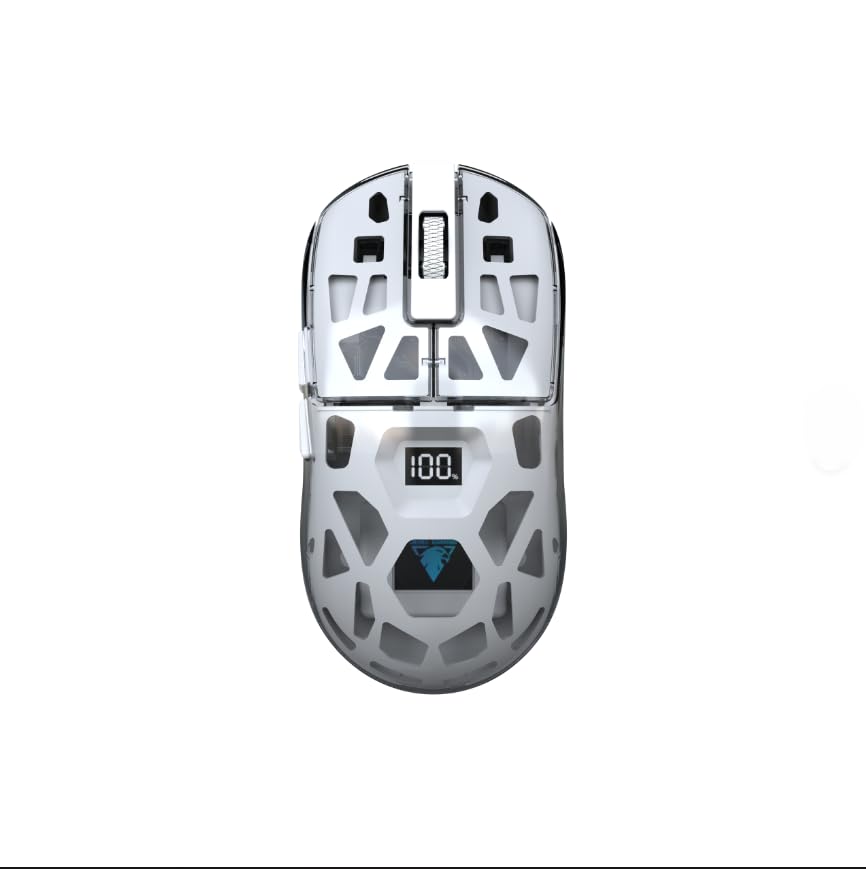
Mynd: Nærmynd af hliðinni view of the Jedel WD154 Wireless Mouse, showcasing its unique transparent shell and the integrated digital LED display indicating a 100% battery charge.
Hnappar aðgerðir:
- Vinstri smellihnappur: Staðlað vinstri smelliaðgerð.
- Hægri smellihnappur: Staðlað hægrismellti.
- Skrunahjól: Skrunaðu upp/niður, miðsmellið.
- DPI hnappur: Adjusts mouse sensitivity (DPI).
- Áfram hnappur: Siglar áfram í web vafrar/forrit.
- Afturábak hnappur: Siglar afturábak í web vafrar/forrit.
- Mode Switch Button (underneath): Toggles between 2.4GHz and Bluetooth modes.
Uppsetning
1. Hleðsla músarinnar
Before first use, fully charge the mouse using the provided USB-C cable.
- Connect the USB-C end of the cable to the mouse's charging port.
- Connect the USB-A end to a power source (e.g., computer USB port, USB wall adapter).
- The digital LED display will show the charging progress. A full charge is indicated by '100'.

Mynd: Ítarleg view of the front of the Jedel WD154 Wireless Mouse, illustrating the USB-C charging port with the charging cable securely connected.
2. Tenging í gegnum 2.4 GHz þráðlaust net
- Finndu 2.4 GHz USB-móttakarann, sem venjulega er geymdur í hólfi neðst á músinni.
- Stingdu USB-móttakaranum í lausan USB-tengi á tölvunni þinni eða tækinu.
- Kveikið á músinni með því að nota rofann á neðri hliðinni.
- Press the Mode Switch button (if present) until the mouse is in 2.4GHz mode (often indicated by a specific LED color or pattern).
- Músin ætti að tengjast sjálfkrafa.
3. Tenging í gegnum Bluetooth 5.1
- Kveikið á músinni með því að nota rofann á neðri hliðinni.
- Press the Mode Switch button (if present) until the mouse is in Bluetooth mode. The LED indicator will typically flash, indicating it's in pairing mode.
- On your device (PC, Mac, tablet, smartphone), go to Bluetooth settings.
- Leitaðu að new devices and select "Jedel WD154" (or similar name) from the list.
- Fylgdu öllum leiðbeiningum á skjánum til að ljúka pörunarferlinu.
Notkunarleiðbeiningar
DPI aðlögun
The mouse features adjustable DPI settings (800/1200/1600) to control cursor sensitivity.
- Ýttu á DPI hnappur (usually located behind the scroll wheel) to cycle through the available DPI settings.
- Each press will change the sensitivity, allowing you to find your preferred speed for different tasks or games.
RGB lýsingarstýring
Músin er með kraftmikla RGB lýsingu.
- The RGB lighting typically activates automatically when the mouse is powered on.
- Specific button combinations (e.g., DPI button + a side button) might cycle through different lighting modes or turn the RGB on/off. Refer to the quick start guide for specific controls if available.

Image: A compilation of images demonstrating the Jedel WD154 Wireless Mouse with its RGB lighting set to various colors, showcasing the customizable aesthetic.
Orkustjórnun
- The digital LED display shows the current battery percentage (1-100%).
- When the battery is low, recharge the mouse using the USB-C cable.
- The mouse may enter an automatic sleep mode after a period of inactivity to conserve battery. Move the mouse or click a button to wake it up.
Viðhald
- Þrif: Notið mjúkan, þurran klút til að þrífa músina. Fyrir þrjósk óhreinindi, þurrkið örlítiðamp Hægt er að nota klút, en gætið þess að raki komist ekki inn í tækið.
- Geymsla: Geymið músina á köldum, þurrum stað fjarri beinu sólarljósi og miklum hita.
- Umhirða rafhlöðu: Avoid fully discharging the battery frequently. Charge it regularly to maintain battery health.
- Forðastu dropa: Protect the mouse from drops and impacts, which can damage internal components or the transparent casing.
Úrræðaleit
| Vandamál | Möguleg lausn |
|---|---|
| Mús svarar ekki |
|
| Hreyfing bendilsins er óregluleg eða hæg |
|
| RGB lýsing virkar ekki |
|
| Get ekki tengst í gegnum Bluetooth |
|
Tæknilýsing
- Gerð: WD154
- Tengingartækni: Bluetooth 5.1 + 2.4GHz (Dual Mode)
- DPI stillingar: 800 / 1200 / 1600 (Stillanlegt)
- Fjöldi hnappa: 6
- Hreyfingarskynjun: Optískur
- Sérstakir eiginleikar: Transparent Design, RGB Lighting, Digital Battery Percentage Skjár
- Aflgjafi: Endurhlaðanleg rafhlaða (USB-C)
- Samhæf tæki: Tölva, fartölva, spjaldtölva, snjallsími
- Samhæft stýrikerfi: Windows, Mac OS
- Þyngd hlutar: 96 grömm
- Vöruvídd (L x B): 12.7 cm x 6.4 cm
Ábyrgð og stuðningur
Upplýsingar um ábyrgð
Þessi vara kemur með a 14 daga ábyrgð frá kaupdegi. Þessi ábyrgð nær yfir framleiðslugalla við eðlilega notkun. Hún nær ekki til tjóns sem orsakast af misnotkun, slysum, óheimilum breytingum eða eðlilegu sliti.
Þjónustudeild
For technical assistance, troubleshooting, or warranty claims, please contact your retailer or the point of purchase. Please have your proof of purchase and product model number (WD154) ready when contacting support.