
1. Inngangur
This manual provides essential information for setting up, operating, and maintaining your HP OmniDesk Slim Desktop PC, Model S03-0006. This desktop PC is designed for daily tasks, offering an Intel Core i3-14100 processor, ample memory, and various connectivity options for productivity and entertainment.
2. Innihald pakka
Gakktu úr skugga um að allir hlutir séu til staðar í pakkanum:
- HP S03-000 OmniDesk Slim Desktop PC
- Aflgjafi
- USB Black Wired Keyboard (if included with specific bundle)
- USB Wired Mouse (if included with specific bundle)
Athugið: Aukahlutir geta verið seldir sér.
3. Vöru lokiðview
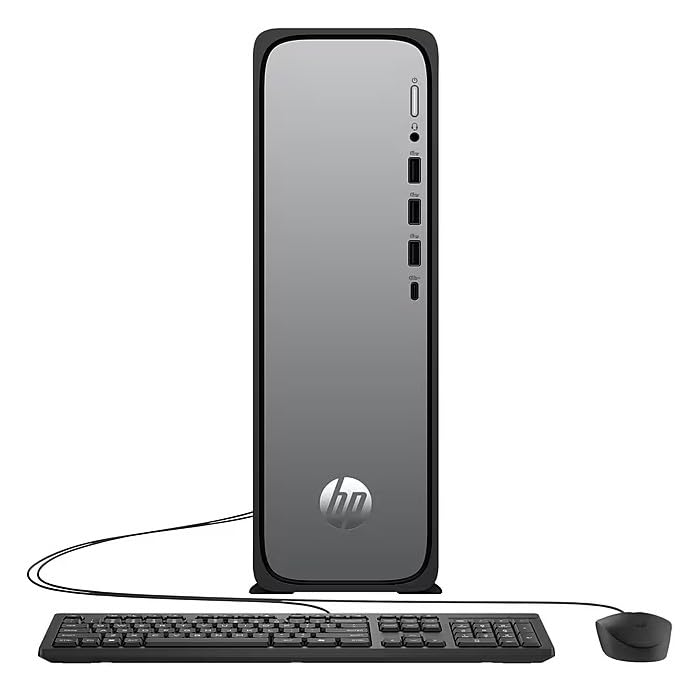
The HP OmniDesk Slim Desktop PC features a compact design with essential components for efficient computing.

Mynd 3.1: HP OmniDesk Slim Desktop PC showcasing þess grannur profile, Intel Core i3-14100 processor, 8GB DDR5 RAM, 256GB SSD, Intel UHD Graphics 710, Wi-Fi 6, Bluetooth 5.4, Windows 11, and dual display support.
3.1. Tengi og tengi
Familiarize yourself with the various ports on your desktop PC for connecting peripherals and displays.
Mynd 3.2: Front and rear port layout of the HP OmniDesk Slim Desktop PC. Front ports include a headphone/microphone combo jack, USB Type-A 5Gbps ports, and a USB Type-C 10Gbps port. Additional ports (typically rear) include 4 USB 2.0 Type-A, 1 RJ-45 (Ethernet), 1 HDMI Out, and 1 DisplayPort 1.4.
- Framhöfn:
- Heyrnartól / hljóðnema sambland
- USB Type-A 5Gbps signaling rate (3 ports)
- USB Type-C 10Gbps signaling rate (1 port)
- Hafnir að aftan:
- USB 2.0 Type-A (4 ports)
- RJ-45 (Ethernet)
- HDMI 1.4b (1 port)
- DisplayPort 1.4a (1 port)
4. Uppsetningarleiðbeiningar
Follow these steps to set up your HP OmniDesk Slim Desktop PC:
- Tengja skjá: Connect your monitor to the PC using an HDMI or DisplayPort cable. Ensure the cable is securely plugged into both the PC and the monitor.
- Tengja jaðartæki: Plug in your USB keyboard and mouse into the available USB ports on the PC.
- Tengdu rafmagn: Connect the power supply cable to the PC's power input, then plug the other end into a wall outlet or surge protector.
- Kveikt á: Press the power button on the front of the PC. The system will boot up, and you will see the Windows 11 setup screen.
- Upphafleg uppsetning Windows: Follow the on-screen instructions to complete the Windows 11 setup, including language, region, network connection, and user account creation.
5. Notkunarleiðbeiningar
5.1. Grunnaðgerð
- Kveikt/slökkt: Press the power button to turn on the PC. To shut down, click the Start button, then Power > Shut down.
- Endurræsa: Smelltu á Start hnappinn, síðan á Power > Endurræsa.
- Svefnhamur: Smelltu á Start hnappinn, síðan á Power > Sleep.
5.2. Tengist við netkerfi
Your PC supports both wired (Ethernet) and wireless (Wi-Fi) network connections.
- Þráðlaus tenging: Connect an Ethernet cable from your router or modem to the RJ-45 port on the back of the PC.
- Wireless Connection (Wi-Fi 6):
- Smelltu á Wi-Fi táknið í verkefnastikunni.
- Veldu Wi-Fi netið sem þú vilt af listanum.
- Sláðu inn öryggislykilinn fyrir netið (lykilorð) ef beðið er um það og smelltu síðan á Tengdu.
5.3. Dual Display Support
To extend your desktop to a second monitor:
- Connect the second monitor to an available video output port (HDMI or DisplayPort) on your PC.
- Right-click on the desktop and select Skjárstillingar.
- Under "Multiple displays," select how you want the displays to behave (e.g., Extend these displays, Duplicate these displays).
6. Viðhald
- Hugbúnaðaruppfærslur: Regularly check for and install Windows updates to ensure system stability and security. Go to Stillingar > Windows uppfærsla.
- Bílstjóri uppfærslur: Keep your device drivers updated. HP Support Assistant (MyHP) can help manage these updates.
- Þrif: Use a soft, dry cloth to clean the exterior of the PC. Avoid liquid cleaners directly on components. Ensure ventilation openings are clear of dust.
- Öryggisgögn: Afrita reglulega mikilvægt fileá utanáliggjandi drif eða skýgeymslu til að koma í veg fyrir gagnatap.
7. Bilanagreining
| Vandamál | Möguleg lausn |
|---|---|
| Tölvan kveikir ekki á sér. |
|
| Engin birting á skjánum. |
|
| Engin nettenging. |
|
| Peripherals (keyboard/mouse) not working. |
|
8. Tæknilýsing
| Nafn líkans | HP OmniDesk Desktop HP S03-000 PC |
| Gerðarnúmer | OmniDesk Slim S03-0006 |
| Örgjörvi | Intel Core i3-14100 (3.5 GHz, 6 MB Cache) |
| Grafík | Intel UHD Graphics 710 (innbyggt) |
| vinnsluminni | 8 GB DDR5 (4800 MT/s), Max 64 GB |
| Geymsla | 256 GB SSD (Solid State Drive) |
| Stýrikerfi | Windows 11 Home |
| Tengingar | Realtek Wi-Fi 6 (2x2), Bluetooth 5.4, Gigabit Ethernet (RJ-45) |
| Hafnir |
|
| Mál (H x B x D) | 11.61 x 3.94 x 11.97 tommur |
| Þyngd | 8.38 pund |
| Vottanir | ENERGY STAR certified, EPEAT Gold with Climate+ |
9. Ábyrgð og stuðningur
9.1. Upplýsingar um ábyrgð
This HP OmniDesk Slim Desktop PC comes with a 90 daga takmörkuð ábyrgðVinsamlegast skoðið ábyrgðarskjölin sem fylgja vörunni varðandi nánari skilmála.
9.2. Tæknileg aðstoð
Fyrir tæknilega aðstoð, niðurhal á rekla eða frekari upplýsingar, vinsamlegast farðu á opinbera HP þjónustusíðuna. website. You can also utilize the pre-installed MyHP application for device customization, optimization, and access to helpful messages and settings.
Always provide your product model number (S03-0006) and serial number when contacting support.