
Inngangur
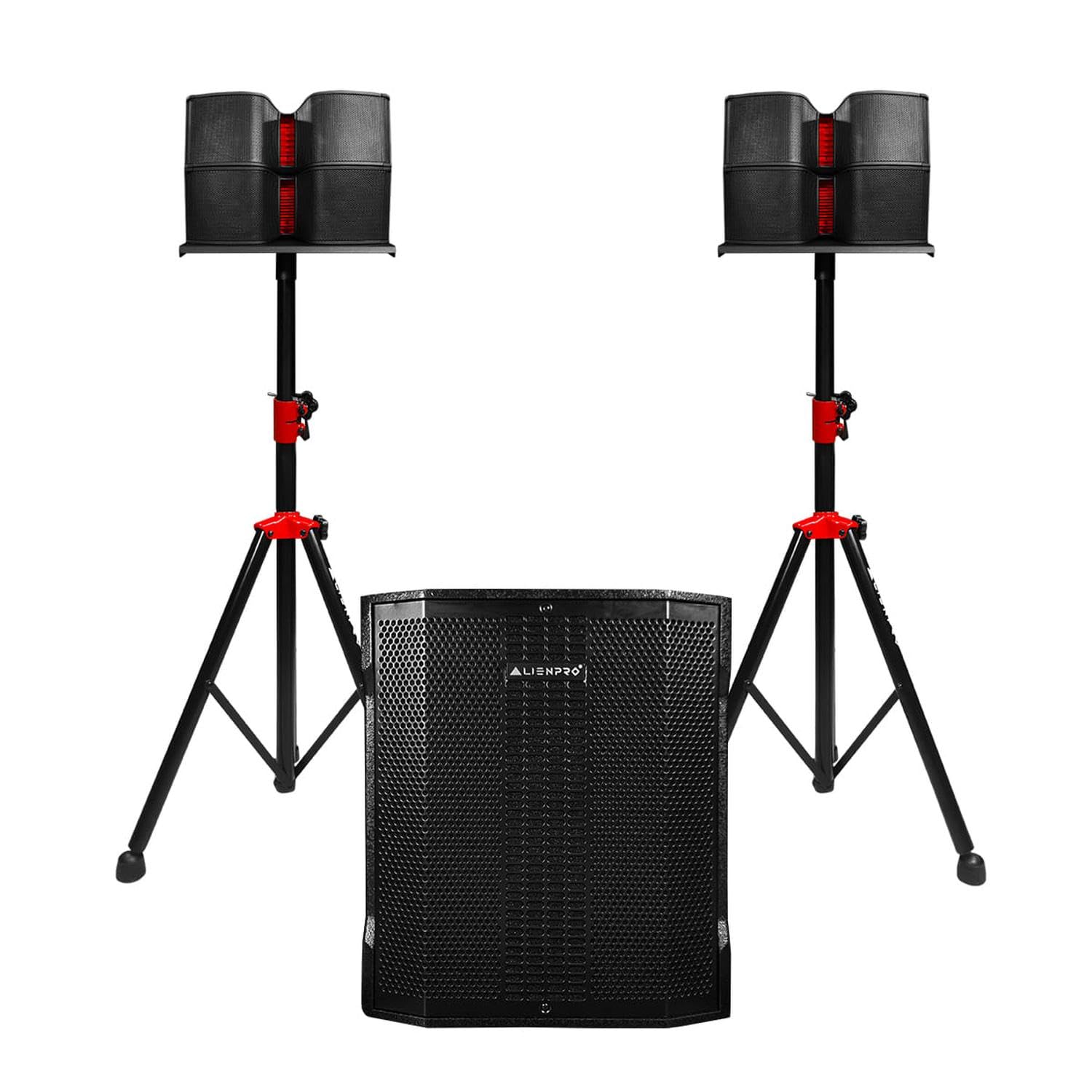
This manual provides essential information for the proper setup, operation, and maintenance of your ALIENPRO Ultra 15 Array Linear Speaker System. This active 2.1 system is designed for professional audio applications, including events, DJ setups, live performances, and mobile sound reinforcement. It features a 15-inch subwoofer, two compact satellite speakers, and an integrated Class D amplifier with digital signal processing (DSP).
Innihald pakka
- 1 x ALIENPRO Ultra 15 Array Subwoofer (15-inch)
- 2 x Satellite Speakers (each with 2 x 1-inch tweeters and 4 x 4-inch woofers)
- Rafmagnssnúra
- Speaker Cables for Satellite Connection
- Notendahandbók (þetta skjal)
Uppsetning
- Upptaka: Fjarlægið alla íhluti varlega úr umbúðunum. Athugið hvort einhver merki séu um skemmdir á meðan á flutningi stendur.
- Subwoofer staðsetning: Position the subwoofer on a stable, flat surface. Ensure adequate ventilation around the unit.
- Satellite Speaker Assembly: Mount the satellite speakers onto appropriate stands (not included) or place them on a stable elevated surface for optimal sound dispersion.
- Connecting Satellite Speakers: Use the provided speaker cables to connect the satellite speakers to the corresponding outputs on the rear panel of the subwoofer. Ensure secure connections.
- Rafmagnstenging: Connect the power cable to the subwoofer's power input and then to a suitable AC power outlet. Ensure the power switch is in the OFF position before connecting.
- Hljóðgjafatenging: Connect your audio source (mixer, media player, etc.) to the desired input on the subwoofer's rear panel (XLR, RCA, or Bluetooth).
Mynd: Rear panel of the ALIENPRO Ultra 15 Array subwoofer. This image displays the various input and output connections, including XLR, RCA, and microphone inputs, as well as the control panel for volume, DSP presets, and echo effect.

Mynd: ALIENPRO Ultra 15 Array satellite speakers. This image shows the two satellite speakers assembled and mounted on a speaker stand, ready for use.
Notkunarleiðbeiningar
- Kveikt/slökkt: Flip the main power switch on the rear panel of the subwoofer to the ON position. The display will illuminate.
- Hljóðstyrkur: Adjust the main volume knob on the subwoofer's control panel to a low level before playing audio. Gradually increase to the desired listening level. Individual input levels may also be adjusted.
- Inntaksval: The system automatically detects active inputs. For Bluetooth, ensure no other wired inputs are active or reduce their volume.
- Bluetooth-parun:
- Virkjaðu Bluetooth á farsímanum þínum.
- Select "ALIENPRO ULTRA 15" from the list of available devices.
- Once paired, the Bluetooth indicator on the subwoofer's display will confirm the connection.
- TWS (True Wireless Stereo) virkni: To link two ALIENPRO Ultra 15 Array systems wirelessly for stereo sound:
- Ensure both units are powered on and not connected to any Bluetooth device.
- On one unit, press and hold the TWS button until the display indicates TWS pairing mode.
- Repeat on the second unit. The units will automatically connect.
- Once connected, pair your Bluetooth device to the primary unit. Audio will play in stereo across both systems.
- DSP forstillingar: Use the DSP control on the rear panel to select between three audio presets:
- Íbúð: Provides a neutral frequency response, suitable for general listening or when external equalization is used.
- DJ: Enhances bass and treble for a more impactful sound, ideal for music playback.
- Í beinni: Optimizes the sound for live vocals and instruments, providing clarity and presence.
- Microphone Input with Echo: Connect a microphone to the MIC input. Adjust the MIC volume and ECHO effect level using the dedicated controls on the rear panel.
Viðhald
- Þrif: Disconnect the power before cleaning. Use a soft, dry cloth to wipe down the surfaces of the speakers. Do not use liquid cleaners or abrasive materials.
- Geymsla: When not in use for extended periods, store the system in a cool, dry place, protected from dust and extreme temperatures.
- Loftræsting: Ensure that the subwoofer's ventilation ports are clear and unobstructed to prevent overheating. The system includes built-in protection against overheating and short circuits.
- Kapalstjórnun: Regularly check all cables for wear or damage. Replace any damaged cables immediately to ensure safe operation.
Úrræðaleit
- Enginn kraftur:
- Check if the power cable is securely connected to both the subwoofer and the power outlet.
- Gakktu úr skugga um að rafmagnsinnstungan sé virk.
- Ensure the power switch on the subwoofer is in the ON position.
- Ekkert hljóð:
- Confirm that the main volume and individual input volumes are turned up.
- Check all audio cable connections from your source to the subwoofer.
- Ensure satellite speakers are correctly connected to the subwoofer.
- Ef þú notar Bluetooth skaltu ganga úr skugga um að tækið sé parað og spili hljóð.
- Bjagað hljóð:
- Reduce the main volume or the input level from your audio source.
- Athugið hvort snúrur séu skemmdar.
- Ensure the DSP preset is appropriate for your audio content.
- Bluetooth pörunarvandamál:
- Ensure the subwoofer is in pairing mode.
- Move your Bluetooth device closer to the subwoofer.
- Reyndu að aftengja tækið og para það aftur.
- Ensure no other Bluetooth devices are actively connected to the speaker.
Tæknilýsing
| Fyrirmynd | ULTRA-ARRAY15 |
| Tegund hátalara | 2.1 Linear Speaker System |
| Amplification Tegund | Active (Class D) |
| RMS máttur | 800W (340W Subwoofer + 2 x 230W Satellites) |
| Tíðni svörun | 45Hz - 18KHz |
| Hámark SPL | 121dB |
| Subwoofer | 1 x 15-inch Woofer |
| Gervihnattahátalarar | 2 x (2 x 1-inch Tweeters + 4 x 4-inch Woofers) |
| Tengingar | Bluetooth, TWS, XLR Inputs, RCA Inputs, MIC Input |
| DSP forstillingar | Flat, DJ, Live |
| Sérstakir eiginleikar | Echo Effect for MIC, Overheating & Short Circuit Protection |
| Mál (Subwoofer) | Approximately 107cm (D) x 53cm (W) x 110cm (H) (Total system dimensions) |
| Vöruþyngd | 56.1 kíló |
Ábyrgð og stuðningur
This product is subject to a 30-day return policy. For extended protection, optional accidental damage protection plans are available from Assurant for 2 or 3 years. Please refer to your purchase documentation for specific terms and conditions.
For technical support or service inquiries, please contact your retailer or the ALIENPRO customer service department. Keep your purchase receipt and product model number (ULTRA-ARRAY15) readily available when contacting support.