
1. Inngangur
Welcome to the user manual for your new Apple iPad Air 13-inch (M4). This guide provides essential information to help you set up, operate, maintain, and troubleshoot your device. The iPad Air combines powerful performance with a sleek design, featuring the Apple M4 chip, a Liquid Retina display, and advanced camera capabilities.
For additional support and detailed information, please visit the official Apple Support websíða.
2. Hvað er í kassanum
Your iPad Air package includes the following items:
- iPad Air
- USB-C hleðslusnúra
- 20W USB-C rafmagnstengi

Image: The iPad Air, USB-C Charge Cable, and 20W USB-C Power Adapter as packaged in the box.
3. Vöru lokiðview
3.1 Helstu eiginleikar
- Apple M4 Chip: Delivers advanced graphics and high performance for multitasking and AI tasks.
- Fljótandi sjónuhimnuskjár: Stunning 13-inch display with P3 wide color, True Tone, and ultralow reflectivity.
- Touch ID: Secure authentication for unlocking, app sign-ins, and Apple Pay.
- Ítarlegri myndavélar: 12MP Center Stage front camera and 12MP Wide back camera for photos and 4K videos.
- Wi-Fi 7 with Apple N1: Fast wireless connectivity for quick data transfers.
- iPadOS: Intuitive operating system with flexible windowing for enhanced productivity.
- Apple Intelligence: Personal intelligence system for writing, expression, and task management with privacy protections.
- Rafhlöðuending allan daginn: Designed to support extended use throughout the day.

Image: A user interacting with the iPad Air using an Apple Pencil, highlighting its portability and creative capabilities.
3.2 Líkamlegir eiginleikar
The iPad Air features a slim design with accessible buttons and ports.

Mynd: Nærmynd af hliðinni view of multiple iPad Air devices, showcasing the various color options and button placements.
3.3 Sýning og afköst
The 13-inch Liquid Retina display offers a resolution of 2732-by-2048 pixels at 264 ppi, supporting P3 wide color and True Tone technology for accurate color representation. The Apple M4 chip provides exceptional processing power for demanding applications and graphics-intensive tasks.

Image: The iPad Air screen demonstrating multitasking capabilities with two applications open side-by-side, powered by the M4 chip and iPadOS.
3.4 Apple Intelligence
Apple Intelligence is integrated into iPadOS, offering features that enhance productivity and creativity while prioritizing user privacy.
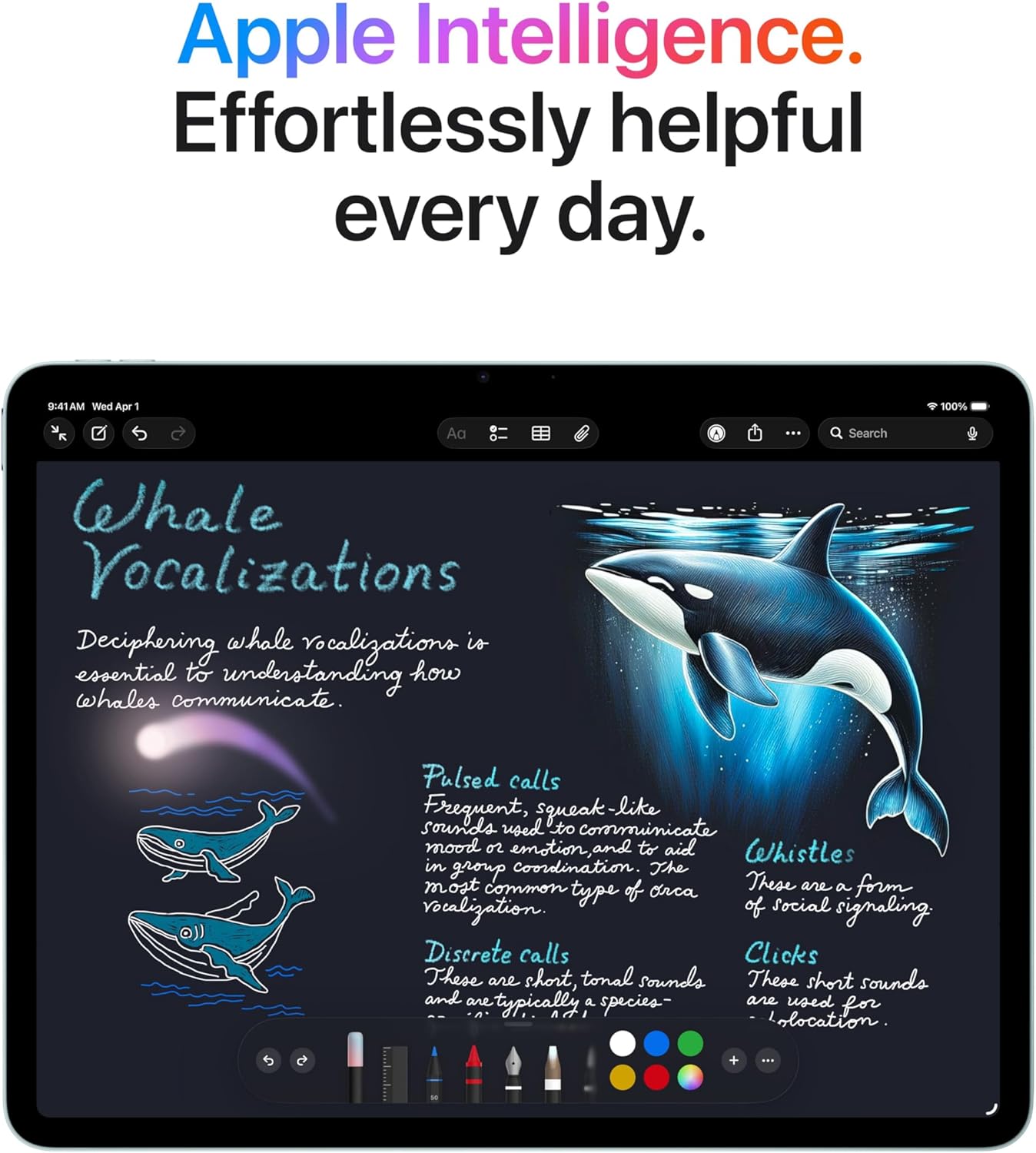
Image: The iPad Air screen showing a detailed note with drawings and text, illustrating how Apple Intelligence can assist with creative and organizational tasks.
3.5 Aukabúnaður
The iPad Air supports Apple Pencil Pro and Apple Pencil (USB-C) for precise input, and the Magic Keyboard for an enhanced typing and trackpad experience.

Image: The iPad Air connected to a Magic Keyboard, showcasing its use as a productivity tool with a full keyboard and trackpad.
3.6 Opinbert vörumyndband
Myndband: Yfirview of the Apple iPad Air, highlighting its design, M4 chip, display, and compatibility with accessories like Apple Pencil Pro and Magic Keyboard. It also showcases its use for work, learning, and entertainment.
4. Uppsetning
4.1 Byrjunarkveikt
- Haltu inni efsta hnappinum þar til Apple merkið birtist.
- Fylgdu leiðbeiningunum á skjánum til að velja tungumál og svæði.
4.2 Wi-Fi tenging
- Veldu Wi-Fi netið þitt af listanum.
- Sláðu inn lykilorðið ef beðið er um það.
4.3 Data Transfer and Apple ID
- Choose to restore from a backup (iCloud or computer) or set up as a new iPad.
- Skráðu þig inn með Apple ID-inu þínu eða stofnaðu nýtt.
4.4 Touch ID Setup
- Follow the on-screen prompts to register your fingerprint for Touch ID.
- This allows for secure unlocking and purchases.
5. Notkunarleiðbeiningar
5.1 Grunnbendingar
- Bankaðu á: Veldu hlut eða virkjaðu hnapp.
- Strjúktu: Fletta í gegnum skjái eða fletta í gegnum efni.
- Klípa: Aðdráttur eða minnkun á myndum og web síður.
- Multi-finger gestures: Use for multitasking, such as switching between apps or returning to the Home screen.
5.2 Stjórnstöð
Swipe down from the top-right corner of the screen to access Control Center for quick access to settings like Wi-Fi, Bluetooth, brightness, and volume.
5.3 Fjölverkavinnsla
- Skipta View: Drag an app from the Dock to the side of an open app to use two apps simultaneously.
- Renndu yfir: Drag an app from the Dock over an open app to use it in a floating window.
5.4 Forritastjórnun
- Sækja forrit: Use the App Store to find and download applications.
- Skipuleggðu forrit: Tap and hold an app icon to rearrange or delete apps.
6. Viðhald
6.1 Þrif á iPad Air
- Notið mjúkan, lólausan klút til að þrífa skjáinn og ytra byrði tækisins.
- Avoid abrasive materials, aerosols, solvents, or ammonia-based cleaners.
- Ekki úða hreinsiefnum beint á iPadinn.
6.2 Umhirða rafhlöðu
- Charge your iPad Air using the provided USB-C cable and 20W USB-C power adapter.
- Forðastu mikinn hita, þar sem það getur haft áhrif á afköst rafhlöðunnar.
- For optimal battery health, keep the battery charge between 20% and 80% when possible.
6.3 Hugbúnaðaruppfærslur
Regularly update your iPadOS to ensure you have the latest features, security enhancements, and bug fixes. Go to Stillingar > Almennt > Hugbúnaðaruppfærsla.
7. Bilanagreining
7.1 Tæki svarar ekki
If your iPad Air is unresponsive, try a force restart:
- Ýttu á og slepptu hratt hljóðstyrkshnappinum.
- Ýttu á og slepptu hratt hljóðstyrkstakkanum.
- Press and hold the Top button until the Apple logo appears.
7.2 Vandamál með Wi-Fi tengingu
- Gakktu úr skugga um að Wi-Fi sé virkt í Stjórnborði eða Stillingum.
- Endurræstu Wi-Fi leiðina þína.
- Farðu til Stillingar > Wi-Fi, tap the information icon (i) next to your network, and select "Forget This Network," then reconnect.
7.3 Rafhlaða tæmist hratt
- Athugaðu Stillingar> Rafhlaða til að bera kennsl á forrit sem nota mesta orku.
- Minnka birtustig skjásins.
- Disable background app refresh for non-essential apps (Settings > General > Background App Refresh).
8. Tæknilýsing
| Eiginleiki | Lýsing |
|---|---|
| Vörumál | 11.05 x 8.46 x 0.24 tommur |
| Þyngd hlutar | 1.36 pund |
| Tegundarnúmer vöru | MH5T4LL/A |
| Geymslugeta minni | 128 GB |
| Skjástærð | 13 tommur |
| Skjáupplausn Hámark | 2732 x 2048 pixlar upplausn við 264 ppi |
| Chip | Apple M4 örgjörvi (8 kjarna örgjörvi, 9 kjarna skjákort, 16 kjarna taugavél) |
| Myndavél | 12MP Wide camera (back), Landscape 12MP Center Stage camera (front) |
| Myndbandsupptaka | Up to 4K at 60 fps (back), 1080p HD at 60 fps (front) |
| Farsíma og þráðlaust | Wi-Fi 7 (802.11be), Bluetooth 6, Thread networking technology |
| Skynjarar | Snertilausn, Þriggja ása snúningsmælir, Hröðunarmælir, Loftþrýstingsmælir, Umhverfisljósskynjari |
| Hleðsla og útvíkkun | USB-C port (supports Charging, DisplayPort, USB 3 up to 10Gb/s) |
9. Ábyrgð og stuðningur
9.1 Vöruábyrgð
Your Apple iPad Air is covered by a limited warranty. For details on warranty coverage, including terms and conditions, please refer to the warranty information provided with your purchase or visit the official Apple websíða.
9.2 Tæknileg aðstoð
For technical assistance, troubleshooting, or service inquiries, please contact Apple Support:
- Stuðningur á netinu: Heimsókn support.apple.com/ipad
- Símastuðningur: Refer to Apple's regional support numbers available on their websíða.
- Apple Store: Visit an authorized Apple Store or service provider for in-person assistance.
Before contacting support, please have your iPad Air's serial number ready. This can be found in Stillingar > Almennt > Um.