
1. Inngangur
This manual provides essential information for the safe and efficient operation of your PowMr 4000W Hybrid Solar Inverter. This device is designed to convert 24VDC battery power into 110/120VAC pure sine wave electricity, integrating a 140A MPPT charge controller for optimal solar energy utilization. It supports various battery types and off-grid system configurations. Please read this manual thoroughly before installation and use, and retain it for future reference.
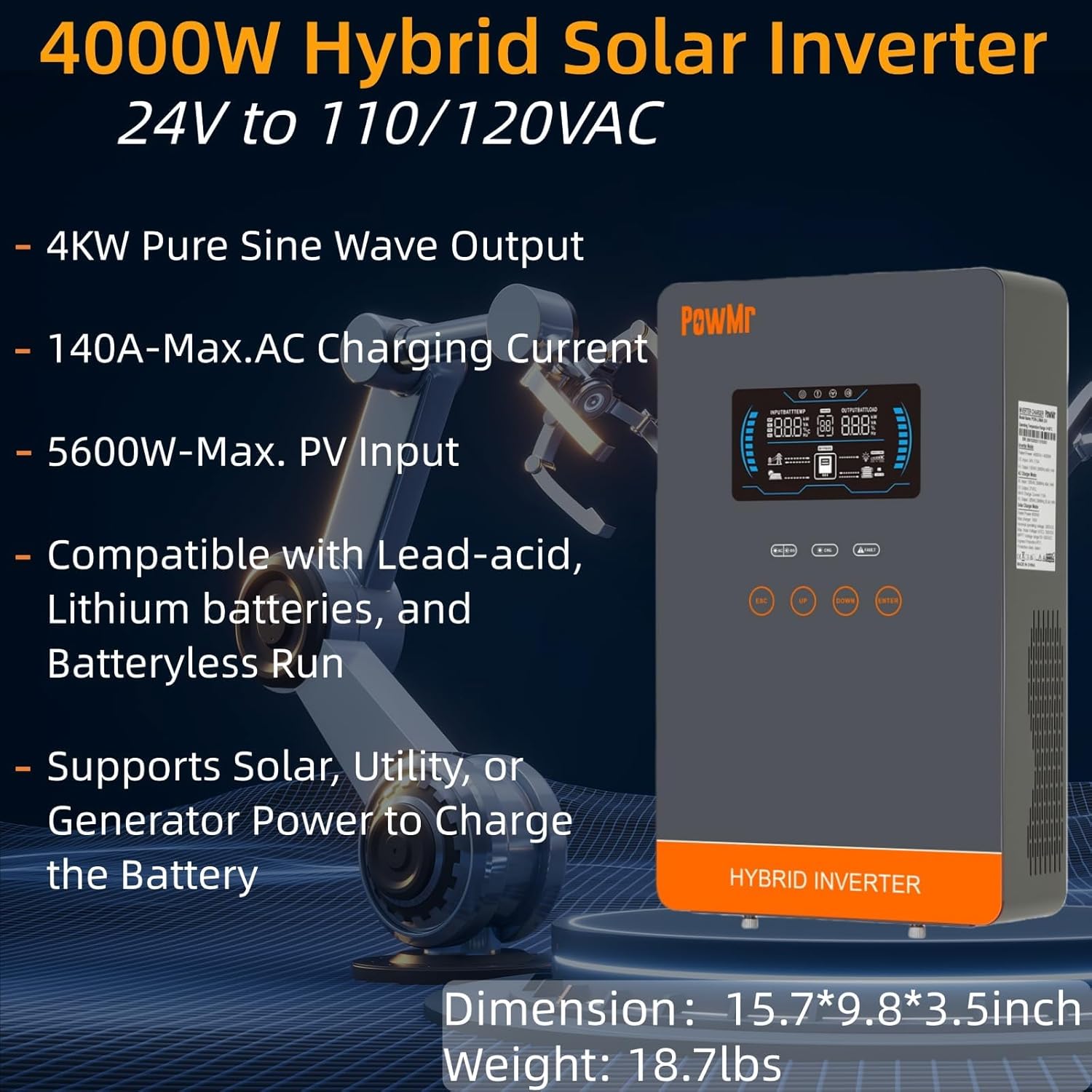
Image: The PowMr 4000W Hybrid Solar Inverter, highlighting its 4KW pure sine wave output, 140A max AC charging current, 5600W max PV input, compatibility with various batteries, and support for solar, utility, or generator power to charge the battery. Dimensions are 15.7"L x 9.8"W x 3.5"H and weight is 18.7lbs.
2. Öryggisleiðbeiningar
Fylgið alltaf eftirfarandi öryggisráðstöfunum til að draga úr hættu á raflosti, eldsvoða eða meiðslum:
- Uppsetning verður að vera framkvæmd af hæfu starfsfólki.
- Gakktu úr skugga um að allar raflagnir séu rétt stærðar og rétt einangraðar.
- Ekki taka inverterinn í sundur. Það eru engir hlutar inni í honum sem notandinn getur gert við.
- Haldið inverternum frá eldfimum efnum, raka og beinu sólarljósi.
- Tryggið næga loftræstingu í kringum inverterinn til að koma í veg fyrir ofhitnun.
- Aftengdu alltaf allar aflgjafa (PV, rafhlöðu, AC inntak) áður en viðhald eða raflögn eru framkvæmd.
- Notið viðeigandi persónuhlífar (PPE) við uppsetningu og viðhald.
3. Vöru lokiðview
3.1. Eiginleikar
- Pure Sine Wave Output: Provides stable and clean power suitable for sensitive electronics.
- Innbyggður MPPT hleðslustýring: 140A MPPT for efficient solar charging.
- Breitt rafhlöðusamhæfni: Supports AGM, Gel, Lead-acid, Lithium-ion, and LiFePO4 batteries.
- Batteryless Mode: Can power loads directly from PV/AC grid without a connected battery.
- Margar hleðslustillingar: Solar Only, Mains Only, Mains & Solar Hybrid.
- Margfeldi álagsúttaksstillingar: Utility Priority, Solar Priority, Solar and SBU Priority.
- Ítarleg vernd: Skammhlaup, yfir voltage, undir voltage, overload, reverse polarity, over-temperature, and backfill protection.
- Notendavænt viðmót: 6.25-inch LCD screen with touch controls for real-time data display.
- Samskiptahöfn: RS485 and RS232 for monitoring and control.
3.2. Auðkenning íhluta

Image: A detailed diagram of the PowMr Hybrid Solar Inverter, showing its front panel and connection ports. Key components labeled include: 1. LCD display, 2. Status indicator, 3. Charging indicator, 4. Fault indicator, 5. Function touch buttons, 6. On/off switch, 7. AC input, 8. AC output, 9. PV input, 10. Battery input, 11. RS485/RS232 communication port.
3.3. Verndunareiginleikar

Image: An illustration detailing the comprehensive protection features of the inverter, including Short Circuit Protection, Over-Load Protection, Over Current Protection, Backfill Protection, Over Voltage Protection, Over-Temperature Protection, Under Voltage Protection, and Over Charge Protection.
4. Innihald pakka
Þegar þú tekur úr umbúðunum skaltu ganga úr skugga um að allir hlutir séu til staðar og óskemmdir:
- PowMr 4000W Hybrid Solar Inverter
- Leiðbeiningar (þetta skjal)
- Communication Cables (if applicable, check packaging)
- Mounting Hardware (if applicable, check packaging)
5. Uppsetning og uppsetning
5.1. Uppsetning á inverter
Select a suitable location for mounting the inverter. It should be:
- Innandyra, varið gegn beinu sólarljósi, rigningu og ryki.
- Vel loftræst til að leyfa varmaleiðni.
- Nálægt rafhlöðunni til að lágmarka kapallengd og hljóðstyrktage dropi.
- On a solid, non-flammable surface.
5.2. Raflið
Follow the wiring diagram carefully. Incorrect wiring can cause damage to the inverter, batteries, or connected loads, and may pose a safety hazard.

Image: A comprehensive wiring diagram illustrating connections for PV input, Mains/Generator input, AC output, and Battery input. It specifies voltage ranges, current ratings, and recommended wire gauges for each connection point.
5.3. Rafhlöðutenging
The inverter is compatible with various 24V battery types. Ensure your battery bank matches the inverter's voltage kröfur.

Image: An illustration showing the inverter's compatibility with various battery types including AGM, GEL, FLD (Flooded), LI (Lithium-ion), SLD (Sealed Lead-Acid), and USER-defined settings. It also indicates a maximum battery charging current of 140A (utility charging + solar charging).
- Connect the battery cables to the inverter's battery terminals, ensuring correct polarity (positive to positive, negative to negative).
- Herðið allar tengingar örugglega.
5.4. Tenging við sólarorkukerfi
- Connect the solar panel array to the PV input terminals, observing correct polarity.
- Ensure the PV array's open circuit voltage and power are within the inverter's specifications.
5.5. Tenging við riðstraumsinntak/úttak
- Connect the AC utility grid or generator to the AC input terminals.
- Tengdu riðstraumsálagið þitt við riðstraumsútgangsklemmurnar.
- Ensure all AC connections are properly grounded.
6. Notkunarleiðbeiningar
6.1. Kveikja / slökkva á
- Til að kveikja á: Ensure all connections are secure. First, connect the battery, then the PV array, and finally the AC input. Press the On/Off switch.
- Til að slökkva á: Disconnect the AC input, then the PV array, and finally the battery. Press the On/Off switch.
6.2. LCD skjár og stjórntæki
The LCD screen displays real-time system data. Use the touch buttons to navigate menus and adjust settings.
6.3. Setting Charging and Output Modes
Inverterinn býður upp á sveigjanlega hleðslu- og úttaksstillingu til að henta ýmsum orkuþörfum.

Image: An illustration detailing the three charging modes (1. Only Solar, 2. Only Utility, 3. Solar+Utility) and three output modes (1. Utility First, 2. Solar First (default), 3. SBU priority). Steps to set programs are also provided: 1. Long press and hold ENTER button for 3s, 2. Press UP and DOWN to select setting programs, 3. Press ENTER to confirm or ESC to exit.
6.3.1. Hleðslustillingar
- Aðeins sólarorka: Hleður rafhlöður eingöngu með sólarsellum.
- Aðeins aðalréttur: Charges batteries exclusively from the AC utility grid or generator.
- Rafmagns- og sólarorkublöndun: Prioritizes solar charging, supplementing with AC utility/generator if solar power is insufficient.
6.3.2. Load Output Modes
- Forgangsröðun gagnsemi: Loads are primarily powered by the AC utility grid. Inverter switches to battery/solar if utility fails.
- Forgangur sólarorku: Loads are primarily powered by solar and battery. Inverter switches to utility if solar/battery power is insufficient.
- SBU forgangur (sólarorka-rafhlöðu-veita): Loads are primarily powered by solar, then battery, and finally by utility as a last resort.
7. Viðhald
Reglulegt viðhald tryggir bestu mögulegu afköst og endingu invertersins.
- Þrif: Periodically clean the inverter's exterior with a dry cloth. Do not use liquid cleaners.
- Loftræsting: Ensure cooling fan vents are clear of dust and obstructions. The triple cooling fan design helps dissipate heat efficiently.
- Tengingar: Athugið árlega allar rafmagnstengingar til að athuga hvort þær séu þéttar og hvort um sé að ræða tæringu.
- Umhverfi: Maintain a clean, dry, and well-ventilated environment around the inverter. The dust-proof design helps prevent dust ingress.
8. Bilanagreining
If you encounter issues, refer to the following common problems and solutions. For persistent issues, contact customer support.
| Vandamál | Möguleg orsök | Lausn |
|---|---|---|
| Inverterinn kveikir ekki á sér | Engin tenging við rafhlöðu; Lágt rafhlöðumagntage; On/Off switch off | Check battery connections; Charge battery; Turn on switch |
| Engin AC framleiðsla | Overload; Short circuit; Inverter fault | Reduce load; Check for short circuits; Restart inverter |
| Hleðsla á sólarljósum virkar ekki | PV array disconnected; Insufficient sunlight; PV voltagof lágt/hátt | Check PV connections; Ensure adequate sunlight; Verify PV array specifications |
| Viðvörun um ofhleðslu | Connected loads exceed inverter capacity | Disconnect some loads; Ensure total load is within 4000W |
| Viðvörun um háan hita | Léleg loftræsting; Of hár umhverfishitastig | Clear vents; Improve airflow; Relocate inverter if necessary |
9. Tæknilýsing
Technical specifications for the PowMr 4000W Hybrid Solar Inverter:
| Parameter | Gildi |
|---|---|
| Gerðarnúmer | POW-LVM4K-24V-FBA2 |
| Notaður framleiðsla máttur | 4000W |
| Inntak Voltage (DC) | 24VDC |
| Output Voltage (AC) | 110/120VAC |
| Úttaksbylgjuform | Hrein sinusbylgja |
| Hámark PV Open Circuit Voltage | 350VDC |
| PV Array MPPT Voltage Svið | 55-350VDC |
| Hámark PV inntaksafl | 5600W |
| Rafmagnsinntaksrúmmál netstage | 110/120VAC |
| Max. Hybrid Charging Current (AC+PV) | 140A |
| Samskipti | RS485, RS232 |
| Skjár Tegund | LCD |
| Mál (L x B x H) | 15.7" L x 9.8" B x 3.5" H |
| Þyngd | 18.7 lbs (approximate, derived from image) |
10. Ábyrgð og stuðningur
10.1. Upplýsingar um ábyrgð
The PowMr 4000W Hybrid Solar Inverter comes with an 18 mánaða ábyrgð from the date of purchase. This warranty covers defects in materials and workmanship under normal use. It does not cover damage caused by improper installation, misuse, accidents, unauthorized modifications, or natural disasters.
10.2. Þjónustudeild
For technical assistance, warranty claims, or any questions regarding your PowMr inverter, please contact PowMr customer support through the retailer's platform or the official PowMr website. Please have your model number (POW-LVM4K-24V-FBA2) and purchase date available when contacting support.