
1. Inngangur
The EcoVolt OUKITEL P2001E Pro is a high-capacity portable power station designed to provide reliable electricity for various applications, including home backup, outdoor adventures, and professional use. Featuring a 2048Wh LiFePO₄ battery and a 3200W AC output (6400W peak), it can power a wide range of devices and appliances. This manual provides essential information for safe and efficient operation, setup, maintenance, and troubleshooting.

Image: The OUKITEL P2001E Pro providing power in an outdoor campstilling.
2. Öryggisleiðbeiningar
Please read and understand all safety instructions before operating the OUKITEL P2001E Pro. Failure to follow these instructions may result in electric shock, fire, or serious injury.
- Ekki taka í sundur, gera við eða breyta einingunni.
- Haldið tækinu frá hitagjöfum, beinu sólarljósi og eldfimum efnum.
- Ekki útsetja tækið fyrir vatni eða öðrum vökva.
- Tryggið góða loftræstingu við notkun og hleðslu.
- Geymið þar sem börn og gæludýr ná ekki til.
- Notið aðeins upprunalega eða vottaða hleðslusnúrur og fylgihluti.
- Ef eldur kviknar skal nota þurrduftslökkvitæki.
3. Innihald pakka
Gakktu úr skugga um að allir hlutir sem taldir eru upp hér að neðan séu innifaldir í pakkanum þínum. Ef einhverjir hlutir vantar eða eru skemmdir skaltu hafa samband við þjónustuver.
- OUKITEL P2001E Pro Portable Power Station
- 1 x AC hleðslusnúra
- 1 x sólarhleðslusnúra (MC4 til XT90)
- 1 x Notendahandbók
Athugið: The solar panel (if purchased) and the power station are shipped separately. Please await the arrival of both packages.

Image: OUKITEL P2001E Pro and its accessories.
4. Vöru lokiðview
The OUKITEL P2001E Pro features a comprehensive array of input and output ports to meet diverse power needs. Familiarize yourself with the layout and functions of each component.

Mynd: Yfirview of the 13 output ports.
Framhlið
- LCD skjár: Sýnir rafhlöðustöðu, inntaks-/úttaksafl og stöðuvísa.
- Aflhnappur: Kveikir/SLÖKKUR á tækinu.
- Jafnstraumsútgangstengingar: 12V/10A car port, 12V/3A DC5521 ports.
- USB úttakstengi: USB-A (QC3.0 18W), USB-C (PD 100W, PD 20W).
- AC Output tengi: 4 x 220-240V AC outlets (Pure Sine Wave).
Bakhlið
- AC inntaksport: For charging via grid power.
- XT60 inntaksport: For solar panel charging.
- Hnappur til að vernda ofhleðslu: Resets the system in case of overload.
Video: An unboxing and initial demonstration of the OUKITEL P2001E Pro, showing its components and basic operation.
5. Uppsetning
Before first use, ensure the power station is fully charged. Place the unit on a stable, flat surface with adequate ventilation.
- Taktu upp: Takið rafmagnsstöðina og allan fylgihluti varlega úr umbúðunum.
- Upphafsgjald: Connect the power station to an AC outlet using the provided AC charging cable. Allow it to charge completely before first use.
- Kveikt á: Press and hold the main Power Button for a few seconds until the LCD display illuminates.
6. Hleðsla rafstöðvarinnar
The OUKITEL P2001E Pro offers multiple charging options for flexibility.
AC hleðsla
- Connect the AC charging cable to the AC input port on the rear of the unit and then to a wall outlet.
- The unit can charge to 80% in approximately 55 minutes and fully charge in about 2 hours.
- The charging speed can be adjusted via the knob on the front panel (400W/800W/1200W/1800W) or through the mobile app.

Image: Super-fast AC charging capability.
Sólarhleðsla
- Connect compatible solar panels (up to 500W) to the XT60 input port using the provided solar charging cable.
- Charging time varies depending on sunlight intensity and solar panel wattage.
Hleðsla bíls
- Connect the car charging cable (not included, but compatible with the DC input) to your vehicle's 12V/24V outlet.
Dual Charging (AC + Solar)
- Combine AC (1800W) and solar (500W) inputs for the fastest charging, achieving a full charge in approximately 1.2 hours.

Image: Multiple fast charging options.
7. Rekstur virkjunarinnar
The OUKITEL P2001E Pro can power up to 13 devices simultaneously through its various output ports.
Using AC Outputs
- Press the AC Power Button to activate the AC outlets.
- Plug your devices into the AC outlets. The unit provides a rated output of 3200W (6400W peak).
- The LCD display will show the current AC output wattage.

Image: High power output for various appliances.
Notkun DC og USB útganga
- Press the DC Power Button to activate the DC and USB ports.
- Connect your USB-powered devices to the USB-A or USB-C ports.
- Connect 12V devices to the car port or DC5521 ports.
UPS virkni (órofin aflgjafi)
- When connected to AC power, the P2001E Pro can act as an UPS. In the event of a power outage, it automatically switches to battery power within 0.01 seconds.
- This feature ensures continuous operation for sensitive electronics like computers, preventing data loss.

Image: UPS protection for continuous power.
8. Snjallforritastýring
Manage and monitor your OUKITEL P2001E Pro remotely using the dedicated mobile app.
- Sækja appið: Leitaðu að the "OUKITEL Power" app on your smartphone's app store.
- Tengjast: Enable Bluetooth or Wi-Fi on your phone and follow the in-app instructions to connect to your power station.
- Eiginleikar: The app allows you to monitor battery status, adjust charging speed (AC and solar input), and control power output settings.

Image: Smart app for complete power control.
9. Viðhald
Rétt viðhald tryggir langlífi og bestu mögulegu afköst rafstöðvarinnar.
- Þrif: Þurrkið tækið með þurrum, mjúkum klút. Notið ekki slípiefni eða leysiefni.
- Geymsla: Store the unit in a cool, dry place, away from direct sunlight and extreme temperatures. For long-term storage, charge the battery to 50-80% every 3-6 months.
- Umhirða rafhlöðu: The LiFePO₄ battery is designed for over 3500 charge cycles, offering a lifespan of over 15 years. An integrated BMS (Battery Management System) protects against overvoltage og yfirstraumur.

Image: Long-lasting LiFePO₄ battery with BMS protection.
10. Bilanagreining
If you encounter issues with your OUKITEL P2001E Pro, refer to the following common problems and solutions:
- Eining kviknar ekki: Ensure the battery is charged. Press and hold the Power Button for a few seconds.
- No Output from AC/DC/USB Ports: Ensure the respective output buttons (AC/DC) are pressed to activate the ports. Check if the device connected is within the power station's output limits.
- Vísbending um ofhleðslu: If an overload warning appears, disconnect some devices and press the Overload Protection Button on the rear panel to reset.
- Hleðsla hægt: Verify that the charging speed adjustment knob is set to the desired wattage. Ensure solar panels are clean and receiving direct sunlight.
- Vandamál með tengingu forrita: Ensure Bluetooth/Wi-Fi is enabled on your phone and the power station. Restart both devices and try reconnecting.
Ef vandamál koma upp aftur, vinsamlegast hafið samband við þjónustuver.
11. Tæknilýsing
| Eiginleiki | Forskrift |
|---|---|
| Vörumerki | EcoVolt |
| Nafn líkans | P2001E Pro |
| Tegund rafhlöðu | LiFePO₄ (litíum járnfosfat) |
| Getu | 2048 Wh |
| AC Output Power | 3200 W (metið), 6400 W (hámark) |
| Voltage | 230 volt |
| AC Input Power | 1800 W (hámark) |
| Sólarorkuframleiðsla (PV) | 12-60V, 1000W Hámark |
| Hleðslutími (AC) | Um það bil 2 klukkustundir (full hleðsla) |
| Charging Time (AC + Solar) | Um það bil 1.2 klukkustundir (full hleðsla) |
| Hávaðastig | 30 dB |
| Fjöldi rafmagnsinnstungna | 4 |
| USB-C tengi | 4 (PD 100W, PD 20W) |
| USB-A tengi | 2 (QC3.0 18W) |
| DC framleiðsla höfn | 2 x DC5521 (12V/3A), 1 x Car Port (12V/10A) |
| UPS skiptitími | < 0.01 sekúndur |
| Mál (L x B x H) | 39.9L x 28.6W x 32H cm |
| Þyngd | 22 kíló |
| Sérstakir eiginleikar | Extra-long autonomy, Digital display, Portable, Overload protection, Super quiet |
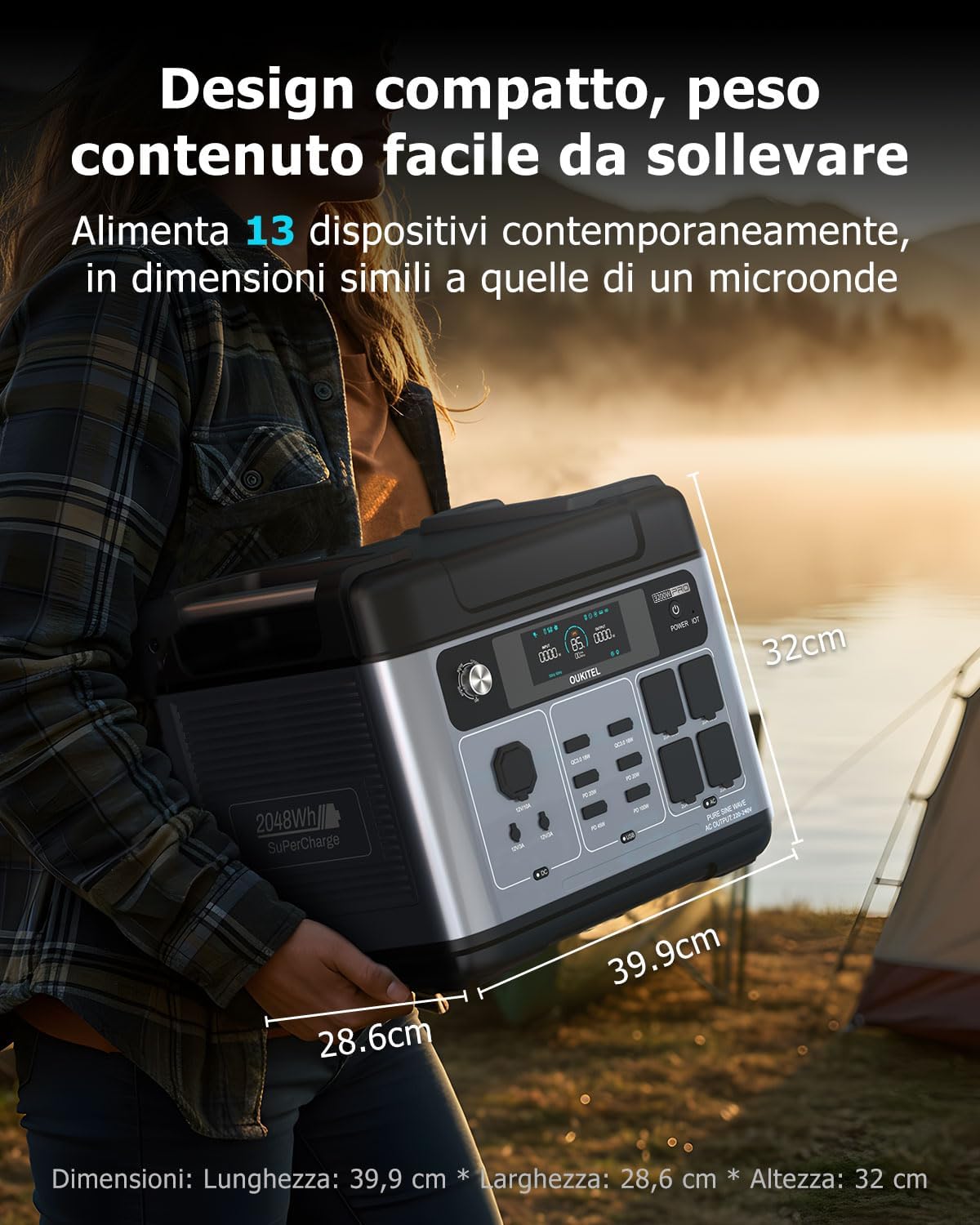
Mynd: Stærð vörunnar.
12. Ábyrgð og stuðningur
The OUKITEL P2001E Pro is built for durability and comes with comprehensive support.
- Ábyrgð: The product includes a 5-year manufacturer's warranty.
- Líftími rafhlöðu: The integrated LiFePO₄ battery is designed for over 3500 charge cycles, providing an estimated lifespan of over 15 years.
- Þjónustudeild: A local service center is available in Germany. Our support team aims to respond within 8 hours, offering fast, professional, and reliable assistance.
For warranty claims or technical assistance, please refer to the contact information provided in your warranty card or visit the official EcoVolt websíða.