
Inngangur
This manual provides essential information for the safe and efficient use of your Xiaomi 55-inch 4K UHD Smart Quantum MagiQ S Mini LED Google TV. Please read these instructions thoroughly before operating the device and retain them for future reference.
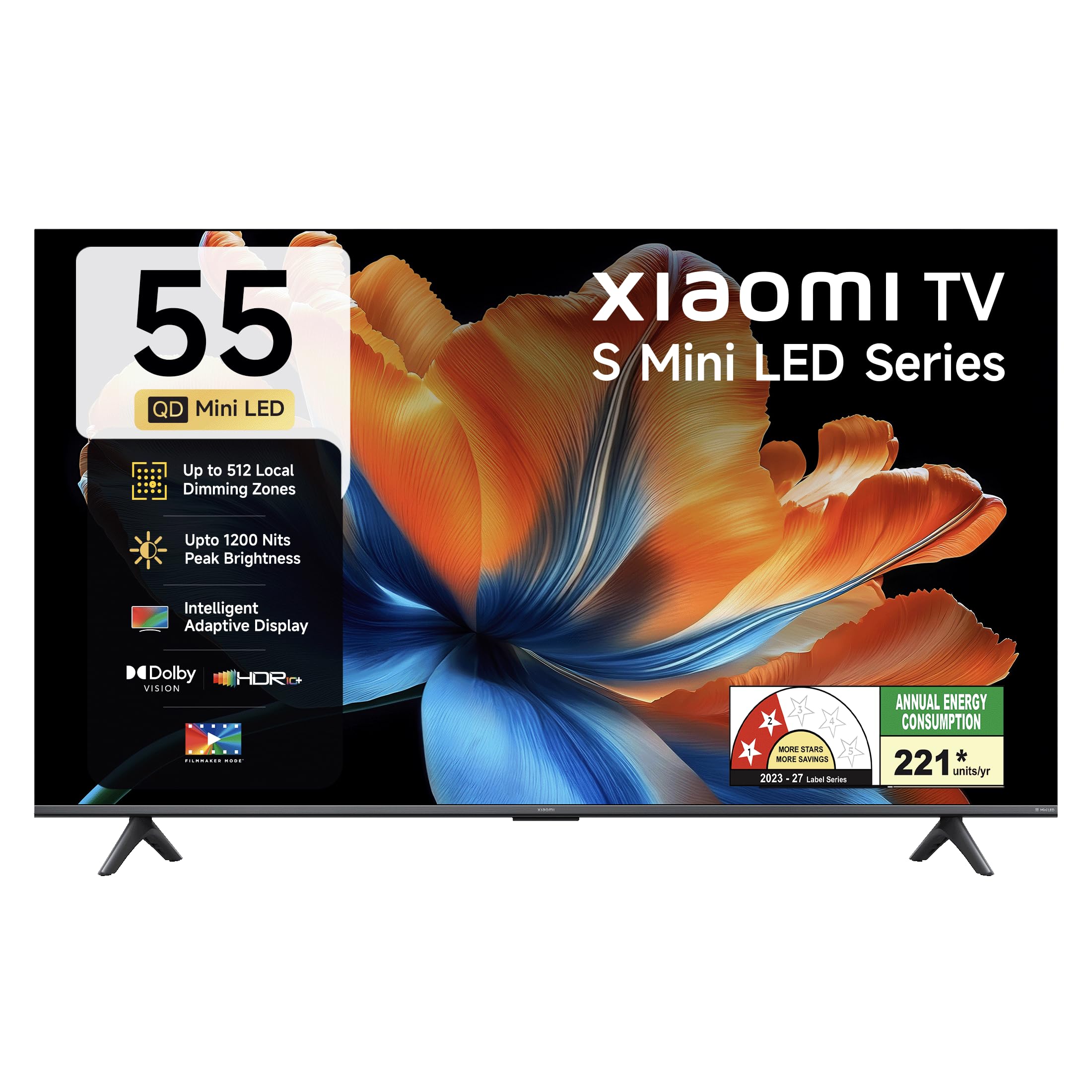
Mynd: Framan view of the Xiaomi 55-inch 4K UHD Smart Quantum MagiQ S Mini LED Google TV, showcasing mjóa rammhönnun þess.
Uppsetningarleiðbeiningar
1. Upppakkning og fylgihlutir
Carefully remove all items from the packaging. Ensure all components listed below are present and undamaged.

Image: Contents of the product box, including the TV unit, remote control, user manual, two stand units, four screws, two AAA batteries, and a power cord.
- 1 LED sjónvarpseining
- 1 Fjarstýring
- 1 Notendahandbók (þetta skjal)
- 2 Stand Units
- 4 Screws for stand installation
- 2 AAA rafhlöður (fyrir fjarstýringu)
- 1 Rafmagnssnúra
2. Uppsetning á standi eða veggfesting
Your television supports both table-top stand installation and wall mounting. Choose the method suitable for your environment.
- Fyrir uppsetningu stands: Attach the two provided stand units to the bottom of the TV using the four screws. Ensure they are securely fastened.
- Fyrir veggfestingu: Use a compatible VESA wall mount (sold separately). Follow the instructions provided with your wall mount kit. Ensure the wall can support the TV's weight.
3. Að tengja ytri tæki
Connect your external devices such as set-top boxes, gaming consoles, or audio systems to the TV's ports.

Mynd: Aftan view of the TV highlighting connectivity ports: Optical, Earphone, AV In, 3 HDMI ports (one with eARC), 2 USB 2.0 ports, Antenna, and Ethernet.
- HDMI tengi (x3): Connect gaming consoles, Blu-ray players, or set-top boxes. One port supports eARC for enhanced audio return channel functionality.
- USB tengi (x2): Tengdu USB-geymslutæki til að spila margmiðlunarefni.
- Ethernet tengi: Fyrir snúrubundið internettengingu.
- Optical Output: Til að tengjast við ytri hljóðkerfi.
- AV inn: Til að tengja eldri tæki með samsettri mynd og stereóhljóði.
- Loftnet: Til að tengja jarðbundið eða kapalloftnet.
4. Fyrsta ræsing og uppsetning
After connecting all necessary cables, plug the power cord into an electrical outlet. Press the power button on the remote control or the TV to turn it on. Follow the on-screen instructions for initial setup, which typically includes:
- Val á tungumáli
- Nettenging (Wi-Fi eða Ethernet)
- Innskráning á Google reikning
- Rásarskönnun
Að stjórna Xiaomi snjallsjónvarpinu þínu
1. Fjarstýringaraðgerðir
Fjarstýringin sem fylgir með veitir aðgang að öllum sjónvarpsaðgerðum. Settu tvær AAA rafhlöður í fjarstýringuna og gætið þess að þær snúi rétt.

Image: Xiaomi remote control, featuring dedicated quick access buttons for popular streaming services and Google Assistant voice control.
- Aflhnappur: Kveikir eða slekkur á sjónvarpinu.
- Hnappur Google aðstoðarmanns: Virkjar raddstýringu til að leita að efni, stjórna snjalltækjum heima og fleira.
- Siglingarpúði: Notað til að fletta í gegnum valmyndir og velja hluti.
- Hljóðstyrkur upp/niður: Stillir hljóðstyrkinn.
- Rás upp/niður: Skiptir um sjónvarpsrásir.
- Hnappar fyrir flýtileiðir: Dedicated buttons for Netflix, Prime Video, YouTube, Disney+ Hotstar, SonyLIV, and Live TV.
- Þagga hnappur: Þaggar hljóðið í sjónvarpinu.
2. Google TV Interface and Applications
Your TV runs on the Android 14 OS with Google TV, offering a personalized content experience. Access a wide range of applications from the Google Play Store.

Image: The PatchWall interface, providing customized content recommendations and curation from various streaming platforms.
- Viðmót fyrir efni fyrst: Organizes content from all your streaming services in one place.
- Persónulegur atvinnumaðurfiles: Búðu til einstaka atvinnumennfiles fyrir persónulegar ráðleggingar.
- Stuðnd forrit: Pre-installed and downloadable apps include Netflix, Prime Video, YouTube, Zee5, JioCinema, SonyLiv, and more.
- Google aðstoðarmaður: Use voice commands for navigation, search, and smart home control.
3. Mynd- og hljóðstillingar
Fínstilltu þitt viewing and listening experience through various picture and sound modes.
Myndastillingar:
- Kvikmyndagerðarstilling: Disables post-processing effects to display content as intended by the director.
- Dolby Vision: Enhances HDR content with dynamic metadata for optimized image quality frame by frame.
- HDR10+: Uses dynamic data to enhance every frame, providing an immersive viewupplifun.
- Augnþægindastilling: Minnkar blátt ljós og flökt fyrir þægilegri upplifun viewupplifun.
- MEMC Engine: Motion Estimation, Motion Compensation technology for smoother motion in fast-paced scenes.
- AI Picture Optimization Engine: Advanced AI algorithms analyze content in real-time to enhance clarity, contrast, and color reproduction.

Image: Filmmaker Mode, designed to preserve original colors, contrast, and motion for an authentic cinematic experience.

Image: Dolby Vision technology, optimizing image quality with deeper blacks and brighter highlights.

Image: HDR10+ dynamic frame-by-frame tuning, ensuring consistent detail across dark and bright scenes.

Image: Eye Care Mode, providing flicker-free visuals with DC Dimming and reduced blue light for comfortable viewing.
Hljóðstillingar:
- 34 watta afköst: Powerful built-in box speakers.
- Dolby hljóð: Gefur ríkan, skýran og kraftmikinn hljóm.
- DTS-X og DTS Virtual:X: Býður upp á upplifunarríkt, fjölvítt hljóð.
- Xiaomi hljóð: Preset audio configurations developed for optimal sound quality.

Image: Xiaomi Sound, offering tailored audio experiences through expert-developed configurations.
4. Connectivity and Streaming
Your TV offers versatile connectivity options for seamless streaming and device integration.
- Tvöfalt band Wi-Fi: Connects to 2.4GHz and 5GHz wireless networks.
- Bluetooth: Tengdu þráðlaus heyrnartól, hátalara eða annan Bluetooth-aukabúnað.
- Google Cast Built-in: Stream content directly from compatible apps on your smartphone or tablet.
- Apple AirPlay 2: Streymdu efni úr Apple tækjum.
- Miracast: Mirror your Android device's screen wirelessly.

Image: Stream content from your phone using Google Cast or Apple AirPlay 2.
Umhirða og viðhald
Rétt umhirða tryggir langlífi og bestu mögulegu virkni sjónvarpsins.
- Skjárhreinsun: Þurrkið skjáinn varlega með mjúkum, lólausum klút. Fyrir þrjósk bletti skal nota sérstakan hreinsilausn fyrir skjáinn á klútinn, ekki beint á skjáinn.
- Líkamsþrif: Wipe the TV's frame and back panel with a soft, dry cloth. Avoid abrasive cleaners or solvents.
- Loftræsting: Tryggið nægilegt loftflæði í kringum sjónvarpið. Ekki loka fyrir loftræstingarop.
- Slökkva á: Slökkvið alltaf á sjónvarpinu og takið það úr sambandi við rafmagn áður en það er þrifið eða ef það verður ekki notað í langan tíma.
- Hugbúnaðaruppfærslur: Periodically check for and install software updates to ensure optimal performance and security.
Úrræðaleit algeng vandamál
Refer to this section for solutions to common operational problems.
| Vandamál | Lausn |
|---|---|
| Sjónvarpið kviknar ekki | Ensure the power cord is securely plugged into both the TV and a working electrical outlet. Check if the power outlet is active. Try pressing the power button on the TV itself. |
| Engin mynd, en hljóð er til staðar | Check the input source. Ensure the connected device (e.g., set-top box) is turned on and functioning. Try a different HDMI cable or port. |
| Ekkert hljóð, en mynd er til staðar | Check the volume level and ensure the TV is not muted. Verify audio output settings (e.g., internal speakers, external sound system). Check audio cables for external devices. |
| Fjarstýring svarar ekki | Replace the AAA batteries in the remote control. Ensure there are no obstructions between the remote and the TV. Re-pair the Bluetooth remote if necessary (refer to TV settings). |
| Get ekki tengst Wi-Fi | Ensure your Wi-Fi router is on and working. Re-enter the Wi-Fi password. Try restarting both the TV and the router. Check if other devices can connect to the Wi-Fi network. |
Tæknilýsing
Detailed specifications for the Xiaomi 55-inch 4K UHD Smart Quantum MagiQ S Mini LED Google TV (Model L55MC-IN).

Image: Physical dimensions and weight of the Xiaomi 55-inch TV, both with and without the stand.
| Eiginleiki | Forskrift |
|---|---|
| Gerðarnúmer | L55MC-IN |
| Skjástærð | 55 tommur (138 cm) |
| Skjátækni | Mini LED |
| Upplausn | 4K Ultra HD (3840 x 2160) |
| Endurnýjunartíðni | 60 Hz (DLG 120 Hz) |
| Hámarks birta | Allt að 1200 nitum |
| Stýrikerfi | Android 14 OS with Google TV |
| vinnsluminni | 2GB |
| ROM (innri geymsla) | 32 GB |
| Hljóðúttak | 34 Watt |
| Hljóðtækni | Dolby Audio, DTS-X, DTS Virtual:X |
| Tengingar | Dual Band Wi-Fi, Bluetooth, 3 HDMI (1 eARC), 2 USB, Optical, Ethernet, AV In |
| Skjáspeglun | Google Cast, Apple AirPlay 2, Miracast |
| Sérstakir eiginleikar | Filmmaker Mode, MEMC, Eye Comfort Mode, AI Picture Optimization Engine |
| Vörumál (D x B x H) | 31.2D x 31.2W x 76.9H Centimeters (with stand) |
| Item Weight Without Stand | 11.6 kíló |
| Orkunotkun | 230 Watt |
| Upprunaland | Indlandi |
Upplýsingar um ábyrgð
Your Xiaomi TV comes with a comprehensive warranty provided by the brand from the date of purchase.
- Hefðbundin ábyrgð: 3-year comprehensive warranty for non-prebook customers (purchases between April 22nd - May 31st).
- Pre-book Customer Warranty: 4-year comprehensive warranty for pre-book customers (purchases between April 22nd - April 30th).
Warranty claims can be made using your Amazon invoice as proof of purchase. For detailed terms and conditions, please refer to the official Xiaomi warranty policy or contact customer support.
Þjónustudeild
For any assistance, service requests, or queries regarding your Xiaomi TV, please contact Xiaomi customer support.

Mynd: Yfirview of Xiaomi's customer support commitments, including quick installation, prompt call-backs, and swift doorstep solutions.
- Uppsetningarþjónusta: New TV installations are typically completed within 3 hours of your appointment.
- Service Requests: Búist er við símtali frá þjónustuteyminu innan 60 mínútna vegna allra þjónustubeiðna.
- Stuðningur á staðnum: Experts aim to arrive at your home within 24 hours of your service request.
Please visit the official Xiaomi India websíðuna eða vísaðu til tengiliðaupplýsinganna sem fylgja með í umbúðum vörunnar til að fá nýjustu upplýsingar um þjónustu.