1. Inngangur
The Alesis ADAT-HD24 is a 24-track, 24-bit/96kHz hard disk recorder designed for seamless integration into any standard ADAT recording environment. This unit provides robust performance for music recording, utilizing standard, low-cost IDE computer drives for media. It features dual hot-swappable media bays, internal editing capabilities, and comprehensive connectivity options.
The ADAT-HD24 is engineered to deliver remarkable stability and performance, making it a reliable choice for professional audio production. Its user-friendly interface aligns with the expectations of ADAT users, ensuring efficient operation within existing studio setups.
2. Uppsetning
2.1 Upptaka og skoðun
Carefully remove the ADAT-HD24 from its packaging. Inspect the unit for any signs of damage that may have occurred during transit. Retain all packaging materials for future transport or storage.
2.2 Uppsetning harða disksins
The ADAT-HD24 utilizes standard IDE computer drives housed in hot-swappable caddies. The unit includes two media bays. To install a hard drive:
- Gakktu úr skugga um að slökkt sé á einingunni.
- Insert a hard drive, pre-mounted in an Alesis caddy, into one of the two front-panel media bays.
- Gently push the caddy until it clicks securely into place.
- The caddies support IDE/EIDE/ATA drives ranging from 5,400 to 10,000 RPM, up to 2 TB in size.
2.3 Einingin tengd
Refer to the rear panel diagram for connection points. Ensure all connections are secure before powering on the unit.

Mynd 2.1: Rear panel of the Alesis ADAT-HD24, illustrating the various input and output connections.
- Kraftur: Connect the included power cable to the AC inlet (90-230V AC, 60W).
- Analog hljóð: Use 1/4-inch TRS cables for the 24 analog inputs and 24 analog outputs (+4dBu nominal level).
- Stafrænt hljóð: Connect ADAT Optical cables to the three ADAT Optical input ports and three ADAT Optical output ports for 24-channel digital I/O.
- Samstilling: Connect ADAT Sync devices to the DB-9 ADAT Sync In/Out ports. For external clocking, connect a 75Ω BNC cable to the Word Clock input.
- MIDI: Connect MIDI devices to the MIDI In/Out ports.
- Ethernet: Connect an RJ-45 Ethernet cable to the 10 Base-T Ethernet port for computer connectivity.
- Footswitch/Remote: Connect a 1/4-inch footswitch for punch-in/out or an LRC remote for traditional wired control.
3. Operating the ADAT-HD24
3.1 Grunnupptaka
The ADAT-HD24 supports 24-track, 24-bit digital audio recording at 44.1 kHz or 48 kHz sample rates. With the optional EC2 upgrade, it can record 12 tracks at 88.2 kHz or 96 kHz.
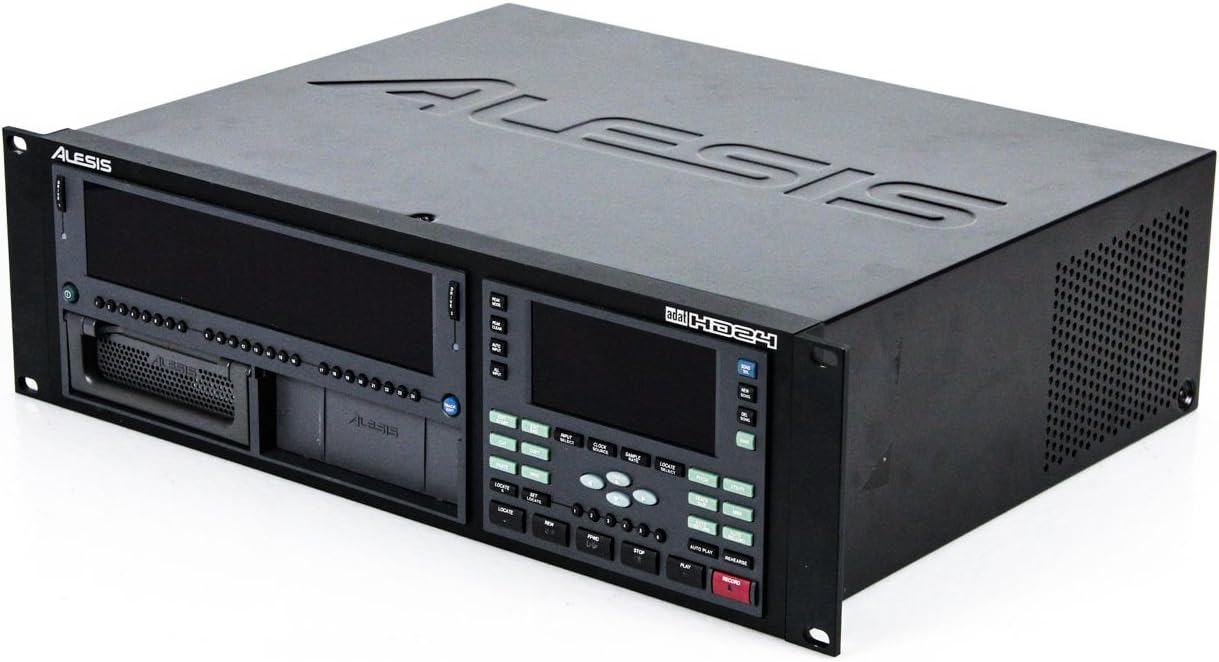
Mynd 3.1: Front panel of the Alesis ADAT-HD24, showing the display, transport controls, and media bays.
- Kveikt á: Press the power button. The unit will initialize and display the main recording screen.
- Track Arming: Select the desired tracks for recording using the front panel controls.
- Stilling inntaksstigs: Monitor input levels to prevent clipping.
- Upptaka: Press the Record button, then the Play button to begin recording.
- Spilun: Use the transport controls (Play, Stop, Rewind, Fast Forward) for navigation. The ADAT/FST (File Streaming Technology) provides instant random access to audio.
3.2 Internal Editing
The ADAT-HD24 offers basic internal editing capabilities:
- Klippa: Remove a selected audio segment.
- Afrita: Duplicate a selected audio segment.
- Líma: Insert a copied segment at a specified location.
- Track Move: Relocate audio data between tracks.
- An undo function is available for editing operations.
3.3 Synchronization and Networking
- Samstilling margra eininga: Multiple ADAT-HD24 units can be synchronized to expand track count for larger recording systems.
- ADAT System Integration: The unit is designed for efficient integration with existing ADAT systems using ADAT Optical and ADAT Sync.
- Tölvutenging: The built-in Ethernet port allows for easy transfer of audio files to a computer-based Digital Audio Workstation (DAW).
- MIDI Time Code (MTC): The MIDI Out port can transmit MTC for synchronization with other MIDI-compatible devices.
4. Viðhald
4.1 Stjórnun harðdisks
Regularly back up your recorded data. The hot-swappable media bays facilitate quick drive changes for backup or expanding storage capacity. Ensure hard drives are properly formatted for use with the ADAT-HD24.
4.2 Þrif
Keep the unit clean by wiping its exterior with a soft, dry cloth. Avoid using liquid cleaners or solvents, which can damage the finish or internal components. Ensure ventilation grilles are free from dust accumulation to maintain proper airflow.
5. Bilanagreining
If you encounter issues with your ADAT-HD24, consider the following general troubleshooting steps:
- Enginn kraftur: Verify the power cable is securely connected to both the unit and a working power outlet. Check the power switch position.
- Engin hljóðinntak/úttak: Confirm all audio cables (analog and digital) are correctly connected and not damaged. Check input source levels and output monitoring paths.
- Hard Drive Not Recognized: Ensure the hard drive caddy is fully inserted and the drive is properly seated within the caddy. Verify the drive is compatible and correctly formatted.
- Samstillingarvandamál: Check all sync connections (ADAT Sync, Word Clock) and ensure all devices are set to the correct master/slave configuration and sample hlutfall.
- Stýringar sem svara ekki: Power cycle the unit by turning it off, waiting a few seconds, and then turning it back on.
For persistent issues, consult the Alesis support websíðuna eða hafið samband við þjónustuver þeirra til að fá frekari aðstoð.
6. Tæknilýsing
| Fjölmiðlar | Dual hot-swappable bays for standard IDE/EIDE/ATA drives (5,400/7,200/10,000 RPM, up to 2 TB) |
| Track Count | 24 tracks at 24-bit, 44.1 or 48 kHz 12 tracks at 88.2 or 96 kHz (with optional EC2 upgrade) |
| Analog tengingar | 24 x 1/4-inch TRS Inputs (+4dBu) 24 x 1/4-inch TRS Outputs (+4dBu) |
| Stafrænar tengingar | 3 x ADAT Optical Inputs (24-channel) 3 x ADAT Optical Outputs (24-channel) |
| Aðrar tengingar | MIDI inn/út Alesis Sync In/Out (DB-9) Word Clock Input (BNC, 75Ω) Footswitch Jack (1/4-inch) LRC Input (1/4-inch) 10 Base-T Ethernet (RJ-45) |
| Hljóðupplýsingar | Tíðnisvörun: 20Hz-20kHz +0/-1dB Dynamic Range: 103dB A/D, >103dB D/A (A-weighted) Bjögun (THD+N): <0.003% Inntaksstig: Nominal +4dBu, Maximum +19dBu Pitch Control: +100 cents/-200 cents, min-max 30-50kHz (30-100kHz with version 2.0) |
| Aflþörf | 90-230V AC, 60W |
| Mál (H x B x D) | 5.09 x 19 x 17 inches (3U rackmount) |
| Þyngd | 20 pund |
7. Ábyrgð og stuðningur
Specific warranty terms and support contact information are not provided within this manual. Please refer to the Alesis official website or your product's original documentation for detailed warranty information and customer support resources.


