Inngangur
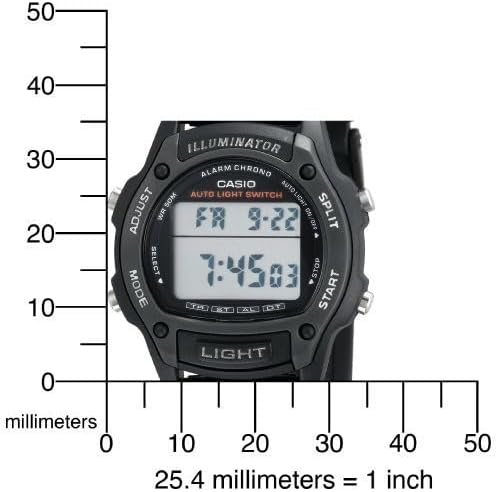
This manual provides detailed instructions for the setup, operation, maintenance, and troubleshooting of your Casio W93H-1AV Multifunction Sport Watch. Designed for durability and functionality, this digital watch is water-resistant and features a resin case, polyurethane band, and mineral dial window. It includes a digital display with day and date calendars, and a quartz movement for precise timekeeping.

Uppsetning
Upphafleg stilling tíma og dagsetningar
- Í tímamælingarstillingu, ýttu á og haltu inni STILLA hnappinn (efst til vinstri) þar til sekúndustafirnir byrja að blikka. Þetta gefur til kynna stillingarstillinguna.
- Ýttu á MODE hnappinn (neðst til vinstri) til að fletta í gegnum stillingarnar: Sekúndur → Klukkustund → Mínútur → Ár → Mánuður → Dagur.
- Notaðu BYRJA button (bottom right) to increase the flashing value. Use the SKIPTA button (top right) to decrease the flashing value (for time and date settings).
- Þegar allar stillingar hafa verið stilltar, ýttu á STILLA hnappinn aftur til að hætta í stillingarstillingu.
12/24 tíma snið
Í tímatökuham, ýttu á 12/24klst button (top left, labeled ADJUST) to toggle between 12-hour and 24-hour time formats.

Upppakkning og upphafleg yfirferðview
Myndband 1: Upppakkning og upphafleg yfirferðview of the Casio W93H-1AV watch, demonstrating its appearance and basic functions right out of the box.
Notkunarleiðbeiningar
Stillingarleiðsögn
Ýttu á MODE button (bottom left) to cycle through the different modes: Timekeeping, Stopwatch, Alarm, and Dual Time.
Ljósvirkni
Ýttu á LJÓS button (bottom center) to illuminate the display for easy viewing in low-light conditions. The watch features an Auto EL Backlight with Afterglow.
Skeiðklukkustilling
- Farðu í skeiðklukkustillingu með því að nota MODE hnappinn.
- Ýttu á BYRJA (bottom right) to begin timing.
- Ýttu á SKIPTA (top right) to record lap times without stopping the main timer.
- Ýttu á BYRJA again to pause the timer. Press BYRJA að halda áfram.
- Ýttu á STILLA (top left) to reset the stopwatch to zero.
Viðvörunarstilling
- Farðu í vekjarastillingu með því að nota MODE hnappinn.
- Ýttu á STILLA hnappinn þar til tölurnar fyrir vekjaraklukkuna blikka.
- Notaðu MODE hnappinn til að velja á milli klukkustundar- og mínútustillinga.
- Notaðu BYRJA hnappinn til að stilla vekjaratímann.
- Ýttu á STILLA til að staðfesta og hætta.
- Ýttu á BYRJA to toggle the alarm on/off. An alarm indicator will appear on the display when active.
Tvöfaldur tímastilling
This mode allows you to keep track of a second time zone. Navigate to the Dual Time Mode using the MODE takki. Ýttu á og haltu inni STILLA to enter setting mode, then use BYRJA og MODE to set the second time zone.
Viðhald
Skipt um rafhlöðu
The Casio W93H-1AV uses one Lithium Metal battery (CR1616). To replace the battery, carefully remove the four screws on the stainless steel back cover using a small screwdriver. Replace the battery, ensuring correct polarity, and then reattach the back cover securely. It is recommended to have the water resistance seal checked by a professional after battery replacement to maintain its integrity.
Vatnsheld umönnun
This watch is water resistant to 165 feet (50 meters). This means it is suitable for short periods of recreational swimming, but not for diving or snorkeling. Avoid operating buttons while the watch is wet or submerged to prevent water intrusion.
Þrif
Þrífið úrið reglulega með mjúkum, þurrum klút. Fyrir þrjósk óhreinindi, þurrkið örlítið.amp cloth can be used, followed by drying. Avoid using harsh chemicals or abrasive cleaners.
Úrræðaleit
- Skjárinn er auður eða dimmur: Rafhlaðan gæti verið lítil eða tæmd. Sjá kaflann „Skipti á rafhlöðu“.
- Tíminn er rangur: Ensure the time and date settings are correctly configured as per the "Initial Time and Date Setting" section. Check if the 12/24 hour format is set as desired.
- Ljósavirkni virkar ekki: This could indicate a low battery. If the battery has been recently replaced and the issue persists, contact customer support.
- Hnappar svara ekki: Ensure the watch is not in a locked mode (if applicable, though this model does not feature a lock). If the watch is wet, dry it thoroughly before attempting to use buttons. If the issue persists, a reset may be necessary.
- To perform a full reset: In some cases, removing and reinserting the battery can perform a hard reset. Note that this will erase all settings, and you will need to reconfigure the time and date.
Tæknilýsing
| Eiginleiki | Forskrift |
|---|---|
| Gerðarnúmer | W93H-1AV (930102) |
| Skjár Tegund | Stafræn |
| Hreyfing | Japanskur kvars |
| Vatnsþol | 165 fet (50 metrar) |
| Málsefni | Resín |
| Hljómsveitarefni | Resín |
| Tegund rafhlöðu | 1 litíummálmur (CR1616) |
| Þvermál hylkis | 36 millimetrar |
| Málsþykkt | 10 millimetrar |
| Þyngd hlutar | 95 grömm |

Ábyrgð og stuðningur
Ábyrgð framleiðanda
This Casio watch is covered by a manufacturer's warranty. Please refer to the warranty card included with your purchase for specific terms, conditions, and duration. Keep your proof of purchase for warranty claims.
Þjónustudeild
For further assistance, technical support, or service inquiries, please visit the official Casio websíðuna eða hafðu samband við þjónustuver þeirra. Þú getur líka heimsótt Casio verslun á Amazon fyrir upplýsingar um vörur og úrræði.
Casio Brand Overview
Video 2: A brief brand video from Casio, highlighting their commitment to innovation and quality in timepieces.


