1. Vöru lokiðview
The Motorola BDA-S1 is a bi-directional cable TV amplifier designed to enhance signal quality for various home entertainment and internet services. This device is engineered to boost signal strength by up to 32 times, effectively reducing common signal issues such as snow, graininess, and digital pixelation on your television, and improving reliability for cable modems and HDTV signals.
It is fully compatible with all standard cable TV services, cable boxes, cable modems, and HDTV systems. The BDA-S1 features a weather-sealed and protective coating, making it suitable for both indoor and outdoor installations. Furthermore, it meets all applicable IEEE surge standards, contributing to enhanced system reliability and protection.
This model is a commercial version of the Motorola Signal Booster 484095-001-00 and includes a power supply for operation.
2. Uppsetning og uppsetning
Proper installation of the Motorola BDA-S1 is crucial for optimal performance. The amplifier should be installed at the point where the main cable or antenna line enters your home, ideally before any signal splitters.
Uppsetningarskref:
- Identify Entry Point: Locate the main coaxial cable line that brings the signal into your home from your cable provider or antenna.
- Aftengja snúruna: Carefully disconnect the existing coaxial cable from its connection point (e.g., wall plate, splitter input).
- Tengingarinntak: Connect the incoming coaxial cable directly to the INNSLAG port of the BDA-S1 amplíflegri.
- Tengdu úttak: Use an additional coaxial cable (not included) to connect the FRAMLEIÐSLA port of the BDA-S1 to your existing splitter or the first device in your signal chain (e.g., TV, cable modem).
- Rafmagnstenging: Connect the included power supply to the BDA-S1 amplifier's power input. Plug the power supply into a standard electrical outlet.
- Öruggar tengingar: Ensure all coaxial cable connections are finger-tight to prevent signal loss.
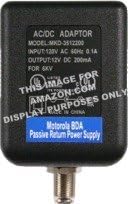
Image of the Motorola BDA Passive Return Power Supply, model MKD-3612200. This AC/DC adaptor provides 12V DC 200mA output and is used to power the BDA-S1 amplíflegri.
Note: Coaxial cables are not included with the amplifier. You will need at least one additional coaxial cable for installation.
3. Notkunarleiðbeiningar
Once the Motorola BDA-S1 amplifier is properly installed and connected to a power source, it operates automatically. The device continuously amplifies the incoming signal to improve its quality and strength for all connected devices. No manual adjustments or user interaction are required for its operation.
The amplifier is designed for continuous operation. Ensure the power supply remains connected to maintain signal amplification.
4. Viðhald
The Motorola BDA-S1 is designed for minimal maintenance. To ensure long-term performance and reliability, consider the following:
- Tengingarathuganir: Periodically inspect all coaxial cable connections to ensure they remain tight and secure. Loose connections can degrade signal quality.
- Hreinlæti: Haltu amplifier unit clean and free from dust and debris. Use a soft, dry cloth for cleaning. Do not use liquid cleaners directly on the unit.
- Umhverfisvernd: While the unit is weather-sealed for outdoor use, protecting it from direct exposure to extreme weather conditions (e.g., heavy rain, direct sunlight, extreme temperatures) can help extend its lifespan.
- Heilleiki kapals: Ensure that all coaxial cables connected to the amplifier are in good condition, without kinks, cuts, or excessive bending.
5. Bilanagreining
If you encounter issues with your signal after installing the Motorola BDA-S1, refer to the following troubleshooting guide:
- No Signal or Poor Signal Quality (Graininess, Pixelation):
- Athugaðu kraft: Ensure the power supply is securely connected to the amplifier and plugged into a functional electrical outlet. The amplifier requires power to operate.
- Staðfestu tengingar: Confirm that all coaxial cables are tightly connected to the amplifier's input and output ports, as well as to your other devices (splitters, TVs, cable modems). Loose connections are a common cause of signal degradation.
- Uppsetning staðsetning: Tryggðu að amplifier is installed at the primary entry point of the cable into your home, before any splitters. Installing it further down the line may not provide optimal results.
- Issues with Interactive Services (e.g., Video On Demand, Internet Uploads):
- Return Path Compatibility: Ef þú ert að nota amplifier with services like Verizon FIOS or other interactive services, ensure that the amplifier supports the necessary return path bandwidth (typically 5-42 MHz) and has minimal return path loss. The single-port BDA-S1 is designed to minimize this loss, but excessive splitting after the amplifier can still impact performance.
- MoCA Compliance: For FIOS services, ensure the amplifier is MoCA compliant if your setup relies on MoCA for communication between devices. The BDA-S1 is designed to be compatible.
- Signal Over-Amplýsing: In rare cases, if your incoming signal is already very strong, adding an amplifier might cause over-amplification, leading to signal distortion. If this occurs, you may need to remove the amplifier or consult with your service provider.
If these steps do not resolve your issue, contact your cable service provider or Motorola customer support for further assistance.
6. Tæknilýsing
| Gerðarnúmer | BDA-S1/EPS |
| Vörumál | 5.13 x 4.75 x 3.56 tommur |
| Þyngd hlutar | 1.15 pund |
| Framleiðandi | Motorola |
| Merkjaaukning | Allt að 32x |
| Tvíátta | Já |
| Surge Standards | Meets IEEE standards |
| Umsókn | Inni eða úti |
| Aflgjafi | Included AC/DC Adaptor (Model MKD-3612200, Input: 120V AC, Output: 12V DC 200mA) |
7. Upplýsingar um ábyrgð
Motorola provides a limited warranty for its products. For specific warranty terms, conditions, and duration, please refer to the documentation included with your original purchase. It is recommended to retain your proof of purchase (receipt or invoice) as it may be required for any warranty claims.
Warranty coverage typically addresses defects in materials and workmanship under normal use. Damage resulting from improper installation, misuse, neglect, or unauthorized modifications is generally not covered.
8. Stuðningur og samband
For technical assistance, product inquiries, or to access additional support resources, please visit the official Motorola support websíða. The webVefsíðan býður yfirleitt upp á algengar spurningar, leiðbeiningar um bilanaleit og upplýsingar um tengiliði fyrir þjónustuver.
When contacting support, please have your product model number (BDA-S1) and any relevant purchase information readily available to expedite assistance.


