Inngangur
This manual provides comprehensive instructions for the setup, operation, maintenance, and troubleshooting of your Logitech M510 Wireless Mouse. Designed for comfort and efficiency, the M510 offers precise control and convenient features for your computing needs.
The Logitech M510 is a comfortable wireless computer mouse featuring a USB Unifying Receiver, back/forward buttons, and side-to-side scrolling. It operates on 2 AA batteries and is compatible with Personal Computers and Macbooks running operating systems like Windows 10.
Innihald pakka
- Logitech M510 þráðlaus mús
- Logitech Uniting móttakari
- 2 AA Batteries (pre-installed or included)
Uppsetning
1. Uppsetning rafhlöðu
The Logitech M510 mouse requires two AA batteries for operation. These are typically included with your purchase. If not already installed, follow these steps:
- Finndu rafhlöðulokið neðst á músinni.
- Renndu eða lyftu lokinu til að opna hólfið.
- Insert two AA batteries, ensuring the positive (+) and negative (-) terminals align correctly with the indicators inside the compartment.
- Lokaðu rafhlöðuhólfinu tryggilega.
2. Tenging við sameinandi móttakara
The Logitech M510 uses a Logitech Unifying Receiver for wireless connectivity. This small USB receiver allows you to connect multiple compatible Logitech devices to your computer using a single USB port.
- Locate the Logitech Unifying Receiver. It is often stored inside the battery compartment of the mouse for safekeeping during transport.
- Plug the Unifying Receiver into an available USB port on your computer (desktop, laptop, or Macbook).
- Your computer should automatically detect the receiver and install the necessary drivers. This may take a few moments.
- Once the drivers are installed, the mouse should be ready for use. If not, ensure the mouse's power switch (if present) is in the 'ON' position.

Mynd: Ofan frá og niður view of the Logitech M510 Wireless Mouse alongside its compact USB Unifying Receiver.
Notkun músarinnar
The Logitech M510 Wireless Mouse is designed for intuitive use with several programmable buttons and comfortable ergonomics.
Grunnaðgerðir
- Vinstri smellihnappur: Aðalhnappur til að velja hluti, opna files, og samskipti við hugbúnað.
- Hægri-smellur: Aukahnappur til að fá aðgang að samhengisvalmyndum og viðbótarvalkostum.
- Skrunahjól: Skrunaðu upp eða niður í gegnum skjöl og web síður. Skrunhjólið virkar einnig sem miðsmellishnappur.
- Side-to-Side Scrolling: Tilt the scroll wheel left or right to scroll horizontally in applications that support this feature.
Advanced Features (Programmable Buttons)
The M510 features two thumb buttons (back/forward) on the left side, which can be customized using Logitech Options software (available for download from the Logitech website). By default, these buttons perform browser navigation functions.
- Til baka hnappur: Siglar aftur inn web vafra eða file landkönnuðir.
- Áfram hnappur: Siglar áfram í web vafra eða file landkönnuðir.
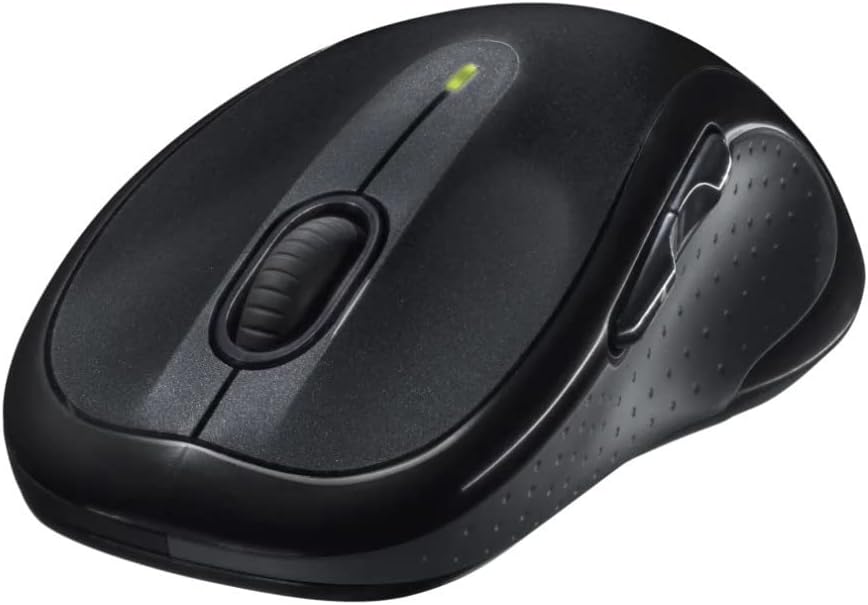
Mynd: Hornlaga view of the Logitech M510 Wireless Mouse, highlighting its ergonomic shape and side buttons.
Viðhald
Að þrífa músina þína
To ensure optimal performance and hygiene, regularly clean your Logitech M510 mouse:
- Disconnect the mouse from your computer by removing the Unifying Receiver.
- Notaðu létt mjúkan, lólausan klút dampened with water or a mild cleaning solution (e.g., isopropyl alcohol) to wipe down the surface of the mouse.
- For crevices and around buttons, use a cotton swab or a soft brush.
- Avoid getting liquid into the internal components or the optical sensor.
- Allow the mouse to dry completely before re-connecting.
Skipt um rafhlöðu
The Logitech M510 has an average battery life of 18 months. When the battery indicator light (if present) flashes or mouse performance degrades, it's time to replace the batteries.
- Slökktu á músinni með því að nota rofann á neðri hliðinni.
- Opnaðu hlífina á rafhlöðuhólfinu.
- Fjarlægðu gömlu AA rafhlöðurnar.
- Insert two new AA batteries, observing the correct polarity (+/-).
- Lokaðu rafhlöðuhólfinu.
- Kveiktu aftur á músinni.
Úrræðaleit
| Vandamál | Möguleg orsök | Lausn |
|---|---|---|
| Mús svarar ekki | Low or dead batteries; Unifying Receiver not connected; Mouse power off; Driver issue. | Replace batteries; Ensure Unifying Receiver is securely plugged into a USB port; Turn mouse power switch to 'ON'; Reinstall Logitech Options software or check device manager for driver issues. |
| Sein eða óregluleg hreyfing bendils | Interference; Dirty optical sensor; Mouse used on unsuitable surface; Low battery. | Move mouse closer to receiver; Clear obstructions; Clean optical sensor; Use a mouse pad or suitable surface; Replace batteries. |
| Hliðarhnappar virka ekki | Software not installed or configured; Application does not support custom buttons. | Download and install Logitech Options software from the official Logitech website to customize button functions. Ensure the application you are using supports these functions. |
| Unifying Receiver not recognized | Faulty USB port; Driver issue. | Try a different USB port; Restart your computer; Download and install the Logitech Unifying Software to re-pair the mouse with the receiver. |
Tæknilýsing
| Eiginleiki | Smáatriði |
|---|---|
| Vörumerki | Logitech |
| Gerðarnúmer | 910-001822 |
| Röð | M510 |
| Tengitækni | Radio Frequency, USB (via Unifying Receiver) |
| Hreyfingarskynjunartækni | Laser |
| Litur | Dökkgrár |
| Þyngd hlutar | 4.6 aura (u.þ.b. 130 grömm) |
| Vörumál (LxBxH) | 4.38 x 2.5 x 1.75 tommur (u.þ.b. 11.13 x 6.35 x 4.45 cm) |
| Aflgjafi | Rafhlöðuknúið |
| Rafhlöður nauðsynlegar | 2 AA rafhlöður (innifalið) |
| Meðal rafhlöðuending | 18 mánuðir |
| Vélbúnaðarvettvangur | Personal Computer, Macbook |
| Samhæfni stýrikerfis | Windows 10 (and likely earlier versions, macOS) |
| Sérstakir eiginleikar | Battery Life Indicator, Power Saving Mode, Programmable Buttons, Wireless |
| Dagsetning fyrst í boði | 7. júní 2010 |

Mynd: Ofan frá og niður view of the Logitech M510 Wireless Mouse showing its approximate dimensions (4.4" length, 2.5" width).
Ábyrgð og stuðningur
Upplýsingar um ábyrgð
Logitech products typically come with a limited hardware warranty. For specific warranty terms and conditions applicable to your Logitech M510 Wireless Mouse, please refer to the warranty card included with your product or visit the official Logitech websíða.
Þjónustudeild
For further assistance, technical support, or to download the latest software (such as Logitech Options or Unifying Software), please visit the official Logitech support websíða:
Þú gætir einnig fundið gagnlegar auðlindir, algengar spurningar og samfélagsvettvanga á þeirra websíða.


