1. Inngangur
Welcome to the user manual for your Nikon COOLPIX S6100 digital camera. This guide provides essential information for setting up, operating, and maintaining your camera to ensure optimal performance. The COOLPIX S6100 features a 16.0-megapixel CCD sensor, a 7x NIKKOR wide-angle optical zoom lens, a 3-inch touch-panel LCD, and HD (720p) movie recording capabilities.
2. Vöru lokiðview
Familiarize yourself with the main components and controls of your Nikon COOLPIX S6100 camera.
Framan View

Mynd 2.1: Framan view of the Nikon COOLPIX S6100 camera, highlighting the NIKKOR 7x wide optical zoom lens and built-in flash.
Stjórntæki að ofan og aftan
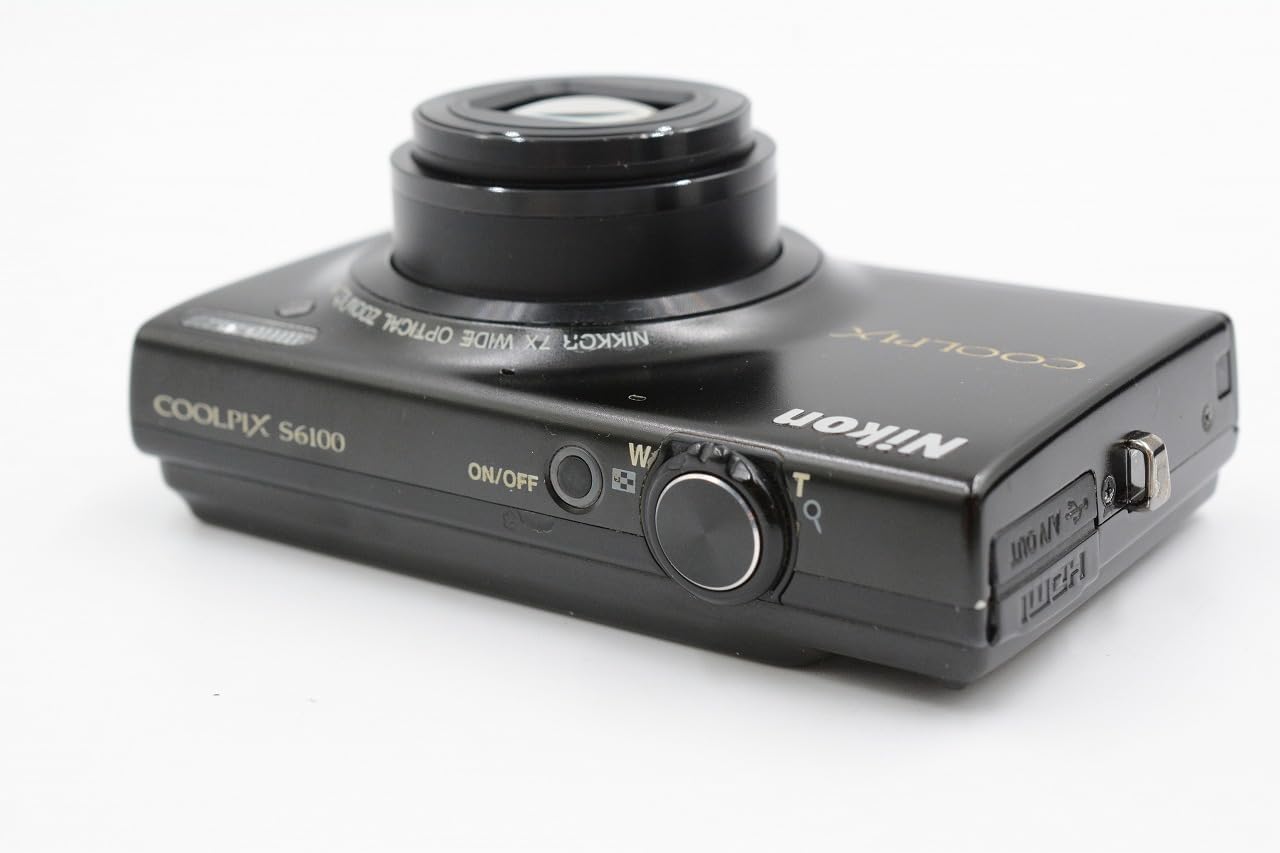
Mynd 2.2: Að ofan og aftan view of the camera, illustrating the ON/OFF button, shutter release, zoom control, and HDMI/USB ports.
Touch-Panel LCD Interface
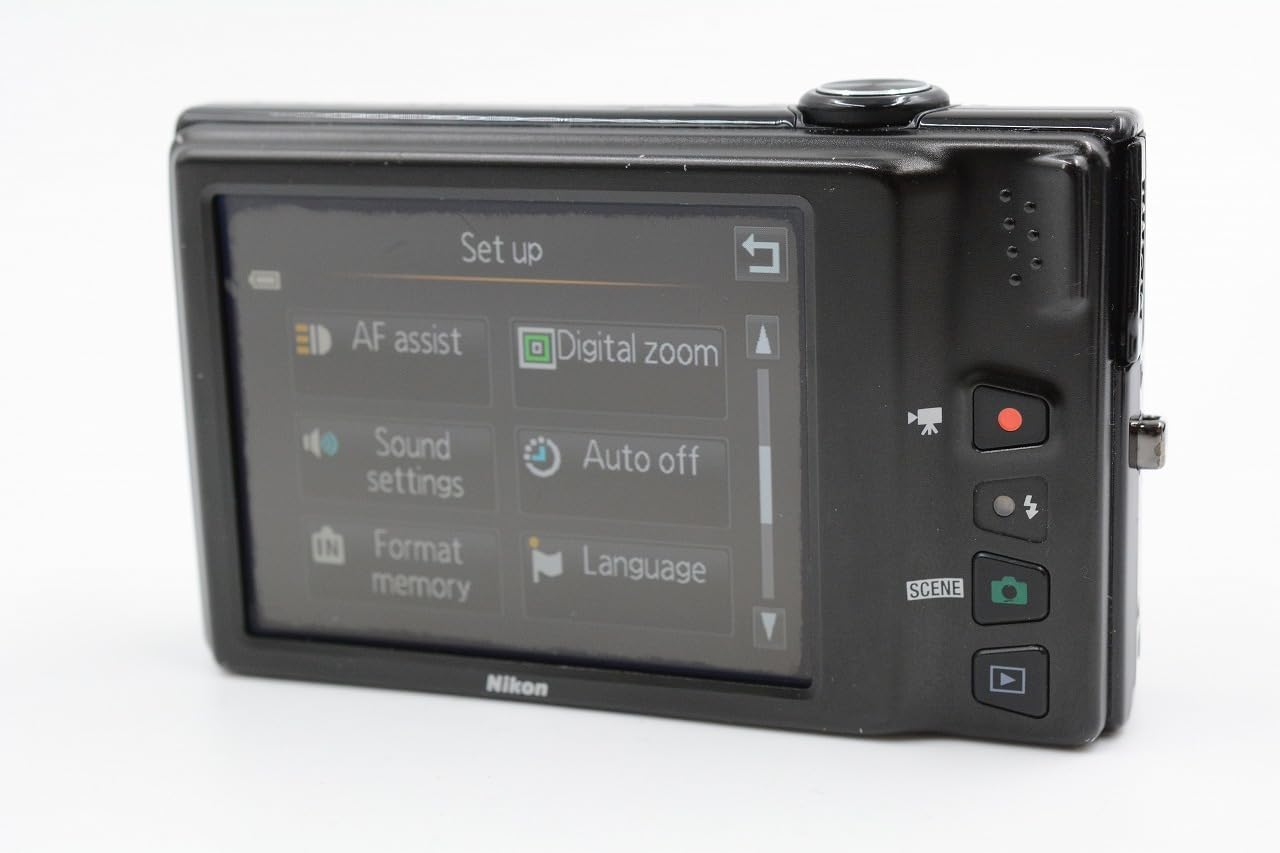
Mynd 2.3: The 3-inch touch-panel LCD displaying the camera's setup menu, including options for AF assist, digital zoom, sound settings, auto off, format memory, and language.
3. Uppsetning
3.1. Að setja rafhlöðuna og minniskortið í
The camera uses a rechargeable Lithium-ion battery. Ensure the battery is fully charged before first use. The camera supports SD, SDHC, and SDXC memory cards.
- Opnaðu rafhlöðu-/minniskortshlífina sem er staðsett neðst á myndavélinni.
- Insert the battery with the correct orientation until it clicks into place.
- Insert a compatible memory card into the slot until it clicks.
- Lokaðu hlífinni örugglega.

Mynd 3.1: Neðst view of the camera with the battery and memory card compartment open, showing the slots for insertion.
3.2. Hleðsla rafhlöðunnar
The camera can be charged via a USB cable connected to a computer or using the included AC adapter and USB cable connected to a wall outlet. A light on the back of the camera indicates charging status.
3.3. Upphaflegar stillingar
Upon first power-on, you may be prompted to set the language, date, and time. Use the touch screen or physical controls to navigate and confirm your selections.
4. Grunnaðgerð
4.1. Að taka myndir
- Kveiktu á myndavélinni með því að ýta á ON/OFF hnappinn.
- Beindu myndavélinni að viðfangsefninu. Myndavélin mun sjálfkrafa stilla fókusinn.
- Press the shutter button halfway down to confirm focus.
- Ýttu afsmellaranum alveg niður til að taka myndina.
4.2. Upptaka myndbönd
The COOLPIX S6100 features a dedicated movie recording button.
- Ýttu á tileinkaða Movie Record hnappinn til að hefja upptöku.
- Ýttu á Movie Record hnappinn aftur til að stöðva upptöku.
Videos are recorded in HD (720p) resolution.
4.3. Spilun
Að endurtakaview myndirnar þínar og myndbönd:
- Ýttu á Spilun hnappinn.
- Use the touch screen or directional controls to scroll through your images and videos.
5. Ítarlegir eiginleikar
5.1. Virkni snertiskjás
The 3-inch touch-panel LCD allows for intuitive control. You can tap to focus, navigate menus, and review images. A stylus is included for precise interaction.
5.2. Scene Selection
The camera offers 19 scene modes plus an auto scene selector. These modes optimize camera settings for specific shooting conditions (e.g., Portrait, Landscape, Night Portrait, Close-up). Access scene modes via the menu on the touch screen.
5.3. Filter Effects and Retouching
Enhance your photos directly on the camera with various filter effects and retouching options, including:
- Drawing or writing on photos
- Adding decorations
- Cross screen effect
- Fish eye effect
- Selective color
- Black and white conversion
- Sepia tone
- Glamour retouch
- Skin softening
5.4. Zoom and Image Stabilization
The camera features a 7x optical zoom NIKKOR ED glass lens and up to 4x digital zoom. The 4-way VR (Vibration Reduction) image stabilization system helps reduce blur caused by camera shake, especially in low light or when using the zoom.
6. Viðhald
6.1. Þrif á myndavélinni
- Linsa: Use a soft, lint-free cloth or a lens brush to gently remove dust. For smudges, use a lens cleaning solution applied to a cloth, not directly to the lens.
- LCD skjár: Þurrkið varlega með mjúkum, þurrum klút. Forðist að þrýsta fast á skjáinn.
- Myndavél: Use a soft, dry cloth to wipe away dust and dirt. Do not use organic solvents or strong cleaning agents.
6.2. Geymsla
When not in use, store the camera in a cool, dry place away from direct sunlight, high temperatures, and humidity. Remove the battery if the camera will not be used for an extended period.
7. Bilanagreining
Ef þú lendir í vandræðum með myndavélina þína skaltu skoða eftirfarandi algengar lausnir:
- Myndavélin kveikir ekki á sér: Gakktu úr skugga um að rafhlaðan sé fullhlaðin og rétt sett í.
- Pictures are blurry: Check that the lens is clean. Ensure the camera has focused correctly before taking the shot. Use VR image stabilization in low light or with zoom.
- Villa í minniskorti: Ensure the memory card is inserted correctly and is not full. Try formatting the card (this will erase all data).
- Snertiskjárinn svarar ekki: Gently clean the screen. If using a stylus, ensure it is making proper contact.
For more detailed troubleshooting, please consult the official Nikon support resources.
8. Tæknilýsing
| Gerð skynjara | 16.0-megapixel CCD |
| Linsa | NIKKOR 7x Optical Zoom ED Glass Lens (28-196mm equivalent) |
| Myndstöðugleiki | 4-way VR (Vibration Reduction) |
| Skjár | 3-inch (460,000-dot) Touch-Panel LCD |
| Myndbandsupptaka | HD 720p with Stereo Sound |
| Geymslumiðlar | SD/SDHC/SDXC minniskort |
| Tengingar | USB, HDMI (Mini Connector) |
| Stærðir (u.þ.b.) | 97.9 x 58.0 x 21.9 mm (3.9 x 2.3 x 0.9 tommur) |
| Þyngd (u.þ.b.) | 177 g (6.3 oz) with battery and memory card |
9. Ábyrgð og stuðningur
Your Nikon COOLPIX S6100 camera is covered by a limited warranty. Please refer to the warranty card included with your product for specific terms and conditions. For technical support, service, or additional information, please visit the official Nikon website or contact Nikon customer service.
Þú getur fundið frekari upplýsingar og stuðning á Nikon verslun á Amazon.